1. Киришүү
This manual provides detailed instructions for the installation, operation, and maintenance of your FOSCAM V8EP 4K IP PoE Security Camera. The V8EP is an 8-megapixel outdoor camera designed for home and business surveillance, featuring 4K Ultra HD resolution, AI human and vehicle detection, color night vision, two-way audio, and Power over Ethernet (PoE) for simplified setup.

Image 1.1: FOSCAM V8EP Camera and App Interface
2. Продукт бүтүп калдыview
2.1 Пакеттин мазмуну
- 1x FOSCAM V8EP 8MP Outdoor IP Camera
- 1x Ыкчам орнотуу колдонмосу
- 1x Ethernet кабели
- 1x Surveillance Sign
- 1x Суу өткөрбөй турган капкак
2.2 Негизги өзгөчөлүктөрү
- 4K 8MP Ultra HD чечилиши: Captures video at 3840x2160p with 6X digital zoom for clear details.
- Адамды жана унааны аныктоонун жасалма ыкмасы: Advanced algorithms identify humans and vehicles, reducing false alarms.
- Түнкү көрүнүш: Provides full-color video in low-light conditions up to 66 feet using built-in spotlights.
- Siren Alert & Spotlights: Deters intruders with an audible siren and bright spotlights upon detection.
- Эки тараптуу аудио: Камтылган микрофон жана динамик реалдуу убакытта баарлашууга мүмкүндүк берет.
- Ethernet аркылуу күч (PoE): Simplifies installation by delivering power and data through a single Ethernet cable.
- IP66 аба ырайы: Ар кандай тышкы аба ырайынын шарттарына туруштук берүү үчүн иштелип чыккан.

Image 2.1: 4K Ultra HD Clarity Comparison
3. Орнотуу
3.1 PoE Installation
The FOSCAM V8EP camera utilizes Power over Ethernet (PoE) technology, requiring only one Ethernet cable for both power supply and data transmission. This simplifies wiring and installation.
- Камераны орнотуу: Securely mount the camera to a wall or desired surface using the provided mounting hardware. Ensure the camera is positioned to cover the desired surveillance area.
- Ethernet кабелин туташтыруу: Connect one end of the Ethernet cable to the camera's PoE port.
- Connect to PoE Switch/NVR: Connect the other end of the Ethernet cable to a PoE switch, PoE injector, or a Foscam NVR. Ensure the PoE device is powered on.
- Тармак туташуусу: Connect your PoE switch or NVR to your router for network access.

Image 3.1: PoE Installation Diagram
3.2 App Setup and Initial Connection
To access and manage your camera, download the Foscam app on your smartphone.
- Download Foscam App: Издөө "Foscam" in your device's app store (iOS or Android) and install the application.
- Эсеп түзүү: Open the app and follow the prompts to create a new Foscam account or log in if you already have one.
- Камера кошуу: In the app, select the option to add a new camera. Follow the on-screen instructions, which typically involve scanning a QR code on the camera or manually entering its details.
- Орнотууларды конфигурациялоо: Once connected, you can configure various camera settings, including network preferences, recording schedules, and alert notifications.
4. Операция
4.1 AI Detection
The FOSCAM V8EP camera features intelligent AI detection capabilities to distinguish between different types of motion.
- Адамды аныктоо: Identifies human figures, reducing alerts from non-human movements.
- Унаа аныктоо: Recognizes vehicles, useful for monitoring driveways or parking areas.
- Custom Motion Zones: You can define specific areas within the camera's field of view where motion detection should be active, ignoring irrelevant areas to minimize false alarms.
- Жөнгө салынуучу сезгичтик: Sensitivity levels for detection can be adjusted via the Foscam app to suit your environment.

Image 4.1: AI Human and Vehicle Detection
4.2 Түнкү көрүнүш
The camera provides advanced night vision options for clear surveillance in low-light conditions.
- Color Starlight Night Vision: Utilizes a high-quality sensor and F/1.6 aperture to capture color video in very low ambient light, extending up to 66 feet.
- Integrated Spotlights: Built-in spotlights (4500K) can be activated manually or automatically upon motion detection to illuminate the area and enable full-color night vision.
- Инфракызыл (ИК) түнкү көрүү: When spotlights are off, the camera automatically switches to infrared mode for black and white video in complete darkness.
- Schedule Spotlights: You can set schedules for when the spotlights should be active.

Image 4.2: Color Night Vision with Spotlights
4.3 Эки тараптуу аудио
Communicate directly through the camera using its integrated microphone and speaker.
- Реалдуу убакыттагы байланыш: Speak to visitors or deter unwanted individuals from your smartphone via the Foscam app.
- Аудио мониторинг: Камера жайгашкан жерден аудиону угуңуз.
Image 4.3: Two-Way Audio Functionality
4.4 Сигнал системасы
When abnormal activity is detected, the camera can trigger an alarm to deter intruders and notify you.
- Сиренаны активдештирүү: An audible siren can be triggered automatically or manually.
- Spotlight Activation: Spotlights can flash to draw attention and illuminate the scene.
- Ыкчам эскертүүлөр: Receive push notifications, emails, or alerts on your device, allowing you to respond promptly.
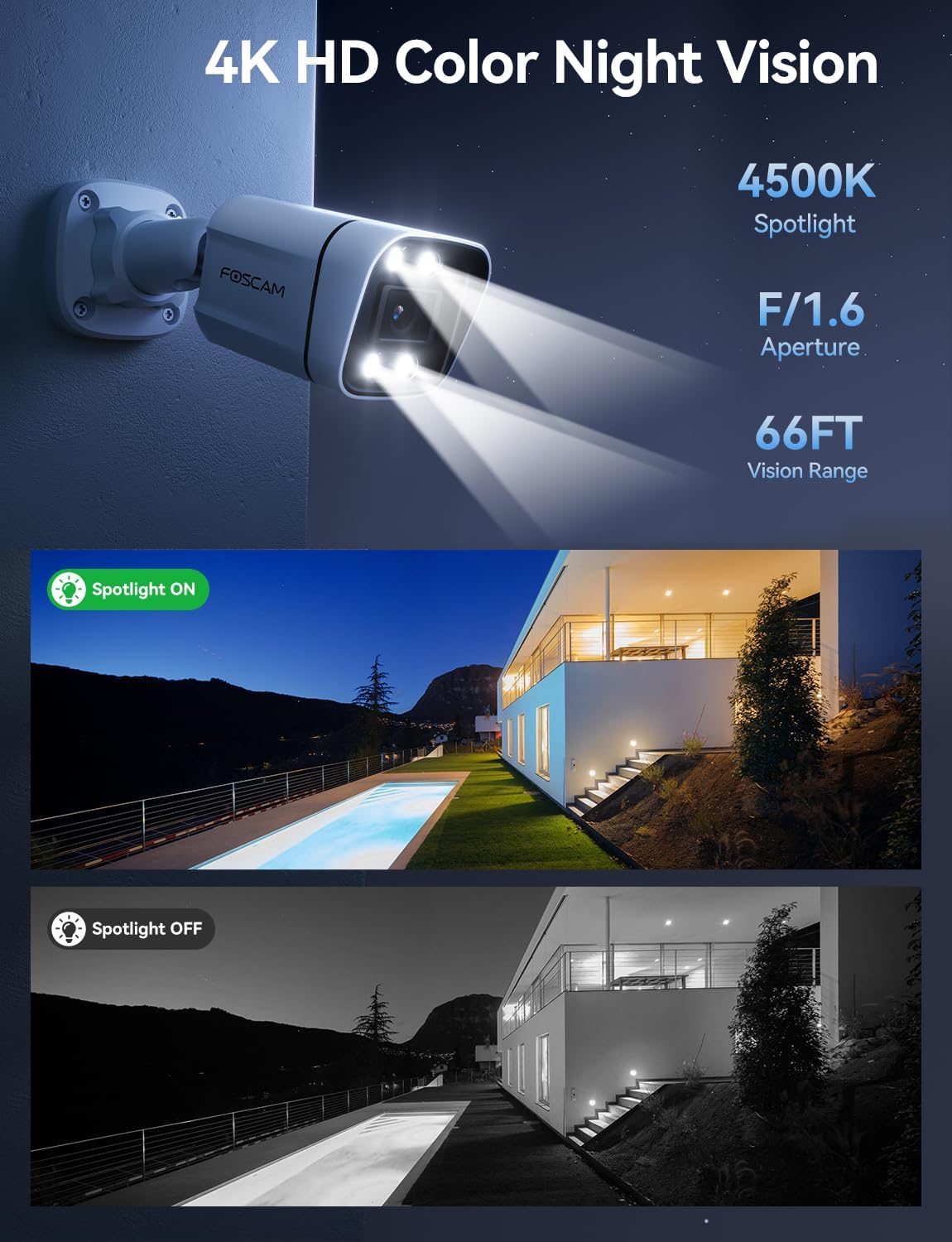
Image 4.4: Sound and Light Alarm System
4.5 Remote Access and Compatibility
Monitor your property from anywhere at any time.
- Foscam App/VMS: Түз эфирге кирүү view, recordings, and settings through the Foscam mobile app or Foscam VMS software on a computer.
- Smart Home интеграциясы: Compatible with Alexa and Google Assistant for voice control and integration into smart home ecosystems.
- NVR/NAS Compatibility: Supports Blue Iris, Homey, Synology NAS, Qnap NAS, and ONVIF-enabled NVRs for local storage and advanced management.

Image 4.5: Remote Access Across Devices
5. Техникалык тейлөө
5.1 Аба ырайына туруктуулук
The FOSCAM V8EP camera features an IP66 weatherproof housing, ensuring reliable operation in various outdoor conditions, including rain, snow, and dust.

Image 5.1: IP66 Weatherproof Design
5.2 Жалпы кам көрүү
- Тазалоо: Мезгил-мезгили менен камеранын линзасын жана корпусун жумшак, гamp cloth to remove dirt and debris that may affect image quality. Do not use harsh chemicals.
- Кабелдик текшерүү: Regularly inspect the Ethernet cable and connections for any signs of wear or damage.
- Программалык камсыздоонун жаңыртуулары: Keep the camera's firmware updated through the Foscam app to ensure optimal performance and access to new features.
6. Кыйынчылыктарды
- Электр кубаты/байланыш жок: Ensure the Ethernet cable is securely connected to both the camera and a powered PoE device (switch/injector/NVR). Verify the PoE device is functioning correctly and connected to your network.
- Колдонмого туташуу мүмкүн эмес: Ensure your smartphone is connected to the same network as the camera during initial setup. Restart the camera and your router. Verify the Foscam app is updated to the latest version.
- Көп кездешүүчү жалган сигналдар: Adjust the AI detection sensitivity settings in the Foscam app. Utilize custom motion zones to exclude areas with irrelevant movement (e.g., swaying trees, busy roads).
- Түнкү көрүү начар: Ensure the camera lens is clean. Check if the spotlights are enabled and functioning. Verify there are no obstructions blocking the camera's view.
- Жок Web Интерфейс: Note that this camera model primarily uses the Foscam app for configuration and live viewing. A direct web interface may not be available for all settings.
7. Техникалык шарттар
| Өзгөчөлүк | Спецификация |
|---|---|
| Модель аты | V8EP |
| Видео тартуунун резолюциясы | 4K (3840x2160p) |
| Натыйжалуу дагы эле чечим | 8 депутат |
| Frame Rate | 20 кадр/сек |
| Field Of View | 110 градус |
| Digital Zoom Ratio | 20X |
| Байланыш технологиясы | Зымдуу (PoE) |
| Connectivity Protocol | Ethernet |
| Power Source | Зымдуу электр (PoE аркылуу) |
| Ички/тышкы колдонуу | Ички, сырткы |
| Эл аралык коргоо рейтинги | IP66 |
| Түнкү көрүү диапазону | 66 Feet (Color Starlight) |
| Флэш эс тутумдун максималдуу өлчөмү | 256 ГБ (Micro SD) |
| Элементтин өлчөмдөрү (L x W x Y) | 4.3 x 3.94 x 7.6 дюйм |
| Элемент Салмагы | 1.34 фунт |
| Controller Type | Alexa, Google Assistant, Blue Iris, Homey, Synology NAS, Qnap NAS, NVR |
8. Кепилдик жана колдоо
FOSCAM is committed to providing reliable products and customer service.
- Техникалык колдоо: FOSCAM offers 24/7 fast reply and lifetime technical support for its products.
- Сапат кепилдик: The product comes with a 180-day quality guarantee.
- Кайтаруулар: 30 күндүк акысыз кайтаруулардан пайдаланыңыз.
- Алмаштыруу: Free replacement and fast delivery are provided for eligible issues.
For further assistance, please visit the official FOSCAM webсайтка же кардарларды тейлөөгө кайрылыңыз.


