1. Киришүү
The COMFAST CF-726B is a versatile 2-in-1 USB adapter designed to provide both Bluetooth 4.2 and dual-band Wi-Fi connectivity to your computer. This device allows you to connect to wireless networks at speeds up to 650Mbps and pair with various Bluetooth peripherals, enhancing your system's wireless capabilities.
This manual provides essential information for the proper setup, operation, and maintenance of your CF-726B adapter.
2. Продукциянын өзгөчөлүктөрү
- 2-ин-1 Функциясы: Combines Wi-Fi and Bluetooth capabilities in a single USB device.
- Dual Band Wi-Fi: Supports 2.4GHz and 5.8GHz frequencies for flexible network connections.
- High Speed Data Transfer: Achieves Wi-Fi speeds up to 650Mbps.
- Bluetooth 4.2: Enables stable and efficient connection with Bluetooth devices.
- Компакт дизайн: Small form factor for portability and discreet use.
- Кеңири шайкештик: Supports Windows, macOS, and Linux operating systems.
3. Орнотуу жана орнотуу
Before using your COMFAST CF-726B adapter, driver installation is required. The product is supplied with documentation and an installation CD. It is recommended to use the provided CD for driver installation or download the latest drivers from the official COMFAST webсайт.
3.1 Системалык талаптар
- Операциялык системалар: Windows 7/8/8.1/10 (32 or 64-bit), MacOS 10.6~10.11, Linux Kernel 2.6.18~3.10.
- Эскертүү: The Bluetooth driver is жок compatible with Windows XP/Vista.
- Интерфейс: Available USB 2.0 port.
3.2 Driver Installation Steps
- Insert the COMFAST CF-726B adapter into an available USB port on your computer.
- Insert the provided installation CD into your computer's CD/DVD drive.
- Follow the on-screen instructions to install the Wi-Fi and Bluetooth drivers. If an auto-run feature does not start, navigate to the CD drive in 'My Computer' or 'This PC' and run the setup executable (e.g., 'setup.exe' or 'install.exe').
- Alternatively, download the latest drivers from the official COMFAST support website. Ensure you select the correct model (CF-726B) and operating system.
- Орнотуудан кийин, суралса, компьютериңизди өчүрүп-күйгүзүңүз.

Figure 1: COMFAST CF-726B USB adapter. This image shows the compact blue casing of the adapter with its USB connector, ready for insertion into a computer's USB port.
4. Иштөө нускамалары
4.1 Wi-Fi тармагына туташуу
- Ensure the CF-726B adapter is securely plugged into a USB port.
- On Windows, click the Wi-Fi icon in the system tray (usually bottom-right corner). On macOS, click the Wi-Fi icon in the menu bar (top-right corner). For Linux, consult your distribution's network manager.
- Жеткиликтүү тармактардын тизмесинен каалаган Wi-Fi тармагын тандаңыз.
- Суралган болсо, тармактын коопсуздук ачкычын (сырсөз) киргизиңиз.
- Click 'Connect'. The adapter will establish a connection to the Wi-Fi network.
4.2 Bluetooth түзмөктөрүн туташтыруу
- Ensure the CF-726B adapter is securely plugged into a USB port.
- On Windows, go to 'Settings' > 'Devices' > 'Bluetooth & other devices'. On macOS, go to 'System Preferences' > 'Bluetooth'. For Linux, use your desktop environment's Bluetooth settings.
- Компьютериңизде Bluetooth'ду күйгүзүңүз.
- Put your Bluetooth device (e.g., headphones, mouse, keyboard) into pairing mode. Refer to your device's manual for specific instructions.
- On your computer, click 'Add Bluetooth or other device' (Windows) or wait for the device to appear in the Bluetooth settings (macOS/Linux).
- Тизмеден түзмөгүңүздү тандап, жупташтыруу процессин аяктоо үчүн экрандагы көрсөтмөлөрдү аткарыңыз.
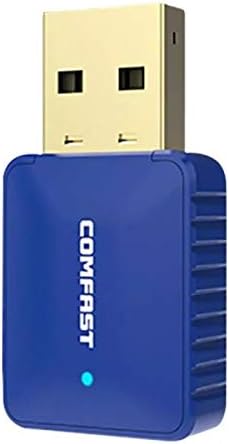
2-сүрөт: Каптал view of the COMFAST CF-726B adapter. This image highlights the compact profile of the device, making it suitable for various USB ports.
5. Техникалык тейлөө
The COMFAST CF-726B adapter is designed for durability. To ensure its longevity and optimal performance, consider the following maintenance tips:
- Тазалыкты сактоо: Periodically clean the USB connector with a dry, lint-free cloth to remove dust or debris.
- Физикалык зыянды болтурбоо: Do not bend, drop, or expose the adapter to excessive force. Avoid pulling the adapter out by its casing; always grasp the USB connector firmly.
- Суюктуктардан коргоо: Адаптерди суудан жана башка суюктуктардан алыс кармаңыз.
- Сактагыч: Колдонулбаганда, адаптерди салкын, кургак жерде, тике күн нурунан жана экстремалдык температурадан алыс сактаңыз.

3-сүрөт: алдыңкы жана каптал view of the COMFAST CF-726B adapter. This perspective shows the overall dimensions and the blue LED indicator light.
6. Кыйынчылыктарды
If you encounter issues with your COMFAST CF-726B adapter, refer to the following common troubleshooting steps:
- Адаптер табылган жок:
- Адаптерди башка USB портуна сайып көрүңүз.
- Компьютериңизди өчүрүп күйгүзүңүз.
- Ensure drivers are correctly installed. Reinstall drivers if necessary.
- Wi-Fi туташуусу жок:
- Verify that your Wi-Fi network is active and broadcasting.
- Wi-Fi сырсөзүн туура киргизгениңизди текшериңиз.
- Ensure the Wi-Fi function is enabled on your computer.
- Try restarting your router/modem.
- Bluetooth Not Working:
- Ensure Bluetooth is enabled in your computer's settings.
- Confirm your Bluetooth device is in pairing mode.
- Remember that the Bluetooth driver is жок compatible with Windows XP/Vista.
- Bluetooth түзмөгүн алып салып, кайра жупташтырыңыз.
- Жай Wi-Fi ылдамдыгы:
- Ensure you are connected to the optimal frequency band (5.8GHz generally offers faster speeds if your router supports it).
- Reduce interference by moving closer to your Wi-Fi router or away from other electronic devices.
- Check for updated drivers.

4-сүрөт: жарылган view of the COMFAST CF-726B adapter. This image illustrates the internal chip (RTL8821CU) responsible for its dual Wi-Fi and Bluetooth functionalities.
7. Техникалык шарттар
| Бренд | ЫКЧАМ |
| Модел | CF-726B |
| Негизги компонент | RTL8821CU |
| Зымсыз стандарттар | IEEE802.11a/b/g/n/ac |
| Bluetooth версиясы | 4.2 |
| Интерфейс | USB 2.0 |
| Жыштык тилкелери | 2.4GHz / 5.8GHz (Dual Frequency) |
| Max Data Rate | 650 Мбит/сек |
| Маалымат коопсуздугу | WPA-PSK/WPA2-PSK, WPA/WPA2, WEP |
| Өлчөмдөр | 36мм x 19мм x 9мм |
| Түс | Көк |
| Колдоого алынган OS | Windows 7/8/8.1/10 (32/64-bit), MacOS 10.6~10.11, Linux Kernel 2.6.18~3.10 |
| Шайкеш түзмөктөр | Стольный компьютер |
8. Кепилдик жана колдоо
8.1 Кепилдик маалыматы
The COMFAST CF-726B adapter comes with a 12 айлык кепилдик from the date of purchase. This warranty covers manufacturing defects and ensures the product functions as described under normal use. Please retain your proof of purchase for warranty claims.
8.2 Кардарларды колдоо
For technical assistance, driver updates, or further inquiries, please refer to the official COMFAST website or contact their customer support channels. The product is supplied with additional documentation that may contain specific support contact details.


