1. Киришүү
Thank you for choosing the Maxcom FW36 Aurum SE Smartwatch. This manual provides detailed instructions to help you set up, operate, and maintain your device, ensuring optimal performance and longevity. Please read this manual carefully before using your smartwatch.

Сүрөт 1: Алдыңкы view of the Maxcom FW36 Aurum SE Smartwatch, displaying time and health metrics.
2. Орнотуу
2.1 Кутудан чыгаруу жана алгачкы текшерүү
Upon opening the package, verify that all components are present: Maxcom FW36 Aurum SE Smartwatch, charging cable, and this user manual. Inspect the device for any visible damage.
2.2 Акылдуу саатты кубаттоо
Before first use, fully charge your smartwatch. Connect the charging cable to the charging port on the back of the watch and to a standard USB power adapter (not included). The battery icon on the screen will indicate charging status. A full charge typically takes approximately 2 hours.
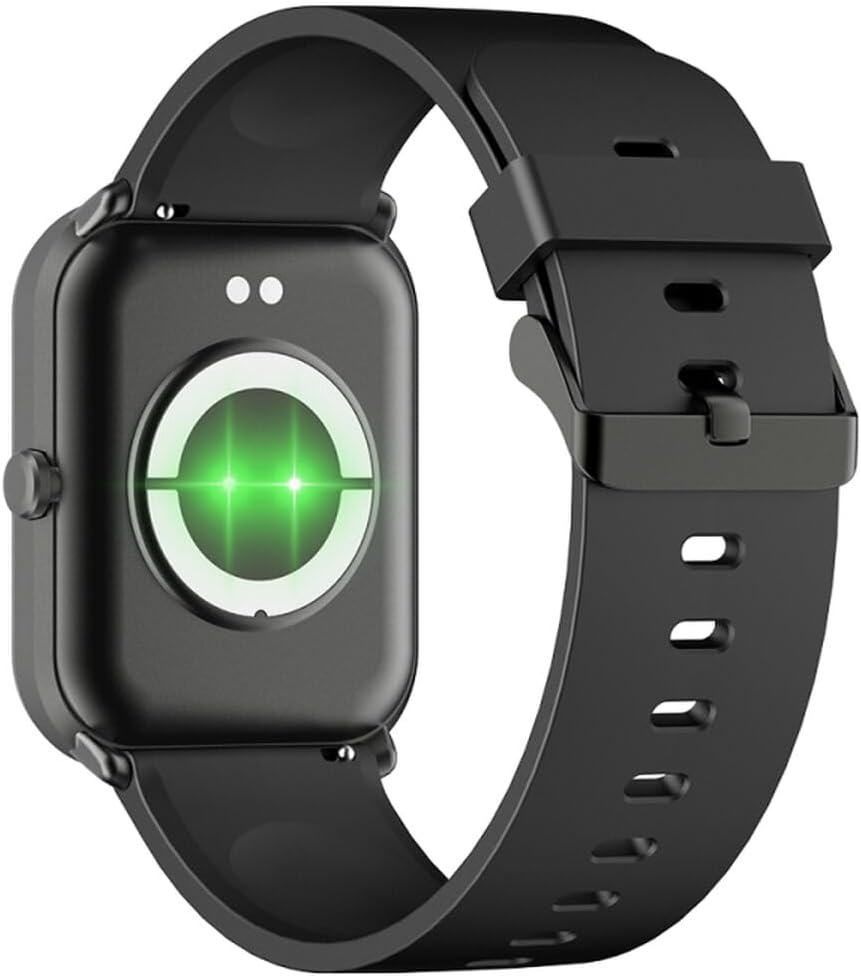
2-сүрөт: Арткы view of the smartwatch, highlighting the charging contacts and health sensors.
2.3 Күйгүзүү/өчүрүү
- Күйгүзүү: Экран күйгөнгө чейин каптал баскычын бир нече секунд басып туруңуз.
- Өчүрүү: From the watch face, swipe down to access quick settings, then tap the power icon, or navigate to "Settings" > "System" > "Power Off". Confirm your selection.
2.4 Колдонмону орнотуу жана жупташтыруу
- Колдонмону жүктөп алыңыз: Scan the QR code in the manual (if provided) or search for "GLORY FIT" in your smartphone's app store (Google Play Store for Android, Apple App Store for iOS).
- Катталуу/Кирүү: Open the GLORY FIT app and follow the on-screen instructions to create an account or log in.
- Жупташтыруу:
- Смартфонуңузда Bluetooth иштетилгенин текшериңиз.
- Open the GLORY FIT app, go to "Device" or "My Device", and tap "Add Device".
- The app will search for nearby devices. Select "FW36 Aurum SE" from the list.
- Смартфонуңузда да, акылдуу саатыңызда да жупташтыруу өтүнүчүн ырастаңыз.
Once paired, the smartwatch will synchronize data with your phone, including time and date settings.
3. Иштөө нускамалары
3.1 Негизги навигация
- Сенсордук экран: Swipe left/right to navigate between main functions (e.g., activity, heart rate). Swipe up to view notifications. Swipe down to access quick settings.
- Каптал баскычы: Press once to return to the watch face or wake the screen. Press and hold for power options.

3-сүрөт: Каптал view of the smartwatch, illustrating the physical button and strap design.
3.2 Ден соолуктун мониторинги
The Maxcom FW36 Aurum SE Smartwatch features several health monitoring functions:
- Жүрөктүн кагышын көзөмөлдөөчү: Swipe to the heart rate interface and wait for the measurement to complete. Ensure the watch is snug on your wrist.
- Кандагы кычкылтек сенсору: Similar to heart rate, navigate to the SpO2 interface for measurement.
- Кан басымы Монитор: Access this function from the main menu or by swiping to its dedicated screen.
- Уйкунун сапатын көзөмөлдөө: Саат уйку учурунда тагынганда уйкуңузга автоматтык түрдө көз салат. View detailed reports in the GLORY FIT app.
- жөө: Tracks your daily steps, distance, and calories burned automatically.
Маанилүү: The health data provided by this device is for reference only and should not be used for medical diagnosis or treatment.
3.3 Көп спорт режими
Access the multi-sport mode from the main menu to select various activities such as running, walking, cycling, etc. The watch will track specific metrics relevant to your chosen activity.
3.4 Билдируулер
Once paired with your smartphone and notification permissions are granted in the GLORY FIT app, your smartwatch will display incoming calls, messages, and app notifications. Swipe up from the watch face to view сиздин эскертме таржымалы.
4. Техникалык тейлөө
4.1 Тазалоо
Regularly clean your smartwatch and strap with a soft, dry cloth. For stubborn dirt, use a slightly damp чүпүрөк, анан кылдат кургатуу. Катуу химиялык заттарды же абразивдүү материалдарды колдонуудан алыс болуңуз.
4.2 Суу жана чаңга туруктуулук
The Maxcom FW36 Aurum SE Smartwatch is designed to be dust resistant and water resistant. This means it can withstand splashes, rain, and brief immersion in shallow water. However, it is not suitable for hot showers, saunas, diving, or high-speed water sports. Avoid pressing buttons underwater.
4.3 Батареяга кам көрүү
Батареянын иштөө мөөнөтүн узартуу үчүн, батареянын тез-тез толук зарядын жоготуп алуудан алыс болуңуз. Түзмөктү көпкө чейин колдонулбаса дагы, үзгүлтүксүз кубаттап туруңуз. Түзмөктү салкын, кургак жерде сактаңыз.
5. Кыйынчылыктарды
- Smartwatch not turning on: Ensure the device is fully charged. Press and hold the side button for an extended period (10-15 seconds).
- Смартфон менен жупташуу мүмкүн эмес:
- Ensure Bluetooth is enabled on your phone and the smartwatch is within range.
- Смартфонуңузду да, акылдуу саатыңызды да өчүрүп күйгүзүңүз.
- Check if the GLORY FIT app has necessary permissions.
- Эгер мурда жупташтырылган болсо, түзмөктү ажыратып, кайра жупташтырып көрүңүз.
- Туура эмес ден соолук көрсөткүчтөрү: Ensure the watch is worn snugly on your wrist, not too tight or too loose. Clean the sensors on the back of the watch. Avoid excessive movement during measurement.
- Билдирмелер алынган жок: Verify that notification permissions are enabled for the GLORY FIT app in your phone's settings. Ensure the app is running in the background.
6. Техникалык шарттар
| Модел | FW36 Aurum SE |
| Бренд | Maxcom |
| Операция системасы | Android |
| Дисплей | 1.69" (4.29 cm) Color Touchscreen, 240 x 280 pixels, Digital, Rounded Corners |
| Батарея сыйымдуулугу | 220 мАч литий-ион |
| Байланыш | Bluetooth |
| Сенсорлор | Heart Rate Monitor, Blood Oxygen Sensor, Blood Pressure Monitor, Pedometer |
| Коргоо | Dust Resistant, Water Resistant |
| Шайкеш колдонмо | GLORY FIT |
| Dimensions (W x T x D) | 44.6 mm x 1.04 cm x 35 mm |
| GPS Функционалдуулугу | жеткиликтүү эмес |
7. Кепилдик жана колдоо
The Maxcom FW36 Aurum SE Smartwatch comes with a эки жылдык кепилдик against factory defects. Please retain your proof of purchase for warranty claims.
For technical support, troubleshooting assistance, or warranty inquiries, please contact Maxcom customer service through their official webсайт же сатып алуу документтери менен камсыз байланыш маалыматы.


