Introduction
This manual provides detailed instructions for the setup, operation, and maintenance of your DOVIICO H13 Smart Watch. Please read this manual thoroughly to ensure proper use and to maximize the benefits of your device. The DOVIICO H13 Smart Watch features a 1.69-inch full touch screen, comprehensive fitness tracking, and health monitoring capabilities, compatible with both iOS and Android smartphones.

Image: The DOVIICO H13 Smart Watch, showcasing its vibrant display and user interface with various application icons.
Эмне камтылган
The DOVIICO H13 Smart Watch package contains the following items:
- 1 x DOVIICO H13 Smart Watch
- 1 Билек боонун х
- 1 x заряддоо кабели
- 1 х Колдонуучунун колдонмосу (бул документ)
Орнотуу колдонмосу
1. Аппаратты заряддоо
Before first use, fully charge your DOVIICO H13 Smart Watch. Connect the provided charging cable to the charging port on the back of the watch and to a standard USB power adapter (not included). A full charge typically takes approximately 2.5 hours.
2. Колдонмону орнотуу
To unlock the full functionality of your smart watch, download and install the companion mobile application on your smartphone. The app is compatible with iOS 9.0 and above, and Android 5.0 and above devices. Издөө the app name (usually mentioned in the quick start guide or on the watch screen during initial setup) in your phone's app store (Apple App Store for iOS, Google Play Store for Android).
3. Түзмөктү жупташтыруу
- Акылдуу саатыңыз кубатталып, күйгүзүлгөнүн текшериңиз.
- Смартфонуңузда Bluetooth'ду иштетиңиз.
- Смартфонуңузда орнотулган өнөктөш колдонмосун ачыңыз.
- Follow the in-app instructions to search for and connect to your DOVIICO H13 Smart Watch. The watch will typically appear as "H13" or "DOVIICO H13" in the list of available devices.
- Эгер суралса, жупташтыруу өтүнүчүн саатыңызда жана смартфонуңузда ырастаңыз.
Жупташтырылгандан кийин, саат маалыматтар телефонуңуз менен шайкештештирилет жана сиз жөндөөлөрдү колдонмо аркылуу ыңгайлаштыра аласыз.
Иштөө нускамалары
Негизги навигация
- Өйдө/ылдый сүрүү: Менюларды жана эскертмелерди сыдырыңыз.
- Солго/Оңго сүрүү: Ыкчам функцияларга же башка маалымат экрандарына кириңиз.
- таптаңыз: Бир нерсени тандаңыз же аракетти ырастаңыз.
- Каптал баскычы: Typically used to return to the home screen or power on/off the device (long press).
Ыңгайлаштырылган саат жүздөрү
The DOVIICO H13 Smart Watch allows for extensive customization of its watch face. Through the companion mobile application, you can browse and download a variety of pre-designed dials. Additionally, you can upload your own photos to personalize the watch background.

Сүрөт: Мисamples of customizable watch faces available for the DOVIICO H13 Smart Watch, including digital and analog styles.
Ден соолук мониторинги
The DOVIICO H13 Smart Watch provides comprehensive health data tracking to help you monitor your well-being.
Жүрөктүн кагышын көзөмөлдөө
Саат жүрөктүн кагышын күнү бою тынымсыз көзөмөлдөйт. Сенин колуңдан келет view real-time heart rate data directly on the watch or access historical data and trends in the companion app.
Blood Pressure and Blood Oxygen (SpO2) Tracking
The device is equipped to measure your blood pressure and blood oxygen saturation levels. For accurate readings, ensure the watch is worn snugly on your wrist. Consult the app for detailed insights and historical data.
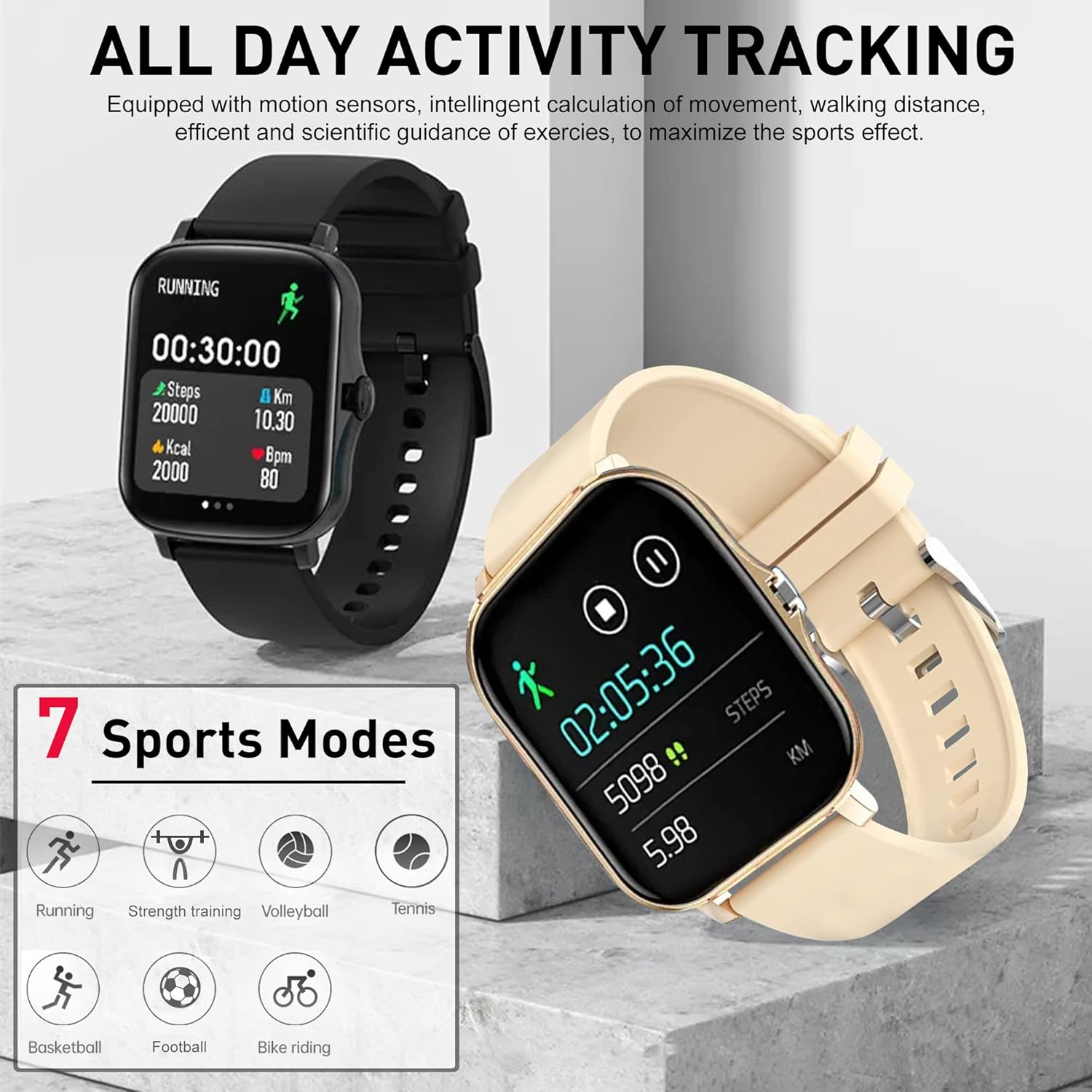
Image: The DOVIICO H13 Smart Watch showing real-time blood pressure (128/90 mmHg) and blood oxygen (98% SpO2) measurements.
Уйкунун мониторинги
Wear your smart watch to bed to track your sleep patterns. It records deep sleep, light sleep, and awake times, providing a comprehensive analysis of your sleep quality in the mobile application.

Image: The DOVIICO H13 Smart Watch displaying sleep duration and a breakdown of sleep stages (deep, light, awake).
Активдүүлүккө көз салуу
The DOVIICO H13 Smart Watch is designed to track your daily activities and workouts, helping you stay motivated and achieve your fitness goals.
All-Day Activity Monitoring
The watch automatically tracks your steps, distance traveled, and calories burned throughout the day. This data is synchronized with the mobile app for detailed analysis and progress tracking.
Спорт режимдери
The DOVIICO H13 supports 7 different sports modes to provide more accurate tracking for specific activities. These include:
- чуркоо
- Велосипед тебүү
- Теннис
- Күч тренинги
- Баскетбол
- Волейбол
- Футбол
Select the appropriate mode before starting your workout for optimized data collection.

Image: The DOVIICO H13 Smart Watch showing a running activity screen with duration, steps, distance, calories, and heart rate, alongside icons representing the 7 supported sports modes.
Smart Features
Beyond health and fitness, the DOVIICO H13 Smart Watch offers a range of smart features to keep you connected and organized.
Акылдуу эскертмелер
Receive alerts for incoming calls, SMS messages, and notifications from social media applications (e.g., WeChat, QQ, Facebook, Twitter, Line, WhatsApp, Instagram) directly on your wrist. The watch will vibrate to notify you, ensuring you don't miss important updates.

Image: Two DOVIICO H13 Smart Watches showing real-time message notifications from social media platforms.
Кошумча куралдар
The watch includes several convenient tools for daily use:
- Таймер жана секундомер: Убакытты эсептөө иш-аракеттери үчүн.
- Ойготкуч саат: Set silent vibrating alarms.
- Музыка контроллери: Смартфонуңузда музыканы ойнотууну көзөмөлдөңүз.
- Аба ырайы: View учурдагы аба ырайы шарттары.
- Отуруучу эстеткич: Кыймылсыздык мезгилинен кийин сизди жылдырууга чакырат.
- Телефонуңузду табыңыз: Жупташкан смартфонуңузду табууга жардам берет.
- Алыстан сүрөткө тартуу: Телефонуңуздун камерасын алыстан башкарыңыз.
- Bluetooth чалуу: Түздөн-түз сааттан чалууларды жасаңыз жана кабыл алыңыз.
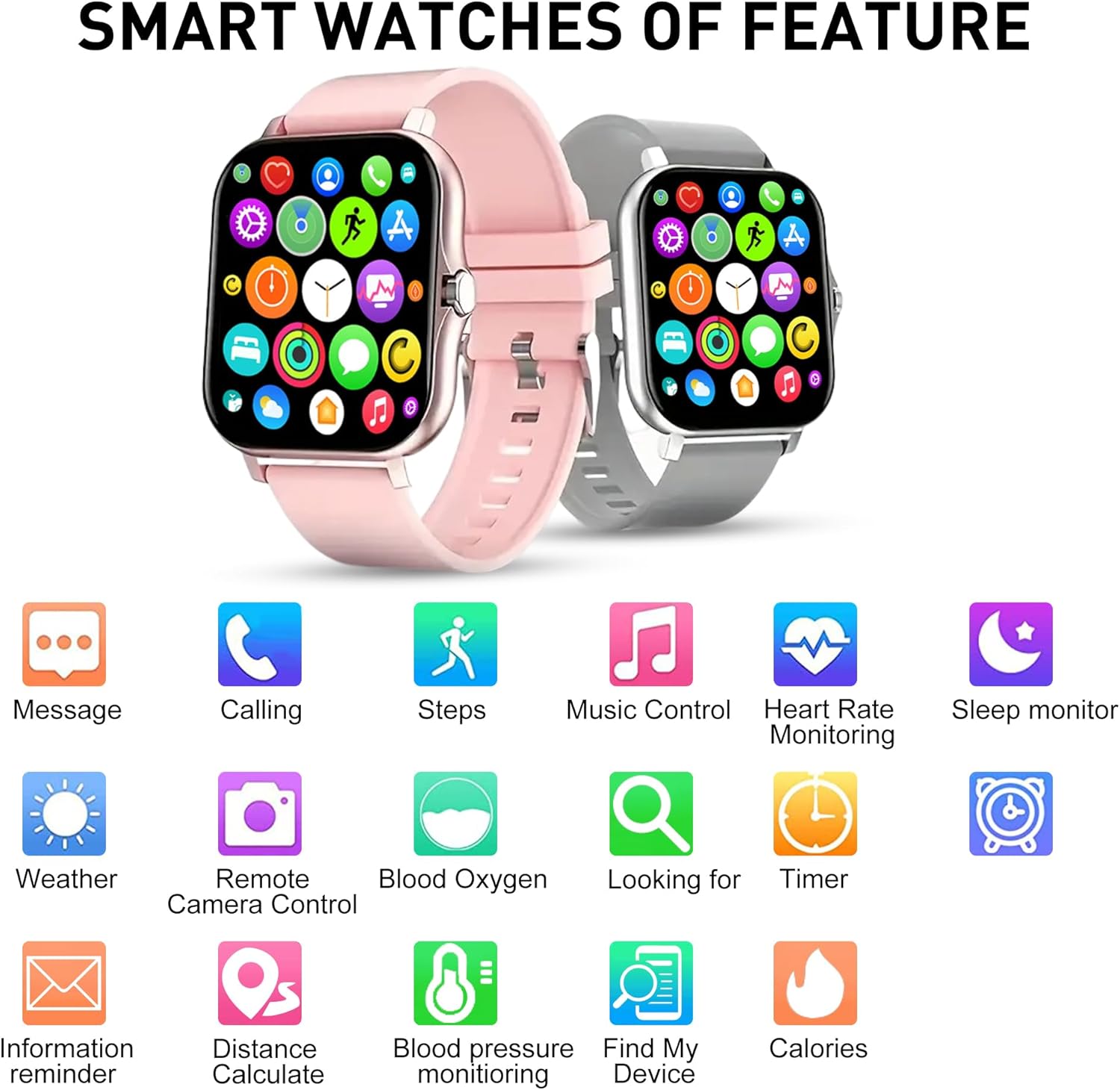
Сүрөт: An overview of the DOVIICO H13 Smart Watch's key features, represented by various icons for functions such as messaging, calling, step tracking, music control, and health monitoring.
Техникалык тейлөө
Акылдуу саатыңызды тазалоо
- Сааттын экранын жана боосун жумшак, d менен үзгүлтүксүз сүртүңүзamp, түксүз кездеме.
- Катуу химиялык заттарды, абразивдүү тазалагычтарды же эриткичтерди колдонуудан алыс болуңуз, анткени алар сааттын жасалгасына жана тетиктерине зыян келтириши мүмкүн.
- Коррозияны болтурбоо үчүн заряддоодон мурун заряддоо контакттары таза жана кургак экенин текшериңиз.
Батареяга кам көрүү
- Батареянын иштөө мөөнөтүн узартуу үчүн, сааттын батареясын тез-тезден толугу менен зарядсыздандырбаңыз.
- Саатты узак убакытка колдонбогондо салкын, кургак жерде сактаңыз.
- The watch has a battery capacity of 160 mAh and typically lasts for 7 days with normal use, with a standby time exceeding 30 days.
Жалпы кам көрүү
- Avoid exposing the watch to extreme temperatures, direct sunlight for prolonged periods, or high humidity.
- While the watch may have some water resistance, avoid submerging it in water or exposing it to high-pressure water jets unless explicitly stated in product specifications.
Проблемаларды чечүү
Күтүлбөйт
- Саат толук заряддалганын текшериңиз. Аны заряддагычка кеминде 30 мүнөт туташтырыңыз.
- Аны күйгүзүү үчүн капталдагы баскычты бир нече секунд басып туруңуз.
Unable to Pair with Smartphone
- Смартфонуңузда Bluetooth иштетилгенин текшериңиз.
- Ensure the watch is within Bluetooth range of your phone (typically 10 meters).
- Смартфонуңузду да, акылдуу саатыңызды да өчүрүп күйгүзүңүз.
- Коштоочу колдонмо эң акыркы версияга жаңыртылганын текшериңиз.
- Эгер мурда жупташтырылган болсо, аппаратты телефонуңуздун Bluetooth жөндөөлөрүнөн ажыратып, анан колдонмо аркылуу кайра жупташып көрүңүз.
Inaccurate Health Readings
- Саат билегиңизге бекем тагылганын, бирок өтө катуу эмес экенин текшериңиз.
- Keep your wrist still during measurements.
- Сааттын арткы бетиндеги сенсорду үзгүлтүксүз тазалап туруңуз.
- Note that smart watch readings are for reference only and should not be used for medical diagnosis.
Эскертмелер көрүнбөйт
- Саат телефонуңуз менен ийгиликтүү жупташтырылганын текшериңиз.
- Check notification permissions for the companion app in your phone's settings.
- Ensure that notification alerts are enabled within the companion app settings for the specific applications you wish to receive alerts from.
- Disable "Do Not Disturb" mode on both your watch and phone.
Техникалык шарттар
| Өзгөчөлүк | Деталь |
|---|---|
| Бренд | DOVIICO |
| Модел | H13 |
| Screen Size | 1.69 дюйм |
| Дисплей түрү | LCD |
| Резолюция | 240 x 240 |
| Операциялык системанын шайкештиги | Android 5.0+, iOS 9.0+ |
| Байланыш | Bluetooth |
| Батарея сыйымдуулугу | 160 миллионamp Саат (мАч) |
| Заряддоо убактысы | Болжол менен 2.5 саат |
| Батареянын иштөө мөөнөтү (Типтүү колдонуу) | 7 күнгө чейин |
| Күтүү убактысы | Over 30 Days |
| Продукциянын өлчөмдөрү | 14.99 x 7.49 x 3 см |
| Элемент Салмагы | 80 г |
| Өзгөчөлүктөр | Heart Rate, Blood Pressure, Blood Oxygen, Sleep Monitoring, Step/Distance/Calorie Tracking, 7 Sports Modes, Call/SMS/Social App Alerts, Alarm, Sedentary Reminder, Music Control, Weather, Remote Camera, Find Phone, Bluetooth Calling. |
Кепилдик жана колдоо
For information regarding warranty coverage and customer support for your DOVIICO H13 Smart Watch, please refer to the warranty card included in your product packaging or visit the official DOVIICO website. If you encounter any issues not covered in this manual, please contact DOVIICO customer service for assistance.


