Introduction
This manual provides detailed instructions for the safe and effective use of your Dylanto Kids Instant Print Camera, Model BLL2. Please read this manual thoroughly before operating the device and retain it for future reference.
Продукт бүттүview
The Dylanto Kids Instant Print Camera is designed for children aged 3-12, offering both digital photography and instant black-and-white printing capabilities. It features a 2.4-inch screen, 1080P video recording, 16x digital zoom, and various creative functions.

Figure 1: Dylanto Kids Instant Print Camera and included accessories.
Пакеттин мазмуну:
- Dylanto Kids Instant Print Camera (Model BLL2)
- 3 Rolls of Thermal Printing Paper
- 32 ГБ эстутум картасы
- Lanyard
- USB Type-C кабели
- Колдонуучунун Колдонмосу (бул документ)
Коопсуздук маалыматы
- Ensure the camera is fully charged before first use and after each use to prolong battery life.
- The thermal printing paper is BPA-free.
- Камераны өтө жогорку температурага же нымдуулукка дуушар кылбаңыз.
- Supervise young children during use to prevent accidental damage or misuse.
- Keep small parts, such as the memory card, out of reach of very young children to prevent choking hazards.
Жайгашуу
1. Камераны заряддоо
Before initial use, fully charge the camera. Connect the provided USB Type-C cable to the camera's charging port and the other end to a compatible USB power adapter (not included) or computer USB port. The charging indicator will show the charging status.
The camera has a 2000 mAh battery capacity, providing approximately 3-4 hours of continuous use after a full charge.
2. Эстутум картасын орнотуу
Locate the memory card slot on the camera. Insert the provided 32GB memory card into the slot until it clicks into place. Ensure the card is inserted in the correct orientation.
3. Loading Printing Paper
The camera uses thermal printing paper. Follow these steps to load a new roll:
- Gently push up the part with the lens to open the paper slot.
- Insert a roll of thermal printing paper into the slot. Ensure the paper feeds from the bottom of the roll and the end of the paper is facing upwards, ready to be pulled out.
- Close the two parts of the camera until they click securely.
- To avoid blank prints, pull the paper out by approximately 1 inch before the first print.

Figure 2: Steps for loading thermal printing paper.

Figure 3: Detailed instructions for paper installation, including a tip for blank prints.
Иштөө нускамалары
Күйгүзүү/өчүрүү
Камераны күйгүзүү же өчүрүү үчүн кубат баскычын басып, кармап туруңуз.
Навигация жана меню
Use the directional buttons and the OK/Shutter button to navigate through the camera's menu and select options on the 2.4-inch IPS screen.

Figure 4: Camera interface showing main functions.
Сүрөт тартуу
In photo mode, frame your shot using the screen. Press the shutter button to capture a photo. The camera supports 16x digital zoom.
The camera can capture color photos digitally and simultaneously print black-and-white thermal photos.
Басып чыгаруу режимдери:
The camera offers three printing modes for thermal prints: Low, Middle, and High, which likely refer to print density or quality.

Figure 5: Available printing modes.
Видеолорду жаздыруу
Switch to video mode. Press the shutter button to start recording 1080P video. Press it again to stop recording.

Figure 6: Video recording capabilities and storage.
Video 1: Demonstration of the camera's instant print and video recording features. This video highlights the camera's ability to capture moments and print them instantly.
Өзгөчөлүктөр
- Убактылуу сүрөткө тартуу: Set intervals for automatic photo capture (e.g., 2s, 5s, 10s).
- Үзгүлтүксүз атуу: Бир нече сүрөттөрдү тез арада тартыңыз.
- Оюндар: The camera includes built-in puzzle games for entertainment.
- Filter Frames & Stickers: Apply various frames and stickers to photos before printing or saving.
- MP3 ойноткучу: The camera supports MP3 playback.
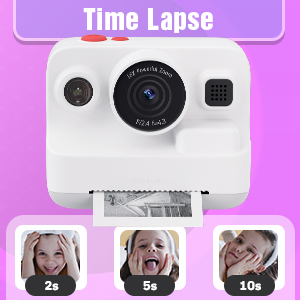
Figure 7: Time-lapse settings.

Figure 8: Built-in games and DIY photo features.

Figure 9: Creative frame and sticker options.
Техникалык тейлөө
- Тазалоо: Use a soft, dry cloth to clean the camera body and screen. Do not use liquid cleaners or abrasive materials.
- Сактагыч: Колдонулбаган учурда камераны салкын, кургак жерде, күн нуру түз тийбеген жерде сактаңыз.
- Батареяга кам көрүү: Fully charge the camera regularly, even if not in frequent use, to maintain battery health.
- Кагазды сактоо: Store thermal paper rolls in a cool, dark place to prevent premature fading or damage.
Проблемаларды чечүү
| Көйгөй | Мүмкүн себеп | Чечим |
|---|---|---|
| Камера күйбөйт. | Батарея аз. | Charge the camera fully using the provided USB Type-C cable. |
| Printed photos are blank. | Thermal paper installed incorrectly (wrong side up). | Open the paper slot, rotate the paper roll 180 degrees, and re-install it correctly. Ensure the paper feeds from the bottom of the roll and the end is facing upwards. |
| Басып чыгаруу сапаты начар. | Low battery; paper quality; print mode setting. | Ensure camera is fully charged. Use recommended thermal paper. Check print mode settings (Low, Middle, High) and adjust to High for better quality. |
| Сүрөттөрдү/видеолорду сактоо мүмкүн эмес. | Эстутум картасы толгон же туура эмес салынган. | Check if the 32GB memory card is properly inserted. Delete unnecessary files to free up space or replace the card if full. |
| Камера катып калат же жооп бербей калат. | Программанын катасы. | Press and hold the power button for 10-15 seconds to force a restart. If the issue persists, contact customer support. |
Техникалык шарттар
| Өзгөчөлүк | Деталь |
|---|---|
| Модель аты | BLL2 |
| Экранды көрсөтүү | 2.4 дюймдук IPS түстүү экран |
| Сүрөттүн резолюциясы | Up to 12 MP Effective Still Resolution |
| Video Resolution | 1080P (AVI format) |
| Оптикалык масштаб | 16x Digital Zoom |
| Image Stabilization | Санарип |
| Фото сенсор технологиясы | CMOS (1/4-inch sensor size) |
| Колдоого алынган File Формат | JPEG (photos) |
| Батарея сыйымдуулугу | 2000 мАч литий-ион |
| Батареянын иштөө мөөнөтү | Approx. 3-4 hours continuous use |
| Заряддоо интерфейси | USB Type-C |
| Memory Storage | 32GB (included) |
| Байланыш | USB, Wi-Fi |
| Flash | Built-In, Automatic |
| Үзгүлтүксүз атуу | 30 кадр/сек |
| Жаш аралыгы | Kid (3-12 years old recommended) |
| Өлчөмдөрү (болжол менен) | 3.9 дюйм (туурасы) x 3.1 дюйм (бийиктик) |

Figure 10: Camera dimensions and included accessories.
Кепилдик маалымат
The Dylanto Kids Instant Print Camera comes with a 6 айлык кепилдик сатып алынган күндөн тартып. Бул кепилдик өндүрүштүк кемчиликтерди жана нормалдуу колдонуудагы бузулууларды камтыйт. Бул туура эмес колдонуудан, кырсыктардан, уруксатсыз оңдоодон же кадимки эскирүүдөн келип чыккан зыянды камтыбайт.
Кепилдик дооматтары үчүн сатып алганыңыздын далилин сактап коюңуз.
Кардарларды колдоо
For any questions, technical assistance, or warranty claims, please contact Dylanto customer support through the retailer where you purchased the product or visit the official Dylanto brand store on Amazon:


