1. Продукт бүтүп калдыview
The Poly Voyager 4320 UC is a wireless stereo headset designed for professionals requiring seamless connectivity and productivity in various work environments. It features a noise-canceling boom microphone with Acoustic Fence technology, ensuring clear audio transmission by blocking background noise. The headset connects to PC/Mac via a BT700 USB-C Bluetooth adapter (with an included USB-C to USB-A adapter) and to mobile devices via Bluetooth 5.2. It offers up to 24 hours of talk time and includes a desktop charging stand for convenient power management. This model is Microsoft Teams certified and integrates with other communication platforms like Zoom.

Image 1.1: The Poly Voyager 4320 UC Wireless Headset shown on its included desktop charging stand. The headset features over-the-head stereo design with a flexible boom microphone.
2. Негизги өзгөчөлүктөрү
- Таза аудио сапаты: Features a noise-canceling dual microphone with Acoustic Fence technology to minimize background noise, ensuring your voice is heard clearly.
- Ийкемдүү туташуу: Connects wirelessly to computers (PC/Mac) via the included BT700 USB-C Bluetooth adapter (with USB-C to USB-A adapter) and to mobile phones via Bluetooth 5.2.
- Extended Mobility: Offers a wireless range of up to 164 feet (50 meters) from your computer, allowing freedom of movement during calls.
- Батареянын узак иштөө мөөнөтү: Provides up to 24 hours of talk time on a single charge. Can also be used as a wired headset via audio-over-USB mode.
- Ыңгайлуу дизайн: Equipped with an adjustable padded headband and memory foam ear cushions for comfortable extended wear.
- Dedicated Microsoft Teams Button: Instant access to the Microsoft Teams app for seamless collaboration. Also compatible with Zoom and other platforms.
- Desktop Charging Stand: Simplifies charging and provides a convenient storage solution.
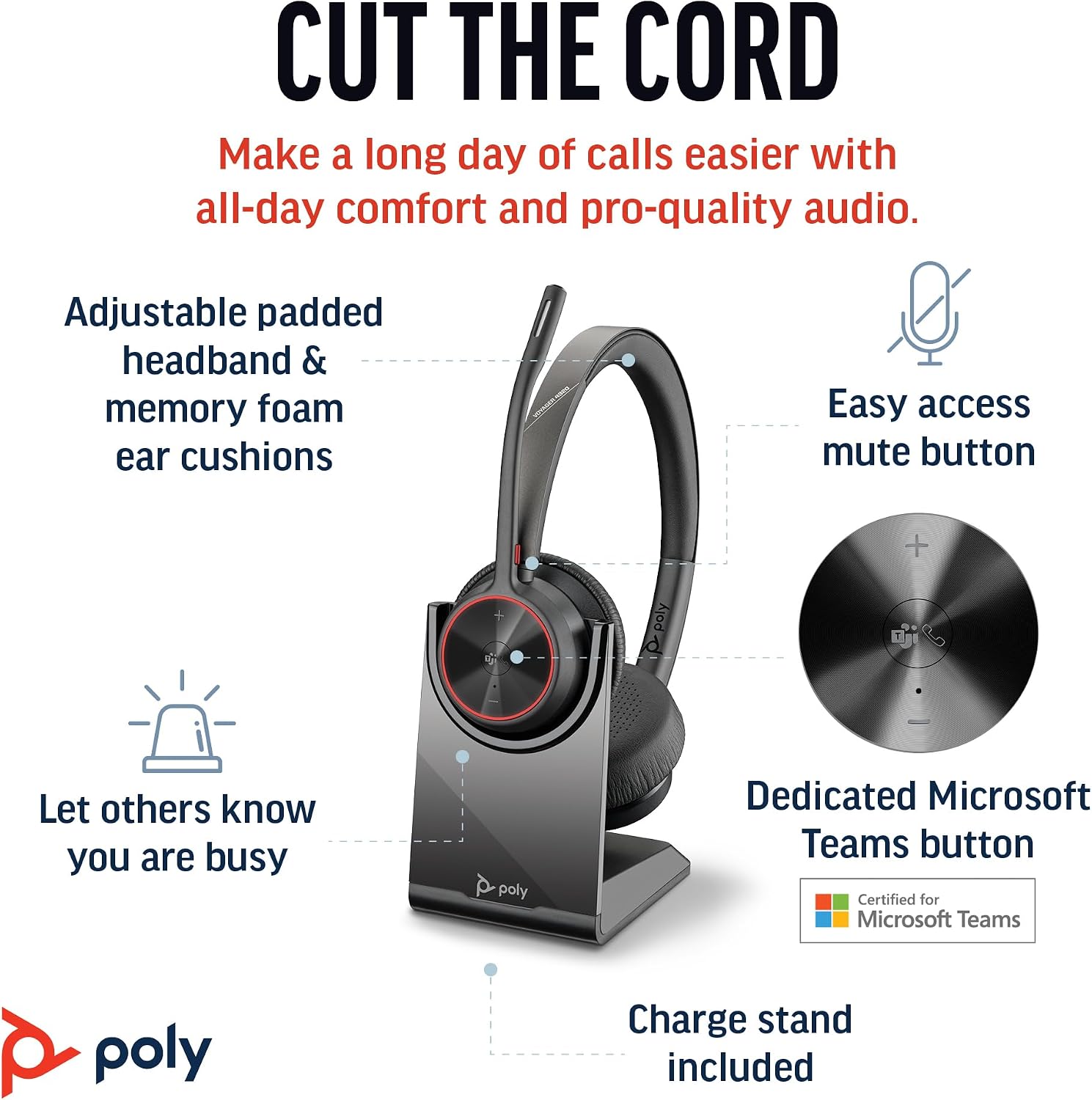
Image 2.1: The Poly Voyager 4320 UC Headset highlighting its adjustable padded headband, memory foam ear cushions, easy access mute button, dedicated Microsoft Teams button, and included charge stand.

Image 2.2: Illustration demonstrating the noise-canceling dual microphone with Acoustic Fence technology, which filters out background noise for clear communication.
3. Орнотуу колдонмосу
3.1 Пакеттин мазмуну
Пакетиңизде бардык буюмдар бар экенин текшериңиз:
- Poly Voyager 4320 UC зымсыз гарнитура
- Иш столунун заряддоочу стенди
- BT700 USB-C Bluetooth адаптери
- USB-C - USB-A адаптер
- USB заряддоо кабели
- Travel Pouch (may be included with some versions)
3.2 Гарнитураны заряддоо
Before first use, fully charge your headset. The headset can be charged using the included desktop charging stand or directly via the USB charging cable.
- Заряддоо стенди колдонуу: Connect the USB charging cable to the charging stand and then to a powered USB port (e.g., computer, wall adapter). Place the headset onto the charging stand. The headset's LED indicator will show charging status.
- Direct USB Charging: Connect the USB charging cable directly to the headset's USB-C port and then to a powered USB port.
A full charge takes approximately 1.5 hours. The headset provides up to 24 hours of talk time and 47 hours of listening time.
3.3 Түзмөктөргө туташуу
The Voyager 4320 UC headset offers multiple connection options:
3.3.1 Connecting to PC/Mac (via USB Adapter)
- Insert the BT700 USB-C Bluetooth adapter into an available USB-C port on your computer. If your computer only has USB-A ports, use the included USB-C to USB-A adapter.
- The adapter's LED will flash blue, indicating it is searching for the headset.
- Power on your headset. The headset and adapter are pre-paired and should connect automatically. The adapter's LED will turn solid blue when connected.
- Компьютериңиздин үн жөндөөлөрүнөн жана байланыш тиркемелеринен (мисалы, Microsoft Teams, Zoom) аудио киргизүү жана чыгаруу түзмөгү катары Poly Voyager 4320 UC тандаңыз.
3.3.2 Connecting to Mobile Phone (via Bluetooth)
- With the headset powered on, press and hold the Bluetooth pairing button on the headset until the headset's LED flashes red and blue, indicating pairing mode.
- On your mobile phone, go to Bluetooth settings and enable Bluetooth.
- Жеткиликтүү түзмөктөрдүн тизмесинен "Poly Voyager 4320 UC" тандаңыз.
- Once paired, the headset's LED will stop flashing and remain solid blue.

Image 3.1: Diagram illustrating the multiple connection options for the Poly Voyager 4320 UC headset, including connection to a PC/Mac via the USB-C BT700 Bluetooth adapter (with USB-A adapter option) and direct Bluetooth connection to a mobile device.
4. Иштөө нускамалары
4.1 Гарнитураны тагынуу
The headset can be worn with the microphone boom on either the right or left side. Rotate the boom up and over to align with the desired side. For optimal microphone performance, position the boom approximately two finger-widths from the corner of your mouth.
4.2 Гарнитураны башкаруу элементтери
- Үндү жогорулатуу/төмөндөтүү (+/-): Adjusts listening volume.
- Чалуу баскычы: Чалууга жооп берүү же аяктоо үчүн басыңыз.
- Үнсүз баскычы: Located on the microphone boom. Press to mute/unmute your microphone. A dynamic mute alert will notify you if you speak while muted.
- Microsoft командалары баскычы: Dedicated button for instant access to the Microsoft Teams application.
- Кубат баскычы: Slide to power on/off.
4.3 LED көрсөткүчтөрү
The headset and USB adapter feature LED indicators to provide status information:
- Гарнитура LED:
- Solid Blue: Connected/In call
- Flashing Red/Blue: Pairing mode
- Катуу кызыл: Үнсүз
- Катуу янтарь: Заряддоо
- Flashing Red: Low battery
- USB Adapter LED (BT700):
- Solid Blue: Connected/In call
- Flashing Blue: Searching for headset
- Катуу кызыл: Үнсүз
5. Техникалык тейлөө
5.1 Тазалоо
To maintain the headset's performance and hygiene:
- Кулак жаздыкчаларын жана баш боосун жумшак, d менен сүртүңүзamp кездеме. Катуу химиялык заттарды же абразивдүү материалдарды колдонуудан алыс болуңуз.
- Do not immerse the headset in water or any liquids.
- Keep the charging contacts on the headset and stand clean and free of debris.
5.2 Сактоо
When not in use, store the headset on its charging stand or in the included travel pouch to protect it from dust and damage. Avoid storing in extreme temperatures.
6. Кыйынчылыктарды
6.1 Аудио жок же аудио сапаты начар
- Байланышты текшерүү: Ensure the headset is properly connected to your device (solid blue LED on headset and adapter).
- Үн деңгээли: Verify that headset, computer, and application volume levels are not muted or set too low.
- Демейки түзмөк: Confirm that the Poly Voyager 4320 UC is selected as the default playback and recording device in your computer's sound settings and communication software.
- Диапазон: Ensure you are within the wireless range (up to 50 meters) of your connected device.
- Интерференция: Тоскоолдук жаратышы мүмкүн болгон башка зымсыз түзмөктөрдөн алысыраак жылдырыңыз.
6.2 Микрофон иштебейт
- Үнсүздү текшерүү: Ensure the microphone is not muted (headset LED should not be solid red).
- Микрофондун абалы: Adjust the microphone boom to be two finger-widths from your mouth.
- Демейки түзмөк: Confirm the headset is selected as the default recording device in your computer's sound settings and communication software.
- Программалык камсыздоонун жөндөөлөрү: Операция тутумуңуздагы микрофондун купуялык жөндөөлөрүн текшериңиз.
6.3 Headset Not Pairing/Connecting
- Power Cycle: Гарнитураны өчүрүп кайра күйгүзүңүз.
- Кайра жупташтыруу: Follow the pairing instructions in Section 3.3 to re-pair the headset with your device or USB adapter.
- Adapter Reset: If using the USB adapter, try unplugging and re-inserting it.
- Clear Device List: On your mobile device, forget the headset from the Bluetooth device list and attempt to pair again.
7. Техникалык шарттар
| Өзгөчөлүк | Спецификация |
|---|---|
| Модель аты | Voyager 4320 Teams Version with Charge Stand, USB-C BT700 with USB-C to USB-A Adapter |
| Байланыш технологиясы | Зымсыз (Bluetooth 5.2) |
| Зымсыз диапазон | 50 метрге чейин (164 фут) |
| Talk Time | 24 саатка чейин |
| Угуу убактысы | 47 саатка чейин |
| Заряддоо убактысы | Болжол менен Толук заряддоо үчүн 1.5 саат |
| Микрофон | Acoustic Fence технологиясы менен ызы-чууну жок кылуучу кош микрофон |
| Шайкеш түзмөктөр | Уюлдук телефондор, рабочий компьютерлер, ноутбуктар, планшеттер |
| Башкаруу түрү | Медиа башкаруу, тийүү |
| Элемент Салмагы | 162 грамм (5.7 унция) |
| Продукциянын өлчөмдөрү | 3.94 x 0.79 x 1.06 дюйм |
| Батарея түрү | 1 литий-иондук батарейка (кошулган) |
| UPC | 017229196667, 196548548736 |
8. Кепилдик жана колдоо
Кепилдик жөнүндө маалымат жана техникалык колдоо алуу үчүн, расмий Poly компаниясына кайрылыңыз webсайтка же кардарларды тейлөөгө кайрылыңыз. Кепилдик дооматтар үчүн сатып алганыңыздын далилин сактаңыз.


