1. Киришүү
This manual provides essential information for the safe and efficient operation of your Anern 4200W Hybrid Solar Inverter. This device is designed to convert DC power from solar panels into AC power for household appliances, while also managing battery charging and grid interaction. Please read this manual thoroughly before installation and operation.
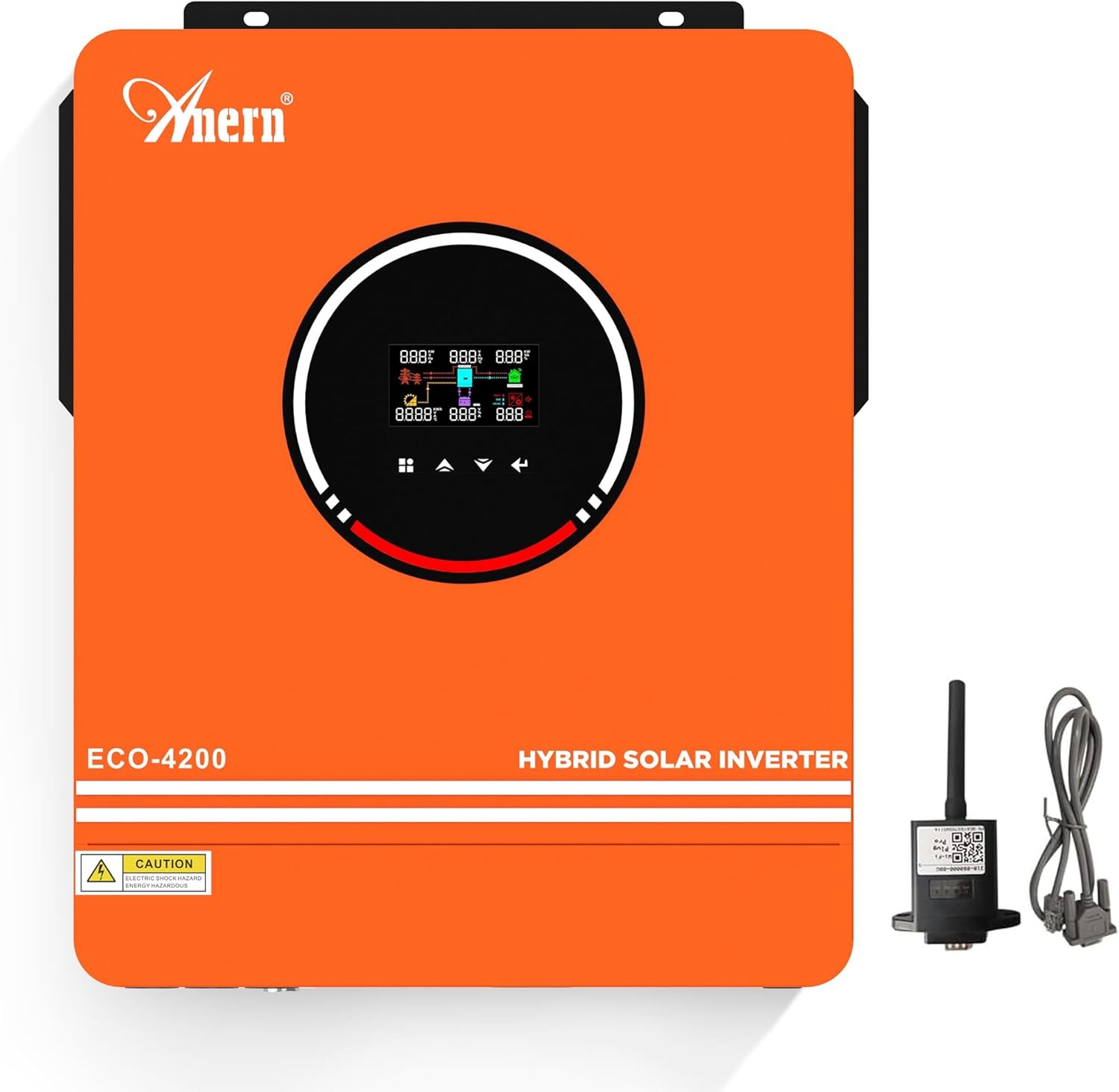
Figure 1.1: Anern 4200W Hybrid Solar Inverter with included WiFi module.
2. Коопсуздук маалыматы
Маанилүү коопсуздук чаралары:
- The starting power of inductive loads must be at least three times the rated power. Excessive inrush current can damage the inverter.
- Connect circuits correctly and install circuit breakers for each circuit.
- Power-on Sequence: First, turn on the battery, then start the inverter, and finally turn on the circuit breakers for photovoltaic (PV), grid, and load.
- Өчүрүү ырааттуулугу: Turn off in the reverse order of power-on.
Интегралдык коргоо функциялары
The inverter is equipped with multiple protection mechanisms to ensure safe operation:
- Ашыкча ток коргоо
- Undervoltage Коргоо
- Кыска туташуулардан коргоо
- Ашыкча ысып кетүүдөн коргоо
- Ашыкча жүктөн коргоо
- Backfill Protection
- Overvoltage Коргоо
- Ашыкча заряддан коргоо

Figure 2.1: ашыкview of the inverter's comprehensive protection features.
3. Продукциянын өзгөчөлүктөрү
- Жогорку кубаттуулугу: 4.2kW hybrid solar inverter (3600W rated power) with 24V DC to 220V/230V AC conversion.
- Advanced MPPT Solar Charger: Integrated 120A MPPT solar charge controller. Max PV Array Open Circuit Voltage: 500Vdc. PV Array MPPT Voltage Range: 90~450Vdc. Max PV Array Power: 6000W.
- Энергияны үнөмдөө режими: Features a dual-circuit AC output function. The primary and secondary outputs are typically used under normal conditions. If there is no PV or grid input and battery voltage is too low, the primary circuit will shut down, and only the secondary output will remain active to conserve energy.
- Алыстан байкоо: Supports WIFI/GPRS remote monitoring, allowing access to data and control of the inverter at any time. A WIFI module is included in the package.
- Бир нече заряддоо режимдери: Three optional charging modes: Solar Only, Solar and Utility, Solar Priority.
- Бир нече чыгаруу режимдери: Output modes include Solar Priority, Utility Priority, and SBU Mode. These modes meet various application requirements.
- Dual AC Outputs: The inverter features dual AC outputs. The combined power of the primary and secondary outputs should not exceed 3.6 kW.
- RGB LCD дисплей: High-resolution RGB LCD display, readable even in daylight, with RGB indicators for different operating modes.
- Батарея шайкештиги: Supports 24V lead-acid and lithium batteries, including GEL, AGM, FLD, LI, and SLD types. The inverter can operate without batteries. It can only be connected to PACE BMS, not BMS from other manufacturers. When using a lithium battery, select 'User-defined' battery type in program 05.

Figure 3.1: The Anern Hybrid Solar Inverter combines multiple functions into one unit.
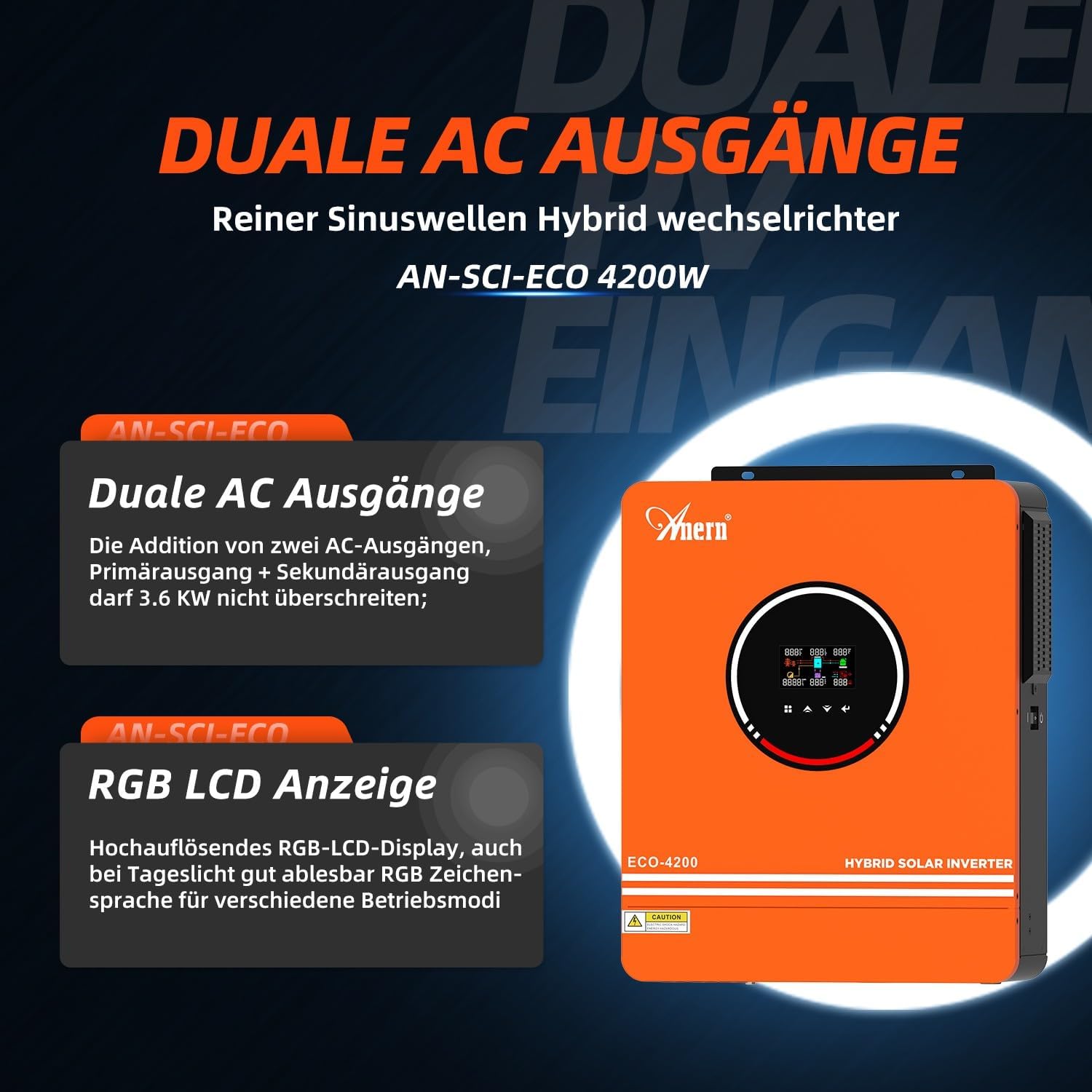
Figure 3.2: Dual AC outputs and the high-resolution RGB LCD display.

Figure 3.3: The inverter supports a wide range of 24V battery types.
4. Техникалык шарттар
| Атрибут | Нарк |
|---|---|
| Модель номери | 4.2KW avec WIFI |
| Бренд | Анерн |
| Ватtage | 3600 Watts (Rated) |
| Продукциянын өлчөмдөрү | 44 x 51 x 21 см |
| Элемент Салмагы | 10 килограмм |
| Power Source | Күн энергиясы |
| Сунушталган колдонмолор | Home, Off-grid |
| Түс | Ачык күрөң |
| Макс. PV Array Open Circuit Voltage | 500Vdc |
| PV Array MPPT Voltage Диапазон | 90~450Vdc |
| Макс. PV Array күчү | 6000 Вт |
| Max. Заряддоо тогу | 120A (MPPT) |
| Макс. AC заряддоо агымы | 100A |
5. Орнотуу жана орнотуу
Proper installation is crucial for the safe and efficient operation of your hybrid solar inverter. Refer to the wiring diagram below for connection details.
Электр өткөргүч схемасы бүттүview
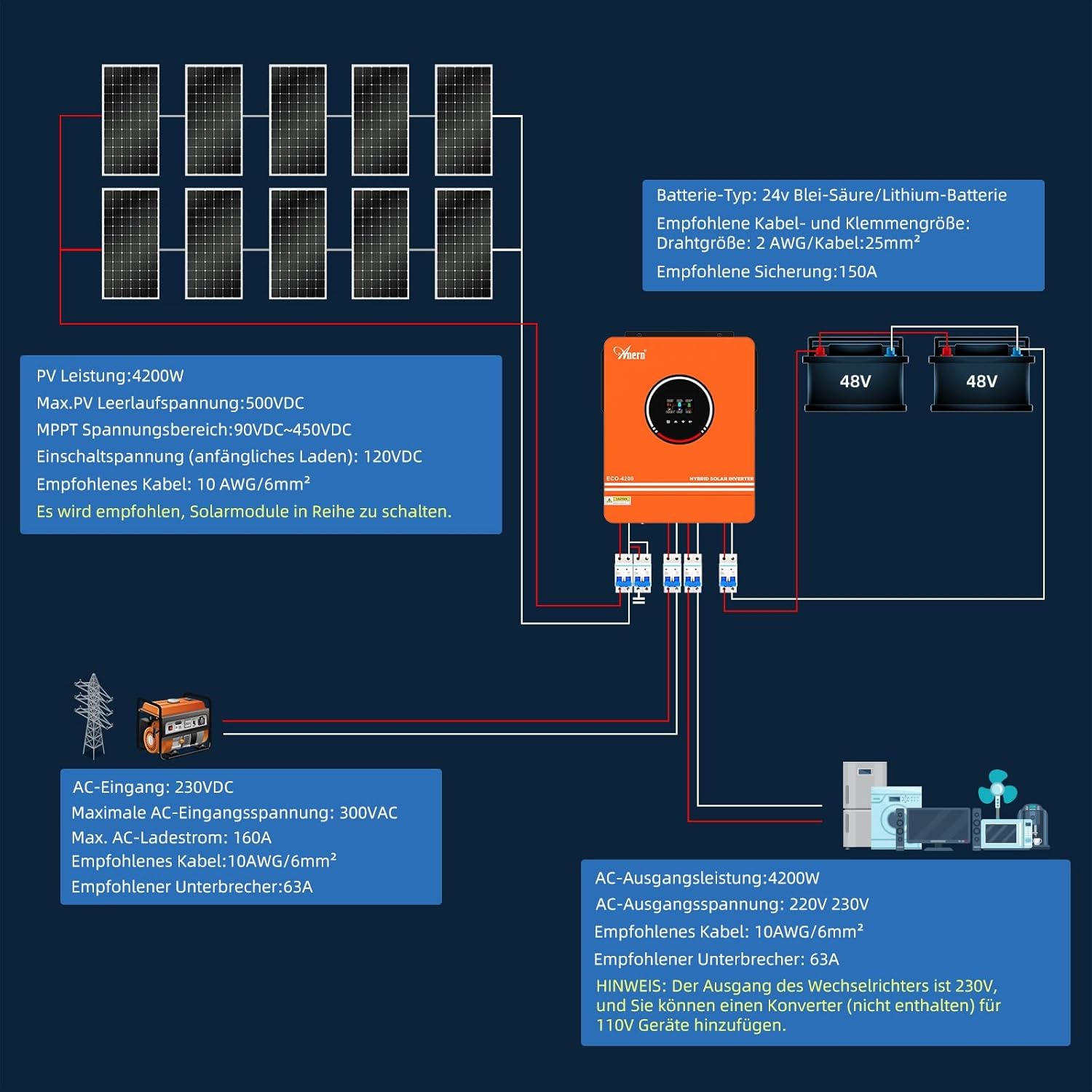
Figure 5.1: Comprehensive wiring diagram for the inverter system.
Туташуу көрсөтмөлөрү
- PV киргизүү:
- PV Power: 4200W
- Макс. PV Open Circuit Voltagд: 500VDC
- MPPT Voltage Диапазону: 90VDC-450VDC
- Start-up Voltage (initial charge): 120VDC
- Recommended Cable: 10 AWG / 6mm²
- It is recommended to connect solar modules in series.
- Батарея туташуу:
- Battery Type: 24V Lead-Acid / Lithium Battery
- Recommended Cable and Terminal Size: 2 AWG / 25mm²
- Сунушталган сактагыч: 150A
- AC киргизүү (тармак/генератор):
- AC Input: 230VDC
- Максималдуу AC киргизүү көлөмүtagд: 300VAC
- Max. AC Charging Current: 120A
- Recommended Cable: 10 AWG / 6mm²
- Recommended Breaker: 63A
- AC чыгышы (жүктөө):
- AC чыгаруу кубаттуулугу: 4200W
- AC Output Voltage: 220V / 230V
- Recommended Cable: 10 AWG / 6mm²
- Recommended Breaker: 63A
- NOTE: The inverter's output is 230V. You can add a converter (not included) for 110V devices.
Ensure all connections are secure and follow local electrical codes. It is highly recommended to have installation performed by a qualified electrician.
6. Иштөө режимдери
Anern гибриддик күн инвертору ар кандай энергияны башкаруу муктаждыктарына ылайыкташтырылган ийкемдүү иштөө режимдерин сунуштайт.
Charging Modes (3 Options)

Figure 6.1: ашыкview of charging and output modes.
- Solar Only (CSO): Solar energy is the primary source for charging the battery. The utility grid charges the battery only when solar energy is unavailable.
- Solar and Utility (SNU): Solar energy and the utility grid charge the battery simultaneously.
- Solar Priority (OSO): Solar energy is the sole charging source, regardless of its availability.
Output Modes (4 Options)
- USB - Utility First: Loads are primarily powered by the utility grid. Solar and battery power are only used if the utility company cannot supply power.
- SUB - Solar First (Standard): If solar energy is insufficient to power all connected loads, the grid supplies the loads simultaneously. The battery powers the loads only in two cases: if solar power is insufficient and grid power is unavailable, or if the grid is unavailable.
- SUB - Priority: If solar energy is insufficient to power all connected loads, the battery powers the loads simultaneously. The utility company then supplies the loads with power when the battery voltage drops below the warning value for low values or in program 12.
- MKS - Priority: Solar power has priority over loads. If solar power is insufficient, the loads are simultaneously supplied by the grid. The batteries serve as backup power.
RGB Operating Modes
The RGB display automatically changes color based on the inverter's operating status:

Figure 6.2: RGB display colors indicating different operating modes.
- Стационардык режим: Ак жарык
- PV режими: Violet Light
- Батарея режими: Кызыл жарык
- Пайдалуу режим: Көк жарык
Remote Monitoring
The included WiFi module enables remote monitoring of your inverter. This allows you to retrieve desired data and operate the inverter from a distance using a compatible application.

Figure 6.3: WiFi monitoring allows control and data access via mobile devices.
7. Техникалык тейлөө
To ensure the longevity and optimal performance of your Anern Hybrid Solar Inverter, regular maintenance is recommended.
- үзгүлтүксүз тазалоо: Keep the inverter's exterior clean and free from dust and debris. Ensure ventilation openings are not blocked.
- Туташуу текшерүүлөрү: Periodically inspect all electrical connections (PV, battery, AC input/output) for tightness and signs of corrosion. Loose connections can lead to overheating and poor performance.
- Экологиялык шарттар: Ensure the inverter is installed in a well-ventilated area, away from direct sunlight, moisture, and extreme temperatures.
- Программалык камсыздоонун жаңыртуулары: Өндүрүүчүнү текшериңиз website or app for any available firmware updates to ensure your inverter has the latest features and bug fixes.
8. Кыйынчылыктарды
Эгерде сиз инверторуңуз менен көйгөйлөргө туш болсоңуз, төмөнкү жалпы көйгөйлөрдү чечүү кадамдарын карап көрүңүз:
- Кубат жок/Дисплей өчүк: Check all power connections, including battery, PV, and AC input. Ensure circuit breakers are in the ON position. Verify battery voltage иштөө диапазонунда.
- Чыгуу күчү жок: Check the load connections and ensure the inverter is not in an error state (indicated by the display or fault indicator). Verify that the output mode is correctly configured.
- Төмөн чыгаруу кубаттуулугу: Ensure PV input is sufficient and batteries are adequately charged. Check for any overload conditions.
- Ашыкча жүктөө эскертүүсү: Reduce the connected load. Ensure the starting power of inductive loads does not exceed the inverter's capacity.
- Ашыкча ысып кетүү: Ensure proper ventilation around the inverter. Clear any obstructions from cooling fans.
- WiFi туташуу маселелери: Ensure the WiFi module is correctly installed and within range of your network. Refer to the WiFi module's specific instructions for setup.
For persistent issues, refer to the detailed troubleshooting section in the complete user manual (if available in PDF format) or contact customer support.
9. Кепилдик жана колдоо
Anern provides a 1-year warranty for this inverter. For any issues during use, please contact Anern customer support. You may be required to provide a video demonstrating the fault to assist technicians in diagnosing the cause.
For further assistance, please visit the official Anern store on Amazon or contact their customer service directly. Ensure you have your product model and purchase details ready when contacting support.


