Introduction
Сатып алганыңыз үчүн рахматasing The Voice Legend Wireless Bluetooth Speaker. This portable speaker is designed to deliver clear audio with a vibrant LED light show, making it perfect for various settings. It features Bluetooth connectivity for seamless music streaming, FM radio, hands-free calling, and support for USB and Micro SD playback. Its durable and lightweight design ensures portability and ease of use.
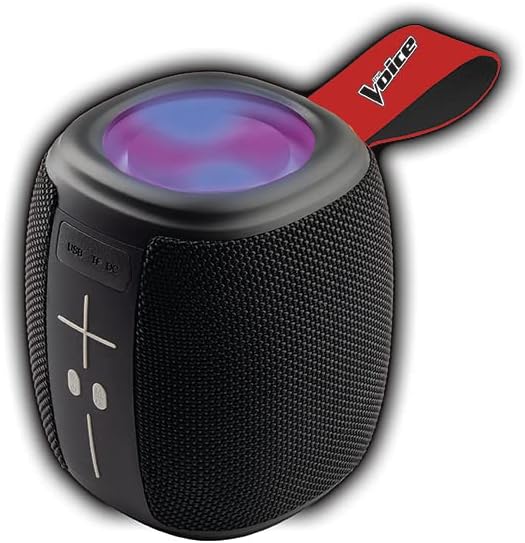
Image: The Voice Legend Wireless Bluetooth Speaker, showcasing its compact design and top-mounted LED light panel.
Кутуда эмне бар
Сураныч, бардык буюмдар бар экенине ынануу үчүн пакетиңиздин мазмунун текшериңиз:
- 1x The Voice Legend Bluetooth Speaker
- 1x USB-C заряддоо кабели
- 1x Instruction Manual

Image: A visual representation of the package contents, including the speaker, USB-C charging cable, and the user manual.
Продукт өзгөчөлүктөрү
- Зымсыз Bluetooth байланышы: Easily connect to your smartphone, tablet, or laptop from up to 30 feet away.
- Жандуу LED жарык шоу: Features multiple color modes for a dynamic visual experience, suitable for parties or ambient lighting.
- Портативдик жана жеңил дизайн: Compact dimensions (4.49 x 4.49 x 5.16 inches) and light weight (1.4 pounds) with a handy carrying strap for easy transport.
- FM радиосу: Сүйүктүү радиостанцияларыңызды күүлүңүз.
- Hands Free Чалуу: Built-in microphone allows for clear speakerphone calls.
- Бир нече ойнотуу параметрлери: Supports music playback via USB and Micro SD card slots.
- Кайра заряддалуучу батарея: Provides up to 4 hours of playtime on a single charge.
- Oversize Controls: Easy-to-use large buttons for volume and playback control.
- Чыныгы зымсыз стерео (TWS) функциясы: Connect two The Voice Legend speakers for an enhanced stereo sound experience.
- Суу өткөрбөйт: Чачырандыларга жана жеңил жамгырларга туруштук берүү үчүн иштелип чыккан.
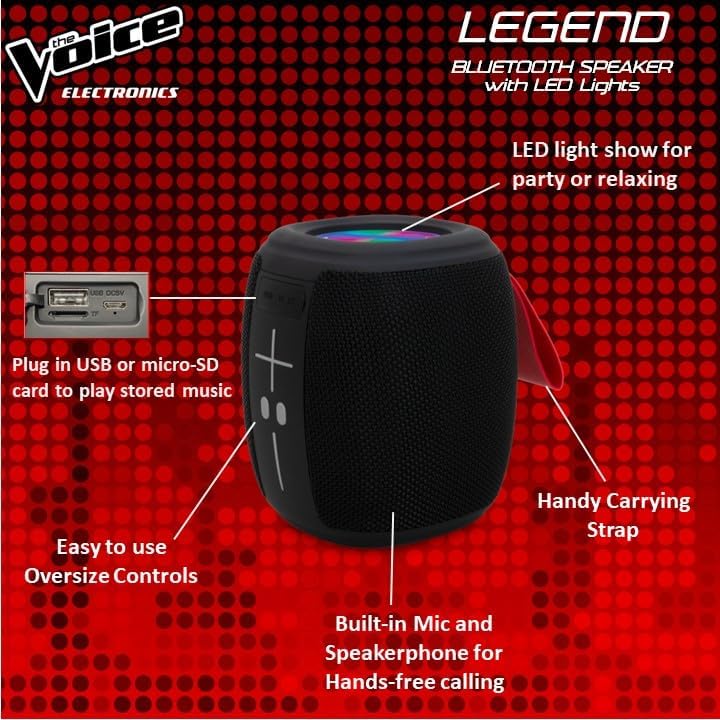
Сүрөт: деталдуу view of the speaker's side, pointing out the oversized controls, USB and Micro-SD card slots, built-in microphone for hands-free calling, and the handy carrying strap.
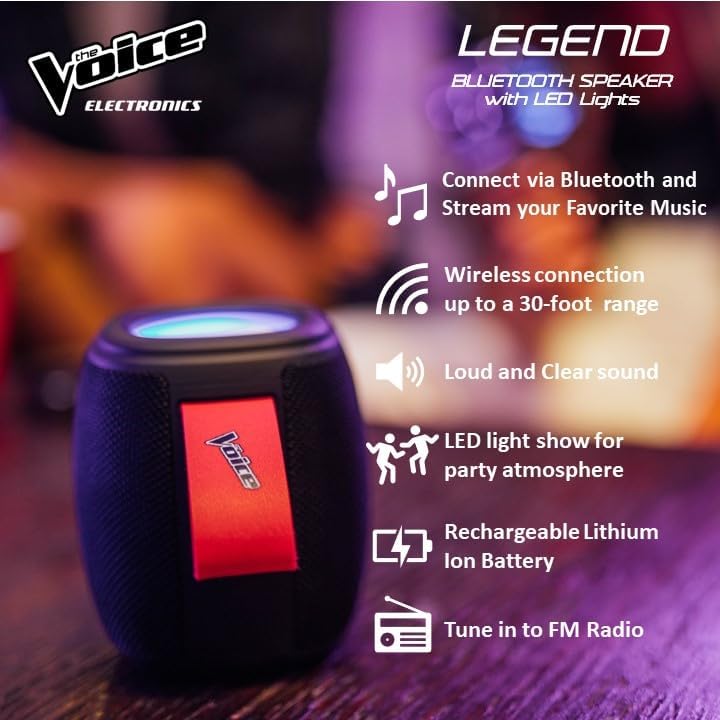
Сүрөт: Инфографика шоусуasing key features like Bluetooth connectivity, 30-foot wireless range, loud and clear sound, LED light show, rechargeable lithium-ion battery, and FM radio tuning.

Image: Demonstrating the speaker's lightweight and durable nature, and how to activate the LED light show for different ambiances.
Жайгашуу
1. Динамикти кубаттоо
Before first use, fully charge the speaker. Connect the provided USB-C charging cable to the speaker's DC 5V port and the other end to a USB power adapter (not included) or a computer USB port. The charging indicator light will show charging status and turn off when fully charged. A full charge provides approximately 4 hours of playtime.
2. Күйгүзүү / Өчүрүү
Press and hold the power button (usually marked with a circle or power symbol) for a few seconds to turn the speaker ON or OFF. A sound prompt will indicate the power status.
3. Bluetooth Жупташтыруу
- Ensure the speaker is powered ON and in Bluetooth pairing mode. A blue LED light will flash rapidly, indicating it's ready to pair.
- Түзмөгүңүздө (смартфон, планшет ж.б.) Bluetooth жөндөөлөрүнө өтүңүз.
- Издөө "The Voice Legend" in the list of available devices.
- Select "The Voice Legend" to connect. Once connected, the blue LED light will stop flashing and remain solid, and you will hear a confirmation sound.
Video: An official product video demonstrating the features and ease of use of The Voice Legend Bluetooth Speaker, including its LED light show and portability.
Иштөө нускамалары
1. Музыканы ойнотуу (Bluetooth режими)
- Once paired, open your music app on your device and start playing.
- колдонуу + жана - buttons on the speaker to adjust volume. Press and hold for volume control.
- баскычын кыска басыңыз + кийинки трекке өтүү үчүн баскычты басыңыз.
- баскычын кыска басыңыз - мурунку трекке өтүү үчүн баскычты басыңыз.
- Press the Play/Pause button (often marked with a play/pause symbol) to pause or resume playback.
2. FM радио режими
- Press the Mode button (often marked "M") to switch to FM Radio mode.
- Динамик жеткиликтүү радиостанцияларды автоматтык түрдө сканерлейт жана сактайт.
- колдонуу + жана - баскычтар сакталган станциялардын ортосунда чабыттоо.
- For better reception, try repositioning the speaker.
3. USB / Micro SD ойнотуу
- Insert a USB drive or Micro SD card (with pre-loaded MP3 audio fileс) тиешелүү уячага киргизиңиз.
- The speaker will automatically detect the media and begin playback.
- Use the playback controls (volume, next/previous track, play/pause) as in Bluetooth mode.
4. Hands Free Чалуу
- Bluetooth аркылуу туташып турганда чалуу келгенде, музыка тындырылат.
- Кирүүчү чалууга жооп берүү үчүн Ойнотуу/Тынытуу баскычын басыңыз.
- Чалууну бүтүрүү үчүн Ойнотуу/Тыным баскычын кайра басыңыз.
- Кирүүчү чалууну четке кагуу үчүн Ойнотуу/Тыным баскычын басып, кармап туруңуз.
5. LED жарыгын башкаруу
The speaker features a dynamic LED light show. Press the dedicated light button (if available, or refer to specific button functions in the included manual) to cycle through different light modes or turn the lights off. There are typically 4 different color modes.
6. Чыныгы зымсыз стерео (TWS) жупташтыруу
To achieve a true stereo sound experience, you can pair two The Voice Legend speakers together:
- Ensure both speakers are powered ON and not connected to any Bluetooth device.
- On one speaker (this will be your primary speaker), press and hold the TWS pairing button (refer to the included manual for exact button location, often a dedicated button or a long press on a multi-function button).
- Негизги динамик кошумча динамикти издейт. Туташтырылгандан кийин, сиз ырастоо үнүн угасыз.
- Эми, "Bluetooth жупташтыруу" бөлүмүндө сүрөттөлгөндөй, түзмөгүңүздү негизги динамикке Bluetooth аркылуу туташтырыңыз. Аудио эки динамик аркылуу тең стерео режиминде ойнотулат.

Image: Two The Voice Legend speakers shown side-by-side, illustrating their True Wireless Functionality (TWS) for connecting and streaming stereo audio.
Техникалык тейлөө
- Тазалоо: Динамикти жумшак, кургак чүпүрөк менен сүртүңүз. Абразивдүү тазалагычтарды же эриткичтерди колдонбоңуз.
- Сактагыч: Динамикти түз күн нурунан жана өтө температурадан алыс салкын, кургак жерде сактаңыз.
- Батареяга кам көрүү: Батареянын иштөө мөөнөтүн узартуу үчүн, бат-баттан батарейканы толук зарядсыздандырбаңыз. Узак убакыт колдонулбаса да, динамикти үзгүлтүксүз заряддап туруңуз.
- Суу каршылык: While waterproof, avoid submerging the speaker in water for prolonged periods. Ensure charging ports are dry before charging.
Проблемаларды чечүү
| Көйгөй | Мүмкүн себеп | Чечим |
|---|---|---|
| Speaker does not turn ON. | Батарея аз. | Динамикти толук заряддаңыз. |
| Bluetooth түзмөгү менен жупташтыруу мүмкүн эмес. | Динамик жупташтыруу режиминде эмес; түзмөк Bluetooth өчүк; спикерден өтө алыс. | Ensure speaker is flashing blue LED. Turn device Bluetooth off/on. Move device closer (within 30 ft). |
| Үн же бурмаланган үн жок. | Үн өтө төмөн; динамик туташкан эмес; аудио булагы маселеси. | Increase speaker and device volume. Re-pair Bluetooth. Check audio source. |
| FM Radio static/poor reception. | Алсыз сигнал. | Reposition the speaker to find a stronger signal. |
| USB/Micro SD аркылуу ойното албайт. | Туура эмес file форматтоо; карта/диск туура эмес салынган. | камсыз кылуу files are MP3. Reinsert card/drive. |
Техникалык шарттар
- Модель аты: The Voice Legend
- Динамик түрү: Портативдик зымсыз динамик
- Байланыш технологиясы: Bluetooth
- Зымсыз байланыш технологиясы: Bluetooth
- Bluetooth диапазону: 30 фут (9.14 метр) чейин
- Аудио чыгаруу режими: Стерео (TWS менен)
- Динамиктин максималдуу чыгаруу күчү: 3 Ватт
- Батареянын иштөө мөөнөтү: 4 саатка чейин
- Кубат булагы: Батарея менен иштейт
- Камтылган компоненттер: Rechargeable battery, Built-in microphone
- Суу өткөрбөйт: Ооба
- Башкаруу ыкмасы: Үн менен башкаруу
- Продукциянын өлчөмдөрү: 4.49 x 4.49 x 5.16 дюйм
- Элемент Салмагы: 1.4 фунт
- UPC: 841133120667
- Өндүрүүчү: The Voice
Кепилдик жана колдоо
The Voice Legend Wireless Bluetooth Speaker comes with a Чектелген Кепилдик. Please refer to the warranty card included in your package for specific terms and conditions, including coverage period and details on how to obtain service.
For technical support, troubleshooting assistance, or warranty claims, please contact The Voice customer service. Contact information can typically be found on the product packaging or on the official The Voice Electronics webсайт.
Сураныч, кепилдик максаттары үчүн сатып алганыңыздын далилин сактап коюңуз.


