Introduction
Thank you for choosing The Voice Hollywood Wireless Headphones. These headphones are designed to provide a superior audio experience with the convenience of wireless connectivity. Featuring HD Ultra Max Sound, a comfortable adjustable headband, and a tri-fold design for portability, they are optimized for seamless integration with Siri and Google Assistant. This manual provides detailed instructions for setup, operation, maintenance, and troubleshooting to ensure optimal performance and longevity of your device.
Коопсуздук маалыматы
- Наушниктерди экстремалдык температурага, нымдуулукка же жегич заттарга тийгизбеңиз.
- Угуу жөндөмүнө зыян келтирбөө үчүн узак убакыт бою жогорку үн деңгээлинде угуудан качыңыз.
- Do not use the headphones while driving, cycling, or in situations where inability to hear ambient sounds could be dangerous.
- Наушниктерди балдардан жана үй жаныбарларынан алыс кармаңыз.
- Only use the provided charging cable and accessories.
- Наушниктерди ажыратууга же өзгөртүүгө аракет кылбаңыз. Бул кепилдикти жокко чыгарат.
Пакеттин мазмуну
Пакетиңизде бардык буюмдар бар экенин текшериңиз:
- The Voice Hollywood Wireless Headphones
- USB Type-C кубаттоочу кабель
- 3.5 мм аудио кабель (AUX)

Figure 1: Included components and key features of the headphones.
Продукт бүттүview
The Hollywood Wireless Headphones feature an ergonomic design for extended comfort and intuitive controls for ease of use. The over-ear cups provide a comfortable fit, and the adjustable headband ensures a secure fit for various head sizes. The tri-fold design allows for compact storage and portability.

Сүрөт 2: Алдыңкы view наушник.

Figure 3: Headphones in folded position for portability.
Башкаруу каражаттары жана порттор
Refer to Figure 1 for a visual guide to the controls and ports. The main controls are located on the ear cups and include:
- Кубат баскычы: Bluetooth жупташтырууну күйгүзүү/өчүрүү жана баштоо үчүн колдонулат.
- Үнүн жогорулатуу/Кийинки трек баскычы: Үнүн жогорулатуу үчүн кыска басыңыз, кийинки трекке узакка басыңыз.
- Үндү азайтуу/Мурунку трек баскычы: Үндү азайтуу үчүн кыска басыңыз, мурунку трек үчүн көпкө басыңыз.
- Көп функциялуу баскыч (MFB): Ойнотуу/тындыруу, чалууларга жооп берүү/аяктоо, үн жардамчысын иштетүү.
- USB Type-C порту: Наушниктерди заряддоо үчүн.
- 3.5 мм аудио уячасы: AUX кабелин колдонуу менен зымдуу туташуу үчүн.
- Камтылган микрофон: Колсуз чалуулар жана үн жардамчысы буйруктары үчүн.
Жайгашуу
Наушниктерди заряддоо
Before first use, fully charge your headphones. A full charge typically takes approximately 2-3 hours.
- Connect the small end of the USB Type-C charging cable to the charging port on the headphone ear cup.
- USB кабелинин чоңураак учун USB кубат адаптерине (кошулмада жок) же компьютердин USB портуна туташтырыңыз.
- The LED indicator light will illuminate during charging and turn off or change color once fully charged.
Bluetooth Жупташтыруу
Кулакчындарды Bluetooth иштетилген түзмөгүңүзгө (мисалы, смартфон, планшет, компьютер) жупташтырыңыз.
- Наушниктердин өчүрүлгөнүн текшериңиз.
- Press and hold the Power button for approximately 5-7 seconds until the LED indicator light flashes blue and red alternately, indicating pairing mode.
- Түзмөгүңүздө Bluetooth иштетип, жаңы түзмөктөрдү издеңиз.
- Select "Hollywood" from the list of available devices.
- Once successfully paired, the LED indicator will flash blue slowly or turn solid blue.
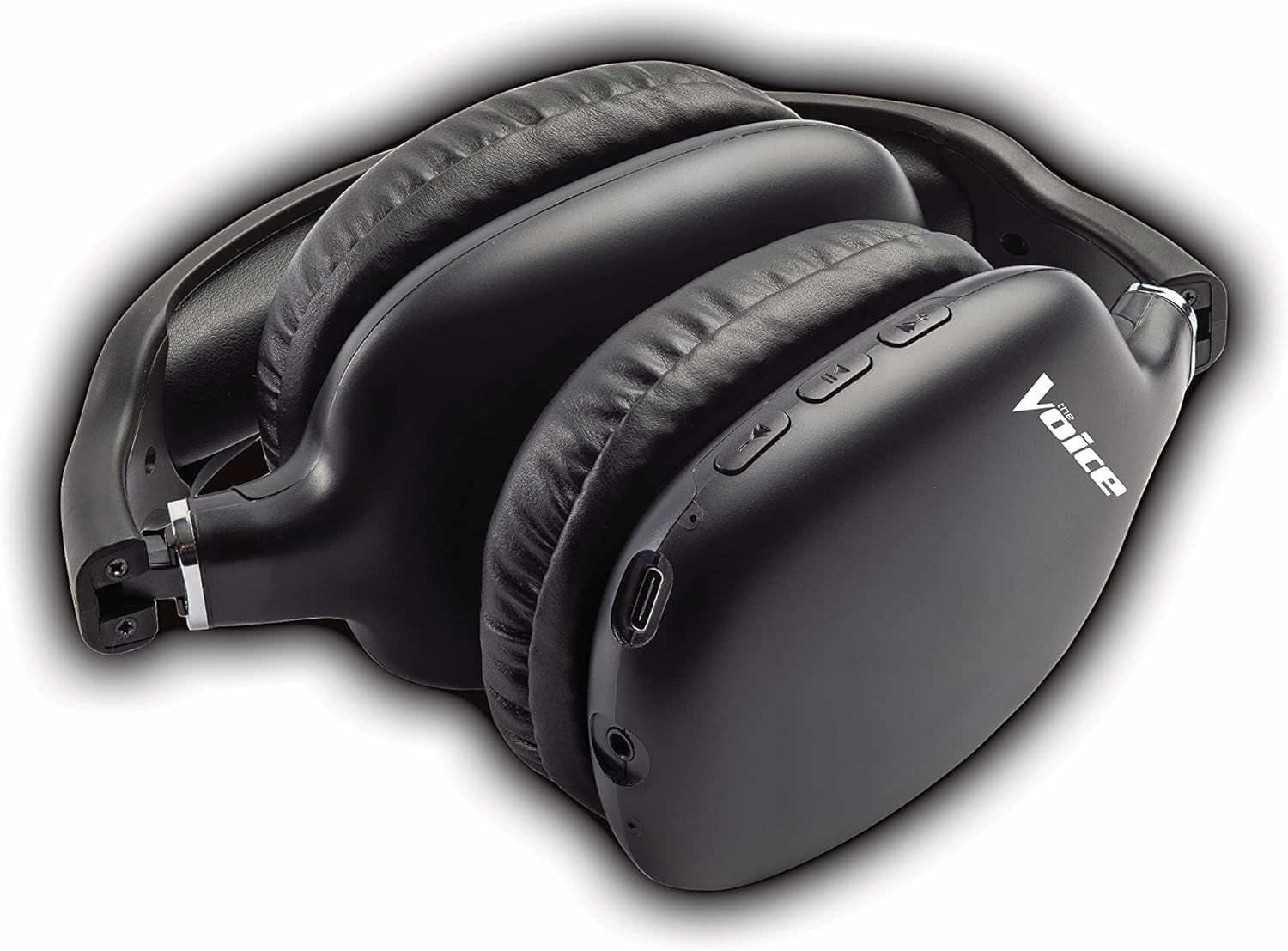
Figure 4: Headphones paired with a smartphone.
Зымдуу туташуу (AUX режими)
You can use the headphones with non-Bluetooth devices or when the battery is depleted using the included 3.5mm audio cable.
- Plug one end of the 3.5mm audio cable into the audio jack on the headphone ear cup.
- Экинчи учун түзмөгүңүздүн 3.5 мм аудио чыгаруу уячасына сайыңыз.
- Наушник автоматтык түрдө зымдуу режимге өтөт.
Иштөө нускамалары
Күйгүзүү/өчүрүү
- Күйгүзүү: LED индикатору көк түстө күйүп-өчкөнгө чейин Кубат баскычын болжол менен 3 секунд басып туруңуз.
- Өчүрүү: LED индикатору өчмөйүнчө кубат баскычын болжол менен 3 секунд басып туруңуз.
Музыканы ойнотуу
- Ойнотуу/тындыруу: Көп функциялуу баскычты (КФБ) кыска басыңыз.
- Кийинки трек: Үндү жогорулатуу баскычын көпкө басыңыз.
- Мурунку трек: Үндү азайтуу баскычын көпкө басыңыз.
- Көлөмү: Үндү жогорулатуу баскычын кыска басыңыз.
- Үнүн азайтуу: Үндү азайтуу баскычын кыска басыңыз.
Чалууларды башкаруу
- Чалууга жооп берүү/аяктоо: Көп функциялуу баскычты (КФБ) кыска басыңыз.
- Чакырууну четке кагуу: Көп функциялуу баскычты (КФБ) көпкө басып туруңуз.
- Акыркы номерди кайра терүү: Көп функциялуу баскычты (КФБ) эки жолу басыңыз.
Үн жардамчысын иштетүү
- Siri/Google Жардамчысын иштетүү: Көп функциялуу баскычты (КФБ) үч жолу басыңыз.
Video 1: Demonstrates the adjustable and padded comfort, built-in mic, and connectivity to Google or Siri for The Voice Hollywood Wireless Headphones.

Figure 5: User enjoying audio with the headphones, highlighting comfort and usability.
Техникалык тейлөө
Тазалоо
Regular cleaning helps maintain the headphones' appearance and functionality.
- Wipe the ear cups and headband with a soft, dry, lint-free cloth.
- өжөр кир үчүн, бир аз гampкездемени суу жана жумшак самын менен сүртүп, андан кийин дароо кургатыңыз.
- Абразивдүү тазалагычтарды, спиртти же химиялык эриткичтерди колдонбоңуз.
Сактагыч
When not in use, store your headphones in a cool, dry place, away from direct sunlight and extreme temperatures. Utilize the tri-fold feature for compact storage.
Проблемаларды чечүү
Эгерде сиз кулакчындарыңыз менен көйгөйлөргө туш болсоңуз, кеңири таралган көйгөйлөр жана аларды чечүү жолдору үчүн төмөндөгү таблицаны караңыз.
| Көйгөй | Мүмкүн себеп | Чечим |
|---|---|---|
| Кулакчындар күйбөйт | Батарея аз | Наушниктерди толук заряддаңыз. |
| Түзмөк менен жупташтыруу мүмкүн эмес | Наушник жупташтыруу режиминде эмес; Түзмөктүн Bluetooth өчүк; Түзмөктөн өтө алыс | Ensure headphones are in pairing mode (flashing red/blue). Turn device Bluetooth on/off. Move headphones closer to device (within 10 meters). |
| Үн жок | Volume too low; Not connected; Incorrect audio source | Наушниктердин жана түзмөктүн үнүн жогорулатуу. Наушниктердин туура жупташкан/туташканын текшериңиз. Түзмөгүңүздөгү аудио чыгаруу жөндөөлөрүн текшериңиз. |
| Үн бурмалоо | Interference; Device volume too high | Move away from other wireless devices. Lower the volume on your device. |
| Микрофон иштебей жатат | Not connected; Device settings | Ensure headphones are properly paired. Check microphone input settings on your device. |
Техникалык шарттар
| Өзгөчөлүк | Деталь |
|---|---|
| Модель аты | Голливуд |
| Байланыш технологиясы | Зымсыз, зымдуу (Bluetooth) |
| Кулак жайгаштыруу | Кулак үстүндө |
| Форма фактору | Кулак үстүндө |
| Башкаруу түрү | Voice Control, Built-in buttons and microphone |
| Жыштык диапазону | 20Гц - 20кГц |
| Элемент Салмагы | 13.4 унция |
| Өлчөмдөрү (пакет) | 9.65 x 8.35 x 3.58 дюйм |
| Модель номери | VHOL-6/2069 |
| UPC | 841133120698 |
Кепилдик жана колдоо
The Voice Hollywood Wireless Headphones come with a standard manufacturer's warranty. For detailed warranty information, technical support, or service inquiries, please refer to the warranty card included in your product packaging or visit the official The Voice Electronics webсайт. Буюмду өзүңүз оңдоого аракет кылбаңыз.


