Продукт бүттүview
The Voice Duo True Wireless Stereo Earbuds offer a seamless audio experience with advanced features designed for convenience and clarity. These earbuds come with a translucent charging case featuring an LCD screen for real-time battery status, ensuring you're always aware of your power levels. With Bluetooth connectivity, auto-pairing, and a built-in microphone, they are ideal for music, calls, and on-the-go use.

Image: The Voice Duo True Wireless Stereo Earbuds, showing both earbuds and the open charging case with an LCD display.
Video: An official product video demonstrating the key features and usage of The Voice Duo True Wireless Earbuds, including their design, connectivity, and charging capabilities.
Эмне камтылган
Your Voice Duo True Wireless Stereo Earbuds package includes the following components:
- The Voice Duo True Wireless Stereo Earbuds (Left and Right)
- Translucent Charging Case with LCD Screen
- USB заряддоо кабели
- User Manual

Image: The product packaging for The Voice Duo True Wireless Stereo Earbuds, indicating the contents.
Жайгашуу
Кулакчындарды жана кутуну кубаттоо
Before first use, ensure both the earbuds and the charging case are fully charged. The translucent charging case features an LCD screen that displays the current battery percentage of the case.
- Place the earbuds into their respective slots in the charging case. The magnetic design will ensure they are correctly seated for charging.
- Connect the provided USB charging cable to the charging port on the case and plug the other end into a compatible USB power source (e.g., computer USB port, wall adapter).
- The LCD screen on the case will illuminate to show the charging status. When fully charged, the display will indicate 100%.
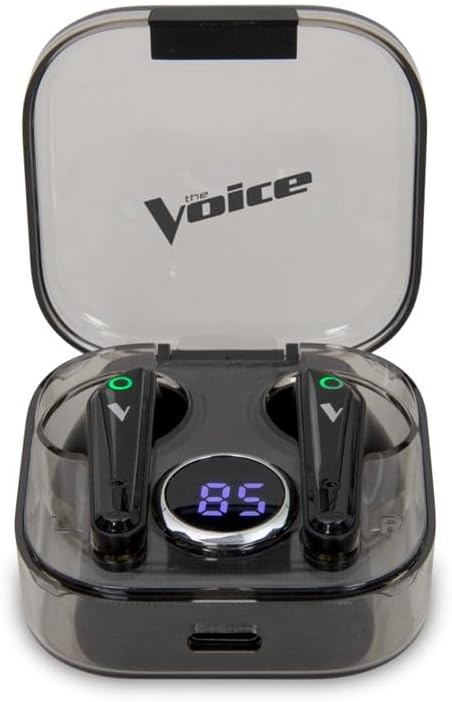
Image: The Voice Duo Earbuds securely placed within their charging case, displaying the battery percentage LCD экранында.
Аспабыңыз менен жупташуу
The Voice Duo Earbuds feature auto-pairing for quick and easy connection.
- Ensure Bluetooth is enabled on your smartphone, tablet, or other compatible device.
- Заряддоо кутусун ачып, эки кулакчынды алып салыңыз. Алар автоматтык түрдө күйүп, жупташтыруу режимине кирет.
- On your device, search for Bluetooth devices and select "The Voice Duo" from the list.
- Туташкандан кийин, сиз үндүү ырастоону угасыз жана кулакчындар колдонууга даяр болот.
Иштөө нускамалары
Автоматтык түрдө күйгүзүү / өчүрүү
The earbuds automatically power on when removed from the charging case and power off when placed back into the case and the lid is closed. This feature helps conserve battery life.
Hands-Free Чалуу
The built-in microphone allows for clear, hands-free calls. When a call comes in, you can answer or end it using the touch controls on the earbuds (refer to the full user manual for specific touch commands).
Үн жардамчысы интеграциясы
The Voice Duo Earbuds are optimized for use with Siri (iOS) and Google Assistant (Android). Simply tap the earbud (refer to the full user manual for specific touch commands) to activate your device's voice assistant and issue commands for navigation, music control, calls, and more.

Image: A person wearing one of The Voice Duo Earbuds, demonstrating its comfortable fit for daily use.
Техникалык тейлөө
To ensure the longevity and optimal performance of your Voice Duo Earbuds, follow these maintenance guidelines:
- Тазалоо: Кулакчындарды жана кубаттоочу кутучаны дайыма жумшак, кургак, түксүз чүпүрөк менен сүртүп туруңуз. Абразивдүү материалдарды же катуу химиялык заттарды колдонуудан алыс болуңуз.
- Сактагыч: Колдонулбаганда, кулакчындарды чаңдан жана бузулуудан коргоо үчүн кубаттоочу кутуга салып сактаңыз.
- Температура: Кулакчындарды жана кутучаны өтө жогорку температурага (ысык же суук) же жогорку нымдуулукка дуушар кылбаңыз.
- Суу таасири: These earbuds are not waterproof. Avoid direct contact with water or excessive moisture.
Проблемаларды чечүү
If you encounter issues with your Voice Duo Earbuds, try the following solutions:
- Үн/Туташуу маселеси жок:
- Кулакчындардын кубатталганын текшериңиз.
- Verify Bluetooth is enabled on your device and
Тектеш документтер - VDUO-6/2067

The Voice DUO TWS Earbuds User Manual and Specifications
Comprehensive user manual for The Voice DUO TWS Earbuds, covering setup, controls, troubleshooting, product specifications, and warranty information. Learn how to pair, use, and care for your wireless earbuds.
The Voice CB-TE072 True Wireless Earbuds Manual
User manual for The Voice CB-TE072 True Wireless Earbuds, covering package contents, safety instructions, FCC compliance, controls, usage instructions, troubleshooting, and warranty information.
MIXX StreamBuds Micro True зымсыз кулакчындары: Кантип колдонуу керектиги боюнча көрсөтмө жана мүнөздөмөлөр
MIXX StreamBuds Micro True Wireless кулакчындары боюнча орнотуу, жупташтыруу, колдонуу, кубаттоо, техникалык мүнөздөмөлөр, коопсуздук жана кайра иштетүү боюнча кеңири колдонмо.
JBL LIVE PRO 2 TWS Чыныгы зымсыз ызы-чууну жок кылуучу кулакчындар боюнча тез баштоо боюнча колдонмо
JBL LIVE PRO 2 TWS чыныгы зымсыз ызы-чууну жок кылуучу кулакчындарды орнотуу жана колдонуу боюнча кеңири колдонмо. Жупташтыруу, башкаруу элементтери, колдонмонун функциялары, кубаттоо жана техникалык мүнөздөмөлөр жөнүндө билип алыңыз.
boAt Airdopes 281: Frequently Asked Questions and Features
Frequently asked questions and technical details for the boAt Airdopes 281 wireless earbuds, covering features like touch controls, call handling, IPX5 water resistance, battery life, Bluetooth 5.0 connectivity, and voice assistant compatibility.