1. Киришүү
This manual provides essential information for the installation, operation, and maintenance of your Philips Hue Wall Tap Dial Light Switch and Philips Hue Smart Dimmer Switch. These devices are designed to enhance your Philips Hue smart lighting system, offering convenient control over your lights. A Philips Hue Bridge (sold separately) is required for full functionality.
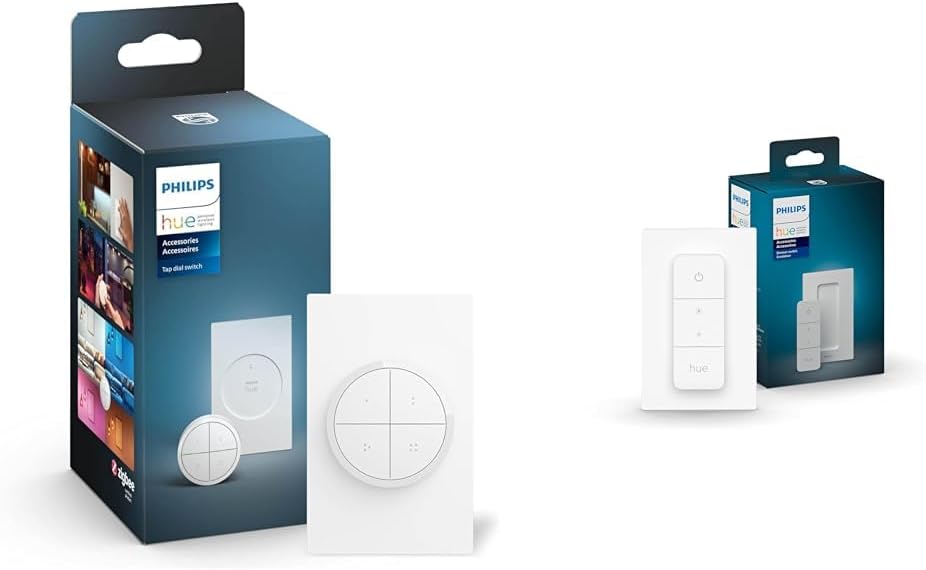
Image 1.1: Philips Hue Wall Tap Dial Light Switch and Smart Dimmer Switch in their retail packaging.
2. Коопсуздук маалыматы
Бул продуктуну колдонуудан мурун бардык коопсуздук көрсөтмөлөрүн окуп чыгып, түшүнүп алыңыз. Бул көрсөтмөлөрдү аткарбоо электр тогуна урунууга, өрткө же башка коркунучтарга алып келиши мүмкүн.
- Do not attempt to open or modify the devices.
- Keep devices away from water and moisture.
- Use only with Philips Hue compatible lighting products and the Philips Hue Bridge.
- Ensure proper ventilation around the devices.
- Батареяларды жергиликтүү эрежелерге ылайык жок кылыңыз.
3. Пакеттин мазмуну
Сиздин пакетте төмөнкү элементтер болушу керек:
- 1x Philips Hue Wall Tap Dial Light Switch (includes dial and wall plate)
- 1x Philips Hue Smart Dimmer Switch (includes remote and wall plate)
- Instruction Manual

Image 3.1: Components of the Philips Hue Tap Dial Switch.

Image 3.2: Components of the Philips Hue Smart Dimmer Switch.
4. Орнотуу
Both the Wall Tap Dial Switch and the Smart Dimmer Switch require a Philips Hue Bridge for full functionality and integration with your smart home system. Ensure your Hue Bridge is set up and connected to your network before proceeding.
4.1 Баштапкы орнотуу кадамдары
- Install your Philips Hue Lighting: Ensure your Philips Hue lights are installed and functioning within your home.
- Connect the Philips Hue Bridge: If not already done, connect your Hue Bridge to your router and power it on.
- Download the Philips Hue App: Download and install the Philips Hue app on your smartphone or tablet. Follow the in-app instructions to set up your Hue Bridge and discover your lights.

Image 4.1: Visual guide for installing Philips Hue lighting.

Image 4.2: Visual guide for connecting the Philips Hue Bridge.

Image 4.3: Visual guide for downloading the Philips Hue app.
4.2 Mounting and Pairing the Wall Tap Dial Switch
- Монтаждоо: The Wall Tap Dial Switch can be mounted to a wall using the included adhesive or screws, or it can be used as a portable remote. The dial itself is magnetic and attaches to the wall plate.
- Жупташтыруу: Open the Philips Hue app, navigate to 'Settings' > 'Accessories setup' > 'Add accessory'. Select the Wall Tap Dial Switch and follow the on-screen instructions to pair it with your Hue Bridge and assign it to rooms or zones.

Image 4.4: The Philips Hue Tap Dial Switch mounted on a wall.
4.3 Mounting and Pairing the Smart Dimmer Switch
- Монтаждоо: The Smart Dimmer Switch remote can be attached magnetically to its wall plate or any metal surface. The wall plate can be mounted using adhesive strips or screws.
- Жупташтыруу: In the Philips Hue app, go to 'Settings' > 'Accessories setup' > 'Add accessory'. Select the Smart Dimmer Switch and follow the app's guidance to connect it to your Hue Bridge and configure its control over your lights.

Image 4.5: The Philips Hue Smart Dimmer Switch being used to control lights.
5. Иштөө нускамалары
5.1 Philips Hue Wall Tap Dial Switch
- Баскычтар: The four buttons can be customized via the Hue app to activate specific lighting scenes, turn lights on/off, or control individual lights or groups.
- Терүү: Rotate the dial clockwise to brighten lights and counter-clockwise to dim lights. The dial's function can also be customized in the app.
- Көчүрүү мүмкүнчүлүгү: The magnetic dial can be removed from its wall plate for use as a portable remote.
5.2 Philips Hue Smart Dimmer Switch
- Күйгүзүү/өчүрүү баскычы: Press the 'On' button to turn lights on. Press the 'Off' button to turn lights off.
- Жарыктык баскычтары: Use the '+' button to brighten lights and the '-' button to dim lights.
- Hue Button: Press the 'Hue' button to cycle through four preset scenes or to get the right light based on the time of day. These scenes are configurable in the Philips Hue app.

Image 5.1: The Philips Hue app interface for assigning routines to accessories.

Image 5.2: Demonstrating the intuitive design of the Philips Hue Smart Dimmer Switch.
5.3 Видео бүттүview of Philips Hue System
Видео 5.3: Бүттүview of the Philips Hue smart lighting system, demonstrating its versatility and control options.
6. Техникалык тейлөө
6.1 Тазалоо
Clean the devices with a soft, dry cloth. Do not use abrasive cleaners or solvents, as these may damage the surface.
6.2 Батареяны алмаштыруу
Both switches are battery-powered. When the battery is low, you may notice a decrease in responsiveness or an indicator in the Philips Hue app. Refer to the specific product's packaging or the Philips Hue app for instructions on how to replace the battery. Typically, these devices use standard coin cell batteries.
7. Кыйынчылыктарды
- Түзмөк жооп бербей жатат: Check the battery. Ensure the device is within range of the Philips Hue Bridge. Verify the device is paired correctly in the Philips Hue app.
- Жарыктар жооп бербейт: Ensure the Philips Hue Bridge is powered on and connected to your network. Check the status of your Philips Hue lights in the app.
- Жупташтыруунун кыйынчылыгы: Ensure the device is in pairing mode (refer to specific product instructions for details). Move the device closer to the Hue Bridge during pairing. Restart the Hue app and the Hue Bridge.
- Үзгүлтүксүз туташуу: Ensure there are no major obstructions (e.g., thick walls, large metal objects) between the switch and the Hue Bridge. Other ZigBee devices can act as repeaters to extend the network range.
8. Техникалык шарттар
| Өзгөчөлүк | Деталь |
|---|---|
| Бренд | Philips Hue |
| Модел | Tap Dial + Dimmer Switch |
| Connectivity Protocol | ZigBee |
| Башкаруу ыкмасы | тийүү |
| Иштөө режими | Manual |
| Шайкеш түзмөктөр | Philips Hue lights, Philips Hue bridge |
| Түс | Ак |
| Материал | Metal (Contact Material) |
9. Кепилдик жана колдоо
Кепилдик жөнүндө маалымат жана кардарларды колдоо кызматы үчүн, расмий Philips Hue компаниясына кайрылыңыз website or contact Philips Hue customer service directly. Keep your proof of purchase for warranty claims.


