1. Киришүү
This user manual provides detailed instructions for the setup, operation, and maintenance of your ViewSonic LS832WU Ultra Short Throw Projector. Please read this manual thoroughly before using the projector to ensure proper and safe operation.
The ViewSonic LS832WU is a high-performance ultra-short throw laser projector designed for various environments, including auditoriums, conference rooms, and educational settings. It features 5,000 ANSI lumens brightness, WUXGA (1920x1200p) resolution, and a 0.25 throw ratio, allowing for large, bright images from a very short distance.

1.1-сүрөт: ViewSonic LS832WU Projector, top-down view.
2. Кутуда эмне бар
Verify that all items listed below are included in your package. If any items are missing or damaged, please contact ViewSonic кардарларды колдоо.
- ViewSonic LS832WU Projector
- Электр кабели
- Алыстан башкаруу
- Колдонуучунун Колдонмосу (бул документ)
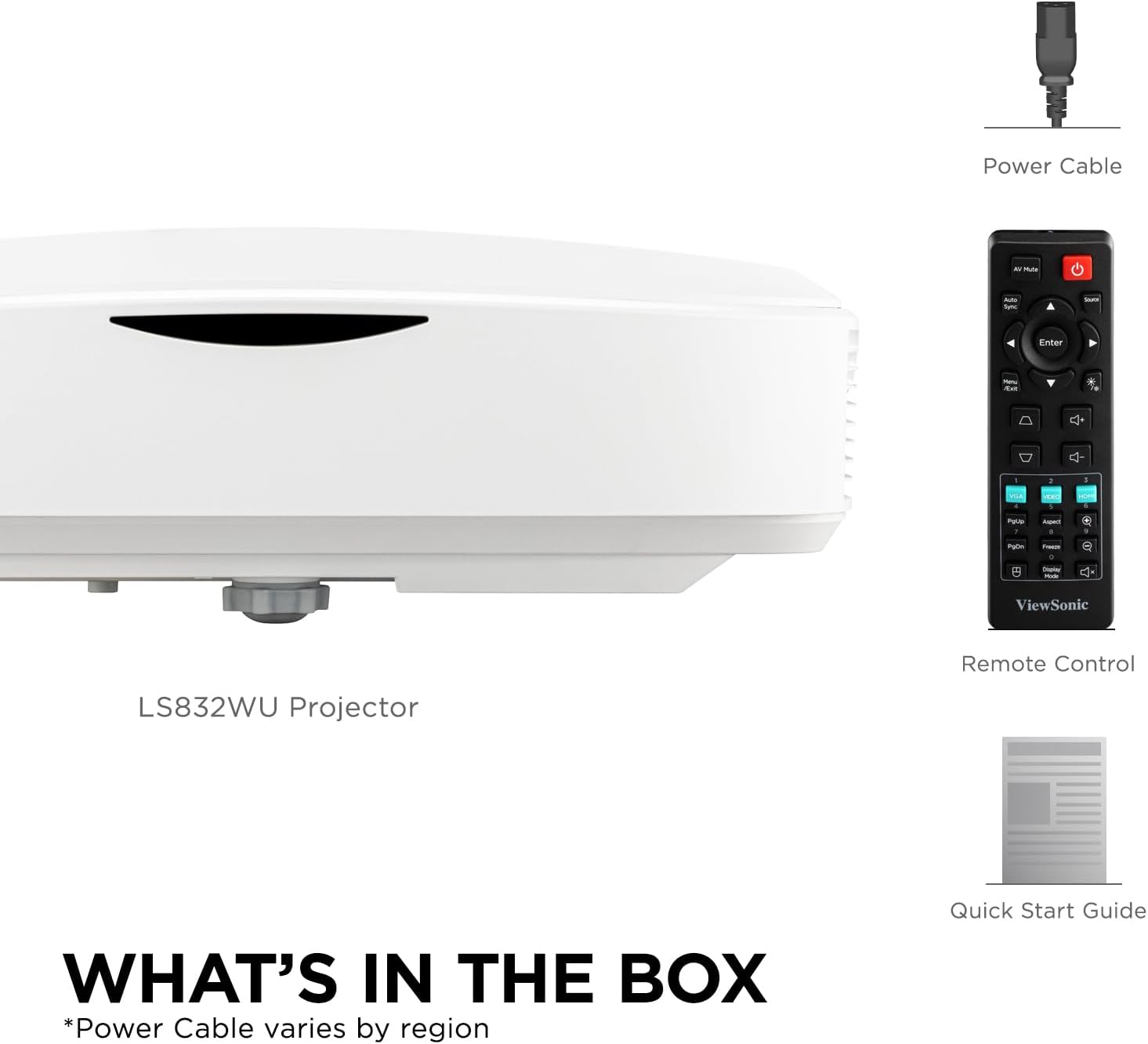
Figure 2.1: Package Contents. Note: Power cable type may vary by region.
3. Продукт бүтүп калдыview
3.1. Проектордун өзгөчөлүктөрү
- Ultra-Short Throw Laser Projector: WUXGA (1920x1200p) resolution with a 0.25 throw ratio and 5,000 ANSI lumens for bright, detailed images in compact spaces.
- Vibrant Colors & HDR Support: SuperColor technology and HDR/HGL compatibility deliver a wide color gamut with enhanced contrast and visual depth.
- Flexible Screen Size & Throw Range: Projects screen sizes from 30" to 150" with a throw distance of 6" - 19"; displays a 100" image from 11 inches away.
- Instant Power On/Off: Enables quick startup and shutdown with optional settings for automatic power control.
- Versatile Installation Options: Supports table or ceiling installation and is compatible with ViewSonic mounts PJ-WMK-305 and PJ-WMK-007.
3.2. Байланыш порттору
The LS832WU projector offers a comprehensive set of connectivity options for various devices.
- 1 x HDMI 2.0
- 1 x HDCP 1.4
- 1 x RS232
- 1 x RJ45 (LAN Control)
- 1 x USB Type-A
- 1 x USB Type-B
- 1 x Audio In/Out (3.5mm Jack)
- 1 x VGA In/Out
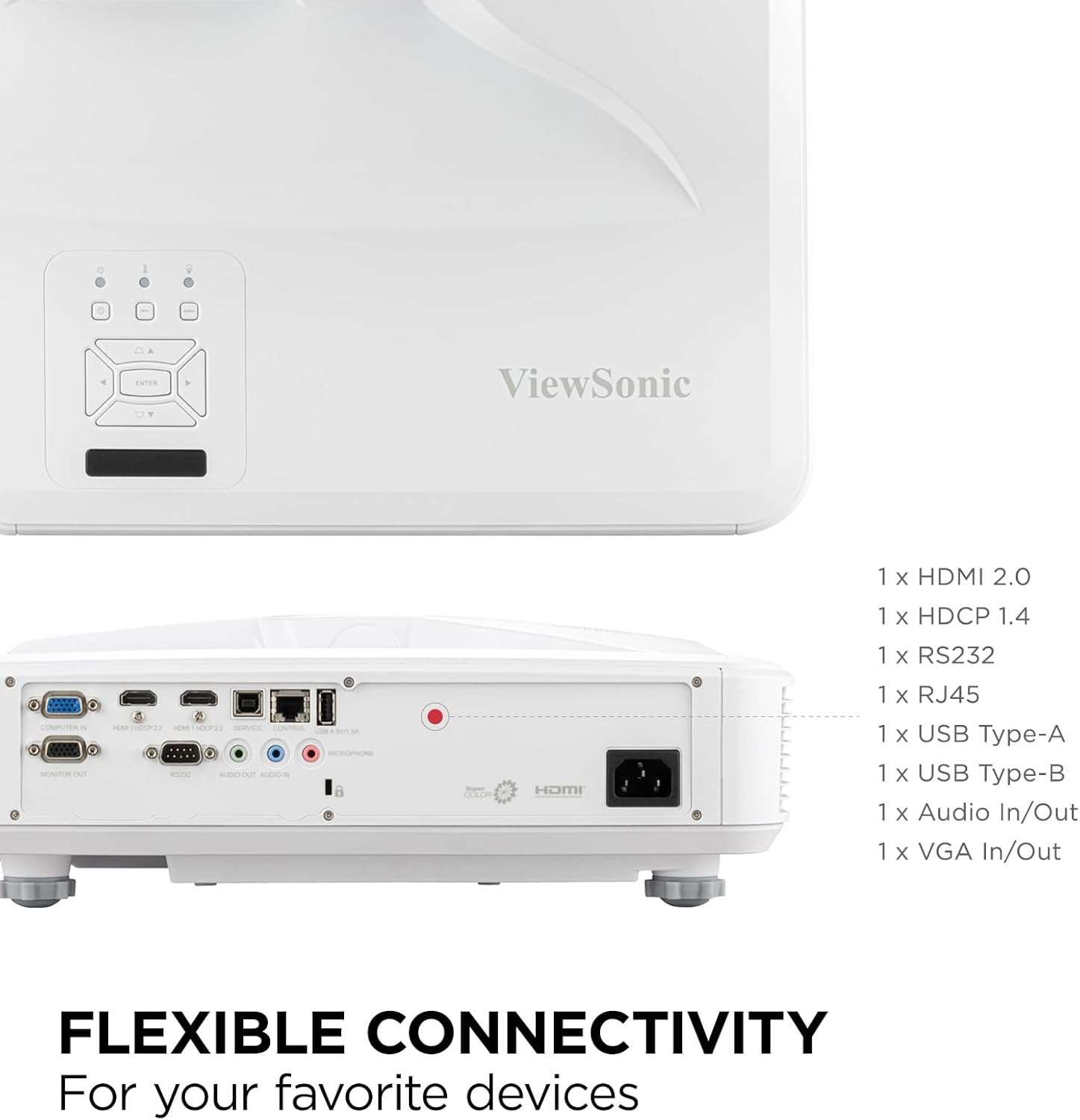
Figure 3.1: Flexible Connectivity Ports.
4. Орнотуу
4.1. Орнотуу жана орнотуу
The ultra-short throw design allows for flexible placement close to the projection surface. Consider the desired screen size and the throw distance when positioning the projector.
- Table-top Placement: Place the projector on a stable, flat surface directly in front of the screen or wall.
- Шыпка орнотуу: For permanent installations, the projector can be mounted to the ceiling using compatible ViewSonic mounts (PJ-WMK-305 and PJ-WMK-007). Ensure the mount is securely fastened and the projector is oriented correctly.

Figure 4.1: Ultra Short-Throw Projector Placement.
Refer to the following image for approximate throw distances and corresponding image sizes:
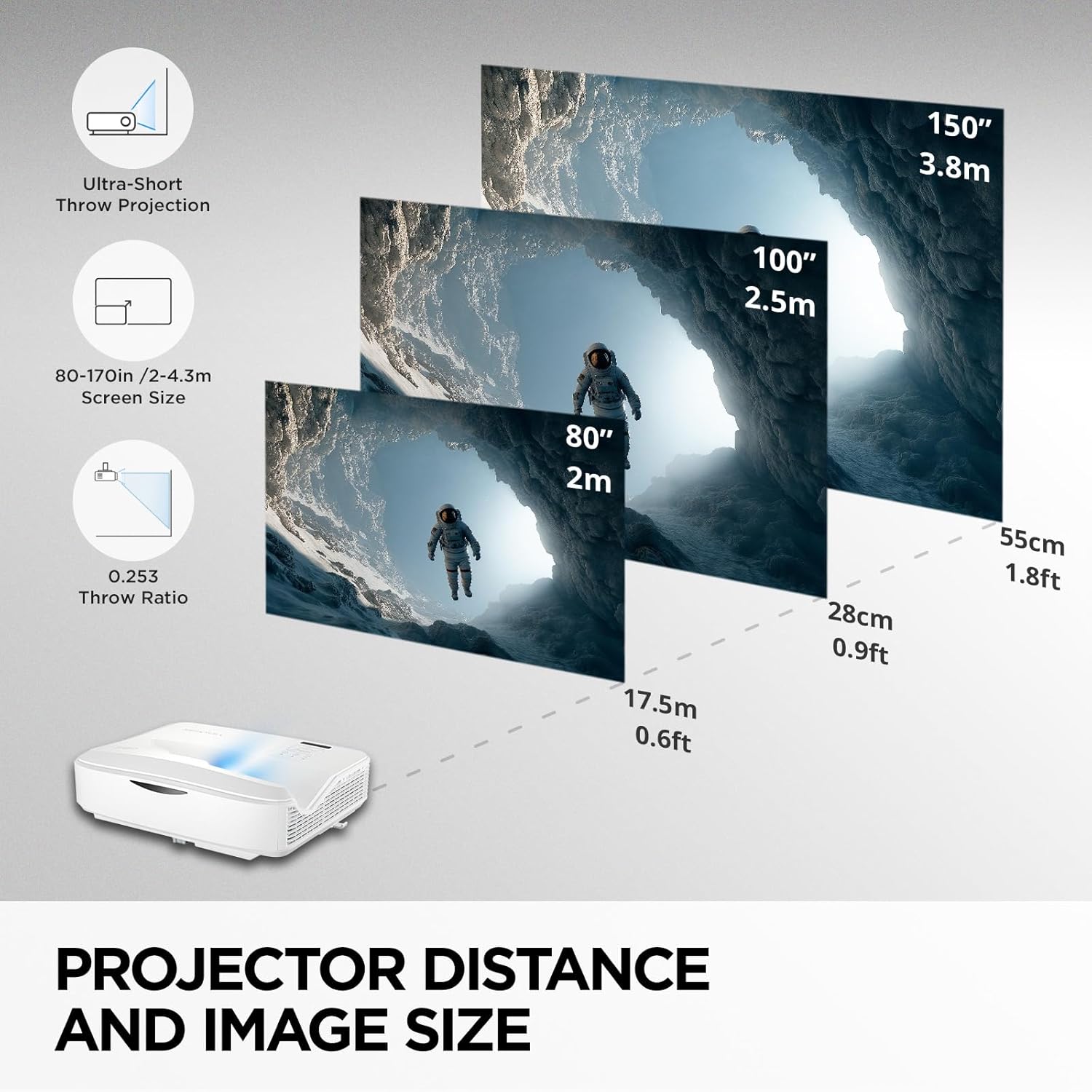
Figure 4.2: Projector Distance and Image Size Guide.
4.2. Connecting Power and Source Devices
- Connect the power cord to the projector's power inlet and then to a grounded electrical outlet.
- Connect your source device (e.g., laptop, Blu-ray player, gaming console) to the projector using an appropriate cable (HDMI, VGA, etc.).
- Проектордун же пульттун кубат баскычын басып, аппаратты күйгүзүңүз.
5. Иштөө нускамалары
5.1. Негизги операция
- Күйгүзүү/өчүрүү: Press the power button on the remote or projector. The laser light source provides instant on/off capabilities.
- Булак тандоо: Use the "Source" button on the remote or projector control panel to cycle through available input sources (HDMI, VGA, etc.).
- Меню навигациясы: Use the arrow keys and "Enter" button on the remote or control panel to navigate the on-screen display (OSD) menu.
5.2. Сүрөттү тууралоо
To optimize your projection, use the following image adjustment features:
- Негизги ташты оңдоо: Corrects trapezoidal distortion when the projector is not perfectly perpendicular to the screen. Access this setting via the OSD menu.
- 4-бурчту тууралоо: Allows for precise adjustment of each corner of the image independently, ideal for irregular surfaces or complex installations.
- Digital Zoom: Adjusts the size of the projected image (0.8x–2.0x) without moving the projector.
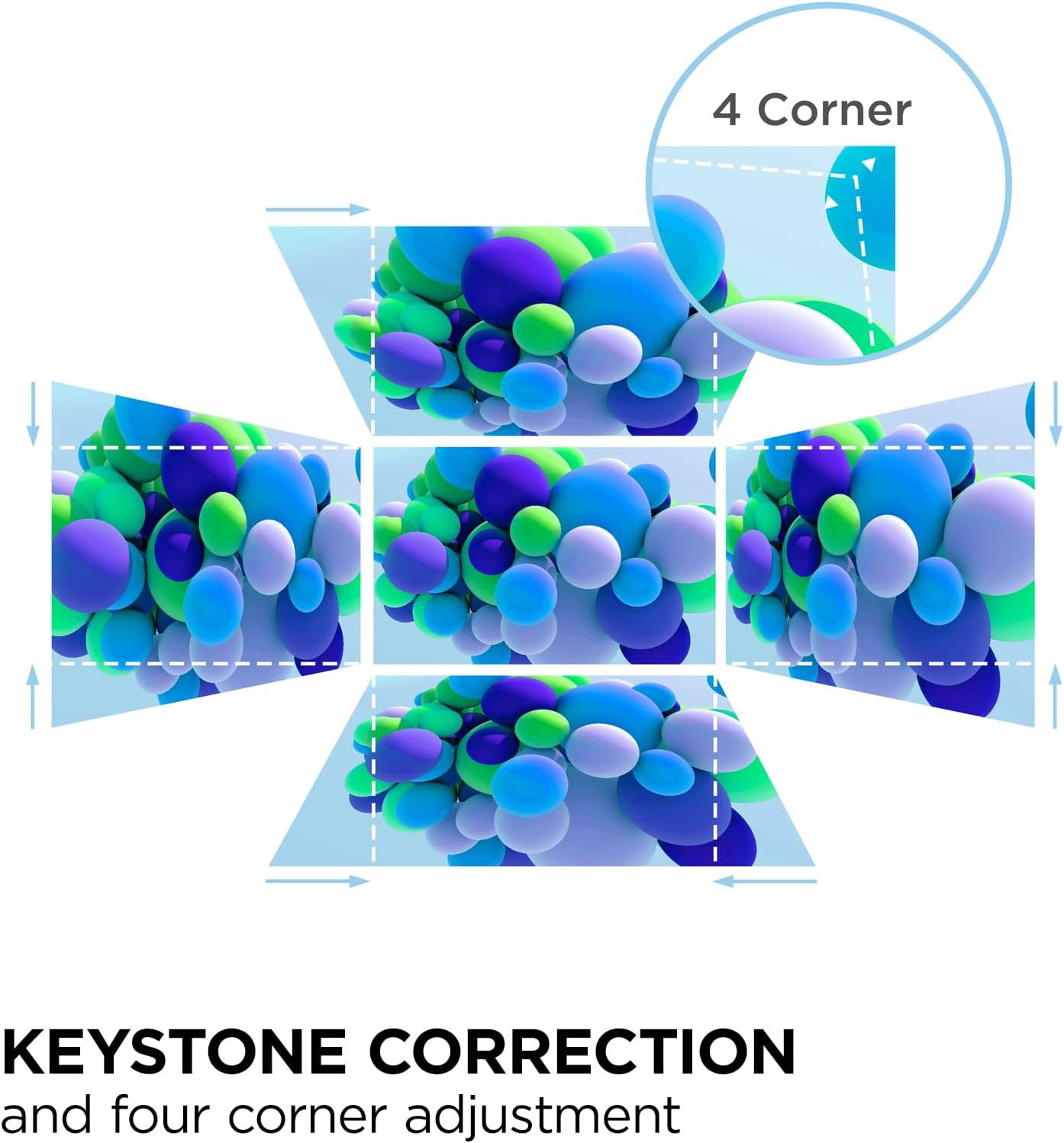
Figure 5.1: Keystone and 4-Corner Adjustment.
5.3. Advanced LAN Control
The LS832WU supports advanced LAN control for centralized management and scheduling. It is compatible with Crestron, AMX, Extron, PJ Link, ATEN, and ViewSonic vController systems. Connect the projector to your network via the RJ45 port and configure settings through the OSD menu or your chosen control software.
6. Техникалык тейлөө
The ViewSonic LS832WU utilizes laser phosphor technology, offering a maintenance-free projection experience without the need for lamp replacements. However, regular cleaning is recommended to ensure optimal performance and longevity.
- Линзаны тазалоо: Проектордун линзасын оптикалык беттер үчүн атайын жасалган жумшак, түксүз чүпүрөк менен акырын сүртүңүз. Абразивдүү тазалагычтарды же ашыкча күч колдонбоңуз.
- Проектордун корпусун тазалоо: Use a soft, dry cloth to wipe down the exterior of the projector. For stubborn marks, a slightly damp cloth with mild detergent can be used, followed by a dry wipe. Ensure no liquid enters the projector.
- Вентиляция: Ensure the projector's ventilation openings are clear and not obstructed to prevent overheating.
The laser light source is designed for extended use, with a lifespan of up to 30,000 hours in SuperEco+ Mode, which translates to more than 10 years of use at 8 hours per day.
7. Кыйынчылыктарды
Проекторуңузда көйгөйлөргө туш болсоңуз, төмөнкү жалпы көйгөйлөрдү жана чечимдерди караңыз:
| Көйгөй | Мүмкүн себеп | Чечим |
|---|---|---|
| Сүрөт чагылдырылган жок | Power cable disconnected, incorrect input source selected, source device not powered on. | Check power connections. Select correct input source. Ensure source device is on and outputting signal. |
| Сүрөт бүдөмүк же фокуста эмес | Projector lens dirty, incorrect focus adjustment, projector too close/far from screen. | Clean the lens. Adjust digital zoom. Ensure projector is within optimal throw distance. |
| Сүрөт бурмаланган (трапеция формасы) | Проектор экранга перпендикуляр эмес. | Use Keystone Correction or 4-Corner Adjustment from the OSD menu. |
| Аудио жок | Audio cable disconnected, volume too low, incorrect audio output on source device. | Check audio cable connections. Increase projector volume. Verify audio settings on source device. |
Кошумча жардам алуу үчүн байланышыңыз ViewSonic кардарларды колдоо.
8. Техникалык шарттар
| Өзгөчөлүк | Деталь |
|---|---|
| Модель номери | LS832WU |
| Display Resolution | WUXGA(1920x1200) |
| Жарыктык | 5000 ANSI челинин |
| Ыргытуу катышы | 0.25 |
| Экрандын өлчөмү (диагоналдык) | 30" to 150" (up to 170" / 432 cm visible screen diagonal) |
| Ыргытуу Дистанция | 6" - 19" (100" image from 11 inches away) |
| Жарык булагы | Лазердик фосфор |
| Жарык булагы Life | Up to 30,000 hours (SuperEco+ Mode) |
| Байланыш технологиясы | 3.5mm Jack, HDMI, USB, RJ45, RS232, VGA |
| Өзгөчөлүктөр | 3D-Ready, Built-In Speaker, Digital Keystone Correction, SuperColor, Ultra Short Throw, HDR/HGL compatibility, 4-Corner Adjustment, Advanced LAN Control |
| Продукциянын өлчөмдөрү (L x W x Y) | 15 x 12.5 x 5.2 дюйм (38.1 x 31.75 x 13.2 см) |
| Элемент Салмагы | 12.8 фунт |
| Өндүрүүчү | ViewSonic |
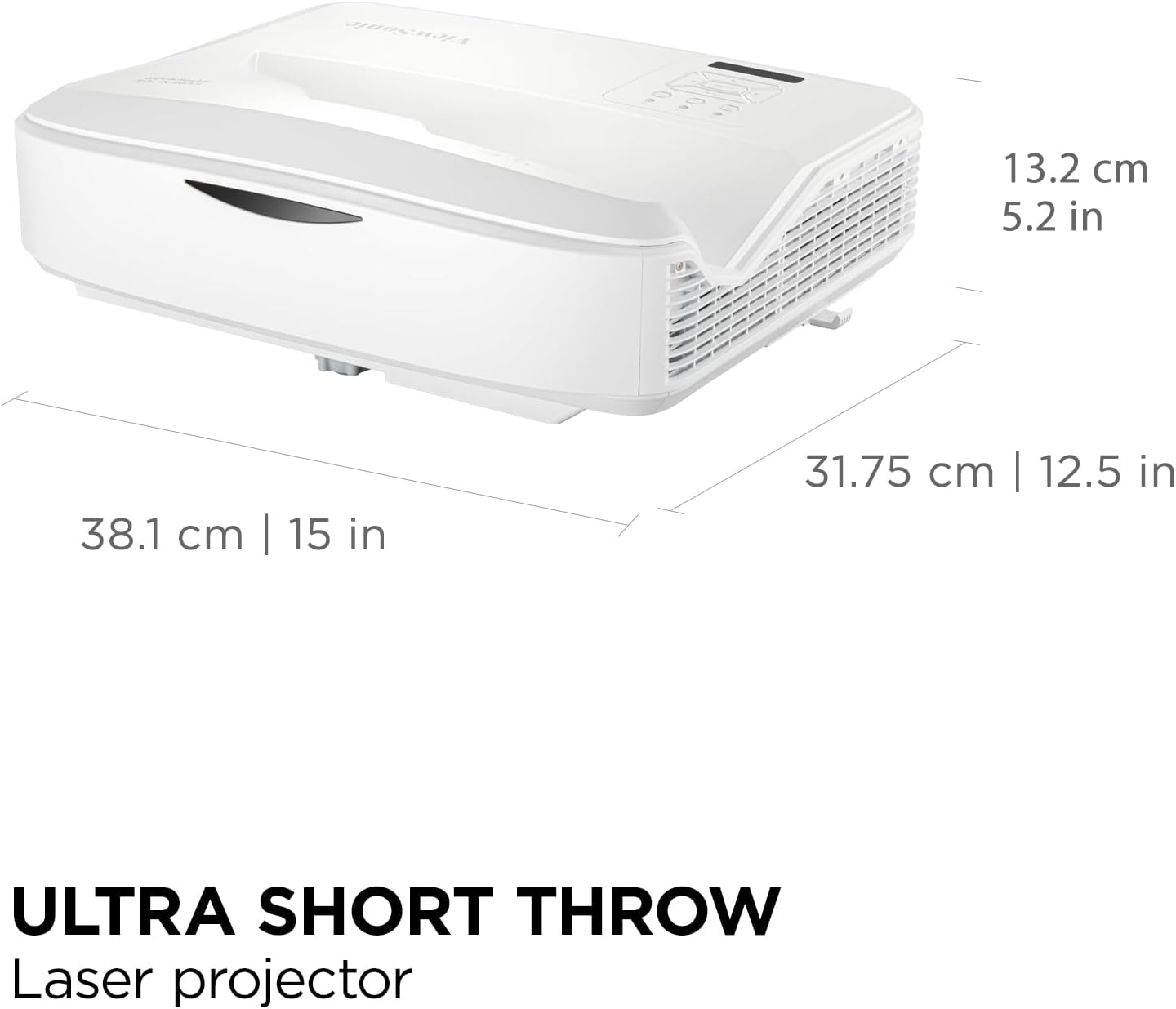
Figure 8.1: Projector Dimensions.
9. Кепилдик жана колдоо
9.1. Кепилдик маалыматы
ViewSonic products typically come with a manufacturer's warranty. For specific warranty terms and conditions applicable to your LS832WU projector, please refer to the warranty card included in your product packaging or visit the official ViewSonic webсайт.
Common warranty coverage includes:
- 3-Year Limited Warranty (for the projector unit)
- Specific coverage for the laser light source (often aligned with the projector warranty or a separate extended period).
9.2. Кардарларды колдоо кызматы
If you require technical assistance, have questions about your product, or need to initiate a warranty claim, please contact ViewSonic customer support. Have your product model number (LS832WU) and serial number ready when contacting support.
You can typically find support contact information on the official ViewSonic webсайт (www.viewsonic.com) or in the Quick Start Guide provided with your projector.


