1. Киришүү
The Widex TV-DEX is a wireless assistive listening device designed to enhance your experience of watching TV and listening to audio content. It provides high-fidelity stereo sound directly to your compatible Widex hearing aids, ensuring clear and immersive audio without distortions or echoes. A key feature is the 'Room Off' function, which allows you to focus solely on the TV audio by temporarily disabling your hearing aid microphones, eliminating background noise.
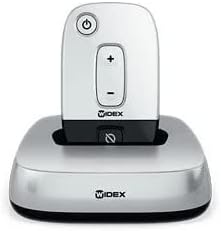
Figure 1: The Widex TV-DEX device in its charging base.
2. Коопсуздук маалыматы
Please read these safety guidelines carefully before using your TV-DEX device to ensure safe and proper operation.
- Аппаратты өзүңүз ачпаңыз же оңдоого аракет кылбаңыз. Unauthorized repairs can cause damage and void the product warranty.
- Keep the device dry. Avoid exposure to water, rain, or excessive moisture.
- Do not expose the device to extreme temperatures, direct sunlight, or heat sources.
- Keep the device out of reach of small children and pets to prevent accidental ingestion of small parts or damage.
- Use only the power adapter and cables supplied with the TV-DEX.
Маанилүү: If you experience any issues or require service, please contact an authorized Widex professional.
3. Орнотуу жана алгачкы колдонуу
Follow these steps to set up your Widex TV-DEX for the first time and begin using it.
- Аппаратты таңгактан чыгаруу: Carefully remove the TV-DEX unit, charging base, power adapter, and any included audio cables from the packaging.
- Туташуу кубаты: Plug the power adapter into the charging base, then connect it to a standard wall outlet. The indicator light on the base should illuminate, indicating power.
- Charge the TV-DEX: Place the TV-DEX unit into the charging base. Ensure it is seated correctly. Allow the unit to charge fully before its first use.
- Сыналгы/аудио булагына туташыңыз: The TV-DEX base offers multiple connection options for your audio source. Choose the best option for your TV or audio device:
- Оптикалык туташуу (сунушталат): Connect one end of the optical cable to the digital optical audio output (TOSLINK) on your TV and the other end to the optical input on the TV-DEX charging base.
- RCA/Analog Connection: If your TV has red and white RCA audio output jacks, use the supplied RCA cables to connect them to the corresponding RCA inputs on the TV-DEX charging base.
- 3.5 мм Jack: For devices with a 3.5mm headphone jack, you may use a 3.5mm to RCA adapter (not included) to connect to the RCA inputs on the TV-DEX base.
- Угуучу аппараттар менен жупташтырыңыз: The TV-DEX is designed to automatically pair with compatible Widex hearing aids when they are within range and in a streaming program. Ensure your hearing aids are turned on. If you experience issues, consult your hearing aid's user manual for specific pairing instructions or contact your hearing care professional.
4. Иштөө нускамалары
This section details the functions and controls of your Widex TV-DEX.
4.1. Күйгүзүү / Өчүрүү
- Күйгүзүү: Кубат баскычын басып, кармап туруңуз (●) on the TV-DEX unit until the indicator light illuminates.
- Өчүрүү: Индикатор жарыгы өчкөнгө чейин кубат баскычын кайра басып, кармап туруңуз.
4.2. Үндү тууралоо
- колдонуу + button to increase the volume of the streamed audio.
- колдонуу - button to decrease the volume of the streamed audio.
- These volume adjustments affect only the audio streamed from the TV-DEX and are independent of your hearing aid's general volume settings.
4.3. Room Off Function
The 'Room Off' function allows you to temporarily mute the microphones on your hearing aids, enabling you to hear only the sound from the TV-DEX without interference from surrounding ambient noise.
- Activate Room Off: Press the 'Room Off' button (⌀) on the TV-DEX unit. You will notice a significant reduction in ambient sound.
- Deactivate Room Off: Press the 'Room Off' button again to re-enable your hearing aid microphones and hear surrounding sounds.
4.4. Charging the TV-DEX
When the battery level is low, the indicator light on the TV-DEX unit will typically change color or flash. To recharge, simply place the TV-DEX unit back into its charging base, ensuring the base is connected to a power source.
5. Техникалык тейлөө жана кам көрүү
Proper care and maintenance will help ensure the longevity and optimal performance of your TV-DEX.
- Тазалоо: Use a soft, dry cloth to wipe the TV-DEX unit and its charging base. Do not use liquid cleaners, solvents, or abrasive materials. Never immerse the device in water.
- Сактагыч: When not in use for extended periods, store the device in a cool, dry place. It is advisable to fully charge the device before storing it for a long duration.
- Батареяга кам көрүү: To maximize the lifespan of the internal battery, avoid frequent complete discharge cycles. Recharge the device regularly as needed.
6. Кыйынчылыктарды
If you encounter any issues with your Widex TV-DEX, refer to the following table for common problems and their solutions.
| Көйгөй | Мүмкүн себеп | Чечим |
|---|---|---|
| Үн жок же үзгүлтүксүз үн жок |
|
|
| Үн бурмаланган же түшүнүксүз |
|
|
| Room Off function not working |
|
|
If the problem persists after attempting these solutions, please contact your authorized Widex dealer or customer support for further assistance.
7. Техникалык шарттар
Key technical specifications for the Widex TV-DEX device.
- Модел: Widex TV-DEX
- Өндүрүүчү: Widex
- Байланыш: Digital Optical (Toslink), Analog RCA (L/R)
- Зымсыз технология: Proprietary WidexLink
- Шайкештик: Designed for use with compatible Widex hearing aids.
- Өзгөчөлүктөрү: Real-time high-fidelity stereo sound, 'Room Off' function for focused listening.
- Электр камсыздоо: AC Adapter (specifics vary by region, refer to adapter label)
8. Кепилдик жана колдоо
For information regarding product warranty and customer support, please refer to the following:
- Кепилдик: This product is covered by a limited manufacturer's warranty. Please retain your original proof of purchase. For detailed terms, conditions, and duration of the warranty, refer to the warranty card or documentation included with your TV-DEX, or visit the official Widex webсайт.
- Кардарларды колдоо: If you have questions, require technical assistance, or need to report a defect, please contact your authorized Widex hearing care professional or visit the Widex support portal online.
- Онлайн ресурстар: Additional information, frequently asked questions (FAQs), and potential software updates may be available on the official Widex webсайт: www.widex.com


