Introduction
Сатып алганыңыз үчүн рахматasing the iTOMA 728 DAB & FM Radio Alarm Clock. This device combines a digital radio with an alarm clock, offering features such as Bluetooth connectivity, dual alarms, a sleep timer, dimmer control, a USB charging port, and a headphone jack. This manual provides detailed instructions for setup, operation, and maintenance to ensure optimal performance and longevity of your product.
Коопсуздук маалыматы
- Колдонуудан мурун бардык нускамаларды кунт коюп окуп чыгыңыз жана келечекте маалымат алуу үчүн сактаңыз.
- Агрегатты тамчылатып же чачыраган суюктуктарга тийгизбеңиз.
- Ваза сыяктуу суюктуктар толтурулган нерселерди аппараттын үстүнө койбоңуз.
- туура желдетүүнү камсыз кылуу; вентиляция тешиктерин жаап салбаңыз.
- Аппарат менен кошо берилген кубат адаптерин гана колдонуңуз.
- Агрегатты күн нурунан, жылуулук булактарынан жана күчтүү магнит талаасынан алыс кармаңыз.
- Агрегатты жумшак, кургак чүпүрөк менен гана тазалаңыз.
Пакеттин мазмуну
- 1 × iTOMA 728 DAB & FM Radio Alarm Clock
- 1 × Кубат адаптери
- 1 × User Manual (Six Languages)
Продукт бүттүview
The iTOMA 728 features a clear LCD display and intuitive controls located on the top panel. Familiarize yourself with the buttons and ports for easy operation.
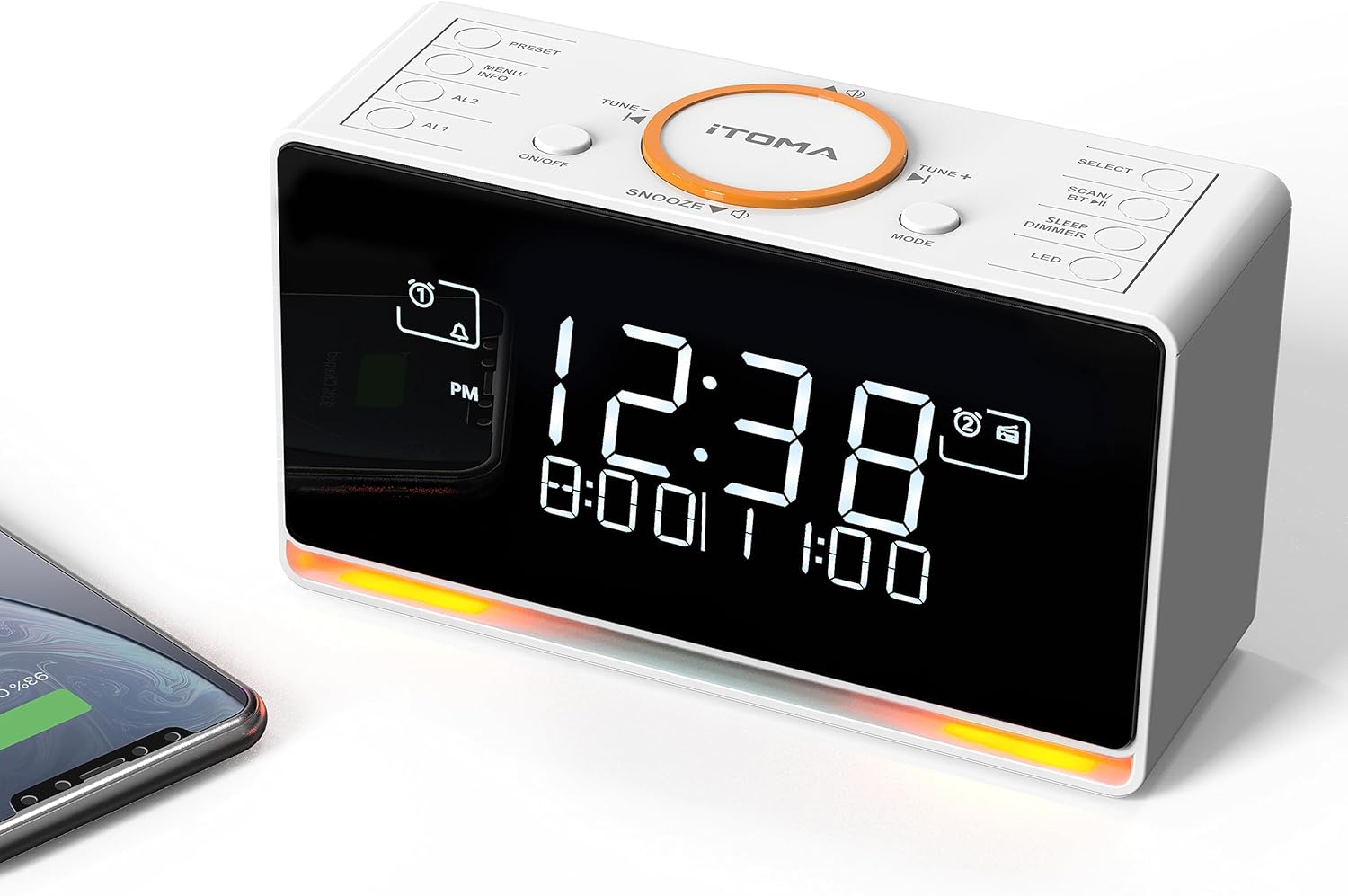
Сүрөттүн сүрөттөлүшү: A white iTOMA 728 DAB & FM Radio Alarm Clock is shown from a slightly elevated angle, highlighting its digital display and the control buttons on its top surface. The display shows '12:38' prominently, with smaller text below indicating alarm times. A smartphone is partially visible on the left, connected to the clock, suggesting its charging capability. The base of the clock emits a soft orange glow, indicating the night light feature.
Башкаруу панелинин макети
- ОРНОТУУ: Access and save radio presets.
- МЕНЮ/МААЛЫМАТ: Меню параметрлерине кирүү же маалыматты көрсөтүү.
- AL1/AL2: Set and activate Alarm 1 and Alarm 2.
- КҮЙГҮЗҮҮ/ӨЧҮРҮҮ: Аппаратты күйгүзүңүз же өчүрүңүз.
- СНУЗЕ: Temporarily silence an active alarm.
- TUNE - / TUNE +: Adjust radio frequency or navigate menu options.
- РЕЖИМ: DAB, FM жана Bluetooth режимдерин которуштуруу.
- ТАНДОО: Confirm selections in the menu.
- SCAN/BT: Initiate radio scan or activate Bluetooth pairing.
- SLEEP/DIMMER: Set sleep timer or adjust display brightness.
- LED: Control the night light feature.
Жайгашуу
1. Баштапкы күйгүзүү
- Connect the provided power adapter to the DC IN port on the back of the unit and then to a wall outlet.
- Аппарат автоматтык түрдө күйөт.
2. Убакыт жана датаны коюу
Upon initial power-on and connection to a DAB radio station, the time and date will automatically update. Manual time setting is also possible via the menu if needed.
3. Антеннаны тууралоо
For optimal DAB and FM radio reception, fully extend the telescopic antenna located on the back of the unit. Adjust its position to achieve the clearest signal.
Иштөө нускамалары
Күйгүзүү/өчүрүү
- басыңыз КҮЙГҮЗҮҮ/ӨЧҮРҮҮ аппаратты күйгүзүү же өчүрүү үчүн баскыч.
DAB & FM радиосу
The radio supports both DAB and FM bands, allowing you to save up to 40 preset stations (20 DAB, 20 FM).

Сүрөттүн сүрөттөлүшү: The iTOMA 728 alarm clock is placed on a wooden bedside table, displaying 'BBC-RADIO' on its screen. Above the clock, large orange icons represent DAB and FM radio signals. Below the clock, smaller icons highlight key features: DAB & FM Radio, Adjustable Volume, Sleep Timer, and DAB+ compatibility.
- Которуу режимдери: басыңыз РЕЖИМ button to cycle between DAB and FM radio.
- Автоматтык сканерлөө: DAB же FM режиминде басып, кармап туруңуз SCAN Жеткиликтүү станцияларды автоматтык түрдө издөө үчүн баскычты басыңыз.
- Кол менен жөндөө: колдонуу ОЮН - or TUNE + жыштыкты кол менен жөндөө үчүн баскычтар.
- Алдын ала орнотууларды сактоо:
- Каалаган станцияңызга которуңуз.
- басып, кармап туруңуз АЛДЫН АЛА баскычы.
- Колдонуу ОЮН - or TUNE + to select a preset number (1-20 for DAB, 1-20 for FM).
- Басыңыз ТАНДОО ырастоо үчүн.
- Алдын ала орнотууларды эстөө: басыңыз АЛДЫН АЛА Сакталган станциялар боюнча айлануу үчүн баскычты кайра-кайра басыңыз.
- Үндү көзөмөлдөө: Use the dedicated volume buttons (often integrated with TUNE +/- or separate) to adjust the 16-level radio volume.
Bluetooth функциясы
Connect your smartphone or tablet wirelessly to play audio through the alarm clock.

Сүрөттүн сүрөттөлүшү: A person's hand holds a smartphone displaying a music playback screen, with the iTOMA 728 alarm clock visible in the background on a white surface. The image emphasizes the ability to stream music via Bluetooth from a mobile device to the alarm clock.
- басыңыз РЕЖИМ button until 'BT' or 'Bluetooth' appears on the display. The unit will enter pairing mode, indicated by a flashing Bluetooth icon.
- On your mobile device, enable Bluetooth and search for 'iTOMA 728' (or similar).
- Select the device to pair. Once connected, a steady Bluetooth icon will appear on the clock's display.
- You can now play audio from your device through the alarm clock.
Кош ойготкуч орнотуулары
Set two independent alarms with various wake-up sounds and scheduling options.

Сүрөттүн сүрөттөлүшү: The iTOMA 728 alarm clock is shown with its display indicating two alarm times. An infographic next to it details the 'DUAL ALARM' feature with '3 Modes': All-7-Day, Weekday, and Weekend, showing which days each alarm can be set for. Above, icons represent 'WAKE-UP MODES' including FM/DAB radio, Vibration, and Buzzer. A person is shown sleeping with an eye mask, illustrating the alarm clock's function.
- Setting Alarm 1 or 2: басып, кармап туруңуз AL1 or AL2 баскычы.
- Колдонуу ОЮН - or TUNE + to set the desired wake-up time, then press ТАНДОО.
- Ойгонуу режими: Select your preferred wake-up sound: DAB radio, FM radio, Buzzer, or Vibration. Press ТАНДОО.
- Ойготкучтун үнү: Adjust the alarm volume (for radio alarms) using ОЮН - or TUNE +, андан кийин басыңыз ТАНДОО.
- Alarm Week Modes: Choose from 'Every day', 'Weekdays only', or 'Weekends only'. Press ТАНДОО ырастоо үчүн.
- Жандыруу/өчүрүү: Кыскача басыңыз AL1 or AL2 Ойготкучту күйгүзүү же өчүрүү үчүн. Иштеп турганда дисплейде ойготкуч сүрөтчөсү пайда болот.
- Чырым Function: Ойготкуч чыкканда, басыңыз СОЮЗ button to temporarily silence it for a set duration (typically 9 minutes).
Уйку таймери
Set a timer for the radio to automatically turn off after a specified period.
- Радио ойноп жатканда, баскычын басыңыз SLEEP/DIMMER button repeatedly to cycle through sleep timer options (e.g., 5, 15, 30, 60, 90, 120 minutes, or OFF).
- Тандалган убакыттан кийин радио автоматтык түрдө өчөт.
Display Dimmer Control & Night Light
Adjust the display brightness and activate the integrated night light.

Сүрөттүн сүрөттөлүшү: The iTOMA 728 alarm clock is shown in two scenarios: one in a brightly lit room and another in a dim environment, illustrating its auto-dimmer function. Below this, four separate images of the clock demonstrate the '4 LEVEL MANUAL DIMMER' settings: High (L-3), Medium (L-2), Low (L-1), and Off, showcasing the adjustable brightness of the LCD display.

Сүрөттүн сүрөттөлүшү: The iTOMA 728 alarm clock is positioned on a dark surface in a dimly lit room, with its integrated orange night light glowing softly from its base. The digital display shows the time '12:38' and alarm settings, highlighting the clock's functionality in low-light conditions.
- Дисплей жарыктыгы: басыңыз SLEEP/DIMMER button (when not setting sleep timer) to cycle through 4 brightness levels (L3-L2-L1-OFF).
- Автоматтык караңгылатуу: The unit features an automatic dimming control function that adjusts display brightness based on ambient light.
- Түнкү жарык: басыңыз LED button to activate the 2-level orange night light. Press again to cycle through brightness levels or turn off.
USB заряддоо порту
The integrated USB port allows you to charge your mobile devices.
- Connect your device's USB charging cable (not included) to the USB port on the back of the alarm clock.
- Ensure the alarm clock is powered on for charging functionality.
Наушник уясы
For private listening, connect headphones to the 3.5mm headphone jack.

Сүрөттүн сүрөттөлүшү: The iTOMA 728 alarm clock is shown on a white desk, with a magnified inset highlighting the headphone jack on its side. A pair of white headphones rests near the clock, indicating the private listening feature. The clock's display shows the time and alarm settings.
- Plug your 3.5mm headphones into the headphone jack located on the side of the unit.
- Audio will automatically switch from the speaker to the headphones.
Техникалык тейлөө
- Тазалоо: Агрегатты жумшак, кургак, түксүз чүпүрөк менен сүртүңүз. Абразивдүү тазалагычтарды, момдорду же эриткичтерди колдонбоңуз.
- Сактагыч: If storing the unit for an extended period, disconnect it from the power source and store it in a cool, dry place.
Проблемаларды чечүү
| Көйгөй | Мүмкүн себеп | Чечим |
|---|---|---|
| Күч жок | Кубат адаптери туташкан эмес же туура эмес розетка. | Кубат адаптери түзүлүшкө жана иштеген электр розеткасына бекем туташканын текшериңиз. |
| Радио кабыл алуу начар | Антенна узартылган эмес же сигналдын начар аймагы. | Телескопиялык антеннаны толугу менен сунуп, тууралаңыз. Түзмөктүн ордун башка жакка буруп көрүңүз. |
| Bluetooth түзмөгү жупташпай жатат | Bluetooth not in pairing mode or device too far. | Ensure the alarm clock is in Bluetooth pairing mode. Move your device closer to the alarm clock. |
| Ойготкуч угулбайт | Ойготкуч иштетилген эмес же үнү өтө төмөн. | Check if the alarm icon is displayed. Ensure alarm volume is set appropriately. |
| USB charging is slow or not working | Cable incompatibility or device requires higher power. | Try a different USB cable. Note that the USB port is for basic charging and may not support fast charging for all devices. |
Техникалык шарттар
- Бренд: iTOMA
- Модел: 728
- Дисплей түрү: White LCD Display
- Кубат булагы: Corded Electric (AC Adapter: 100-240V~50/60Hz)
- Радио топтору: DAB & FM
- Алдын ала орнотуулар: 40 (20 DAB, 20 FM)
- Байланыш: Bluetooth, 3.5mm Earphone Jack
- Ойготкучтун өзгөчөлүктөрү: Dual Alarm, Snooze, 4 Wake-up Sounds (Vibration, Buzzer, DAB, FM), 3 Week Modes
- Таймер: Sleep Timer (5-120 minutes)
- Жарыктандыруу: 4-level Dimmer Control, 2-level Orange Night Light
- Заряддоо: USB Charging Port (cable not included)
- Продукциянын өлчөмдөрү: 6 x 3.81 x 9.1 см
- Элемент Салмагы: 650 грамм
Кепилдик жана колдоо
For warranty information or technical support, please refer to the documentation included with your purchase or contact iTOMA customer service through their official webпродукт сатылып алынган сайт же сатуучу.


