1. Киришүү
Thank you for choosing the BEITONG Asura 2 Pro+ PC Gaming Controller. This manual provides essential information for setting up, operating, and maintaining your controller. Please read it thoroughly to ensure optimal performance and a satisfying gaming experience.
2. Пакеттин мазмуну
- BEITONG Asura 2 Pro+ Gaming Controller
- 2.4 ГГц зымсыз алуучу
- USB-C заряддоо кабели
- User Manual
3. Продукт макети
Familiarize yourself with the buttons and features of your BEITONG Asura 2 Pro+ controller:

Сүрөт 3.1: Detailed diagram of the BEITONG Asura 2 Pro+ controller, highlighting the Home button, Indicator Light, Back button, Start button, Left Stick (LS), Right Stick (RS), Turbo button, Shift button, D-pad, A/B/X/Y buttons, LB/RB/LT/RT triggers, M1/M2 macro buttons, USB-C charging port, and 2.4G wireless USB dongle storage.
- Үй баскычы: Powers on/off, enters pairing mode.
- Индикатор жарыгы: Shows connection status, battery level, and mode.
- Back/Start Buttons: Стандарттык меню навигациясы.
- Left Stick (LS)/Right Stick (RS): Hall Effect joysticks for precise movement. Press down for L3/R3.
- Турбо баскычы: Баскычтарды тез басуу үчүн турбо функциясын иштетет.
- Shift баскычы: Used for mode switching and advanced functions.
- D-под: Багыттуу киргизүү.
- A/B/X/Y баскычтары: Mechanical buttons for primary actions.
- LB/RB/LT/RT Triggers: Hall Effect triggers for precise analog input.
- M1/M2 Macro Buttons: Programmable back paddles for custom commands.
- USB-C заряддоо порту: Заряддоо жана зымдуу туташуу үчүн.
- 2.4G Wireless USB Dongle Storage: Convenient storage for the wireless receiver.
4. Орнотуу жана туташуу
The BEITONG Asura 2 Pro+ supports multiple connection methods:
4.1. 2.4GHz Wireless Connection (PC, Steam Deck, Android TV Box)
- Insert the 2.4GHz wireless receiver into an available USB port on your device (PC, Steam Deck, Android TV Box).
- басып, кармап туруңуз Башкы бет баскычы on the controller until the indicator light flashes rapidly, indicating pairing mode.
- Туташкандан кийин индикатор жарыгы катуу болуп калат.
4.2. Bluetooth 5.0 Connection (PC, Nintendo Switch, Android, iOS)
- Түзмөгүңүздө Bluetooth иштетилгенин текшериңиз.
- басып, кармап туруңуз Башкы бет баскычы on the controller until the indicator light flashes rapidly.
- On your device, search for Bluetooth devices and select "BEITONG Asura 2 Pro+" to pair.
- Туташкандан кийин индикатор жарыгы катуу болуп калат.
4.3. Зымдуу туташуу (PC)
- Connect the USB-C charging cable to the controller and the other end to an available USB port on your PC.
- Контроллер автоматтык түрдө таанылат жана колдонууга даяр болот.

Сүрөт 4.1: The BEITONG Asura 2 Pro+ controller demonstrating its compatibility with various platforms including PC, Laptop, Nintendo Switch, Steam Deck, Mobiles, and Android TV & TV Box.
5. Иштөө нускамалары
5.1. Негизги башкаруу элементтери
The controller features standard gamepad buttons for intuitive gaming. The Hall Effect joysticks and triggers provide enhanced precision and durability, preventing stick drift and offering accurate input down to 0.1mm.

Сүрөт 5.1: Illustration of the 'Dual Hall' high precision control technology for both Hall Sticks and Hall Triggers, emphasizing millimetre response times and 0.1mm pressing accuracy.
5.2. Турбо функциясы
The Turbo function allows for rapid, repeated presses of a button. To activate:
- басып, кармап туруңуз Турбо баскычы.
- While holding Turbo, press the desired action button (e.g., A, B, X, Y, LB, RB, LT, RT).
- Release both buttons. The selected action button will now rapidly repeat its input when held down.
- To deactivate, repeat the process.

Сүрөт 5.2: Visual guide on how to set the Turbo function, showing the Turbo button and an example of activating Turbo for the 'B' button.
5.3. Motion Control (6-Axis Gyroscope)
The controller features a 6-axis gyroscope for motion sensing games, particularly useful on Nintendo Switch and PC titles that support motion input. This allows for intuitive control based on the physical movement of the controller.

Сүрөт 5.3: Depiction of the 6-axis gyroscope enabling somatosensory control for PC and Nintendo Switch, offering full flexibility for motion-sensing games.
6. Customization with BEITONG Gamepad Assistant
Unlock the full potential of your controller with the BEITONG Gamepad Assistant software. This application allows for extensive customization of various settings:
- Macro Key Mapping: Program M1/M2 back paddles to any button or complex command sequences.
- Overclocking Mode: Adjust polling rate for faster response times (up to 600Hz on PC).
- Joystick Dead Zone: Fine-tune joystick sensitivity and eliminate unwanted input.
- Турбо ылдамдыгы: Customize the rapid-fire rate of the Turbo function.
- Дирилдөө күчү: Adjust the intensity of the dual rumble motors.
- RGB Light Effects: Personalize the controller's lighting.
- Joystick/Trigger Calibration: Ensure optimal performance and accuracy.
Сүрөт 6.1: Бүттүview of highly customizable gamepad functions accessible through the BEITONG Gamepad Assistant, including stick sensitivity, vibration intensity, key customization, and turbo frequency.
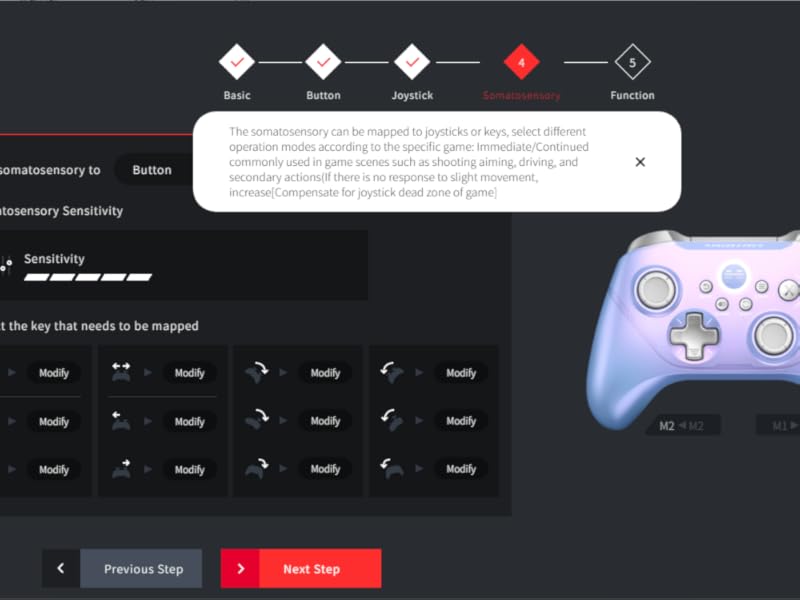
Сүрөт 6.2: Screenshot of the BEITONG Gamepad Assistant interface for button customization, showing options for normal and extended buttons (M1/M2) and macro settings.
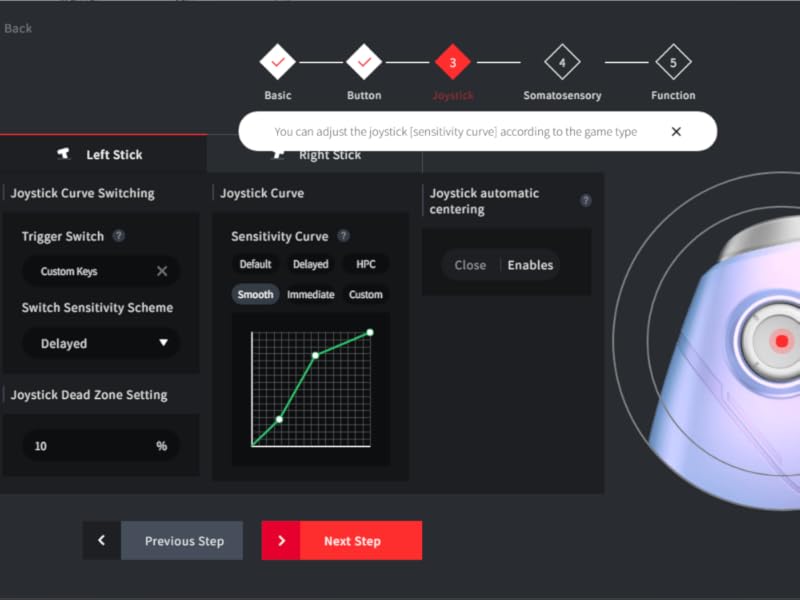
Сүрөт 6.3: Screenshot of the BEITONG Gamepad Assistant for joystick settings, allowing adjustment of joystick sensitivity curves and dead zone settings.
7. Заряддоо жана Батарея
The controller is equipped with a 600mAh battery, providing 12-17 hours of gameplay on a 2-hour charge. Use the provided USB-C cable to charge the controller. You can continue playing while the controller is charging via a wired connection.
8. Техникалык тейлөө
- Башкаргычты кургак, жумшак чүпүрөк менен сүртүп, таза кармаңыз.
- Контроллерди экстремалдык температурага, нымдуулукка же тике күн нуруна кабылуудан сактаңыз.
- Do not attempt to disassemble or repair the controller yourself, as this will void the warranty.
9. Кыйынчылыктарды
9.1. Контроллер туташпай жатат
- Контроллер заряддалганын текшериңиз.
- For 2.4GHz, verify the receiver is properly inserted and the controller is in pairing mode.
- For Bluetooth, ensure Bluetooth is enabled on your device and the controller is discoverable.
- Контроллерди да, түзмөгүңүздү да өчүрүп-күйгүзүп көрүңүз.
9.2. Input Lag or Disconnections
- Ensure the controller is within range of the receiver/Bluetooth device.
- Башка зымсыз түзмөктөрдүн кийлигишүүсүн азайтыңыз.
- For critical gaming, consider using a wired connection.
9.3. Баскычтар жооп бербейт
- Контроллердин батареясынын заряды аз экенин текшериңиз.
- Reset the controller using the reset hole (refer to Image 3.1 for location).
- If the left stick isn't working, ensure you didn't accidentally press the SHIFT key, which can alter its function.
- Use the BEITONG Gamepad Assistant to calibrate joysticks and triggers.
10. Техникалык шарттар
| Өзгөчөлүк | Спецификация |
|---|---|
| Модель номери | Asura 2Pro Plus |
| Байланыш | 2.4 ГГц зымсыз, Bluetooth 5.0, USB-C зымдуу |
| Шайкештик | PC, Android, iOS, Nintendo Switch, Steam Deck (Does NOT support Mac/Xbox/PS4/PS5) |
| Джойстиктер жана триггерлер | Hall Effect (Anti-drift, 0.1mm accuracy) |
| Buttons | Mechanical (0.7mm trigger stroke) |
| Добуш берүү көрсөткүчү | Up to 600Hz (Overclocking mode on PC) |
| Батарея сыйымдуулугу | 600mAh |
| Батареянын иштөө мөөнөтү | 12-17 саат (болжол менен) |
| Заряддоо убактысы | 2 саат (болжол менен) |
| Motion Control | 6-ок гироскоп |
| Макро баскычтары | 2 (M1/M2, customizable) |
11. Кепилдик жана колдоо
BEITONG provides a limited warranty for this product against defects in materials and workmanship under normal use. For warranty claims or technical support, please contact the BEITONG technology team through their official channels or the retailer where you purchased the product. Please retain your proof of purchase for warranty service.
Видео 11.1: An official video from BEITONG showcasing the Asura 2 Pro Game Controller, highlighting its design, features, and performance.


