Introduction
The Nonstop NSA2-BK Station A is a versatile bedside companion designed to enhance your daily routine. This device integrates a wireless Bluetooth speaker, an alarm clock, and a multi-functional charging station, providing convenience and relaxation in one compact unit. It features soothing soundscapes for improved sleep and multiple charging options for your devices.

Сүрөт 1: Алдыңкы view of the Nonstop NSA2-BK Station A, displaying the digital clock, alarm settings, and charging indicators.
Негизги өзгөчөлүктөрү
- Wireless Bluetooth Speaker: Enjoy enhanced stereo sound for music, videos, and apps from your Bluetooth-enabled devices.
- Relaxation Soundscapes: Improve sleep quality with built-in soothing sounds, including gentle ocean waves, calming rain, and noise-masking ambient sounds.
- Wireless Qi Charging: Conveniently charge Qi-compatible smartphones by simply placing them on the top surface of the unit.
- Dual USB Universal Charging: Equipped with two USB ports to charge a variety of devices, including smartphones, iPads, Kindles, and wireless headphones.

Figure 2: Illustration of the relaxation sound features, showing icons for Gentle Waves, Soothing Rain, and White Noise.
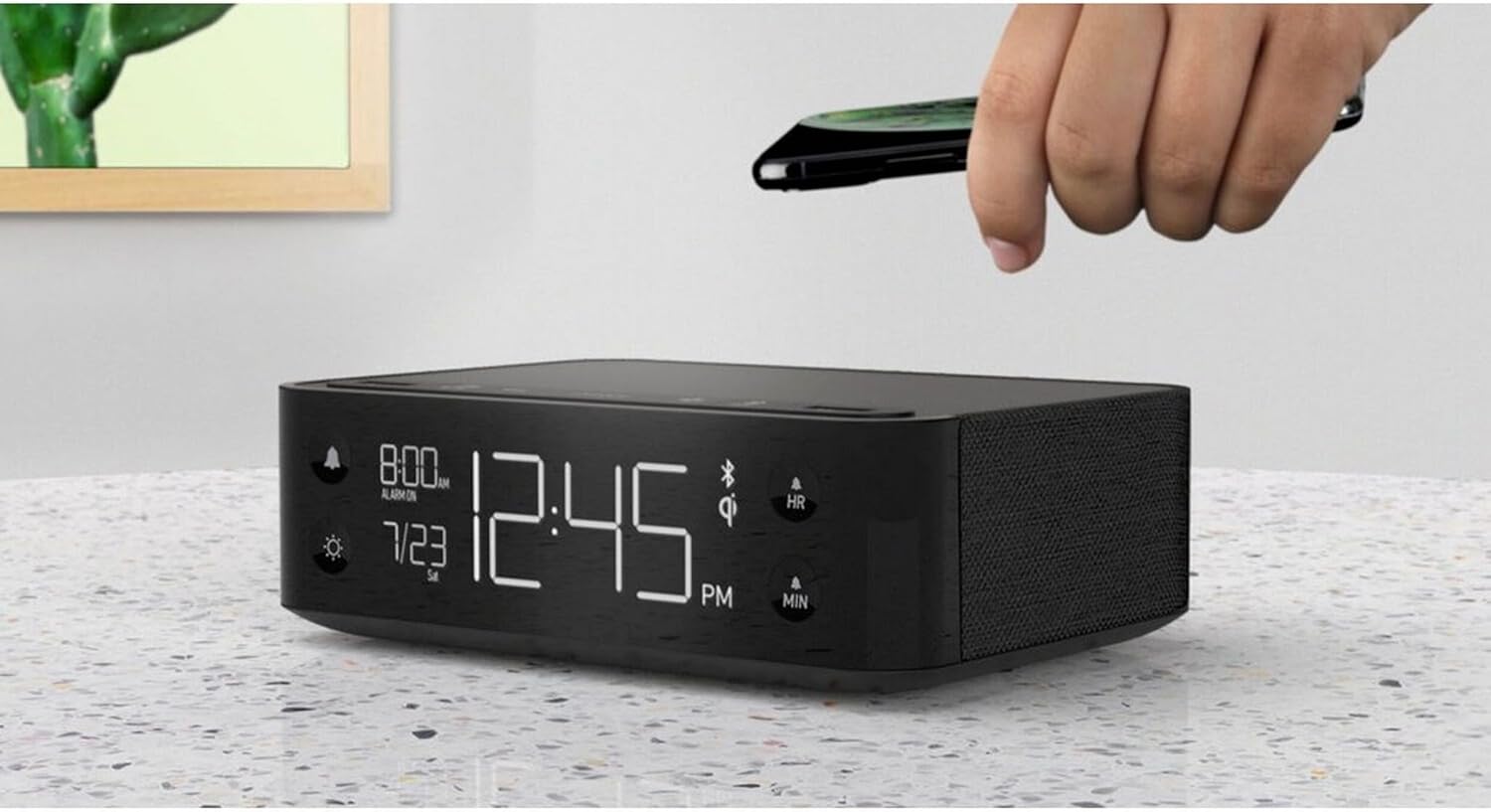
Figure 3: A smartphone being placed on the top surface of the Station A for wireless charging.
Жайгашуу
1. Power Connection
- Unpack the Nonstop NSA2-BK unit and all accessories from the packaging.
- Connect the provided power adapter to the DC input port on the back of the unit.
- Plug the power adapter into a standard electrical outlet. The display will illuminate, indicating the unit is powered on.
2. Баштапкы саатты орнотуу
Upon first power-up, the clock may display a default time. Refer to the "Operating Instructions" section for detailed steps on setting the current time and date.
3. Bluetooth Жупташтыруу
- Мобилдик түзмөгүңүздө (смартфон, планшет ж.б.) Bluetooth функциясы иштетилгенин текшериңиз.
- On the Nonstop NSA2-BK, press the Bluetooth pairing button (refer to button layout in "Operating Instructions" if available, otherwise assume a standard Bluetooth icon button). The Bluetooth indicator on the display will flash.
- On your mobile device, search for available Bluetooth devices. Select "Nonstop NSA2-BK" from the list.
- Once paired, the Bluetooth indicator on the unit will become solid, and you will hear an audible confirmation.
4. Wireless Qi Charging Setup
No specific setup is required for wireless charging beyond connecting the unit to power. Simply place your Qi-compatible device on the designated charging pad on top of the unit. Ensure the device is centered for optimal charging.
Иштөө нускамалары
Убакыт жана дата орнотуу
- басып, кармап туруңуз УБАКЫТТЫ ОРНОТУУ button (or equivalent, often combined with HR/MIN buttons).
- колдонуу HR (саат) жана MIN (Minute) buttons to adjust the time.
- басыңыз УБАКЫТТЫ ОРНОТУУ button again to confirm and move to date setting (if applicable).
- колдонуу HR жана MIN buttons to adjust the month and day.
- Басыңыз УБАКЫТТЫ ОРНОТУУ чыгуу.
Сигналды орнотуу жана колдонуу
- басып, кармап туруңуз Сигналды орнотуу button (bell icon). The alarm time will flash.
- колдонуу HR жана MIN каалаган ойготкуч убактысын коюу үчүн баскычтарды басыңыз.
- Басыңыз Сигналды орнотуу ырастоо үчүн дагы.
- Ойготкучту жандыруу/өчүрүү үчүн басыңыз КҮЙГҮЗҮҮ / КҮЧҮРҮҮ button (bell icon). An alarm indicator will appear/disappear on the display.
- Ойготкуч басылганда, басыңыз СОЮЗ button (if available, or any button except alarm off) for a temporary pause. Press the КҮЙГҮЗҮҮ / КҮЧҮРҮҮ button to turn off the alarm completely.
Using Bluetooth Speaker
- Ensure the unit is paired with your device (see "Bluetooth Pairing" in Setup).
- Play audio from your paired device. Sound will be output through the NSA2-BK speaker.
- Adjust volume using the volume controls on your paired device or on the NSA2-BK unit (if available).
Playing Relaxation Sounds
- басыңыз ҮН button (or similar, possibly a wave/rain icon).
- Press repeatedly to cycle through available soundscapes (Ocean Waves, Rain, Ambient Sounds).
- басып, кармап туруңуз ҮН button to turn off the soundscape.
Using Charging Functions
- Wireless Qi Charging: Place your Qi-compatible smartphone centrally on the top charging pad. A charging indicator on the display will illuminate.
- USB заряддоо: Connect your device's USB charging cable to one of the two USB ports on the back or side of the unit. Charging will begin automatically.
Дисплей жарыктыгын жөндөө
- басыңыз DIMMER button (sun icon).
- Press repeatedly to cycle through different brightness levels for the display.
Техникалык тейлөө
- Тазалоо: Тазалоодон мурун электр кубатынан ажыратыңыз. Түзмөктүн сыртын жумшак, кургак чүпүрөк менен сүртүңүз. Суюк тазалоочу каражаттарды же абразивдүү материалдарды колдонбоңуз.
- Сактагыч: Эгер аппаратты узак убакытка сактасаңыз, аны электр кубатынан ажыратып, салкын, кургак жерде сактаңыз.
- Суюктуктардан алыс болуңуз: Түзмөктү суудан же ашыкча нымдуулуктан алыс кармаңыз.
- Вентиляция: Ашыкча ысып кетүүнүн алдын алуу үчүн аппараттын айланасында туура желдетүүнү камсыз кылыңыз. Вентиляция тешиктерин жаап албаңыз.
Проблемаларды чечүү
| Көйгөй | Мүмкүн себеп | Чечим |
|---|---|---|
| Түзмөк күйбөйт. | Кубат адаптери туташкан эмес же розетка активдүү эмес. | Кубат адаптери шайманга жана иштеп жаткан электр розеткасына бекем сайылганын текшериңиз. |
| Bluetooth түзмөгү жупташа албайт. | Unit is not in pairing mode; device is too far; another device is already connected. | Ensure the NSA2-BK is in pairing mode. Move device closer. Disconnect any previously paired devices. |
| Зымсыз кубаттоо иштебей жатат. | Device is not Qi-compatible; device not centered; foreign objects on pad; thick phone case. | Verify device supports Qi wireless charging. Re-position device centrally. Remove foreign objects or thick phone cases. |
| USB кубаттоо иштебей жатат. | Cable is faulty; device is not compatible; unit is overloaded. | Try a different USB cable. Ensure device is compatible. Avoid charging too many high-power devices simultaneously. |
| Ойготкуч угулбайт. | Ойготкуч иштетилген эмес; үн өтө төмөн. | Ensure the alarm is set and activated (alarm indicator visible). Increase the unit's volume. |
Техникалык шарттар
- Бренд: Үзгүлтүксүз
- Модел: NSA2-BK
- Түсү: Black, Ocean
- Элемент Салмагы: 3 фунт
- Аппараттык интерфейс: USB
- Шайкеш түзмөктөр: iPad, Smartphones, Kindle, Wireless Headphones (via USB/Qi)
- Жалпы USB порттору: 2
- Ватtage: 10 watts (for charging)
- UPC: 840148709171
- ASIN: B0C8LDWF57
- Биринчи жеткиликтүү: 29-июль, 2024-жыл
Кепилдик жана колдоо
Specific warranty details for the Nonstop NSA2-BK are typically provided with the product packaging or on the manufacturer's official webсайт. Кепилдик жөнүндө толук маалымат алуу үчүн ушул булактарга кайрылыңыз.
For technical support, troubleshooting assistance beyond this manual, or inquiries regarding parts and service, please contact Nonstop customer support through their official webсайтка же өнүмүңүздүн баштапкы документтеринде көрсөтүлгөн байланыш маалыматына.
Note: Always retain your proof of purchase for warranty claims.


