Introduction
This manual provides detailed instructions for the installation, operation, and maintenance of your Cobra 29 LTD Professional CB Radio and Wilson 305-492 T2000 Series Black Mobile CB Trucker Antenna. This combined communication system is designed for reliable performance and clear communication on the road.
The Cobra 29 LTD CB radio features a classic design with 4 watts of power, access to all 40 CB channels, and dual-mode AM/FM functionality. It includes an adjustable receiver and SWR calibration for optimized performance. The Wilson 305-492 T2000 antenna is a high-powered mobile CB antenna with a 5-inch shaft and 49-inch stainless steel whip, rated for 3500 watts across the 26MHz to 30MHz frequency range.
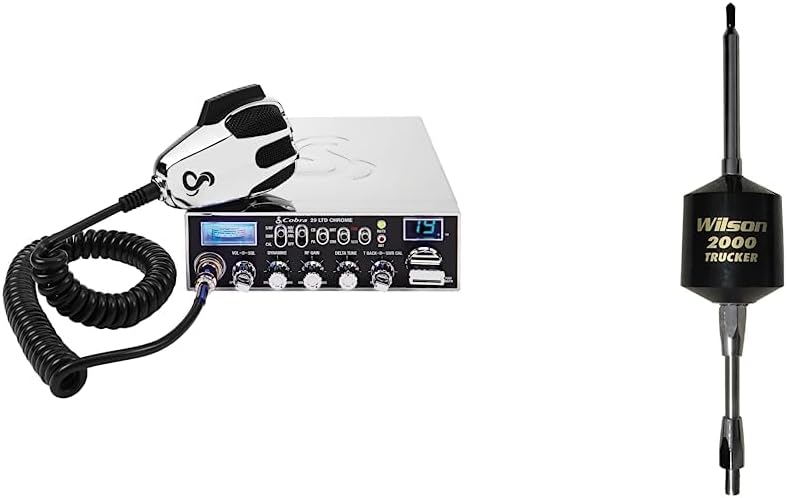
Figure 1: Cobra 29 LTD Professional CB Radio and Wilson T2000 Trucker Antenna bundle.
Жайгашуу
1. Cobra 29 LTD CB Radio Installation
- Монтаждоо: Select a secure and accessible location in your vehicle for the CB radio. Use the provided mounting bracket and hardware to firmly attach the radio, ensuring it does not obstruct driving or safety features.
- Кубат туташуу: Connect the red power wire from the radio to a positive 12V DC power source in your vehicle (e.g., battery terminal or fuse box). Connect the black ground wire to a suitable chassis ground point. Ensure all connections are secure and properly insulated.
- Микрофон туташуу: Plug the microphone cable into the designated port on the front of the Cobra 29 LTD radio.

Figure 2: Close-up of the Cobra 29 LTD CB Radio, showing controls and microphone port.
2. Wilson 305-492 T2000 Antenna Installation
- Антенна орнотуу: Install the Wilson T2000 antenna in a location that provides maximum clearance and a good ground plane, typically on the roof or a sturdy mirror mount on a truck. Ensure the mount is robust enough to support the antenna's size and weight.
- Коаксиалдык кабель туташуусу: Route the coaxial cable from the antenna to the CB radio, avoiding sharp bends or pinching. Connect the antenna's coaxial cable to the ANT connector on the back of the Cobra 29 LTD radio.
- SWR Calibration: After installation, it is crucial to calibrate the Standing Wave Ratio (SWR) of your antenna system. This optimizes performance and prevents damage to the radio. Refer to the 'SWR Calibration' section in the radio's operating instructions for detailed steps.

Figure 3: Wilson 305-492 T2000 Series Black Mobile CB Trucker Antenna.
Official Product Video: Cobra Professional CB Radios
Видео 1: Бүттүview of Cobra Professional CB Radios, highlighting key features and benefits for professional drivers. This video provides a general introduction to the Cobra CB radio line.
Operating the Cobra 29 LTD CB Radio
Controls Overview
The Cobra 29 LTD is designed for ease of use with clearly labeled controls.
- КҮЙГҮЗҮҮ/ӨЧҮРҮҮ/ҮЛДӨМ: Turns the radio on/off and adjusts the listening volume.
- SQUELCH (SQ): Adjusts the receiver sensitivity to eliminate background noise when no signal is present. Turn clockwise until noise disappears.
- RF GAIN: Adjusts receiver sensitivity to match incoming signal strength. Turn counter-clockwise for weaker signals, clockwise for stronger signals.
- DELTA TUNE: Fine-tunes the receive frequency for clearer reception of off-frequency signals.
- NB/ANL (Noise Blanker/Automatic Noise Limiter): Reduces pulse-type noise (e.g., ignition interference) and continuous noise.
- CH9/19 (Instant Channel 9/19): Provides instant access to Emergency Channel 9 or Information Channel 19.
- SWR CAL (SWR Calibration): Used to calibrate the antenna system for optimal performance.
- AM/FM: Арасында тандайт Amplitude Modulation (AM) and Frequency Modulation (FM) modes for communication.

Figure 4: Cobra 29 LTD CB Radio main features highlighted.
Техникалык тейлөө
- үзгүлтүксүз тазалоо: Keep the radio and antenna clean from dust and debris. Use a soft, dry cloth for the radio's exterior.
- Кабелдик текшерүү: Periodically check all cables (power, antenna, microphone) for wear, fraying, or damage. Replace any damaged cables immediately.
- Антенна текшерүү: Ensure the antenna is securely mounted and free from obstructions. Inspect the antenna whip for any bends or damage.
- SWR Re-calibration: Re-calibrate your SWR if you change your antenna, antenna mounting location, or if you suspect a change in performance.
Проблемаларды чечүү
| Көйгөй | Мүмкүн себеп | Чечим |
|---|---|---|
| No power to radio | Электр байланышы бош, сактагыч күйүп кетти | Check power and ground connections. Inspect and replace fuse if necessary. |
| No reception or poor reception | Squelch set too high, antenna not connected, high SWR | Adjust squelch. Check antenna connection. Perform SWR calibration. |
| Начар берүү | Microphone issue, high SWR, low power output | Check microphone connection. Perform SWR calibration. Ensure proper power supply. |
| Ашыкча ызы-чуу | Electrical interference, NB/ANL off | Engage NB/ANL. Check for external electrical interference sources. |
Техникалык шарттар
| Өзгөчөлүк | Description |
|---|---|
| Бренд | Кобра |
| Model Number (Radio) | Cobra 29 LTD |
| Каналдардын саны | 40 |
| Жыштык диапазону | 26 МГц - 30 МГц |
| Сүйлөшүү диапазону максималдуу | 10 миль |
| Антенна модели | Wilson 305-492 T2000 Series |
| Antenna Power Rating | 3500 ватт |
| Antenna Shaft Length | 5 дюйм |
| Antenna Whip Length | 49 дюйм |
| Өзгөчөлүктөр | Long Range, Dual-Mode AM/FM, Instant Channel 9, SWR Calibration |
| Камтылган компоненттер | Cobra 29 LTD CB Radio and Wilson Antenna |
| Сууга туруктуулук деңгээли | Сууга чыдамдуу эмес |
Кепилдик жана колдоо
For warranty information and technical support, please refer to the documentation included with your product or visit the official Cobra and Wilson Antennas websites. Keep your purchase receipt as proof of purchase for any warranty claims.


