1. Киришүү
The GALAYOU G7 Indoor Home Security Camera provides comprehensive surveillance for your indoor spaces, offering advanced features to ensure the safety and peace of mind for your family, pets, and property. This manual will guide you through the setup, operation, and maintenance of your camera.
Негизги өзгөчөлүктөрү:
- Ультра 2K чечилиши: Provides clear and vivid image quality with 6X digital zoom.
- Өркүндөтүлгөн түнкү көрүнүш: Enhanced night vision with effective distance up to 33 ft using 6pcs 940nm Infrared Lights.
- 24/7 Real-Time Motion Alert & Smart Siren: Instant detection and push alerts to your phone, with an optional smart siren.
- Эки тараптуу аудио: Алыстан байланышуу үчүн орнотулган микрофон жана динамик.
- Коопсуз жергиликтүү жана булут сактагычы: Supports up to 128GB micro SD card and encrypted AWS Cloud storage.
- Smart Home интеграциясы: Compatible with Amazon Alexa and Google Home for voice control and live-feed viewing.
- 24/7 үзгүлтүксүз жаздыруу: Available to all Galayou customers without extra fees.

Image: Visual representation of the Galayou G7 camera's key features including 2K resolution, night vision, two-way audio, 24/7 recording, smart siren, optional storage, push notifications, and compatibility with Alexa.
2. Кутуда эмне бар
Сураныч, бардык буюмдар бар экенине ынануу үчүн пакетиңиздин мазмунун текшериңиз:
- Camera body (Galayou G7 Indoor Camera)
- Type-C кабели
- Кубаттуу адаптер
- Монтаждык аксессуарлар
- Ыкчам орнотуу көрсөтмөсү

Image: Two Galayou G7 indoor security cameras, white with black camera faces, standing on their bases. This image represents the product as it appears out of the box.
3. Коопсуздук маалыматы
Коопсуз эксплуатацияны камсыз кылуу жана зыян келтирбөө үчүн төмөнкү коопсуздук чараларын сактаңыз:
- This device is designed for indoor use only. Do not expose it to water or moisture.
- Берилген кубат адаптерин гана колдонуңуз.
- Keep the camera away from direct sunlight, heat sources, and strong magnetic fields.
- Камераны өз алдынча бөлүүгө же оңдоого аракет кылбаңыз. Жардам алуу үчүн кардарларды колдоо бөлүмүнө кайрылыңыз.
- Камеранын кулап түшпөшү үчүн бекем орнотулганын текшериңиз.
- Балдар жана үй жаныбарлары жетпеген жерде сактаңыз.
4. Продукт бүтүп калдыview
Familiarize yourself with the components of your Galayou G7 camera:
Image: A single Galayou G7 indoor camera, showing its compact design with a black camera lens and a white body and base.
Камера компоненттери:
- Камера линзасы: Video foo тартатtage.
- Инфракызыл диоддор: Түнкү көрүнүш үчүн жарыктандырууну камсыз кылыңыз.
- Микрофон: Captures audio for two-way communication and sound detection.
- Баяндамачы: Outputs audio for two-way communication and siren.
- Микро SD карта слоту: For local storage of video recordings (supports up to 128GB).
- Кубат порту (C түрү): Connects the camera to the power adapter.
- Статус индикаторунун жарыгы: Indicates the camera's current status (e.g., connected, recording).
5. Орнотуу колдонмосу
Follow these steps for initial setup of your Galayou G7 camera:

Image: A three-step visual guide for quick installation. Step 1 shows downloading the Wansview Cloud App, Step 2 shows plugging in the camera, and Step 3 shows connecting to 2.4GHz WiFi via app instructions.
- Download the Wansview Cloud App:
Издөө "Вансview Cloud" in the App Store (iOS) or Google Play Store (Android) and download the application. Create an account or log in if you already have one.
- Камераны күйгүзүү:
Connect the Type-C cable to the camera's power port and plug the power adapter into a wall outlet. The camera's status indicator light will turn on.
- Колдонмого камера кошуу:
Wans ачыңызview Cloud App. Tap the "+" icon to add a new device. Follow the on-screen instructions to connect the camera to your 2.4GHz Wi-Fi тармагы. (Note: 5GHz Wi-Fi is not supported).
- Монтаждоо (кошумча):
The camera can be placed on a flat surface or mounted on a wall or ceiling using the included mounting accessories. Ensure the camera is positioned to cover your desired viewаймак.
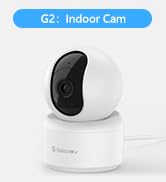
Image: A Galayou G7 camera mounted on a wall, demonstrating a possible installation method.
6. Иштөө нускамалары
6.1 Live View
Once connected, you can access the live video feed from your camera through the Wansview Cloud App. Simply select your camera from the device list to view реалдуу убакыт footage.

Image: A side-by-side comparison demonstrating the clarity difference between 1080P Full HD and 2K 3MP (2304x1296) resolution, highlighting the superior detail of 2K.
6.2 Эки тараптуу аудио
The camera features a built-in microphone and speaker, allowing you to communicate remotely. Tap the microphone icon in the app to speak, and the speaker icon to listen.

Image: A split image showing a woman on her phone and a crying baby in a crib, illustrating the two-way audio feature for remote communication.
6.3 Кыймылды аныктоо жана эскертүүлөр
The camera can detect motion and send real-time alerts to your smartphone. You can customize motion detection sensitivity and set up alert schedules within the app.

Image: A smartphone displaying a "Motion alarm" notification from the Wansview Cloud app, with a live view of a person in a room, demonstrating the instant detection alert feature.
The smart siren feature can be activated to deter intruders when motion is detected.

Image: A dog in a living room with a blue overlay indicating motion detection, showing how the camera identifies movement.
6.4 Түнкү көрүнүш
Камера аз жарык шарттарында автоматтык түрдө түнкү көрүү режимине өтүп, 33 футка чейинки аралыкка чейин так кара жана ак видеону камсыз кылат.

Image: A woman in bed viewing her phone, which displays a black-and-white night vision feed of a baby sleeping, illustrating the camera's low-light capabilities.
6.5 Жазуу жана сактоо
The Galayou G7 supports 24/7 continuous recording. You have two options for video storage:
- Микро SD карта сактагычы: Insert a micro SD card (up to 128GB, not included) into the camera's slot for local storage.
- Булуттагы сактагыч: Subscribe to the Wansview Cloud service for secure, encrypted cloud storage of your video clips. A 30-day free trial may be available.

Image: A visual representation of local storage (SD card) and cloud storage options, showing video clips flowing into a cloud icon and a camera with an SD card slot.

Image: A smartphone screen displaying a timeline of continuous video recording, with multiple video frames shown above, illustrating the 24/7 continuous recording feature.
6.6 Smart Home интеграциясы
The Galayou G7 camera is compatible with Amazon Alexa and Google Home. You can use voice commands to view шайкеш келген акылдуу дисплейлердеги түз эфир.
- Alexa үчүн: Enable the "Wansview Cloud" skill in the Alexa app and link your account. Then, say "Alexa, show me the [Camera Name]".
- Google Home үчүн: Link your Wansview Cloud account in the Google Home app. Then, say "Hey Google, show me the [Camera Name]".

Image: A woman in a kitchen speaking to an Amazon Echo Show device, which displays the live feed from the Galayou camera, demonstrating Alexa integration.
6.7 Түзмөктү бөлүшүү
You can share access to your camera with family members or trusted individuals through the Wansview Cloud App. They will need to download the app and create an account.

Image: A collage of people using their smartphones to view camera feeds, with an overlay showing the device sharing invitation process within the app.
7. Техникалык тейлөө
- Тазалоо: Камеранын линзасын жана корпусун тазалоо үчүн жумшак, кургак чүпүрөктү колдонуңуз. Суюк тазалагычтарды же аэрозолдорду колдонбоңуз.
- Программалык камсыздоонун жаңыртуулары: Вандарды үзгүлтүксүз текшерип туруңузview Cloud App for available firmware updates. Keeping your camera's firmware up-to-date ensures optimal performance and security.
- Сактагычты башкаруу: Эгер SD картаны колдонсоңуз, мезгил-мезгили менен кайраview and delete old recordings to free up space. For cloud storage, manage your subscription and recorded events through the app.
8. Кыйынчылыктарды
| Көйгөй | Мүмкүн болгон себеп / Чечим |
|---|---|
| Камера оффлайн / Wi-Fi'га туташуу мүмкүн эмес |
|
| Видеонун сапаты начар |
|
| Кыймыл эскертүүлөрү жок |
|
| Эки тараптуу аудио иштебейт |
|
9. Техникалык шарттар
| Өзгөчөлүк | Деталь |
|---|---|
| Модель аты | G7 |
| Ички/тышкы колдонуу | Indoor |
| Видео тартуунун резолюциясы | 1296p (2K) |
| Байланыш технологиясы | Wi-Fi (2.4 ГГц гана) |
| Түнкү көрүү диапазону | 33 Фут |
| Сактагыч параметрлери | Микро SD карта (128 ГБ чейин), Cloud Storage |
| Эки тараптуу аудио | Ооба |
| Controller Type | Amazon Alexa, Google жардамчысы, колдонмо |
| Power Source | Электр зымдары |
| Монтаж түрү | Ceiling Mount, Wall-Mounted, Stand |
| Продукциянын өлчөмдөрү (L x W x Y) | 18.19 x 14.69 x 12.8 дюйм |
| Элемент Салмагы | 12.3 унция |
10. Кепилдик жана колдоо
For information regarding product warranty, please refer to the warranty card included in your product packaging or the terms and conditions of your purchase. GALAYOU is committed to providing reliable products and excellent customer service.
If you encounter any issues or have questions about your Galayou G7 camera, please contact GALAYOU customer support through the Wansview Cloud App or visit the official GALAYOU webколдоо булактары үчүн сайт.
Онлайн ресурстар:
- GALAYOU Amazon Store
- Refer to the "Quick installation guide" included in the package for more detailed steps.


