1. Киришүү
Welcome to the user manual for your Hoppstar Expert Digital Camera. This manual provides essential information on how to set up, operate, and maintain your camera, ensuring a fun and creative experience for young photographers. Please read this manual carefully before using the camera and keep it for future reference.
The Hoppstar Expert is designed specifically for children, offering a user-friendly interface, durable construction with interchangeable silicone covers, and a range of exciting features including a selfie camera, video recording, picture frames, photo filters, and face detection.
2. Коопсуздук маалыматы
- This product is intended for children aged 3 years and older. Adult supervision is recommended during use.
- Камераны сууга же ашыкча нымдуулукка дуушар кылбаңыз.
- Avoid dropping the camera or subjecting it to strong impacts, even with the protective silicone cover.
- Keep small parts, such as memory cards, out of reach of very young children to prevent choking hazards.
- Use only the charging cable provided or a compatible USB charger.
- Камераны өз алдынча бөлүктөргө бөлүүгө же оңдоого аракет кылбаңыз. Көйгөйлөр жаралса, кардарларды колдоо кызматына кайрылыңыз.
3. Пакеттин мазмуну
Сураныч, төмөнкү нерселер үчүн кутучаны белгилеңиз:
- Hoppstar Expert Digital Camera
- Instruction Manual
- USB заряддоо кабели
- Lanyard/Strap
- USB-C - USB-A адаптер
- USB-C to Micro-USB Adapter
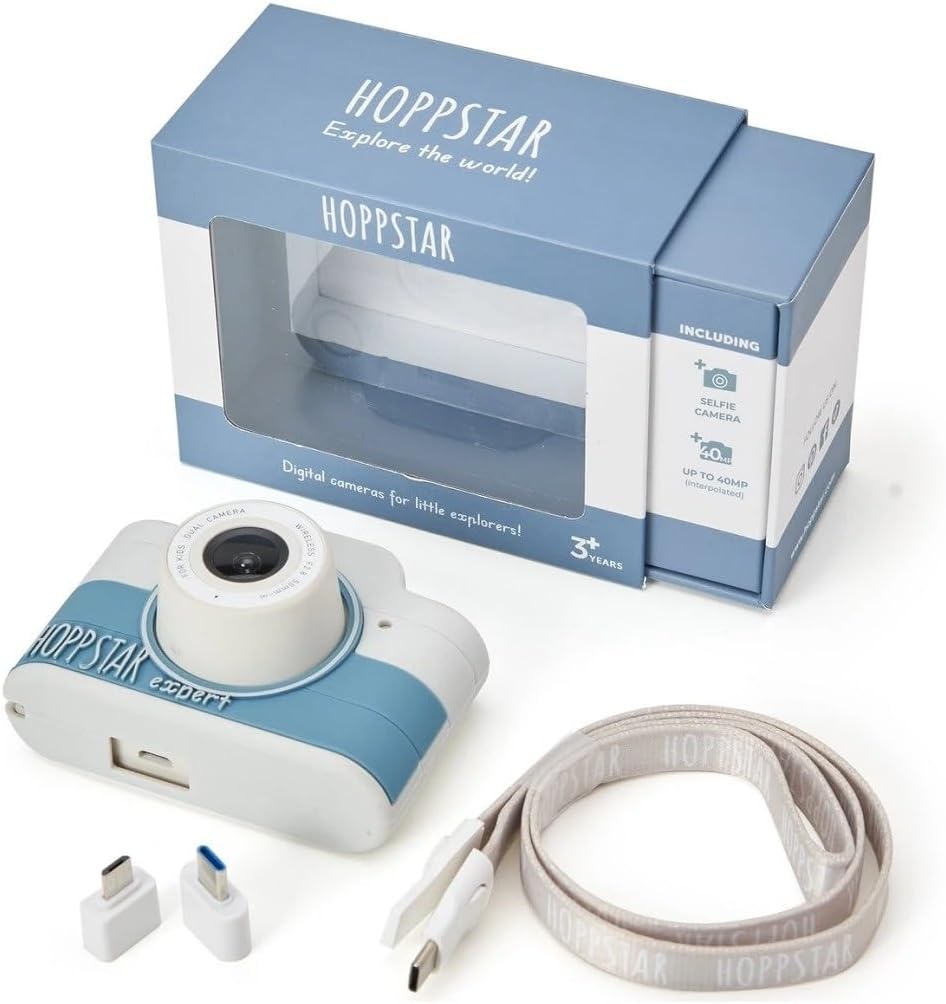
Image: Hoppstar Expert camera shown with its retail packaging, USB charging cable, lanyard, and two USB adapters.
4. Продукт бүтүп калдыview
Фронт View

Image: The front of the Hoppstar Expert camera, featuring the main lens, flash, and the 'Hoppstar Expert' branding on the blue and white body.
- Main Lens: For taking standard photos and videos.
- Flash/Light: Жарык аз шарттарда жарыкты камсыз кылат.
- Микрофон: Видео жазуу учурунда аудиону тартат.
Арткы View

Image: The back of the Hoppstar Expert camera, displaying the LCD screen and the control buttons on either side.
- LCD экран: Менюларды түз эфирде көрсөтөт view, жана ойнотуу.
- Селфи камерасы: Located above the screen for self-portraits.
- Башкаруу баскычтары: Navigation, OK, Menu, and other function buttons.
5. Орнотуу
5.1 Камераны заряддоо
Before first use, fully charge the camera's internal battery. Connect the provided USB charging cable to the camera's USB port and to a USB power source (e.g., computer, wall adapter). The charging indicator light will show the charging status and turn off when fully charged.
5.2 Эстутум картасын салуу
The Hoppstar Expert comes with 16 GB of internal storage. If you wish to expand storage, locate the memory card slot (usually on the side or bottom) and insert a compatible microSD card (not included) until it clicks into place. Ensure the camera is powered off before inserting or removing the card.
5.3 Күйгүзүү/өчүрүү
Press and hold the Power button (usually located on the top or side) for a few seconds to turn the camera on or off.
6. Иштөө нускамалары
6.1 Негизги башкаруу каражаттары
- OK баскычы: Менюлардагы тандоолорду ырастайт, сүрөткө тартат же видео жаздырууну баштайт/токтотот.
- Чабыттоо баскычтары: Used to move through menu options (Up, Down, Left, Right).
- Меню баскычы: Accesses the camera's settings and feature options.
- Режим баскычы: Сүрөт, видео жана ойнотуу режимдери ортосунда которулат.
6.2 Сүрөт тартуу
In photo mode, frame your shot using the LCD screen. Press the OK button to capture a photo. The camera supports both front and selfie cameras. To switch between cameras, navigate to the camera settings in the menu or use a dedicated button if available.
6.3 Видеолорду жаздыруу
Switch to video mode. Press the OK button once to start recording and press it again to stop. Videos are saved to the internal memory or inserted memory card.
6.4 Using Creative Features
The Hoppstar Expert includes several creative features:
- Picture Frames: Apply fun borders to your photos. Access this feature through the camera's menu.
- Photo Filters: Change the look and feel of your photos with various color and effect filters.
- Жүздү аныктоо: The camera can automatically detect faces in the frame, assisting with focus.
Explore these options within the camera's menu settings to enhance your photos and videos.
7. Техникалык тейлөө
- Тазалоо: Use a soft, dry cloth to clean the camera body and screen. For the lens, use a specialized lens cleaning cloth. Do not use liquid cleaners.
- Силикон капкагы: The interchangeable silicone cover can be removed and cleaned with mild soap and water if necessary. Ensure it is completely dry before reattaching.
- Батареяга кам көрүү: Батареянын иштөө мөөнөтүн узартуу үчүн, батареяны тез-тез толук зарядсыздандырбаңыз. Камераны көпкө чейин колдонбосоңуз да, үзгүлтүксүз кубаттап туруңуз.
- Сактагыч: Камераны салкын, кургак жерде күндүн тике тийген нурунан жана экстремалдык температурадан алыс сактаңыз.
8. Кыйынчылыктарды
Камера күйбөй жатат
- Батарея заряддалганын текшериңиз. Камераны кубат булагына туташтырып, кайра аракет кылыңыз.
- Кубат баскычын узак убакытка (5-10 секунд) басып туруңуз.
Сүрөттүн/видеонун сапаты начар
- Ensure the lens is clean and free from smudges or dust.
- Check lighting conditions. Optimal results are achieved in well-lit environments.
- Тартуу учурунда камеранын кыймылсыз турганын текшериңиз.
Camera Freezes/Unresponsive
- Try resetting the camera by pressing the reset button (if available, often a small pinhole) or by holding the Power button until it turns off and then restarting.
Cannot Save Photos/Videos
- Check if the internal memory or inserted memory card is full. Delete unnecessary files or insert a new card.
- Ensure the memory card is properly inserted and not corrupted.
If you encounter issues not listed here or if troubleshooting steps do not resolve the problem, please contact Hoppstar customer support.
9. Техникалык шарттар
| Өзгөчөлүк | Спецификация |
|---|---|
| Бренд аты | Хоппстар |
| Модель аты | Hoppstar Expert Yale |
| Модель номери | 76893 |
| Түс | Yale |
| Пакеттин өлчөмдөрү | 14.3 x 8.7 x 5.1 см |
| Үзгүлтүксүз атуу ылдамдыгы | 30 кадр/сек |
| Камтылган компоненттер | Camera + Instruction Manual |
| Модель жылы | 2023 |
| Тасманын түсү | Түс |
| Экспозицияны башкаруу түрү | Автоматтык |
| Жабык түрү | Электрондук |
10. Кепилдик жана колдоо
The Hoppstar Expert Digital Camera comes with a standard manufacturer's warranty. Please refer to the warranty information provided with your purchase or visit the official Hoppstar website for details regarding warranty terms and conditions.
For technical support, product inquiries, or warranty claims, please contact Hoppstar customer service through their official webсайт же сатып алуу документтеринде көрсөтүлгөн байланыш маалыматы.


