1. Киришүү
This manual provides detailed instructions for the installation, operation, and maintenance of the Fanvil i16SV Video Intercom. The i16SV is an outdoor-rated SIP intercom system designed for secure entry and communication, featuring HD audio and video capabilities.
Please read this manual thoroughly before using the device to ensure proper functionality and safety.
2. Продукт бүтүп калдыview
2.1 Негизги өзгөчөлүктөрү
- Built-in HD camera with infrared night vision (H.264 codec).
- Сыртта колдонуу үчүн IP65 суу өткөрбөйт жана чаң өткөрбөйт деген рейтингге ээ.
- IK10 anti-collision rating with a robust die-cast aluminum frame.
- Анти-тamper alarm system, reporting to a control center if the cover is removed.
- HD voice quality with a built-in 3W speaker and Acoustic Echo Canceller (AEC).
- Supports 2 SIP lines for communication.
- Жөнөкөйлөштүрүлгөн орнотуу үчүн Power over Ethernet (PoE) колдоосу.
2.2 Аппараттын компоненттери
The Fanvil i16SV features a durable aluminum casing designed for outdoor environments. Key components include:
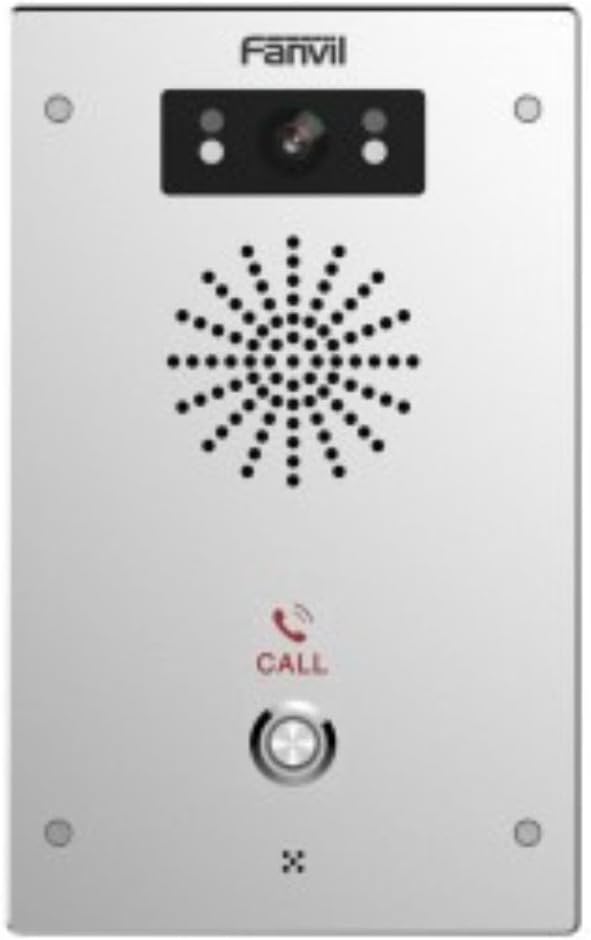
Сүрөт 1: Алдыңкы view of the Fanvil i16SV Video Intercom. The device features a central speaker grille, a camera module with infrared sensors at the top, and a prominent call button with a phone icon below the speaker. The Fanvil logo is visible at the top.
- Камера модулу: Located at the top, includes the 1080p HD camera and infrared sensors for night vision.
- Динамик тор: Central perforated area for audio output.
- Чалуу баскычы: A prominent, illuminated button for initiating calls.
- Микрофон: Integrated for two-way audio communication (not explicitly visible but implied by intercom function).
- Монтаждоо пункттары: Four screw holes, one in each corner, for secure wall mounting.
3. Орнотуу
3.1 Орнотуу
- Сайт тандоо: Choose an outdoor location for wall mounting that provides clear visibility for the camera and is within reach of network and power connections. Ensure the location is suitable for an IP65/IK10 rated device.
- Монтаждоо: Securely attach the intercom to a wall using appropriate screws and anchors for the chosen surface. Refer to the included mounting template (if provided) for precise hole placement.
3.2 Зымдар жана туташуу
- Ethernet аркылуу күч (PoE): Connect a standard Ethernet cable from a PoE-enabled switch or injector to the intercom's Ethernet port. This provides both power and network connectivity.
- Alternative Power (Corded Electric): If PoE is not available, connect a compatible 12V DC power adapter (not included) to the device's power input.
- Тармак туташуусу: The device supports Wi-Fi connectivity. For initial setup or if Wi-Fi is not preferred, use a wired Ethernet connection.
3.3 Баштапкы конфигурация
The Fanvil i16SV operates as a VoIP system. Initial configuration typically involves:
- Тармак орнотуулары: Configure IP address, subnet mask, gateway, and DNS settings.
- SIP каттоо эсеби: Register the intercom with your SIP server (e.g., 3CX, Asterisk, Broadsoft). This involves entering SIP server address, user ID, password, and other SIP parameters.
- Видео жана аудио жөндөөлөрү: Adjust camera resolution (1080p/720p), frame rate, and audio volume as needed.
- Call Button Destination: Program the phone number or SIP URI that the call button will dial.
- Access Control Integration: If integrating with an access control system, configure the necessary relays or protocols.
Refer to the detailed administrator guide (available from Fanvil's website) for advanced configuration options.
4. Иштөө нускамалары
4.1 Чалуу
- To initiate a call, press the ЧАЛ button on the front panel of the intercom.
- The intercom will dial the pre-programmed destination (e.g., an indoor station, a phone number, or a softphone client).
- Once the call is answered, two-way audio communication will be established. If the receiving device supports video, the 1080p camera feed will also be transmitted.
4.2 Receiving a Call (Access Control)
When a call is initiated from the intercom, the receiving party can:
- Байланыш: Speak with the visitor via the intercom's HD audio system.
- View Видео: If using a video-enabled receiving device, view the live video feed from the intercom's camera.
- Кирүү мүмкүнчүлүгүн берүү: If configured, the receiving party can remotely unlock a connected door or gate by dialing a specific DTMF code or using a dedicated button on their device.
4.3 Түнкү көрүнүш
The i16SV automatically activates its infrared night vision in low-light conditions, ensuring clear video surveillance and communication even in complete darkness.
5. Техникалык тейлөө
- Тазалоо: Regularly clean the exterior of the intercom with a soft, damp cloth. Do not use abrasive cleaners or solvents. Ensure the camera lens and speaker grille are free from dust and debris.
- Программалык камсыздоонун жаңыртуулары: Periodically check the Fanvil website for firmware updates. Keeping the firmware updated ensures optimal performance and security.
- Туташуу текшерүү: Periodically inspect all cable connections (Ethernet, power) for wear or damage, especially in outdoor environments.
- Анти-Т.amper Ойготкуч: Ensure the anti-tamper alarm is functional and configured to report to the appropriate control center.
6. Кыйынчылыктарды
| Көйгөй | Мүмкүн себеп | Чечим |
|---|---|---|
| Аппаратка кубат жок. | Loose power connection, faulty PoE switch/injector, or power adapter. | Check all power connections. Verify PoE functionality or test the power adapter. |
| Чалууларды кабыл алуу же жасоо мүмкүн эмес. | Network connectivity issue, incorrect SIP registration, or firewall blocking. | Verify network cable connection or Wi-Fi signal. Check SIP account settings and firewall rules. |
| Видео түрмөгү жок. | Camera settings, network bandwidth, or receiving device incompatibility. | Ensure camera is enabled in settings. Check network bandwidth. Verify receiving device supports H.264 video. |
| Аудио сапаты начар. | Environmental noise, network latency, or speaker/microphone obstruction. | Ensure speaker and microphone are clear. Check network quality. Adjust audio settings. |
| Анти-тamper alarm triggers unexpectedly. | Loose mounting, physical impact, or sensor malfunction. | Ensure the device is securely mounted. Inspect for physical damage. Contact support if issues persist. |
For further assistance, consult the Fanvil i16SV administrator guide or contact Fanvil technical support.
7. Техникалык шарттар
| Өзгөчөлүк | Деталь |
|---|---|
| Модел | i16SV |
| Бренд | Fanvil |
| Ички/тышкы колдонуу | Сыртта |
| Байланыш технологиясы | Wireless (Wi-Fi), Wired (Ethernet/PoE) |
| Power Source | Corded Electric, Power over Ethernet (PoE) |
| Controller Type | VoIP системасы |
| Монтаж түрү | Дубалга орнотуу |
| Видео тартуунун резолюциясы | 1080p, 720p |
| Видео тартуу форматы | MP4 (H.264 codec) |
| Төмөн жарык технологиясы | Түнкү түс (инфракызыл түнкү көрүү) |
| Эл аралык коргоо рейтинги | IP65 (Суу жана чаң өткөрбөйт) |
| Таасирден коргоо рейтинги | IK10 (Anti-collision) |
| Материал | Алюминий |
| Ватtage | 3 ватт |
| Элементтин өлчөмдөрү (L x W x Y) | 7.68 x 4.72 x 1.57 дюйм |
| Элемент Салмагы | 2.07 фунт |
| Шайкеш түзмөктөр | 3CX, Asterisk, Avaya, Broadsoft, Epygi, Huawei, Jabra gn, Metaswitch, NEC, New Rock, Open Vox, Phonism, Plantronics, Porta One, Senheiser, Yeastar, ZTE, Zycoo |
| UPC | 889837001882 |
8. Коопсуздук маалыматы
- Ensure all electrical connections are made by qualified personnel and comply with local electrical codes.
- Аппаратты ачпаңыз casing unless instructed by Fanvil support, as this may void the warranty and expose you to electrical hazards.
- Avoid installing the device in locations with extreme temperatures, direct sunlight for prolonged periods, or excessive vibration.
- Аппаратты күчтүү электромагниттик талаалардан алыс кармаңыз.
- Use only manufacturer-approved accessories and power supplies.
9. Кепилдик жана колдоо
Information regarding the specific warranty terms for the Fanvil i16SV Video Intercom was not provided in the product data. Please refer to the official Fanvil website or contact your point of purchase for detailed warranty information.
For technical support, firmware downloads, and additional documentation, please visit the official Fanvil support webсайтка же кардарларды тейлөө бөлүмүнө кайрылыңыз.
10. Расмий продукт Videos
No official product videos from the seller were provided in the available product data for this manual.


