1. Продукт бүтүп калдыview
The AFERIY Portable Power Station AF-P010 is a versatile and reliable power source designed for various applications, including home backup, outdoor activities, and emergency situations. It features a 512Wh LiFePO4 battery, an 800W AC output (1600W surge), and multiple charging and output ports to power a wide range of devices.

Сүрөт 1.1: Алдыңкы view of the AFERIY Portable Power Station AF-P010, showcasing its compact design and display panel.
Негизги өзгөчөлүктөрү:
- Жогорку кубаттуулук жана өндүрүш: 512Wh battery capacity with 800W continuous AC output (1600W peak).
- Тез кубаттоо: Fully recharges in approximately 1.5 hours via 400W AC input.
- Туруктуу батарея: Equipped with LiFePO4 battery technology, offering over 3500 charge cycles to 80% capacity.
- Бир нече порттор: Includes AC, USB-A QC3.0, USB-C (PD 100W/20W), DC6530, and car charging outlets.
- Үзгүлтүксүз энергия менен камсыздоо (UPS): Automatic switchover in 0.1 seconds during power outages.
- Маалыматтык дисплей: LCD panel shows real-time input/output wattage, battery level, and remaining usage time.
- Интегралдык жарыктандыруу: LED light with multiple modes (Lighting, SOS, Flashing) for various needs.
2. Коопсуздук нускамалары
Read all safety warnings and instructions carefully before using this product. Failure to follow these instructions may result in electric shock, fire, or serious injury.
- Бөлүктү бөлбөөгө, оңдоп же өзгөртпөңүз.
- Аппаратты жылуулук булактарынын жанына же түз күн тийген жерге койбоңуз.
- Жамгырдын же нымдуулуктун таасиринен алыс болуңуз.
- Агрегатты балдардан жана үй жаныбарларынан алыс кармаңыз.
- Түпнуска же тастыкталган аксессуарларды гана колдонуңуз.
- Колдонуу жана кубаттоо учурунда туура желдетүүнү камсыз кылыңыз.
- Өрт чыккан учурда кургак порошок өрт өчүргүчтү колдонуңуз. Суу электр тогуна урунууга алып келиши мүмкүн.
- Do not operate the unit if it has been damaged or dropped.

Image 2.1: Diagram illustrating the Battery Management System (BMS) and its protective features, including short circuit, overload, and temperature protection.
3. Продукциянын компоненттери
Familiarize yourself with the components included in your package and the various ports on the power station.
Пакеттин мазмуну:
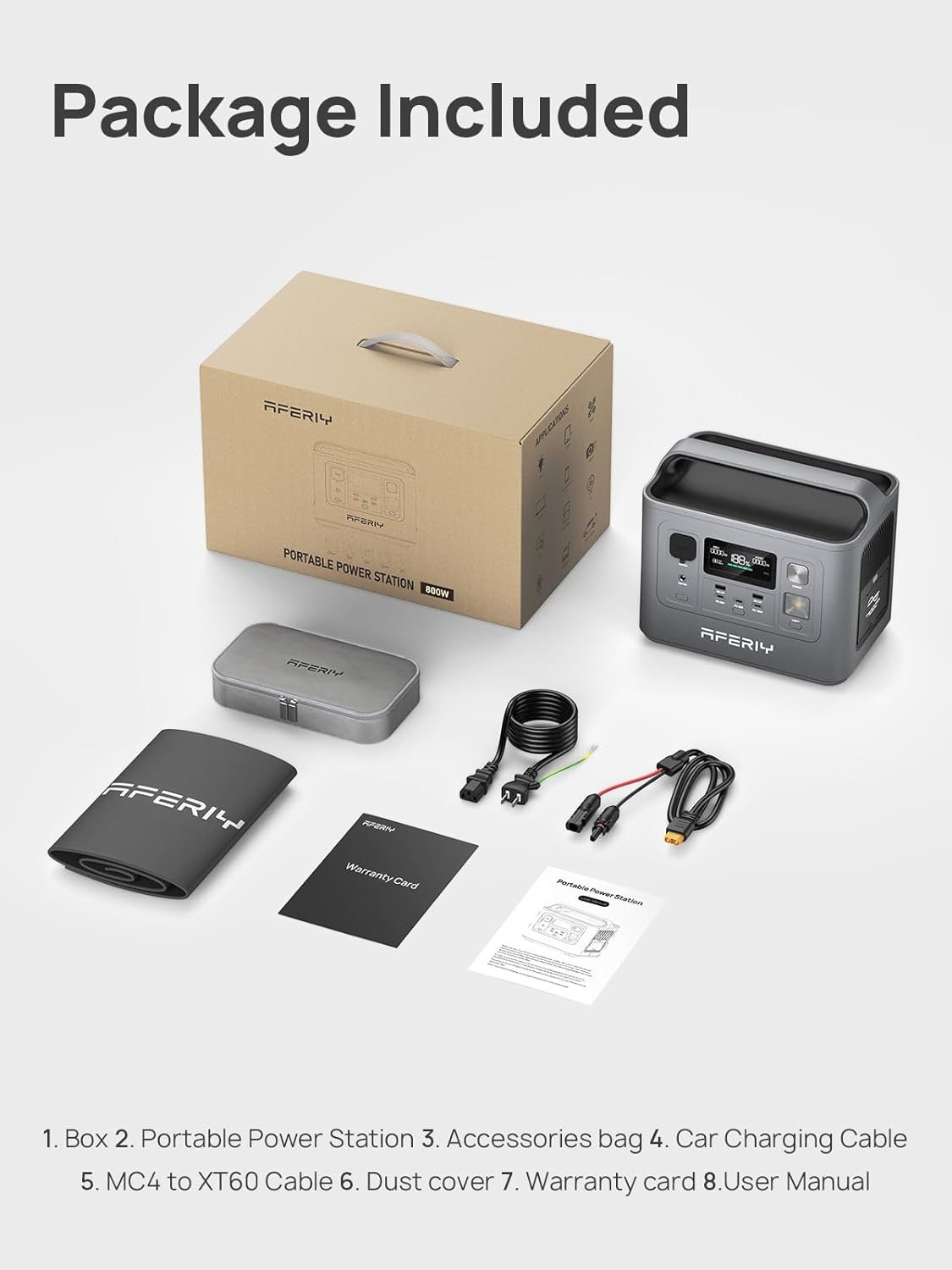
Image 3.1: Contents of the AFERIY Portable Power Station package, including the power station, accessories bag, car charging cable, MC4 to XT60 cable, dust cover, warranty card, and user manual.
- AFERIY Portable Power Station AF-P010
- AC кубаттоочу кабель
- Унаа заряддоо кабели
- MC4 to XT60 Cable (for solar charging)
- User Manual
- Кепилдик картасы
- Аксессуарлар сумкасы
- Чаң капкагы
Порттун жайгашуусу:

Сүрөт 3.2: Детальдуу view of the power station's front panel, labeling the car charger input, DC output port, DC control, main power button, USB ports (QC3.0, Type-C), and light control.
- AC Output (800W): Стандарттык тиричилик техникасы үчүн.
- USB-A QC3.0 (x2): For quick charging compatible USB devices.
- USB-C (PD 100W x1, PD 20W x2): Ноутбуктарды, планшеттерди жана смартфондорду тез кубаттоо үчүн.
- DC6530 чыгаруу: Туруктуу ток менен иштеген түзмөктөр үчүн.
- Унаа кубаттоочу розетка: For 12V car appliances.
- DC киргизүү: For charging via solar panel or car charger.
- AC киргизүү: Розетка аркылуу кубаттоо үчүн.
- LCD дисплей: Иштөө абалын көрсөтөт.
- Кубат баскычы: Агрегатты күйгүзүү/өчүрүү үчүн.
- LED жарык: жарыктандырууну камсыз кылат.
4. Орнотуу
Биринчи колдонуудан мурун, электр станциясы толук заряддалганын текшериңиз.
Алгачкы заряддоо:
- Unpack the power station and all accessories.
- Connect the AC charging cable to the AC input port on the power station.
- Plug the other end of the AC charging cable into a standard wall outlet (110V).
- The LCD display will show the charging status. The unit will be fully charged in approximately 1.5 hours.
- Толук заряддалгандан кийин, заряддоо кабелин ажыратыңыз.
5. Иштөө нускамалары
Күйгүзүү/өчүрүү:
- To turn on the power station, press and hold the main power button for a few seconds until the LCD screen illuminates.
- To turn off the power station, press and hold the main power button again until the LCD screen turns off.
Чыгаруу портторун колдонуу:
- AC чыгаруу: Press the AC button to activate the AC outlets. Plug your devices into the AC ports. Press the AC button again to turn off.
- USB чыгышы: The USB-A and USB-C ports are typically active when the unit is on. Simply plug in your USB devices.
- DC чыгаруу: Press the DC button to activate the DC6530 and car charging outlets. Plug in your 12V DC devices. Press the DC button again to turn off.
Ensure the total power consumption of connected devices does not exceed the power station's rated output (800W continuous, 1600W surge).

Image 5.1: The AFERIY Power Station connected to and powering various electronic devices, demonstrating its versatility for different power needs.
Электр станциясын заряддоо:
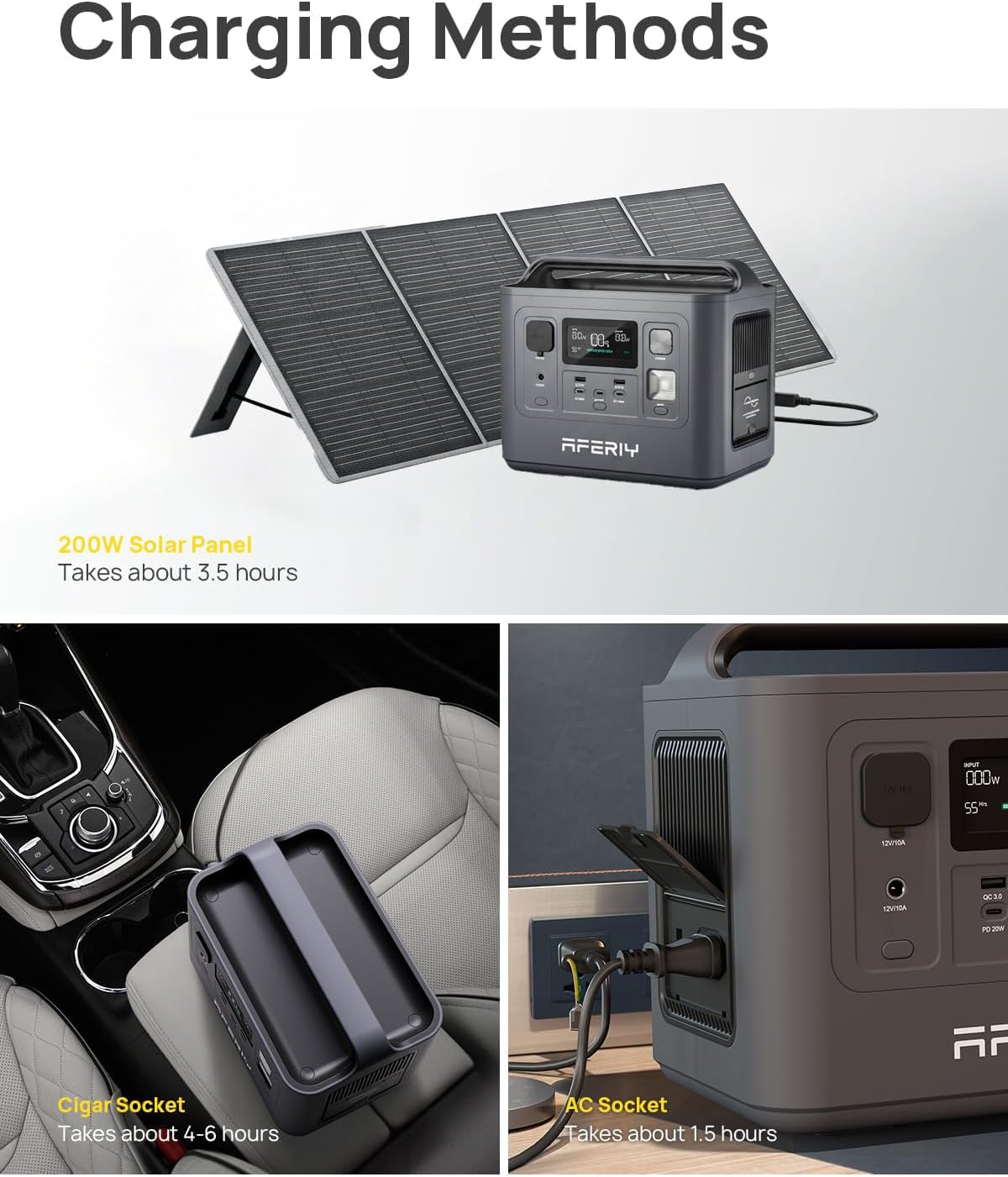
Image 5.2: Illustrations of the three primary charging methods: solar panel (top), car cigar socket (bottom left), and AC wall outlet (bottom right).
- AC дубалды заряддоо: Connect the AC charging cable to the AC input port and a wall outlet. Full charge in approximately 1.5 hours.
- Күн панелин заряддоо: Connect a compatible solar panel (max 200W) to the DC input port using the MC4 to XT60 cable. Charging time varies based on sunlight intensity and panel wattage (approx. 3.5 hours with 200W panel).
- Унаа заряддоо: Connect the car charging cable to the DC input port and your vehicle's 12V car charging outlet. Full charge in approximately 4-6 hours.
UPS функциясы:
When the power station is connected to an AC wall outlet and has devices plugged into its AC output, it can function as an Uninterruptible Power Supply (UPS). In the event of a power outage, the unit will automatically switch to battery power within 0.1 seconds to continue powering connected devices.
LED жарыктын иштеши:
- Press the light button once for standard illumination.
- Press again for SOS mode (flashing pattern).
- Press a third time for flashing mode.
- Жарыкты өчүрүү үчүн төртүнчү жолу басыңыз.
LCD дисплей маалымат:

Сүрөт 5.3: Жакын пландан view of the power station's LCD display, showing input/output wattagд, батареянын пайызыtage, and estimated remaining usage time.
ЖК дисплей электр станциясынын абалы жөнүндө реалдуу убакыт режиминде маалымат берет:
- Батарея деңгээлинин көрсөткүчү: Учурдагы батареянын пайызын көрсөтөтtage.
- Киргизүү күчү: Ват көрсөтөтtage being drawn for charging.
- Чыгуу күчү: Ват көрсөтөтtage being consumed by connected devices.
- Калган убакыт: Estimates the remaining operating time or charging time based on current power usage.
- Ката көрсөткүчтөрү: Alerts for various issues such as overload or temperature warnings.
6. Техникалык тейлөө
Туура техникалык тейлөө электр станцияңыздын узак мөөнөттүү иштешин жана оптималдуу иштешин камсыз кылат.
Сактагыч:
- Электр станциясын салкын, кургак жерде, тике күн нурунан жана экстремалдык температурадан алыс сактаңыз.
- Узак мөөнөткө сактоо үчүн, батарейканын ден соолугун сактоо үчүн 3-6 ай сайын бирдикти болжол менен 50-80% чейин заряддаңыз.
- Нымдуулугу жогору же коррозияга алып келүүчү заттар бар чөйрөдө сактоодон алыс болуңуз.
Тазалоо:
- Ensure the unit is turned off and disconnected from all power sources before cleaning.
- Use a soft, dry cloth to wipe the exterior. Do not use abrasive cleaners or solvents.
- Вентиляция тешиктерин чаңдан жана таштандылардан тазалаңыз.
Батареяга кам көрүү:

Сүрөт 6.1: Ички view highlighting the LiFePO4 battery cells and the Battery Management System (BMS), which contributes to the battery's extended lifespan of over 3500 cycles.
- The LiFePO4 battery is designed for a long lifespan (over 3500 cycles).
- Батареяны бат-баттан толук кубаттап коюудан качыңыз, анткени бул анын жалпы иштөө мөөнөтүн кыскартат.
- If the unit will not be used for an extended period, charge it to 50-80% before storage.
7. Кыйынчылыктарды
If you encounter issues with your AFERIY Portable Power Station, refer to the following common problems and solutions.
| Көйгөй | Мүмкүн себеп | Чечим |
|---|---|---|
| Түзмөк күйбөйт | Батарея толугу менен зарядсызданды; Кубат баскычы жетишерлик көпкө басылган жок. | Charge the unit using the AC adapter; Press and hold the power button for 3-5 seconds. |
| AC чыгаруу иштебейт | AC output not activated; Device power consumption too high; Overload protection triggered. | Press the AC button to activate; Check device wattage; Disconnect device, restart unit. |
| Бирдик заряддалбай жатат | Charging cable not properly connected; Charger fault; Extreme temperature. | Ensure all connections are secure; Try a different charging method; Move unit to a suitable temperature range (0-40°C). |
| LCD display shows error code | Internal fault; Overload; Over-temperature. | Refer to the specific error code in the full manual (if available) or contact customer support. Disconnect devices and allow unit to cool if temperature related. |
If the problem persists after attempting these solutions, please contact AFERIY customer support.
8. Техникалык шарттар
Detailed technical specifications for the AFERIY Portable Power Station AF-P010.
| Өзгөчөлүк | Спецификация |
|---|---|
| Модел | AF-P010 |
| Батарея түрү | LiFePO4 |
| Кубаттуулугу | 512Wh |
| AC Output | 800 Вт (үзгүлтүксүз), 1600 Вт (чоку) |
| AC Voltage | 110V |
| USB-A чыгаруу | 2 x QC3.0 |
| USB-C чыгышы | 1 x PD 100W, 2 x PD 20W |
| DC Output | 1 x DC6530, 1 x Car Charging Outlet |
| AC Input Charging Time | Approx. 1.5 hours (400W) |
| Күн киргизүү (макс.) | 200 Вт |
| Өлчөмдөрү (L x W x Y) | 10.6" x 6.6" x 8.2" (26.9см x 16.8см x 20.8см) |
| Салмагы | 12.3 фунт (5.6 кг) |
| Иштөө температурасы | 0°Cден 40°Cге чейин (32°F—104°F) |
| Сертификаттар | UL, CE, FCC, PSE, RoHS, TELEC |

Image 8.1: Graphic illustrating the pure sine wave output of the power station, ensuring compatibility with sensitive electronics.

Image 8.2: A person carrying the AFERIY Portable Power Station, demonstrating its lightweight and portable design for easy transport.
9. Кепилдик жана колдоо
Кепилдик маалыматы:
The AFERIY Portable Power Station AF-P010 comes with an industry-leading 5-year warranty, with an additional 2 years available upon product registration, totaling up to 7 years of coverage. This warranty covers defects in materials and workmanship under normal use.
Please retain your proof of purchase for warranty claims. The warranty does not cover damage caused by misuse, accidents, unauthorized modifications, or natural disasters.
Кардарларды колдоо:
For any questions, technical assistance, or warranty claims, please contact AFERIY customer support through the following channels:
- Электрондук почта: Refer to your warranty card or the official AFERIY webбайланыш маалыматы үчүн сайт.
- Webсайт: Visit the official AFERIY webКөп берилүүчү суроолор, колдоо булактары жана байланыш формалары үчүн сайт.
When contacting support, please provide your product model (AF-P010) and purchase date to expedite assistance.


