1. Киришүү
Welcome to the user manual for your Optoma HD30LV 1080p Full HD Home Projector. This document provides essential information for the safe and efficient operation of your device. Please read these instructions carefully before using the projector and retain them for future reference.
2. Продукт бүтүп калдыview
The Optoma HD30LV is designed to deliver a high-quality visual experience for home theater and gaming. It features 1080p Full HD resolution, 4K HDR input compatibility, and a compact design for versatile placement.
Негизги өзгөчөлүктөрү:
- 4,500 люмен: Ар кандай жарыктандыруу шарттарына ылайыктуу ачык сүрөттөрдү берет.
- 4K UHD and HDR Compatible: Supports high-resolution and high dynamic range content for enhanced detail and color.
- Портативдик жана жеңил: Designed for easy transport and flexible installation.
- Жакшыртылган оюн режими: Offers lightning-fast response times for a smooth gaming experience.
- Dual HDMI Connectors: Бир эле учурда бир нече түзмөккө туташуу мүмкүнчүлүгүн берет.
Кутуда эмне бар:
- Optoma HD30LV Projector
- Электр кабели
- Алыстан башкаруу
- Колдонуучунун Колдонмосу (бул документ)
Продукт визуалдык көрүнүштөрү:

Фронт view of the Optoma HD30LV projector, showcasing the lens and ventilation.

Жогорку view of the Optoma HD30LV projector, showing the control panel and focus/zoom adjustments.
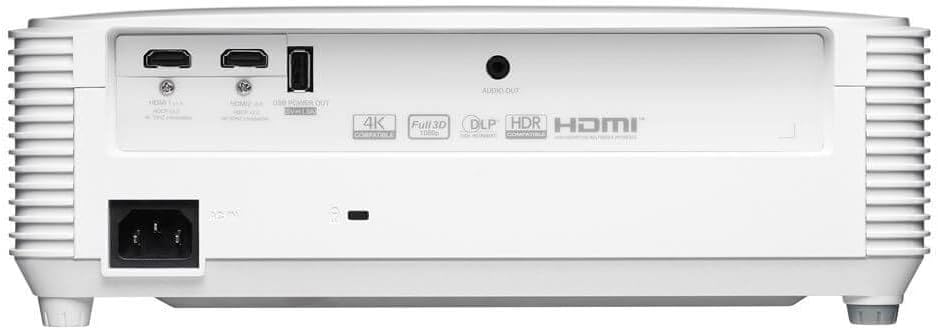
Арткы view of the Optoma HD30LV projector, detailing the input and output ports.
Продукциянын видеосу:
Расмий продукт аяктадыview video demonstrating the features and design of the Optoma HD30LV projector.
3. Орнотуу
3.1 Пакеттен чыгаруу жана жайгаштыруу
- Проекторду жана бардык аксессуарларды таңгактан кылдаттык менен чыгарып алыңыз.
- Place the projector on a stable, flat surface or mount it securely according to the manufacturer's guidelines. Ensure adequate ventilation around the unit.
- Consider the throw distance for your desired screen size. The HD30LV can project a 120-inch image from approximately 13 feet 10 inches (4.22 meters) away.

Diagram illustrating recommended throw distances for 100-inch and 120-inch screen sizes for the HD30LV projector.
3.2 Түзмөктөрдү туташтыруу
The HD30LV features multiple connectivity options. Refer to the diagram below for port locations.

Деталдаштырылган view of the Optoma HD30LV projector's dimensions and labeled connectivity ports, including HDMI and USB.
- Күч: Кубат кабелин проекторго жана тиешелүү розеткага туташтырыңыз.
- HDMI: Use an HDMI cable to connect your video source (e.g., Blu-ray player, gaming console, streaming device) to one of the two HDMI 2.0 ports.
- USB өчүрүү: A USB port (5V/1.5A) is available for powering compatible devices.
- Аудио чыгышы: Connect external audio systems via the 3.5mm stereo audio jack if desired.
- Кенсингтон кулпусу: For security, a Kensington lock slot is provided.
4. Иштөө нускамалары
4.1 Күйгүзүү/өчүрүү
- Press the power button on the projector or the remote control to turn the unit on.
- Өчүрүү үчүн, кубат баскычын кайра басыңыз. Суралса, өчүрүүнү ырастаңыз.
4.2 Сүрөттү тууралоо
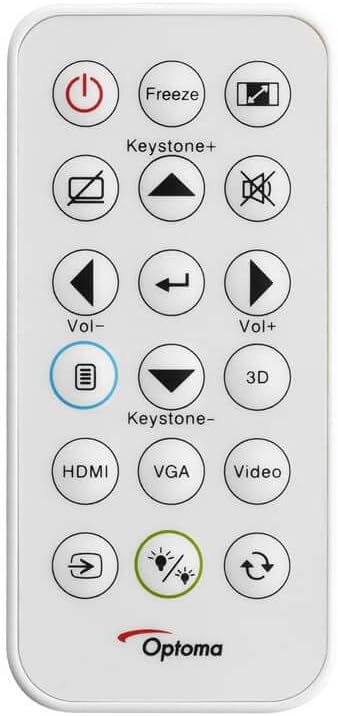
The remote control for the Optoma HD30LV projector, showing buttons for power, input, keystone, volume, and 3D functions.
- Фокус: Объективдеги фокус шакекти сүрөт так жана тунук болгонго чейин айлантыңыз.
- Чоңойтуу: Adjust the zoom ring on the lens to change the image size without moving the projector.
- Негизги ташты оңдоо: Use the 'Keystone+' and 'Keystone-' buttons on the remote control or the projector's control panel to correct trapezoidal image distortion.
- Киргизүү булагы: Press the 'HDMI' button on the remote or the 'Source' button on the projector to cycle through available input sources.
4.3 Өркүндөтүлгөн функциялар
- 4K HDR Input: The projector is compatible with 4K HDR signals, providing enhanced contrast and color. Ensure your source device is configured to output HDR.
- Жакшыртылган оюн режими: Activate this mode through the projector's menu for reduced input lag, optimizing your gaming experience.
- Full 3D: The projector supports Full 3D content from compatible sources. Active DLP Link 3D glasses (sold separately) are required for 3D viewing.

Visual comparison of different resolutions (SD, HD, Full HD 1080p) to demonstrate the clarity of the HD30LV's native 1080p output.
5. Техникалык тейлөө
Үзгүлтүксүз тейлөө оптималдуу иштешин камсыз кылат жана проекторуңуздун иштөө мөөнөтүн узартат.
- Линзаны тазалоо: Оптикалык линзалар үчүн атайын жасалган жумшак, түксүз кездемени колдонуңуз. Абразивдүү материалдардан же катуу химиялык заттардан алыс болуңуз.
- Cleaning the Projector Casing: сыртын жумшак менен сүртүңүз, гamp кездеме. Абразивдүү тазалагычтарды же эриткичтерди колдонбоңуз.
- Вентиляция: Ensure the projector's ventilation openings are clear and unobstructed to prevent overheating. Do not block air vents.
- Сактагыч: Проекторду узак убакыт бою колдонбогон учурда, аны салкын, кургак, чаңдан жана өтө жогорку температурадан корголгон жерде сактаңыз.
6. Кыйынчылыктарды
If you encounter issues with your Optoma HD30LV projector, refer to the following common problems and solutions:
| Көйгөй | Мүмкүн чечим |
|---|---|
| Сүрөт көрсөтүлгөн жок | Check power connections. Ensure the correct input source is selected. Verify the video cable is securely connected. |
| Сүрөт бүдөмүк | Линзадагы фокус шакекчесин тууралаңыз. Проекциялык бет тегиз жана проектор туруктуу экенин текшериңиз. |
| Сүрөт трапеция түрүндө | Use the keystone correction function on the remote or projector control panel. Position the projector perpendicular to the screen if possible. |
| Үн жок | Check volume settings on the projector and source device. Ensure external audio systems are correctly connected and powered on. |
| Проектор ысып кетет же өчүп калат | Ensure ventilation openings are clear. Operate the projector in a well-ventilated area. |
For more detailed troubleshooting or issues not listed here, please refer to the comprehensive support section on the Optoma webсайтка же кардарларды колдоо менен байланышыңыз.
7. Техникалык шарттар
| Өзгөчөлүк | Деталь |
|---|---|
| Модель номери | HD30LV |
| Display Resolution | 1920 x 1080 (1080p Full HD) |
| Жарыктык | 4,500 Lumens |
| Байланыш технологиясы | HDMI, USB |
| Өзгөчөлүктөр | 4K HDR Input, Compact Size, Full 3D, High Brightness, Low Input Lag |
| Продукциянын өлчөмдөрү | 9.61 x 12.44 x 4.25 дюйм (244 x 316 x 108 мм) |
| Элемент Салмагы | 6.35 фунт (2.88 кг) |
| Өндүрүүчү | Optoma Technology Inc. |
| Батареялар | 1 литий-металл батарея талап кылынат (алыстан башкаруу үчүн кошулган) |
8. Кепилдик жана колдоо
For information regarding your product's warranty, please refer to the warranty card included with your projector or visit the official Optoma website. Optoma provides customer support for technical assistance, service, and parts.
Онлайн колдоо: зыярат кылыңыз Optoma Support Page for FAQs, downloads, and contact information.
Байланыш маалыматы: Refer to your product packaging or the Optoma webакыркы кардарларды тейлөө байланыш маалыматы үчүн сайт.


