Introduction
This manual provides instructions for the Alienware AW520H Wired Gaming Headset. It covers setup, operation, maintenance, and troubleshooting to ensure optimal performance and longevity of your device.
The Alienware AW520H headset is designed to deliver precision audio with Hi-Res certified drivers and Dolby Atmos spatial audio support, integrated into a comfortable and adjustable design.
Кутуда эмне бар
Пакетте бардык компоненттер бар экенин текшериңиз:
- Alienware AW520H Wired Gaming Headset
- Documentation (User Manual, Warranty Information)
Продукт бүттүview
Familiarize yourself with the key components and features of your Alienware AW520H headset.
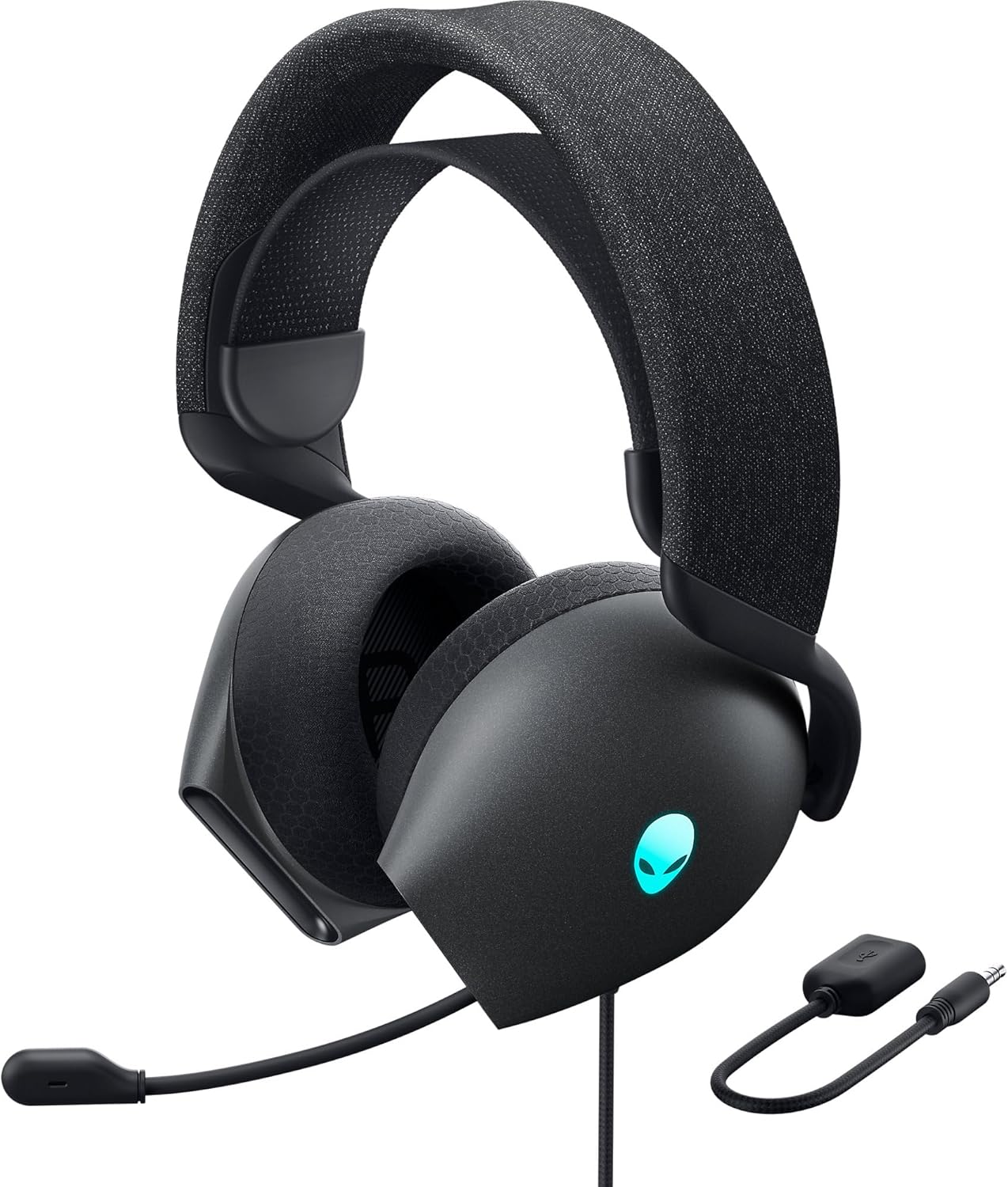

Негизги өзгөчөлүктөрү:
- Hi-Res Certified Drivers: Delivers clear and rich sound across a wide frequency range.
- Dolby Atmos Spatial Audio: Provides precise positional audio for an immersive experience.
- AI-Driven Noise Cancellation Microphone: Retractable boom mic focuses on your voice, reducing ambient noise.
- Ыңгайлуу дизайн: Features soft memory foam ear pads with breathable fabric and an adjustable suspension headband for extended wear.
- AlienFX RGB Lighting: Customizable RGB lighting on the earcups, controllable via Alienware Command Center.
- Ар тараптуу байланыш: Supports both USB and 3.5mm connections for broad compatibility.
Жайгашуу
Follow these steps to set up your Alienware AW520H headset.
1. Гарнитураны туташтыруу
The AW520H offers flexible connectivity options:
- 3.5 мм аудио уячасы: Connect the 3.5mm cable directly to your PC, gaming console controller, or any other compatible device with a 3.5mm audio port. This provides basic audio and microphone functionality.
- USB туташуу: For full functionality, including Dolby Atmos spatial audio and AlienFX RGB lighting customization, connect the headset via USB to your PC. This typically involves using a 3.5mm to USB adapter if your PC does not have a combined audio jack.


2. Software Installation (Optional, for full features)
To unlock the full potential of your headset, including Dolby Atmos and AlienFX RGB lighting customization, install the Alienware Command Center software on your PC. This software allows for personalized audio profileс жана жарык эффекттери.
- Download the latest version of Alienware Command Center from the official Alienware support webсайт.
- Орнотууну аяктоо үчүн экрандагы нускамаларды аткарыңыз.
- Connect your headset via USB to ensure it is recognized by the software.
Иштөө нускамалары
Аудио башкаруу элементтери
The headset features integrated controls for convenient audio management:
- Көлөм дөңгөлөгү: Located on the earcup, rotate the wheel to increase or decrease the audio volume.
- Микрофондун үнүн басуу баскычы: Press the button on the earcup to mute or unmute the microphone.

Микрофонду колдонуу
The AW520H features an AI-driven noise-canceling retractable boom microphone:
- Кеңейтүү/чыгуу: Gently pull the microphone boom out from the earcup to extend it for use. Push it back into the earcup to retract it when not needed.
- Позициялоо: Үнүңүздүн так угулушу үчүн, микрофонду оозуңуздан болжол менен 1-2 дюйм алыстыкта коюңуз.
- Ызы -чууну жокко чыгаруу: The AI-driven noise cancellation automatically works to filter out ambient sounds, focusing on your voice.

Ыңгайлуулук үчүн тууралоо
The headset is designed for comfort during long gaming sessions:
- Suspension Headband: Slide the suspension headband up or down to find the ideal fit for your head size.
- Кулакчындын айлануусу: The earcups can slightly pivot to conform to the shape of your ears.
- Memory Foam Ear Pads: The soft memory foam ear pads with breathable fabric provide cushioning and ventilation.

AlienFX RGB Lighting
Customize the RGB lighting on your headset using the Alienware Command Center software:
- Alienware командалык борборун ачыңыз.
- Navigate to the lighting settings for your AW520H headset.
- Select desired colors, effects, and brightness levels.
- Ensure the headset is connected via USB for lighting customization.
Техникалык тейлөө
Proper maintenance ensures the longevity and performance of your headset.
- Тазалоо: Наушниктерди жана баш боолорду сүртүү үчүн жумшак, кургак чүпүрөктү колдонуңуз. өжөр кир үчүн, бир аз гamp кездеме колдонсо болот, бирок ашыкча нымдуулуктан алыс болуңуз. Катуу химиялык заттарды же абразивдүү тазалагычтарды колдонбоңуз.
- Сактагыч: Store the headset in a clean, dry place away from extreme temperatures and direct sunlight. Retract the microphone when not in use to protect it.
- Кабельге кам көрүү: Avoid sharp bends or kinks in the audio cable. Do not pull on the cable to disconnect the headset.
- Кулак төшөктөрү: The ear pads are made of breathable fabric and memory foam. While durable, they are not designed for frequent removal. If replacement is needed, consult Alienware support.
Проблемаларды чечүү
If you encounter issues with your Alienware AW520H headset, refer to the following common solutions:
Аудио жок же үнү төмөн
- Байланыштарды текшерүү: Ensure the 3.5mm cable or USB connection is securely plugged into both the headset and your device.
- Үн деңгээли: Verify that the volume wheel on the headset is turned up. Check the audio output settings on your PC or console to ensure the headset is selected as the default output device and volume is not muted.
- Программалык камсыздоо/драйверлер: If connected via USB, ensure Alienware Command Center is installed and updated. Check your operating system's sound settings for driver issues.
- Башка түзмөктө сыноо: Connect the headset to a different device (e.g., smartphone, another PC) to determine if the issue is with the headset or the original device.
Микрофон иштебейт
- Үнсүз баскычын текшерүү: Гарнитурадагы микрофондун үнүн өчүрүү баскычы иштетилбегенин текшериңиз.
- Микрофондун абалы: Verify the microphone boom is fully extended and positioned correctly.
- Киргизүү орнотуулары: Check your PC or console's sound input settings to ensure the headset microphone is selected as the default input device. Adjust microphone volume levels.
- Колдонмо орнотуулары: Some applications (e.g., Discord, Zoom) have their own microphone settings. Verify the correct microphone is selected within these applications.
- Программалык камсыздоо/драйверлер: If connected via USB, ensure Alienware Command Center is installed and updated.
AlienFX RGB Lighting Not Working
- USB туташуу: Ensure the headset is connected via USB to your PC. RGB lighting functionality requires a USB connection.
- Alienware Command Center: Verify that Alienware Command Center is installed and running. Check the lighting settings within the software for the headset.
- Программалык камсыздоону жаңыртуу: Ensure Alienware Command Center and headset firmware are up to date.
Техникалык шарттар
| Өзгөчөлүк | Деталь |
|---|---|
| Модель аты | AW520H |
| Байланыш технологиясы | Wired (USB, 3.5 mm Jack) |
| Аудио драйвер түрү | Динамикалык драйвер |
| Frequency Response | 40 кГц (22 000 Гц) |
| Импеданс | 32 Ом |
| Noise Control | Active Noise Cancellation (AI-driven for mic) |
| Микрофон | Retractable, Unidirectional |
| Controls | Volume Control, Microphone Mute (On-headset) |
| Кулак жайгаштыруу | Кулак үстүндө |
| Форма фактору | On Ear |
| Материал | Memory foam, breathable fabric |
| Түс | Dark Side of the Moon |
| Продукциянын өлчөмдөрү | 7.28 x 4.35 x 8.46 дюйм |
| Элемент Салмагы | 11.8 унция |
| Өндүрүүчү | Dell |
| Шайкеш түзмөктөр | Windows, wired devices |
Кепилдик жана колдоо
For warranty information and technical support, please refer to the documentation included with your product or visit the official Alienware support webсайт.
Өндүрүүчү: Dell
Модель номери: AW520H
Биринчи жеткиликтүү болгон күнү: 30-июнь, 2023-жыл
For further assistance, please contact Alienware customer support through their official channels.


