1. Киришүү
This manual provides comprehensive instructions for the setup, operation, maintenance, and troubleshooting of your Sonnet Echo 20 Thunderbolt 4 SuperDock. Please read this manual thoroughly before using the device to ensure proper functionality and safety.
The Sonnet Echo 20 Thunderbolt 4 SuperDock is a versatile docking station designed to expand the connectivity of your computer, offering a wide array of ports for peripherals, displays, and network connections, along with power delivery and internal storage expansion capabilities.
2. Продукт бүтүп калдыview
2.1 Негизги өзгөчөлүктөрү
- Кеңири байланыш: Features three Thunderbolt 4 ports, four USB 3.2 Gen 2 Type-A ports, four USB 3.2 Gen 2 Type-C charging ports, an HDMI port, RJ45 2.5 Gigabit Ethernet, 3.5mm combo audio, 3.5mm microphone, line-level R+L RCA audio out, SD 4.0 card slot, and an M.2 SSD slot.
- Жогорку чечилиштеги дисплейди колдоо: Supports single displays up to 8K @60Hz, or dual displays up to 6K @60Hz.
- Кубат жеткирүү: Provides up to 100W of power to charge your connected laptop via the Thunderbolt 4 cable.
- Internal Storage Expansion: Includes an M.2 NVMe SSD slot, allowing for up to 8TB of additional storage with data transfer speeds up to 800MB/s (SSD sold separately).
- Кеңири шайкештик: Compatible with Apple M-series Macs, Thunderbolt 3 Intel Macs, Thunderbolt 3 and 4 Windows computers, Thunderbolt 4/USB4 Chromebooks, and M-series iPad Pro.
2.2 Порттун жайгашуусу
The Sonnet Echo 20 SuperDock features a comprehensive array of ports on its front and rear panels to accommodate various devices and connections.

Figure 2.2.1: ашыкview of the Sonnet Echo 20 Thunderbolt 4 SuperDock with labeled ports and typical connections.

Figure 2.2.2: Detailed diagram illustrating the front and rear panel ports of the SuperDock.
- Алдыңкы панели:
- Combo Audio Jack (3.5mm): For headphones or headsets.
- USB 3.2 Gen 2 Type-A Ports (x2): For connecting USB-A devices.
- USB 3.2 Gen 2 Type-C Charging Ports (x2): For connecting and charging USB-C devices.
- SD 4.0 Card Slot: For reading SD cards.
- Арткы Panel:
- 20VDC 7.5A Power Input: Connect the included power adapter here.
- HDMI 2.1 Port: For connecting an external display.
- Thunderbolt 4 Computer/100W Charging Port: Connects to your host computer and provides power delivery.
- Thunderbolt 4 Peripheral Ports (x2): For connecting additional Thunderbolt devices or displays.
- 2.5 Gigabit Ethernet Port: For wired network connection.
- USB 3.2 Gen 2 Type-A Ports (x2): For connecting USB-A devices.
- USB 3.2 Gen 2 Type-C Charging Ports (x2): For connecting and charging USB-C devices.
- Audio Line Out Jacks (R+L RCA): For connecting to external speakers or audio systems.
- Microphone Jack (3.5mm): For connecting an external microphone.
- Төмөнкү панели:
- M.2 SSD Slot: Accessible via the bottom panel cover for installing an NVMe SSD.
3. Орнотуу
3.1 Кутуда эмне бар

Figure 3.1.1: Included items in the Sonnet Echo 20 Thunderbolt 4 SuperDock package.
Бардык компоненттер бар экендигин текшериңиз:
- Sonnet Echo 20 Thunderbolt 4 SuperDock unit
- Кубаттуу адаптер
- Электр кабели
- Thunderbolt 4 кабели
- Колдонуучунун колдонмосу (ушул колдонмо)
3.2 Баштапкы туташуу
- Туташуу кубаты: Plug the power adapter into the 20VDC 7.5A input port on the rear of the SuperDock, then connect the power cord to a wall outlet.
- Хост компьютерине туташуу: Use the included Thunderbolt 4 cable to connect the Thunderbolt 4 Computer/100W Charging Port on the SuperDock to a Thunderbolt 4, Thunderbolt 3, or USB4 port on your computer. This connection also provides up to 100W of power to charge your laptop.
- Install M.2 NVMe SSD (Optional):
- Unscrew and remove the bottom panel cover of the SuperDock.
- Carefully insert your M.2 NVMe SSD into the designated slot.
- Secure the SSD with the provided screw or retention mechanism.
- Replace the bottom panel cover and secure it.
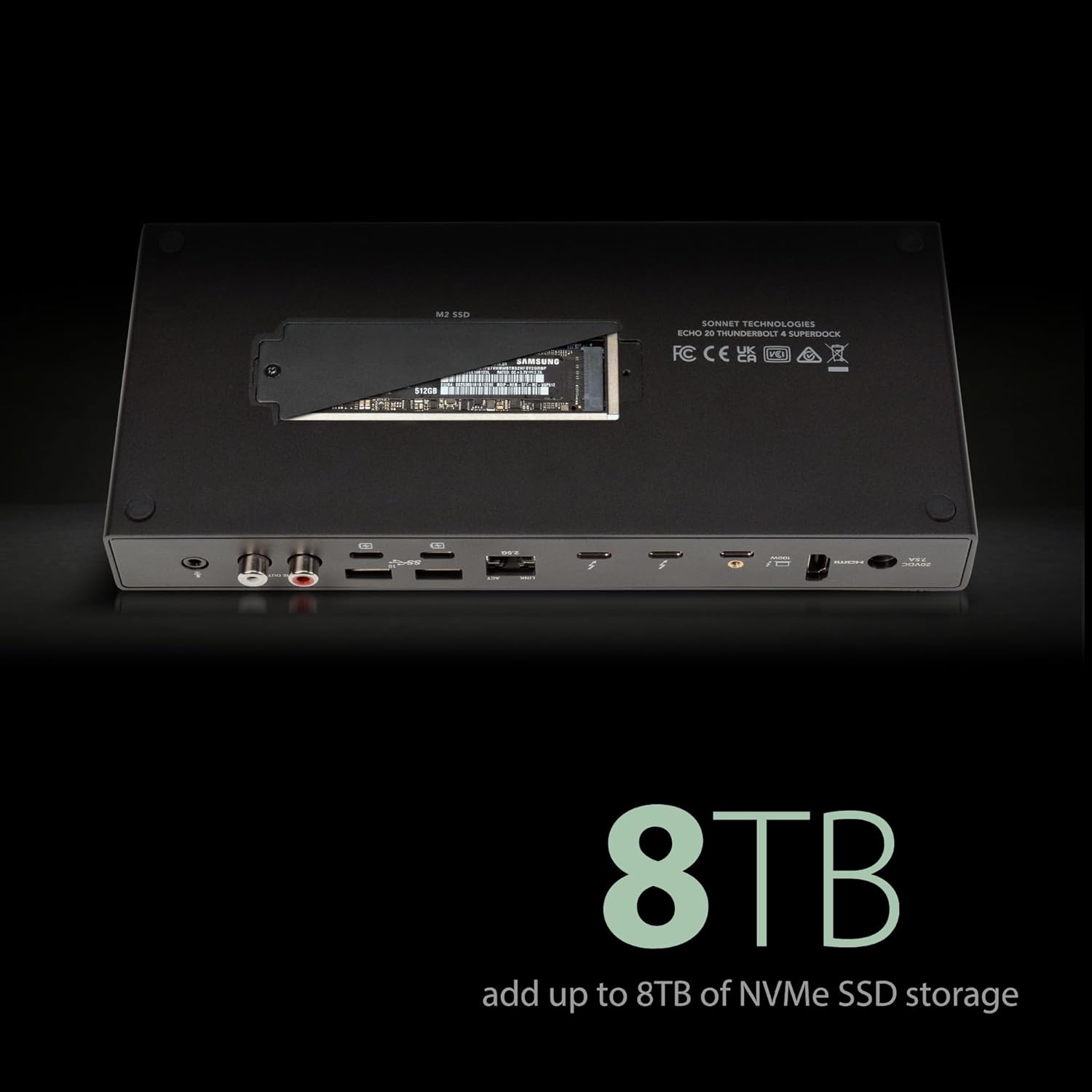
Figure 3.2.1: Location of the M.2 NVMe SSD slot on the bottom of the SuperDock.
- Перифериялык түзүлүштөрдү туташтыруу: Connect your desired peripherals such as external displays, USB devices, Ethernet cable, audio devices, and SD cards to the appropriate ports on the SuperDock.
4. Иштөө нускамалары
4.1 Күйгүзүү/өчүрүү
The Sonnet Echo 20 SuperDock does not have a dedicated power button. It powers on automatically when connected to a powered host computer and turns off when the host computer is shut down or disconnected.
4.2 Дисплейлерди туташтыруу
The SuperDock supports various display configurations:
- Жалгыз дисплей: Connect a single display to the HDMI 2.1 port for resolutions up to 8K @60Hz. Alternatively, use one of the Thunderbolt 4 peripheral ports with a compatible USB-C to DisplayPort/HDMI adapter for resolutions up to 8K @60Hz.
- Кош дисплейлер: Connect two displays to the Thunderbolt 4 peripheral ports using compatible USB-C to DisplayPort/HDMI adapters for resolutions up to 6K @60Hz each.

Figure 4.2.1: The SuperDock supports various high-resolution display configurations, including single 8K or dual 6K displays.
4.3 USB түзмөктөрүн колдонуу
Connect your USB-A and USB-C devices to the respective ports on the front and rear panels. The USB 3.2 Gen 2 ports offer data transfer speeds up to 10Gbps. The USB-C charging ports provide power for charging compatible devices.
4.4 Тармактык туташуу
Connect an Ethernet cable from your router or network switch to the 2.5 Gigabit Ethernet port on the rear panel for a high-speed wired network connection.

Figure 4.4.1: The 2.5 Gigabit Ethernet port provides a stable and fast network connection.
4.5 Аудио байланыштар
Use the 3.5mm combo audio jack on the front for headphones or headsets. The rear panel features a dedicated 3.5mm microphone jack and line-level R+L RCA audio output jacks for connecting to external speakers or audio systems.
4.6 SD картаны колдонуу
Insert your SD 4.0 compatible memory cards into the front SD card slot for fast data transfer. The slot supports various SD card formats, including SDHC and SDXC.

Figure 4.6.1: The SD 4.0 card slot supports high-speed data transfer from compatible memory cards.
4.7 Internal SSD Usage
After installing an M.2 NVMe SSD (as described in Section 3.2), the SSD will appear as an external drive on your computer. You may need to format the SSD before use, depending on your operating system and prior usage. This slot provides speeds up to 800MB/s, ideal for backups or additional storage.

Figure 4.7.1: The internal M.2 SSD slot allows for significant storage expansion.
5. Техникалык тейлөө
5.1 Тазалоо
To clean the SuperDock, disconnect it from power and all connected devices. Use a soft, dry, lint-free cloth. Do not use liquid cleaners or aerosol sprays, as these may damage the device.
5.2 Сактоо
When not in use for extended periods, store the SuperDock in a cool, dry place away from direct sunlight and extreme temperatures.
5.3 Микропрограмма жаңыртуулары
Periodically check the Sonnet Technologies website for any available firmware updates for your Echo 20 Thunderbolt 4 SuperDock. Firmware updates can improve performance, add features, or resolve compatibility issues.
6. Кыйынчылыктарды
If you encounter issues with your Sonnet Echo 20 Thunderbolt 4 SuperDock, refer to the following common troubleshooting steps:
| Көйгөй | Мүмкүн себеп | Чечим |
|---|---|---|
| Dock not recognized by computer. | Бош байланыш, шайкеш келбеген порт, драйвер көйгөйү. |
|
| Дисплейдин чыгышы жок. | Incorrect cable, display settings, incompatible resolution. |
|
| USB devices not working. | Power issue, faulty device, driver issue. |
|
| M.2 SSD табылган жок. | Improper installation, unformatted drive. |
|
If the problem persists after attempting these steps, please contact Sonnet Technologies customer support.
7. Техникалык шарттар
| Өзгөчөлүк | Деталь |
|---|---|
| Модель номери | ECHO-DK20-T4 |
| Interfaces | 3x Thunderbolt 4, 4x USB 3.2 Gen 2 Type-A, 4x USB 3.2 Gen 2 Type-C (charging), 1x HDMI 2.1, 1x RJ45 2.5 Gigabit Ethernet, 1x 3.5mm Combo Audio, 1x 3.5mm Microphone, 1x Line-level R+L RCA Audio Out, 1x SD 4.0 Card Slot, 1x M.2 NVMe SSD Slot |
| Дисплей колдоо | Single display up to 8K @60Hz, Dual displays up to 6K @60Hz |
| Power Delivery | Up to 100W to host computer |
| M.2 SSD колдоосу | Up to 8TB NVMe SSD (800MB/s transfer speed) |
| Шайкештик | Apple M-series Macs, Thunderbolt 3 Intel Macs, Thunderbolt 3/4 Windows computers, Thunderbolt 4/USB4 Chromebooks, M-series iPad Pro |
| Өлчөмдөрү (L x W x Y) | 9.63 x 4.25 x 1.38 дюйм (24.46 x 10.80 x 3.51 см) |
| Салмагы | 1.75 фунт (0.79 кг) |
| Өндүрүүчү | Sonnet Technologies |
8. Кепилдик жана колдоо
For warranty information and technical support, please visit the official Sonnet Technologies webсайтка же кардарларды тейлөө бөлүмүнө кайрылыңыз. Сатып алуу квитанциясын кепилдик дооматтары үчүн сатып алуунун далили катары сактаңыз.
Sonnet Technologies Webсайт: www.sonnettech.com


