1. Киришүү
Welcome to the user manual for your new THOMSON 50UA5S13 50-inch 4K UHD Smart Android TV. This manual provides essential information for setting up, operating, and maintaining your television. Please read it thoroughly to ensure optimal performance and safe use of your device.
Your THOMSON TV offers a stunning 4K UHD display, providing four times the detail of Full HD. It features the Android TV operating system, granting access to a vast array of applications, intelligent voice control via Google Assistant, and seamless content streaming with Chromecast built-in. Enjoy immersive audio with Dolby Audio technology and versatile content reception through its integrated triple tuner (DTT, cable, or satellite).

Сүрөт 1: Алдыңкы view of the THOMSON 50UA5S13 4K UHD Smart Android TV displaying various streaming app icons.
2. Коопсуздук маалыматы
Телевизоруңузду иштетүүдөн мурун, бардык коопсуздук көрсөтмөлөрүн кунт коюп окуп чыгыңыз. Бул колдонмону келечекте колдонуу үчүн сактап коюңуз.
- Электр камсыздоо: Сыналгы туура чоңдуктагы розеткага туташтырылганын текшериңизtagе буюмдун этикеткасында көрсөтүлгөндөй.
- Вентиляция: Вентиляция тешиктерин жаап албаңыз. Ашыкча ысып кетүүнүн алдын алуу үчүн телевизордун айланасында туура аба агымы үчүн жетиштүү орун калтырыңыз.
- Жайгашкан жери: Place the TV on a stable, level surface. Avoid placing it in direct sunlight, near heat sources, or in environments with high humidity or dust.
- Суу жана ным: Телевизорду жамгырга же нымга тийгизбеңиз. Сыналгыга ваза сыяктуу суюктуктар толтурулган нерселерди койбоңуз.
- Тазалоо: Тазалоодон мурун сыналгыдан ажыратыңыз. Жумшак, кургак чүпүрөктү колдонуңуз. Суюктук же аэрозолдук тазалоочу каражаттарды колдонбоңуз.
- Тейлөө: Телевизорду өзүңүз тейлөөгө аракет кылбаңыз. Бардык тейлөөлөрдү квалификациялуу тейлөө кызматкерлерине тапшырыңыз.
3. Пакеттин мазмуну
Пакетте бардык буюмдар бар экенин текшериңиз:
- THOMSON 50UA5S13 50-inch 4K UHD Smart Android TV
- Remote Control (Premium backlit)
- Электр кабели
- Телевизордук стенд (2 даана) жана бурамалар
- Кепилдик картасы
- Ыкчам баштоо колдонмосу (өзүнчө камтылышы мүмкүн)
4. Физикалык орнотуу
4.1 Телевизордун отургучун бекитүү
- Экранга зыян келтирбөө үчүн телевизорду кылдаттык менен жумшак, таза бетке ылдый караңыз.
- Тургуч бөлүктөрүн телевизордун астыңкы жагындагы тиешелүү уячаларга тууралаңыз.
- Берилген бурамалар менен стенддерди бекитиңиз. Алардын бекем кысылганын текшериңиз.
4.2 Дубалга орнотуу (кошумча)
This TV supports VESA wall mounts with a 200x200 pattern. A wall mount bracket is not included and must be purchased separately. Follow the instructions provided with your wall mount bracket for proper installation. Ensure the wall can support the weight of the TV and the mount.
4.3 Өлчөмдөрү жана жайгаштыруу
Consider the TV's dimensions for optimal placement in your viewаймак.

Figure 2: Diagram showing the dimensions of the THOMSON 50UA5S13 TV: 112 cm width, 69 cm height (with stand), 26 cm depth (with stand).
5. Байланыштар
Connect your TV to various external devices using the ports located on the back and side panels.

Figure 3: Illustration of the back panel ports including HDMI, LAN, USB, Audio Out, Satellite, Antenna, AV In, and Common Interface.
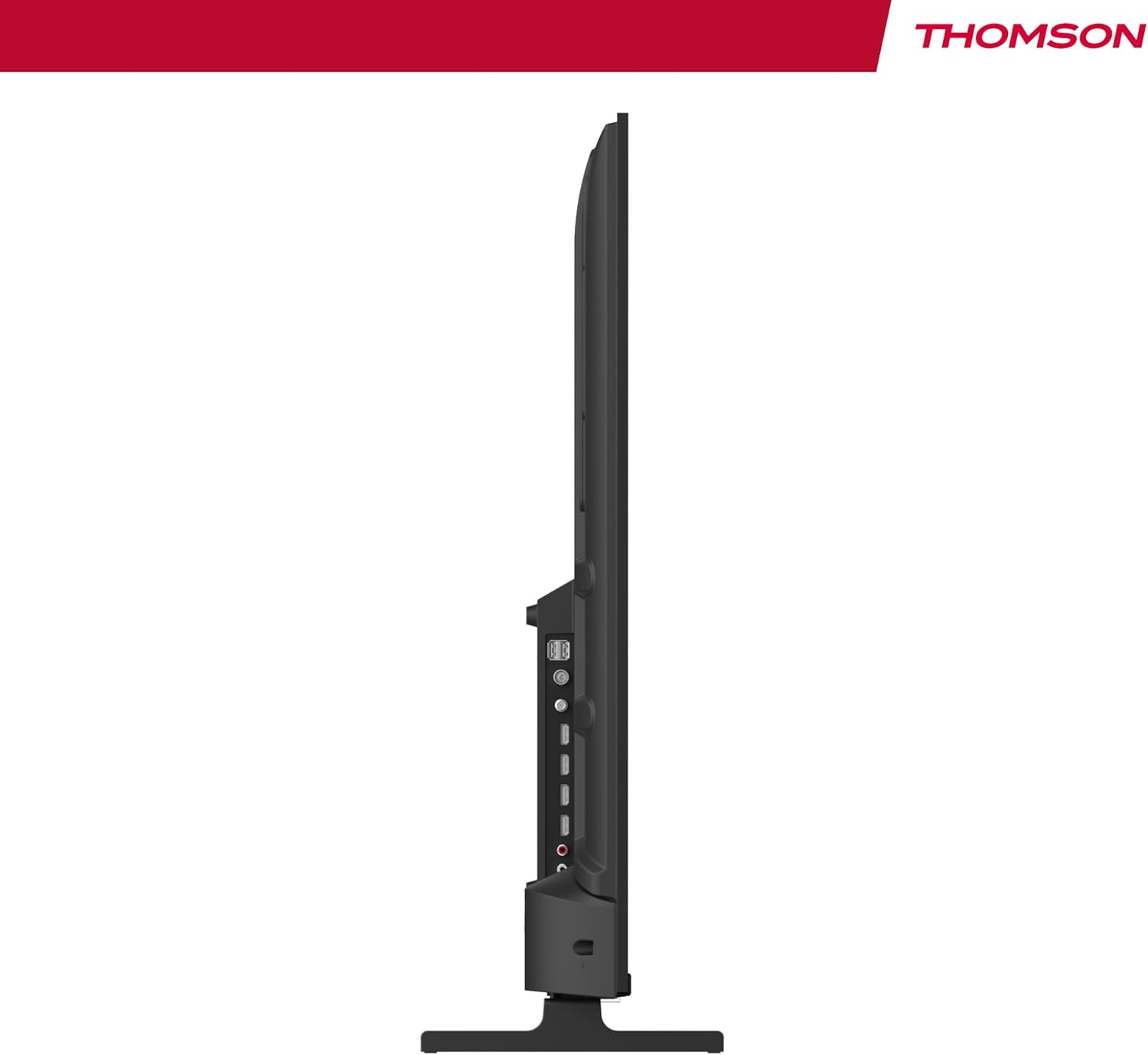
4-сүрөт: Side profile view of the TV, showing accessible ports on the side.
- Күч: Электр кабелин сыналгыга жана розеткага туташтырыңыз.
- Антенна/кабель/спутник: Use the appropriate input for your broadcast signal (DTT, cable, or satellite).
- HDMI (x4): Blu-ray ойноткучтары, оюн консолдору же приставкалар сыяктуу тышкы түзмөктөрдү туташтырыңыз.
- USB (x2): Медиа ойнотуу үчүн USB сактагыч түзмөктөрдү туташтырыңыз.
- LAN: Зымдуу интернет байланышы үчүн Ethernet кабелин туташтырыңыз.
- Audio Out (Digital Optical): Connect to an external sound system for enhanced audio.
- AV ичинде: Композиттик видео жана стерео аудио кабельдер аркылуу эски түзмөктөрдү туташтырыңыз.
- Common Interface (CI+): Insert a CI+ module and smart card for encrypted digital services.
- Bluetooth: Pair wireless headphones, speakers, or other compatible Bluetooth devices.
6. Initial Setup and Android TV
6.1 Биринчи жолу күйгүзүү
- After connecting all necessary cables, plug the TV into a power outlet.
- Пульттагы же сыналгыдагы кубат баскычын басыңыз.
- Каалаган тилиңизди тандоо үчүн экрандагы көрсөтмөлөрдү аткарыңыз.
6.2 Тармакты орнотуу
Connect your TV to the internet for access to Android TV features and apps.
- Wi-Fi: Тизмеден Wi-Fi тармагын тандап, сырсөздү киргизиңиз.
- Зымдуу (LAN): Эгер сиз Ethernet кабелин туташтырсаңыз, телевизор зымдуу туташууну автоматтык түрдө аныкташы керек.
6.3 Google Account Sign-in
Sign in with your Google Account to access the Google Play Store, Google Assistant, and personalized recommendations.
6.4 каналды сканерлөө
After network setup, the TV will guide you through scanning for available channels based on your antenna, cable, or satellite connection.
7. Сыналгыңызды иштетүү
7.1 Алыстан башкаруу
The premium backlit remote control allows easy navigation, even in low light. Key features include:
- Кубат баскычы: Телевизорду күйгүзөт же өчүрөт.
- Чабыттоо баскычтары: Меню багыттоо үчүн.
- Үн/канал баскычтары: Үндү тууралап, каналдарды өзгөртүңүз.
- Google Жардамчы баскычы: Үн менен башкарууну иштетет.
- Favorites Button: Quickly launch your designated favorite application.
- Колдонмонун кыска баскычтары: Популярдуу агымдык кызматтарга түз жетүү.
7.2 Android TV өзгөчөлүктөрү
Your THOMSON TV runs on Android TV, providing a smart and intuitive user experience.

Figure 5: The Android TV home screen displaying various applications and content recommendations.
- Тиркемелер: Access over 400,000 movies and TV shows from apps like Netflix, Prime Video, Disney+, YouTube, Spotify, and Apple TV.
- Google Жардамчысы: Use your voice to control the TV, search for content, get answers, and manage smart home devices. Simply press the Google Assistant button on your remote and speak your command.

Figure 6: A user interacting with the Google Assistant via the TV remote control.
- Chromecast камтылган: Wirelessly stream movies, music, and videos from compatible smartphones, tablets, or computers directly to your TV.
7.3 Сүрөт орнотуулары
Сиздин оптималдаштыруу viewөнүккөн сүрөт технологиялары менен тажрыйба:
- 4K UHD: Enjoy ultra-high definition resolution with 8 million pixels for incredibly detailed and precise images.
- HDR (High Dynamic Range) & Dolby Vision: These technologies enhance contrast, brightness, and color accuracy, providing a more realistic and vibrant picture.

Figure 7: Visual comparison illustrating the enhanced detail of 4K UHD (3840x2160) over Full HD (1920x1080).

Figure 8: Comparison showing the improved contrast and color depth with Dolby Vision compared to Standard Dynamic Range (SDR).
7.4 Үн орнотуулары
Experience dynamic and immersive audio:
- Dolby Audio / Dolby Atmos: Creates a rich, room-filling sound experience. (Note: Dolby Atmos requires compatible sound equipment).

Figure 9: Visual representation of Dolby Atmos sound creating an immersive audio experience around viewлүү.
8. Техникалык тейлөө
8.1 Телевизорду тазалоо
- Тазалоодон мурун дайыма сыналгыдан ажыратыңыз.
- Телевизордун экранын жана корпусун жумшак, түксүз чүпүрөк менен акырын сүртүңүз.
- өжөр белгилери үчүн, жеңил гampen the cloth with water or a specialized screen cleaner (ensure it's safe for TV screens) and wipe gently. Never spray liquid directly onto the screen.
8.2 Программалык камсыздоо жаңыртуулары
Your Android TV may receive periodic software updates to improve performance and add new features. Ensure your TV is connected to the internet to receive these updates. You can usually check for updates in the TV's settings menu.
9. Кыйынчылыктарды
Телевизоруңузда көйгөйлөргө туш болсоңуз, төмөнкү жалпы чечимдерди караңыз:
| Көйгөй | Мүмкүн чечим |
|---|---|
| Күч жок | Электр кабели сыналгыга жана розеткага бекем сайылганын текшериңиз. Башка розеткадан аракет кылып көрүңүз. |
| Сүрөт/үн жок | Ensure the correct input source is selected. Check cable connections to external devices. For sound, check volume levels and external audio system connections. |
| Пульт иштебей жатат | Check or replace the batteries. Ensure there are no obstructions between the remote and the TV's IR sensor. |
| Wi-Fi'га туташпай жатат | Wi-Fi роутериңиз күйүк жана иштеп жатканын текшериңиз. Wi-Fi сырсөзүн кайра киргизиңиз. Сыналгы менен роутерди өчүрүп-күйгүзүп көрүңүз. |
| Slow performance or apps | Close unused applications. Clear cache for problematic apps in settings. Restart the TV. Ensure a stable internet connection. |
10. Техникалык шарттар
Detailed technical specifications for the THOMSON 50UA5S13 TV:
| Өзгөчөлүк | Спецификация |
|---|---|
| Бренд | Томсон |
| Модель номери | 50UA5S13 |
| Screen Size | 50 дюйм (126 см) |
| Дисплей технологиясы | UHD (LED LCD) |
| Резолюция | 3840 x 2160 (4K UHD) |
| Жаңыртуу ылдамдыгы | 60 Гц |
| Өзгөчөлүктөр | Flat Screen, Android TV, Google Assistant, Chromecast built-in, HDR, Dolby Vision, Dolby Audio |
| Байланыш | Bluetooth, Wi-Fi, 4x HDMI, 2x USB, LAN, Digital Optical Audio Out, AV In, CI+ |
| тюнер | Triple Tuner (ATSC for Antenna, Cable, Satellite) |
| Үн конфигурациясы | 2.0 |
| Өлчөмдөрү (L x W x Y) | 111.1 x 26 x 69.2 см (стенд менен) |
| Салмагы | 8.5 килограмм |
| VESA дубалга орнотуу | 200x200 mm (mount not included) |
| Энергия эффективдүүлүгү классы | E |
For detailed energy information, please refer to the EU EPREL database:
EPREL продукт маалымат баракчасы

Figure 10: The EU Energy Label for the THOMSON 50UA5S13 TV, indicating its energy efficiency class and consumption.
11. Кепилдик жана колдоо
Your THOMSON 50UA5S13 TV comes with a full 3-year manufacturer's warranty, demonstrating its reliability and quality. For warranty claims or technical support, please refer to the warranty card included in your package or visit the official THOMSON support webсиздин аймак үчүн сайт. Кепилдикти текшерүү үчүн сатып алганыңыздын далилин сактаңыз.


