Introduction
Thank you for choosing the Eacam QW33 Smart Sports Watch. This manual provides essential information for setting up, operating, and maintaining your device. Please read it thoroughly to ensure optimal performance and longevity of your smartwatch.

Сүрөт 1: Алдыңкы view of the Eacam QW33 Smart Sports Watch.
Продукт өзгөчөлүктөрү
- Multiple Sports Modes & Customizable Dials: Offers a wide range of sports modes and over 100 watch faces for personalized style.
- Large High-Definition Display: Features a 1.28-inch IPS screen with 240x240 pixel resolution for clear and vibrant visuals.
- IP67 Суу жана чаңга туруктуулугу: Designed to withstand splashes, rain, and dust, ensuring durability in various environments.
- Bluetooth байланышы: Seamlessly connects to your smartphone via Bluetooth 5.1 for calls, messages, and notifications.
- Rotatable Knob: Allows for easy navigation through menus and interfaces without direct screen touch.
- Intelligent Health Monitoring: Includes 24-hour heart rate monitoring and sleep tracking.
- Multi-functional Support: Supports NFC access control and quick response code payment (after account binding).
Орнотуу колдонмосу
1. Аппаратты заряддоо
Before first use, fully charge your Eacam QW33 Smart Sports Watch. Use the provided magnetic charging cable. Align the magnetic pins of the charger with the charging contacts on the back of the watch. The watch will vibrate and display a charging indicator.
- Заряддоо режими: Magnetic suction.
- Батарея сыйымдуулугу: 260 мАч литий батареясы.
- Толук кубаттоо убактысы: Болжол менен 2 саат.

2-сүрөт: Арткы view of the watch showing the heart rate sensor and magnetic charging contacts.
2. Колдонмону орнотуу жана жупташтыруу
To unlock the full potential of your smartwatch, download the companion application on your smartphone. The app allows for data synchronization, watch face customization, and advanced settings.
- Scan the QR code in the watch's manual or search for the designated app in your phone's app store (Google Play Store for Android, Apple App Store for iOS).
- Тиркемени орнотуп, аны ачыңыз.
- Смартфонуңузда Bluetooth иштетилгенин текшериңиз.
- In the app, follow the on-screen instructions to search for and pair with your Eacam QW33. The watch's Bluetooth name will typically be 'QW33' or similar.
- Телефонуңузда жана саатыңызда жупташтыруу өтүнүчүн ырастаңыз.
Системанын шайкештиги: Android 5.0 жана андан жогору, iOS 10.0 жана андан жогору.
Иштөө нускамалары
1. Негизги навигация
The Eacam QW33 features a full touch screen and a rotatable knob for intuitive navigation.
- Сенсордук экран: Swipe left/right, up/down to navigate between screens and menus. Tap to select items.
- Rotatable Knob: Rotate the knob to scroll through lists or switch watch faces. Press the knob to return to the previous screen or confirm a selection.

Figure 3: The rotatable knob allows for easy interface switching.
2. Сааттын жүзүн ыңгайлаштыруу
The watch supports over 100 creative dials. You can switch them directly on the watch or through the companion app.
- Байкоодо: From the home screen, long-press the display to enter the watch face selection menu. Swipe left/right or rotate the knob to browse and tap to select.
- Колдонмо аркылуу: Open the companion app, navigate to the 'Dial Market' or 'Watch Face' section, and choose from the available options.

4-сүрөт: Мисamples of multiple creative dials available for the watch.
3. Чалууларды кабыл алуу жана кабыл алуу
With Bluetooth connected to your smartphone, you can manage calls directly from your watch.
- Чалууларды жасоо: Access the 'Dialer' or 'Contacts' function on the watch. You can dial numbers directly or select from synced contacts.
- Чалууларды кабыл алуу: Чалуу келгенде, саат чалуучунун идентификаторун көрсөтөт. Жооп берүү үчүн жашыл сөлөкөттү, ал эми четке кагуу үчүн кызыл сөлөкөттү басыңыз.

Figure 5: The watch displaying an incoming call, allowing direct interaction.
4. Спорт түрлөрү жана ден соолукту көзөмөлдөө
The watch supports various sports modes and continuous health tracking.
- Спорт режимдери: Navigate to the 'Exercise' or 'Sports' menu. Select your desired activity (e.g., running, cycling) to start tracking. The watch will record real-time data such as heart rate, duration, and calories burned.
- Жүрөктүн кагышын көзөмөлдөө: Саат жүрөктүн кагышын тынымсыз көзөмөлдөйт. View your current heart rate and historical data in the 'Heart Rate' section or the app.
- Уйкуга көз салуу: Уйку режимиңизди автоматтык түрдө көзөмөлдөө үчүн саатты уктаар алдында тагыныңыз. View sleep duration and quality analysis in the app.

Figure 6: The watch supports a variety of professional sports modes.
5. Аба ырайы
Once connected to the app, the watch can display real-time weather information.
- Swipe to the weather screen to view current conditions and forecasts for upcoming days.
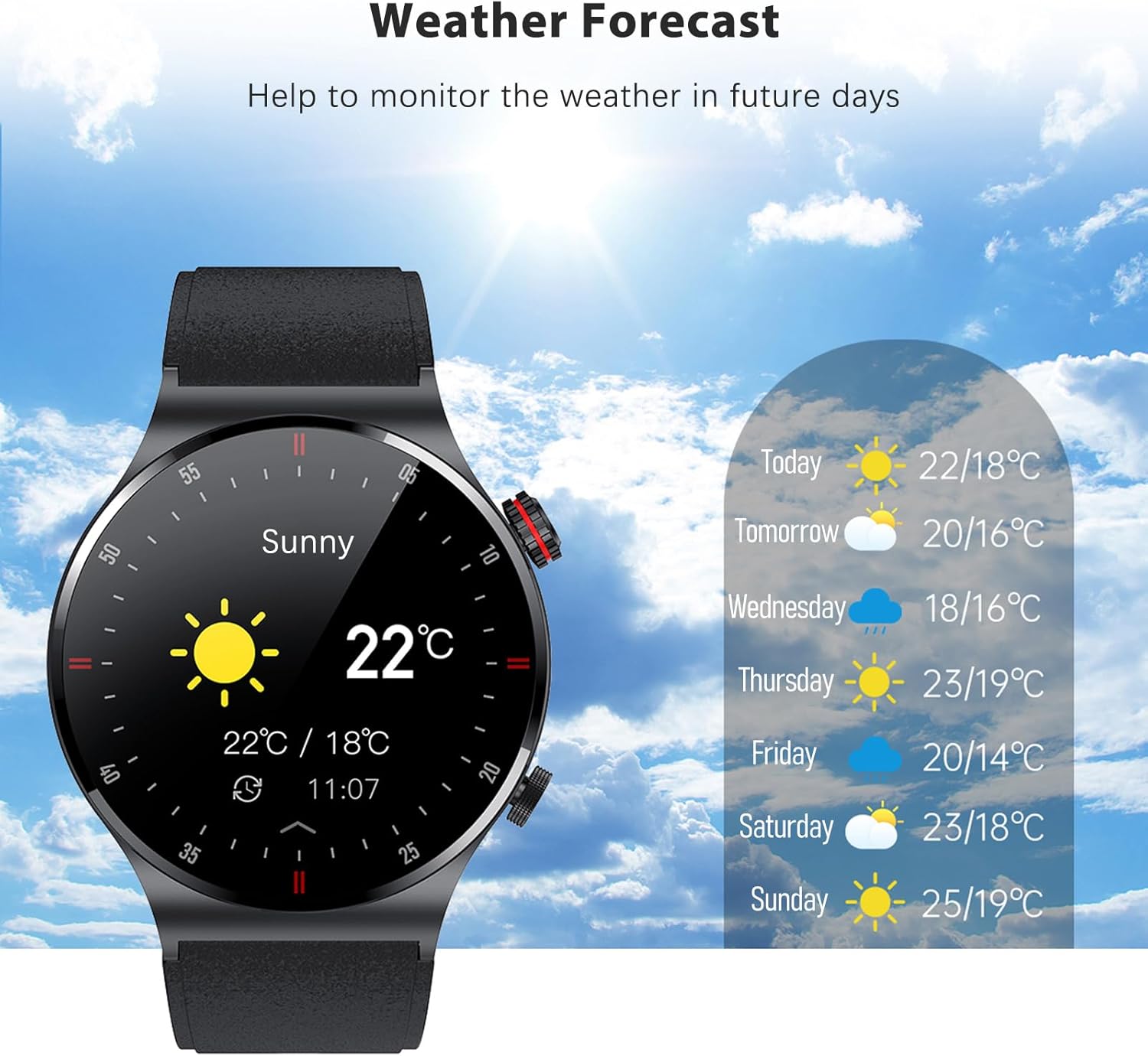
Figure 7: The watch displaying the weather forecast.
Техникалык тейлөө
1. Сууга туруктуулук (IP67)
The Eacam QW33 is IP67 water and dust resistant. This means it is protected against immersion in water up to 1 meter for up to 30 minutes, and is fully dust-tight.
- It is suitable for daily use, such as hand washing, rain, and splashes.
- Жок use the watch in hot water, saunas, or during deep diving.
- Сууга же жогорку басымдагы суу агымдарына узак убакытка дуушар болбоңуз.
- If the watch gets wet, wipe it dry with a soft cloth before charging or using buttons.

Figure 8: The watch is IP67 waterproof, protecting it from rain and sweat.
2. Тазалоо жана сактоо
- Саатты дайыма жумшак, кургак чүпүрөк менен тазалап туруңуз.
- Кежир тактар үчүн, бир аз d колдонуңузamp чүпүрөк, анан кылдат кургатуу.
- Avoid using harsh chemicals, cleaning solvents, or strong detergents, as they may damage the watch's finish or internal components.
- Саатты күн нурунан жана экстремалдык температурадан алыс салкын, кургак жерде сактаңыз.
3. Батареяга кам көрүү
- Батареяны бат-баттан толук түгөтүп коюудан алыс болуңуз.
- Батареянын деңгээли төмөн болгондо саатты заряддаңыз.
- If storing the watch for an extended period, charge it to about 50% to prevent battery degradation.
Проблемаларды чечүү
| Көйгөй | Мүмкүн себеп | Чечим |
|---|---|---|
| Саат күйбөйт | Аз батарея; Системанын бузулушу | Charge the watch for at least 30 minutes; Press and hold the power button for 10-15 seconds to force restart. |
| Телефон менен жупташтыруу мүмкүн эмес | Bluetooth өчүк; Колдонмо маселеси; Көрүү мүмкүн эмес | Ensure phone Bluetooth is on; Restart phone and watch; Reinstall the app; Reset watch to factory settings. |
| Туура эмес ден соолук маалыматы | Improper wearing; Sensor dirty | Ensure watch is snug on wrist; Clean the sensor on the back of the watch. |
| Батареянын иштөө мөөнөтү кыска | Frequent use of power-intensive features; High screen brightness | Reduce screen brightness; Limit continuous heart rate monitoring; Turn off unnecessary notifications. |
Техникалык шарттар
| Өзгөчөлүк | Деталь |
|---|---|
| Продукциянын өлчөмдөрү | 45.7 x 45.7 x 12 мм |
| Продукт Салмагы | 58 грамм |
| Дисплей | 1.28 inch IPS screen, 240 x 240px |
| Сенсордук экран | Толук сенсордук экран |
| CPU | GR5515 |
| Күтүү убактысы | 15 күн |
| Жумуш убактысы | 5-7 күн |
| Батарея | 260 мАч литий батареясы |
| Заряддоо режими | Магниттик сору |
| Bluetooth | BLE 5.1 |
| Суу өткөрбөйт рейтинги | IP67 |
| Системанын шайкештиги | Android 5.0+, iOS 10.0+ |
| Жеткиликтүү тилдер | Simplified Chinese, English, Italian, Japanese, German, Spanish, French, Russian, Portuguese, Polish, Turkish, Greek, Hebrew, Czech, Hungarian, Arabic |
Кепилдик жана колдоо
Кепилдик маалымат
This product is covered by a standard manufacturer's warranty. Please refer to the warranty card included in your package for specific terms and conditions. Keep your purchase receipt as proof of purchase for warranty claims.
Кардарларды колдоо
For any questions, technical assistance, or warranty inquiries, please contact Eacam customer support through the contact information provided on the product packaging or the official Eacam website. Please have your product model number (QW33) and purchase details ready when contacting support.


