1. Киришүү
Welcome to the user manual for your new DOVIICO Military Smart Watch HK87. This manual provides essential information for setting up, operating, and maintaining your device. Please read it thoroughly to ensure optimal performance and longevity of your smartwatch.
The DOVIICO HK87 is designed for durability and functionality, featuring IP68 waterproofing, shock resistance, and dust protection, making it suitable for various outdoor activities. It offers comprehensive health monitoring, multiple sports modes, and convenient communication features.
2. Кутуда эмне бар
Кутучаны ачканда, төмөндө көрсөтүлгөн бардык буюмдар бар экенин текшериңиз:
- 1 x DOVIICO Smart Watch HK87
- 1 х магниттик заряддоо кабели
- 1 х Колдонуучунун колдонмосу (бул документ)
3. Продукт бүтүп калдыview
Familiarize yourself with the components of your DOVIICO Smart Watch HK87.
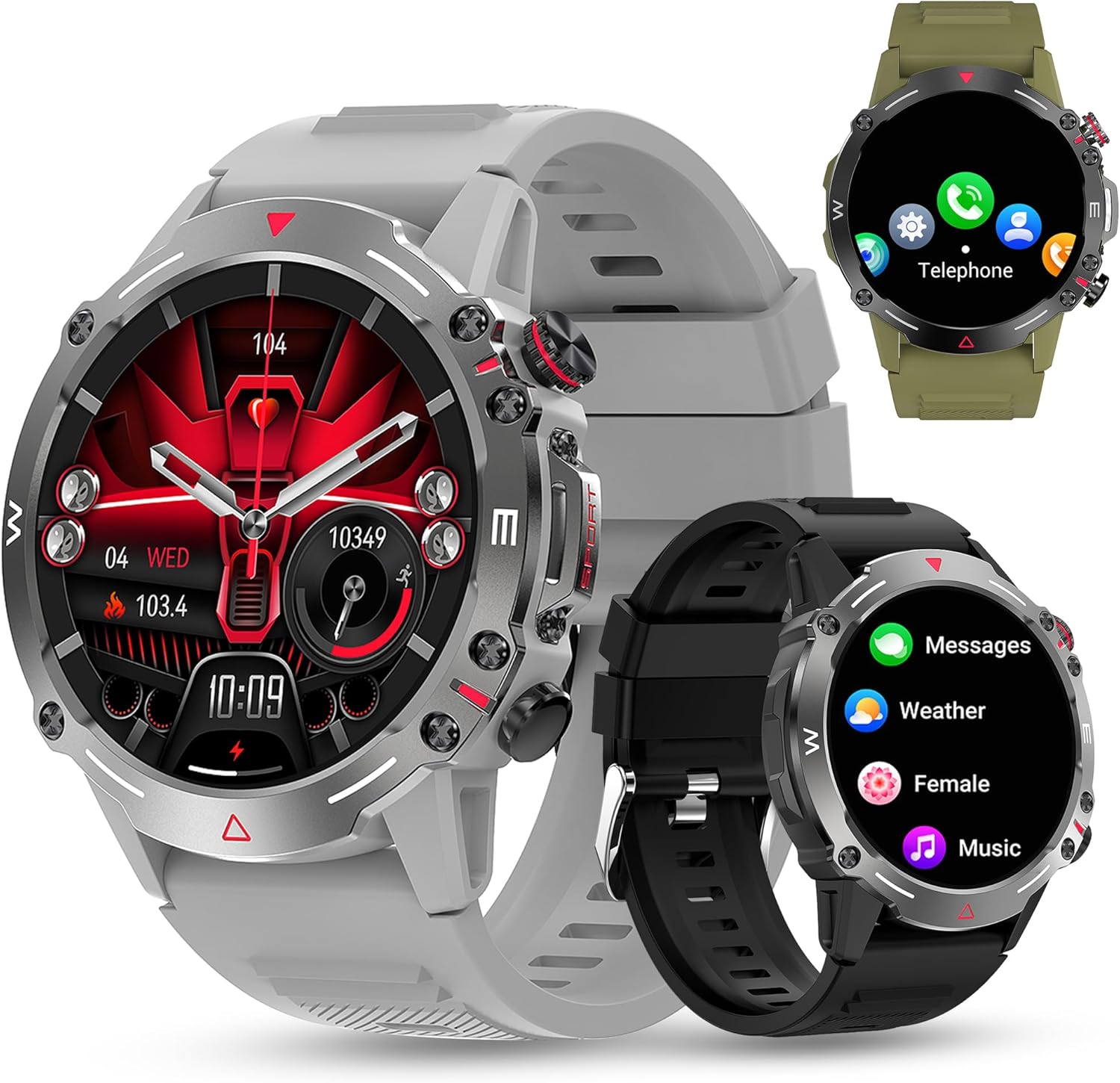
3.1-сүрөт: Фронт view of the DOVIICO Smart Watch HK87, illustrating its robust design and various display options.

3.2-сүрөт: Деталдаштырылган view of the 1.43-inch AMOLED HD screen and the integrated heart rate sensor located on the watch's underside.
Негизги компоненттер:
- 1.43" AMOLED HD Display: High-resolution touch screen for clear visuals and easy navigation.
- Каптал баскычтары: For power, menu access, and quick functions.
- Жүрөктүн кагышынын сенсору: Жүрөктүн кагышын үзгүлтүксүз көзөмөлдөө үчүн арткы бетинде жайгашкан.
- Заряддоо байланыштары: Арткы бетинде кубаттоочу кабелди туташтыруу үчүн магниттик чекиттер бар.
- Speaker & Microphone: For Bluetooth calls and AI voice assistant.
4. Орнотуу
4.1 Акылдуу саатты кубаттоо
Before initial use, fully charge your smartwatch.
- Connect the USB end of the magnetic charging cable to a power adapter (not included) or a computer's USB port.
- Кубаттоочу кабелдин магниттик учун сааттын арткы бетиндеги кубаттоочу контакттар менен тегиздеңиз. Магниттер аны ордуна бекитет.
- Сааттын дисплейи заряддын абалын көрсөтөт. Толук кубаттоо адатта болжол менен 2 саатты талап кылат.

4.1-сүрөт: The watch display showing the charging indicator and battery life expectations.
4.2 Колдонмону орнотуу жана жупташтыруу
To unlock the full functionality of your smartwatch, you need to install the companion app on your smartphone and pair the devices. The watch is compatible with Android 4.4 and above, and iOS 8.4 and above.
- Колдонмону жүктөп алыңыз: Scan the QR code provided in the watch's quick start guide or search for the designated app (e.g., "FitCloudPro" or similar, check packaging for exact name) in your phone's app store (Google Play Store for Android, Apple App Store for iOS).
- Bluetooth иштетүү: Смартфонуңузда Bluetooth иштетилгенин текшериңиз.
- Колдонмону ачуу: Launch the installed app and follow the on-screen instructions to create an account or log in.
- Түзмөк кошуу: Within the app, navigate to the "Device" or "Add Device" section. The app will search for available smartwatches.
- Саатыңызды тандаңыз: Select "HK87" or the corresponding device name from the list. Confirm the pairing request on both your phone and the watch if prompted.
- Уруксаттарды берүү: Grant all necessary permissions requested by the app (e.g., location, notifications, contacts) to ensure full functionality.
Маанилүү: If you experience pairing issues, ensure the watch is sufficiently charged and not paired with another device. Restarting both the watch and your phone can often resolve connectivity problems.
5. Иштөө нускамалары
5.1 Негизги навигация
- Күйгүзүү/өчүрүү: Күйгүзүү же өчүрүү үчүн капталдагы баскычты басып, кармап туруңуз.
- Экранды ойготуу: Raise your wrist or press the side button to wake the screen.
- Өйдө/Төмөн/Солго/Оңго серпүү: Менюлар, эскертмелер жана тез жөндөөлөр аркылуу өтүңүз.
- таптаңыз: Бир нерсени тандаңыз же аракетти ырастаңыз.
5.2 Bluetooth чалуулары жана эскертмелери
Once paired, your smartwatch can handle calls and display notifications.
- Чалууларга жооп берүү/терүү: Use the watch's dial pad or contact list to make calls. When a call comes in, you can answer or reject it directly from the watch.
- Билдирүү эскертмелери: Receive alerts for SMS, WhatsApp, Instagram, Facebook, and other app messages. Swipe down from the main screen to view акыркы эскертмелер.
5.3 Спорт режимдери
The watch offers over 100 sports modes to track your physical activity.

5.1-сүрөт: A visual representation of the diverse sports modes available on the smartwatch.
- Саатыңыздагы "Спорт" менюсуна өтүңүз.
- Select your desired activity (e.g., Running, Cycling, Hiking).
- Tap to start tracking. The watch will record data such as steps, distance, calories burned, and heart rate.
- Tap again to pause or hold to end the activity.
5.4 Ден соолуктун мониторинги
The DOVIICO HK87 provides continuous monitoring of key health metrics.
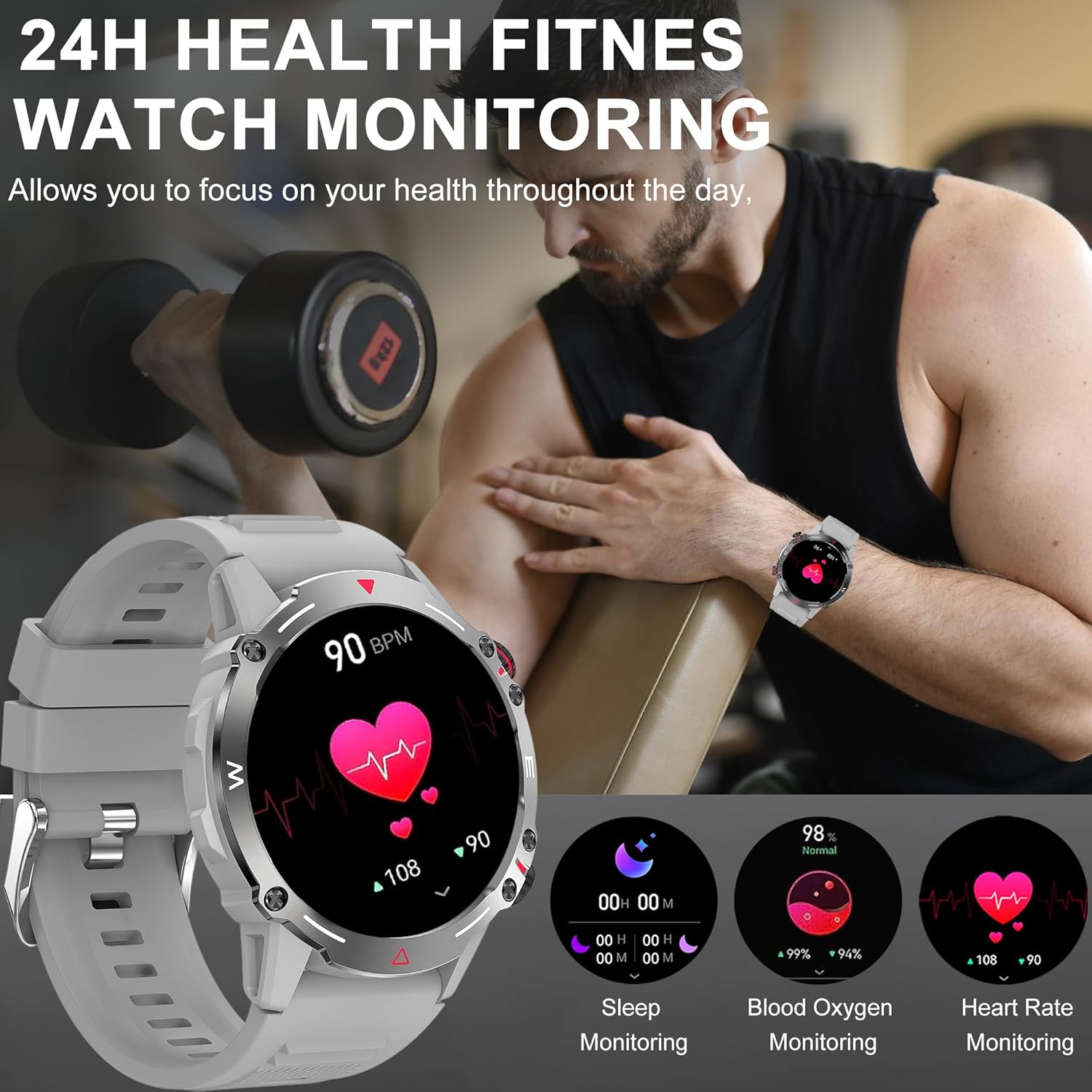
5.2-сүрөт: The watch interface showing real-time health data, including heart rate, blood oxygen, and sleep.
- Жүрөктүн кагышын көзөмөлдөө: Саат жүрөктүн кагышын тынымсыз көзөмөлдөп турат. View current and historical data in the app.
- Кандагы кычкылтектин мониторинги: Сиздин кандын кычкылтек каныккандыгын өлчөө.
- Уйкунун мониторинги: Automatically tracks your sleep patterns (deep sleep, light sleep, wake time). Review Колдонмодо уйкунун деталдуу анализи.
- Кан басымынын мониторинги: Provides an estimate of blood pressure. Эскертүү: This is not a medical device. Measurement data is for reference only and should not be used for medical diagnosis or treatment.

5.3-сүрөт: The sleep monitoring screen on the smartwatch, providing insights into sleep duration and quality.
5.5 Кошумча функциялар
- AI үн жардамчысы: Activate the voice assistant for hands-free control.
- NFC: For compatible NFC functions (e.g., access control, check local availability and setup).
- Музыкалык башкаруу: Смартфонуңузда музыканы ойнотууну көзөмөлдөңүз (ойнотуу, тындыруу, тректерди өткөрүп жиберүү).
- Алыскы камера: Саатыңызды телефонуңуздун камерасы үчүн алыстан жапкыч катары колдонуңуз.
- Аба ырайы: Get real-time weather updates (requires app synchronization).
- Ойготкучтар жана эскертүүлөр: Set alarms, sedentary reminders, and drink water reminders through the app.
- Аялдын физиологиялык цикли: Track and monitor physiological cycles (requires setup in the app).
6. Ыңгайлаштыруу
6.1 Сааттын беттерин өзгөртүү
Саатыңызды ар кандай саат беттери менен жекелештириңиз.
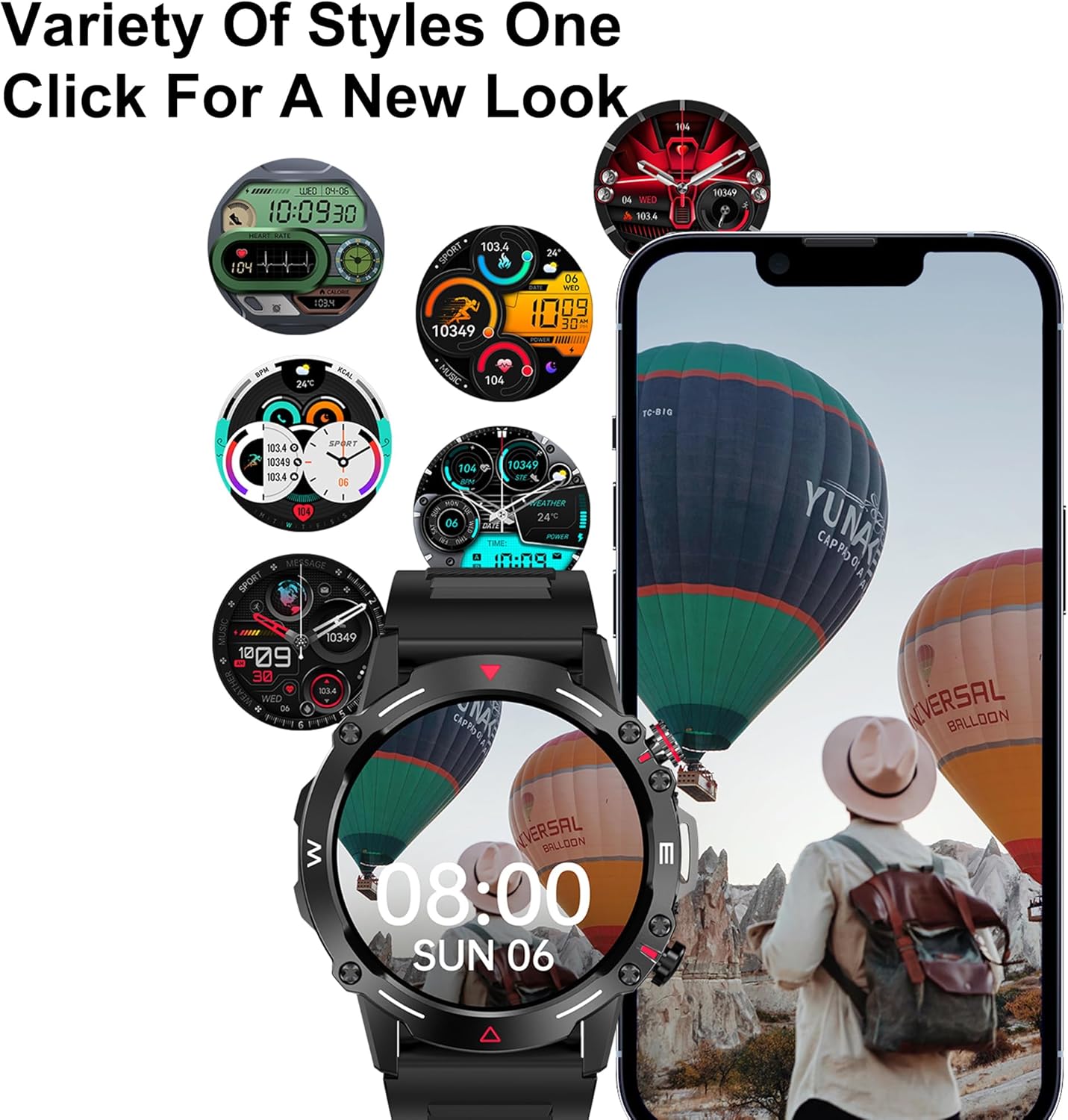
6.1-сүрөт: A selection of customizable watch faces available for the smartwatch.
- Саат боюнча: Press and hold the main screen, then swipe left or right to browse pre-installed watch faces. Tap to select.
- Колдонмо аркылуу: Open the companion app, navigate to the "Dial Market" or "Watch Faces" section. You can download and apply additional watch faces, and even customize some with your own photos.
7. Батарея жана заряддоо
The DOVIICO HK87 is equipped with a 410mAh battery, offering extended usage.
- Батареянын иштөө мөөнөтү: Expect 7-10 days of typical daily use and up to 45 days of standby time.
- Заряддоо убактысы: Толук кубаттоо үчүн болжол менен 2 саат.
- Заряддоо ыкмасы: Use the provided magnetic charging cable. Ensure proper alignment of the charging contacts.
To maximize battery life, consider adjusting screen brightness, reducing notification frequency, and disabling features not actively in use.
8. Техникалык тейлөө
8.1 Гидроизоляция (IP68)
The DOVIICO HK87 has an IP68 waterproof rating, meaning it is resistant to dust and can withstand immersion in water up to 1.5 meters for up to 30 minutes.
- Ал күнүмдүк колдонууга ылайыктуу, мисалы, кол жуу, жамгыр, тайыз сууда сүзүү.
- Avoid hot water, saunas, or diving, as steam and high pressure can compromise the seal.
- Суу астында баскычтарды иштетпеңиз.
- After exposure to water, wipe the watch dry with a soft cloth.
8.2 Тазалоо
- Regularly clean your watch and strap to prevent skin irritation and maintain appearance.
- Wipe the screen and body with a soft, damp, түксүз кездеме.
- Боону кийээрдин алдында жумшак самын менен сууну колдонуңуз, андан кийин жакшылап жууп, толугу менен кургатып алыңыз.
- Катуу химиялык заттарды же абразивдүү материалдарды колдонуудан алыс болуңуз.
9. Кыйынчылыктарды
| Көйгөй | Мүмкүн чечим |
|---|---|
| Саат күйбөй жатат. | Сааттын толук заряддалганын текшериңиз. Кубаттагычты кеминде 10 мүнөткө туташтырыңыз. |
| Смартфон менен жупташтыруу мүмкүн эмес. |
|
| Билдирмелер алынган жок. |
|
| Туура эмес ден соолук маалыматы. |
|
| Батареянын иштөө мөөнөтү кыска. |
|
10. Техникалык шарттар
Detailed technical specifications for the DOVIICO Military Smart Watch HK87.

10.1-сүрөт: Physical dimensions of the DOVIICO Smart Watch HK87.
| Өзгөчөлүк | Деталь |
|---|---|
| Модель номери | HK87 |
| Дисплей | 1.43-inch AMOLED HD Touch Screen, 466*466 Resolution |
| Өлчөмдөр | 1.93 x 1.93 x 0.47 дюйм (диаметри 49 мм, калыңдыгы 11.5 мм) |
| Элемент Салмагы | 5 унция |
| Батарея сыйымдуулугу | 410mAh литий-ион |
| Батареянын иштөө мөөнөтү | 7-10 күн (адатта колдонуу), 45 күн (күтүү режиминде) |
| Заряддоо убактысы | Болжол менен 2 саат |
| Байланыш | Bluetooth 5.0 |
| Суу өткөрбөйт рейтинги | IP68 |
| Шайкештик | Android 4.4 жана андан жогору, iOS 8.4 жана андан жогору |
| Сенсорлор | Жүрөктүн кагышы, кандын кычкылтек менен ... |
| Өзгөчөлүктөр | Bluetooth Call, AI Voice Control, NFC, Alipay offline payment, Custom Dials, 100+ Sports Modes, Weather Forecast, Music Control, Remote Camera, Female Physiological Cycle Tracking |
11. Коопсуздук маалыматы
- Саатты ажыратууга же өзгөртүүгө аракет кылбаңыз.
- Саатты экстремалдык температурадан жана түз күндүн нурунан алыс кармаңыз.
- Avoid exposing the watch to strong magnetic fields.
- This device is not a medical instrument. Health data is for reference only and should not be used for medical diagnosis or treatment. Consult a medical professional for health concerns.
- Балдар жетпеген жерде сактаңыз.
12. Кепилдик жана колдоо
DOVIICO products are designed for quality and reliability. For warranty information, please refer to the warranty card included with your purchase or contact DOVIICO customer support.
If you encounter any issues or have questions regarding your DOVIICO Smart Watch HK87, please contact our customer support team.
- Кардарларды колдоо: Refer to your product packaging or the DOVIICO official webбайланыш маалыматы үчүн сайт.
- Онлайн ресурстар: Visit the DOVIICO webКөп берилүүчү суроолор, жаңыртылган окуу куралдары жана программалык камсыздоону жүктөө үчүн сайт.


