1. Коопсуздук боюнча маанилүү маалымат
Please read this manual carefully before using the AENO Infrared Heater. Failure to follow these instructions may result in electric shock, fire, or serious injury.
- Тазалоодон же кандайдыр бир техникалык тейлөөдөн мурун жылыткычтын розеткадан суурулганын текшериңиз.
- Жылыткычты шнур же вилка бузулганда иштетпеңиз.
- Keep flammable materials (furniture, curtains, bedding, paper, clothes, etc.) at least 3 feet (0.9 meters) from the front, sides, and rear of the heater.
- This heater is for indoor use only. Do not use it outdoors or in wet locations.
- Ванна бөлмөлөрүндө, кир жуучу жайларда же суу менен байланышып калышы мүмкүн болгон ушул сыяктуу имараттын ичинде колдонбоңуз.
- Вентиляциянын же соргучтун тешиктерине бөтөн нерселерди киргизбеңиз же кирүүгө жол бербеңиз, анткени бул электр шокуна же өрткө алып келиши мүмкүн же жылыткычты бузушу мүмкүн.
- Эч кандай түрдө аба кирүүчүлөрдү же чыгарууну тоспоңуз. Тешиктери бүтөлүп калышы мүмкүн болгон керебет сыяктуу жумшак беттерде колдонбоңуз.
- Supervise children and pets when the heater is in operation.
2. Продукт бүтүп калдыview
The AENO Infrared Heater is a modern, energy-efficient heating solution designed for indoor spaces. Featuring a slim, elegant glass panel, it provides comfortable infrared heat without drying the air or burning oxygen. It can be used as a freestanding unit or wall-mounted, offering versatile placement options. The heater is equipped with smart Wi-Fi technology for convenient control via a mobile application and has been recognized as a Reddot Winner 2023 for its innovative design.

This image displays the AENO Infrared Heater in its freestanding configuration, highlighting its sleek black panel design. A close-up inset shows the digital control panel on the side of the heater, while a smartphone in the foreground illustrates the user-friendly AENO mobile application for remote control.

This image showcases the AENO Infrared Heater's "Invisible design," featuring one unit freestanding on the left and another mounted vertically on a wall on the right. The design is recognized with the Reddot Winner 2023 award, emphasizing its aesthetic integration into modern interiors.
3. Орнотуу жана орнотуу
The AENO Infrared Heater offers two convenient installation options: freestanding with included legs or wall-mounted using the provided brackets.
3.1 Freestanding Installation
- Жылыткычты жана бардык кошумча жабдууларды таңгактан этияттык менен алып салыңыз.
- Attach the two provided legs to the bottom of the heater using the designated screws. No extra tools are typically required for this step.
- Place the heater on a stable, level surface, ensuring adequate clearance from walls and other objects as specified in the safety guidelines.
3.2 Дубалга монтаждоо
- Identify a suitable wall location, ensuring it is a sturdy surface capable of supporting the heater's weight (approx. 19.6 lbs).
- Use the mounting stencil (if provided) to mark the drilling points for the wall brackets.
- Drill holes and insert appropriate wall anchors (if necessary, depending on wall material).
- Securely attach the two mounting brackets to the wall.
- Carefully hang the heater onto the mounted brackets, ensuring it is securely seated.

This image provides a visual guide for the easy unpacking and assembly of the AENO Infrared Heater. It details the included components such as mounting brackets, legs, and a quick start guide, and illustrates the straightforward process of attaching the legs for freestanding use or mounting the heater on a wall.

A detailed diagram illustrating the compact dimensions of the AENO Infrared Heater: 0.43 inches in depth, 14.37 inches in width, and 39.37 inches in height. The image also notes the use of premium materials like glass and aluminum, and its origin as "Made in Europe," emphasizing its stylish and innovative design.
4. Иштөө нускамалары
The AENO Infrared Heater can be operated via its integrated control panel or through the AENO mobile application.
4.1 Кол менен башкаруу
The control panel is located on the side of the heater and features an LED display and touch buttons.
- Кубат баскычы: Жылыткычты күйгүзүү же өчүрүү үчүн басыңыз.
- Температураны жөндөө: Use the '+' and '-' buttons to set your desired temperature. The maximum temperature setting is 248°F.
- Smart Mode: Activate or deactivate smart mode for optimized heating.

This image details the LED screen and control buttons on the AENO Infrared Heater, providing a quick reference for setting the heater's functions, including power, temperature, and smart mode.
4.2 Optimal Heating Placement
For optimal heating performance, position the infrared heater to directly face the area or individuals you wish to warm. Infrared heat warms objects and people directly, rather than heating the air.

This visual guide illustrates the optimal placement for the AENO Infrared Heater to achieve effective heating coverage up to 215 sq. ft. It shows correct placements (marked with green checkmarks) where the heater directly warms individuals, and incorrect placements (marked with red crosses) where the heat is obstructed or misdirected.
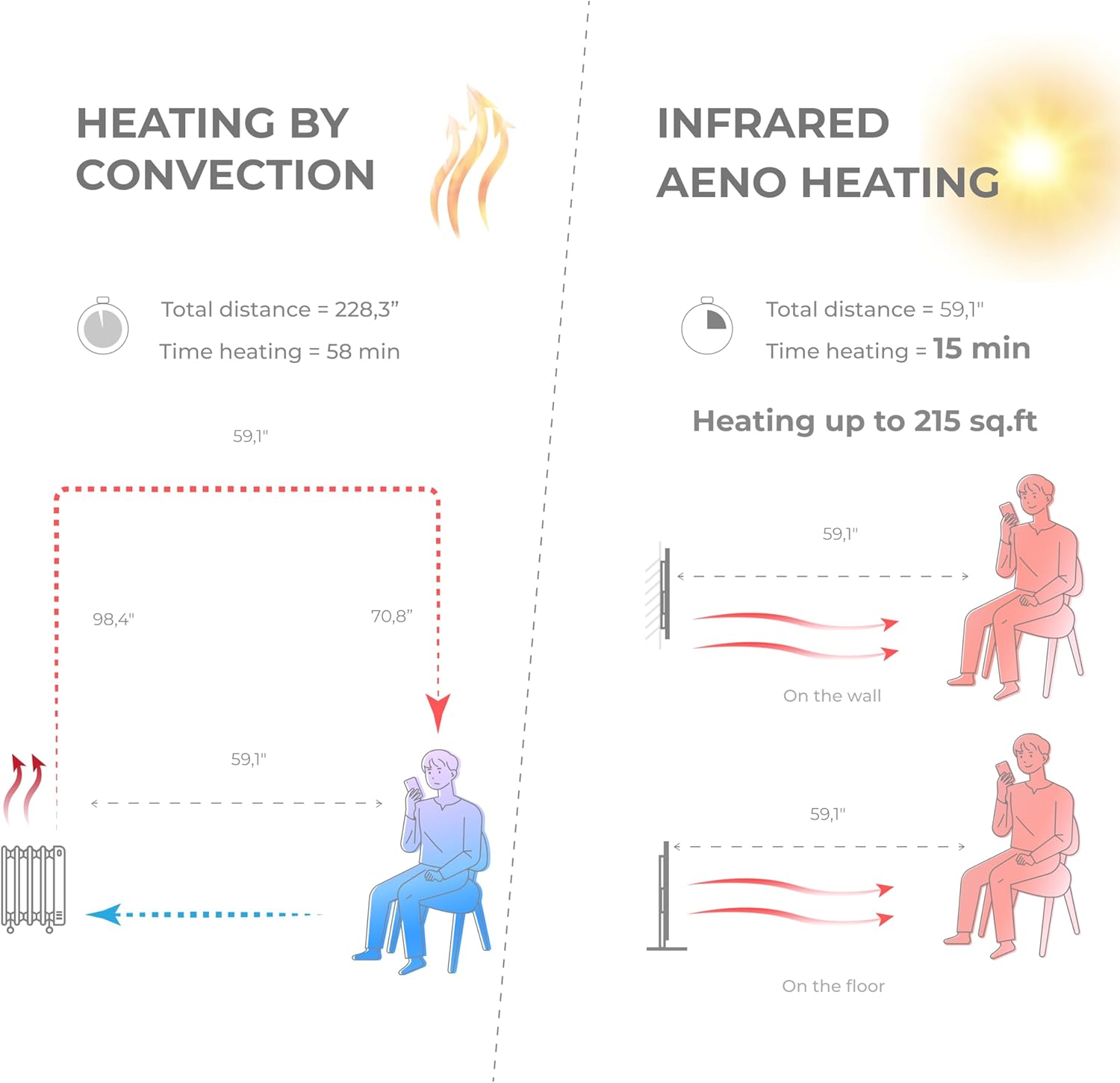
A comparative diagram illustrating the efficiency of AENO Infrared Heating versus traditional convection heating. It shows that infrared heating warms a space up to 215 sq. ft. in 15 minutes, compared to 58 minutes for convection heating, by directly warming objects and people rather than the air.

This image emphasizes the health and comfort benefits of the AENO Infrared Heater. It depicts a serene environment with a person meditating, illustrating that the heater is odorless, silent, does not blow air or cause pollution, and importantly, does not dry out the air or burn oxygen, contributing to a healthier indoor climate.

This image highlights the silent operation of the AENO Infrared Heater, stating "Totally silent 0 dB." It shows the heater in a quiet room setting, reinforcing that it provides warmth without any operational noise, making it ideal for bedrooms, offices, or any space requiring tranquility.
5. AENO App Control
Unlock the full potential of your AENO Infrared Heater by connecting it to the AENO mobile application.
5.1 Колдонмону жүктөп алуу
- Издөө "AENO" in the Apple App Store (for iOS devices) or Google Play Store (for Android devices).
- Download and install the AENO application on your smartphone.
5.2 Wi-Fiга туташуу
- Жылыткычыңыз розеткага сайылып, күйгүзүлгөнүн текшериңиз.
- Open the AENO app and follow the on-screen instructions to add a new device.
- Select your AENO Infrared Heater from the list of discoverable devices.
- Enter your Wi-Fi network credentials when prompted.
- Once connected, the heater's Wi-Fi indicator will confirm successful pairing.
5.3 Колдонмонун өзгөчөлүктөрү
The AENO app provides comprehensive control and monitoring capabilities:
- Алыстан күйгүзүү/өчүрүү: Жылыткычты каалаган жерден күйгүзүңүз же өчүрүңүз.
- Температураны жөндөө: Precisely adjust the target room temperature.
- Пландаштыруу: Create custom heating schedules and timers to automate operation.
- Энергияны керектөө мониторинги: Track and analyze your heater's electricity usage to optimize energy savings.
- Multi-Heater Control: Manage multiple AENO smart devices from a single app.
- Smart Home интеграциясы: Compatible with popular smart home ecosystems like Amazon Alexa, Google Home, and Apple Siri.

This image demonstrates the advanced control features of the AENO Infrared Heater via its smartphone application. It shows how users can remotely turn the heater on/off, adjust the panel temperature between 140-248°F, and monitor and analyze electricity consumption from anywhere in the world. Links to download the app are also visible.

This image illustrates the remote control capabilities of the AENO App, allowing users to switch the heater on/off, set room temperature, create heating schedules, manage multiple heaters, control energy consumption, and set up devices within the AENO ecosystem.

This image highlights the energy efficiency of the AENO Infrared Heater, suggesting it can reduce heating costs by up to 50%. It promotes the concept of spot heating as an effective replacement for central heating systems, keeping specific areas warm with adaptive panel temperature.
6. Техникалык тейлөө
Regular cleaning and proper care will ensure the longevity and efficient operation of your AENO Infrared Heater.
- Тазалоо: Тазалоодон мурун, жылыткычты ар дайым розеткадан сууруп, толугу менен муздаганча күтүңүз. Жумшак,amp cloth to wipe the exterior surfaces. Do not use abrasive cleaners, waxes, or polishes.
- Сактагыч: If storing the heater for an extended period, unplug it and store it in a cool, dry place, preferably in its original packaging.
- Колдонуучу тейлей турган бөлүктөр жок: The heater contains no user-serviceable parts. Do not attempt to disassemble or repair the unit yourself. Refer all servicing to qualified service personnel.
7. Кыйынчылыктарды
If you experience issues with your AENO Infrared Heater, please consult the following common troubleshooting steps:
- Жылыткыч күйбөйт:
- Электр шнурунун иштеген электр розеткасына бекем сайылганын текшериңиз.
- Автоматтык өчүргүч өчүп калганын текшериңиз.
- Verify the power button on the heater or in the app is pressed.
- Жылыткыч жетиштүү жылуулук чыгарбайт:
- Confirm the temperature setting is higher than the current room temperature.
- Ensure the heater is placed optimally, facing the desired heating area, and not obstructed.
- Check the room size; the heater is designed for areas up to 215 sq. ft.
- Колдонмо туташуу көйгөйлөрү:
- Ensure your smartphone is connected to a 2.4GHz Wi-Fi network (5GHz networks are not supported by some smart devices).
- Restart your Wi-Fi router and the heater.
- Жылыткыч Wi-Fi роутериңиздин иштөө диапазонунда экенин текшериңиз.
- Try re-pairing the heater with the app.
- адаттан тыш үндөр же жыттар:
- The AENO Infrared Heater operates silently. If you hear unusual noises, unplug the unit immediately and contact customer support.
- A slight odor may be present during the first few uses; this is normal and should dissipate quickly. If a strong or burning odor persists, unplug the unit and contact support.
If the problem persists after attempting these steps, please contact AENO customer support for further assistance.
8. Техникалык шарттар
| Өзгөчөлүк | Деталь |
|---|---|
| Бренд | AENO |
| Модель номери | AGH0004S-АКШ |
| Өзгөчө өзгөчөлүк | Колдонмо, Кол менен башкаруу, Алыстан башкаруу, Программалануучу, Күйгүзүү/өчүрүү таймери, Энергияны үнөмдөө |
| Түс | Кара |
| Форма фактору | Панел |
| Ички/тышкы колдонуу | Indoor |
| Продукциянын өлчөмдөрү | 0.44"D x 14.38"W x 39.4"H |
| Продукт үчүн сунушталган колдонуу | Үй |
| Монтаж түрү | Дубалга орнотуу, полго орнотуу |
| Бөлмө түрү | Бөлмө, ашкана, конок бөлмө |
| Жылытуу каптоо | чейин 215 чарчы фут. |
| Күйүүчү түрү | Инфракызыл |
| Күйүүчү май түрү | Электр |
| Тtage | 120 вольт |
| Ampөчүрүү | 5.83 Amps |
| Макс Температура Орнотуу | 248 градус Фаренгейт |
| Элемент Салмагы | 19.6 фунт |
| Дата биринчи жеткиликтүү | 5-июль, 2023-жыл |
9. Кепилдик жана колдоо
Specific warranty details for the AENO Infrared Heater are not provided in this manual. Please refer to the warranty card included with your product or visit the official AENO webакыркы кепилдик маалымат үчүн сайт.
For technical support, troubleshooting assistance, or any product-related inquiries, please contact AENO customer service through their official webсайт же продукт таңгагында көрсөтүлгөн байланыш маалыматы.


