1. Продукт бүтүп калдыview
The ION Audio Highlander is a high-powered, all-weather portable Bluetooth speaker designed to deliver rich sound and deep bass even at high volumes. Its durable construction makes it suitable for various environments, ensuring your music can accompany you wherever you go.
Негизги өзгөчөлүктөрү:
- High-Power Audio: Delivers 120 Watts of speaker maximum output power for impactful sound.
- Бас жогорулатуу: Enhances low frequencies for maximum impact.
- Bluetooth 5.0 Enabled: Allows wireless streaming and control of your music from compatible devices.
- IPX5 сууга туруктуу: Designed to withstand splashes and rain, making it safe for outdoor use.
- Rechargeable 50-Hour Battery: Бир кубаттоо менен узартылган ойноо убактысын камсыз кылат.
- Орнотулган туткалар жана дөңгөлөктөр: Facilitates easy transportation.
2. Пакеттин мазмуну
Төмөндө тизмеленген нерселердин баары пакетиңизде бар экенин текшериңиз:
- ION Audio Highlander Portable Speaker
- Электр кабели
3. Орнотуу колдонмосу
3.1 Батареяны заряддоо
Before first use, fully charge the Highlander speaker. The battery life is approximately 50 hours, but initial charging may take several hours.
- Connect the included power cable to the power input on the back of the Highlander speaker.
- Электр кабелинин экинчи учун стандарттуу розеткага сайыңыз.
- The charging indicator light will illuminate. The light will change or turn off once charging is complete.
3.2 Күйгүзүү/өчүрүү
To power the speaker on or off, locate the power button on the control panel.
- Күйгүзүү үчүн: Press and hold the Power button for a few seconds until the display illuminates.
- Өчүрүү үчүн: Press and hold the Power button again for a few seconds until the display turns off.
3.3 Bluetooth жупташтыруу
Follow these steps to connect your Bluetooth device to the Highlander speaker:
- Ensure the Highlander speaker is powered on and in Bluetooth mode. The Bluetooth indicator on the display will flash, indicating it's ready to pair.
- On your Bluetooth device (smartphone, tablet, laptop), go to its Bluetooth settings.
- Издөө available devices. Select "ION Highlander" from the list.
- Once paired, the Bluetooth indicator on the speaker will stop flashing and remain solid. You can now play audio through the speaker.
- To disconnect, turn off Bluetooth on your device or select "Forget This Device" in your device's Bluetooth settings.
4. Иштөө нускамалары
4.1 Башкаруу панелинин үстүнөview
The top panel of the Highlander speaker features various controls for managing audio playback and settings.

- Кубат баскычы: Динамикти күйгүзөт же өчүрөт.
- Үн баскычы: Үндүн жалпы деңгээлин тууралайт.
- Bluetooth баскычы: Bluetooth жупташтыруу режимин баштайт.
- Бас жогорулатуу баскычы: Activates or deactivates the bass boost feature.
- Дисплей экраны: Shows current mode, battery status, and other information.
4.2 Adjusting Volume and Bass Boost
- Көлөмү: Rotate the main volume knob clockwise to increase volume and counter-clockwise to decrease it.
- Бас жогорулатуу: Press the "Bass Boost" button to enhance the bass output. Press it again to return to normal audio.
4.3 Портативдик өзгөчөлүктөрү
The Highlander is designed for easy transport:
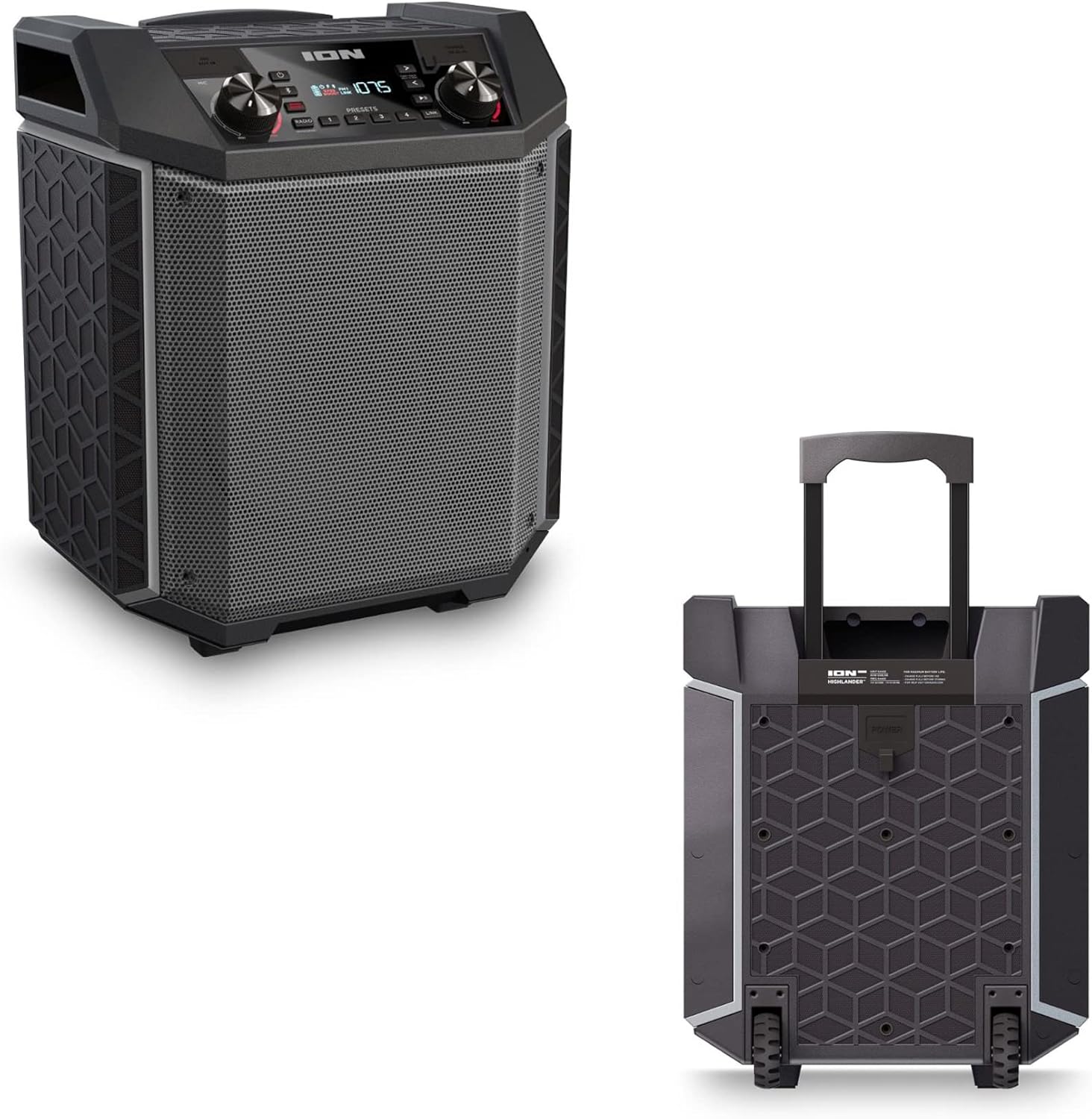

- Тартылуучу тутка: Pull up the integrated handle to roll the speaker like luggage.
- Дөңгөлөктөр: Use the built-in wheels for smooth movement across various surfaces.
4.4 Сууга туруктуулук (IPX5)
The Highlander speaker is IPX5 water-resistant, meaning it can withstand splashes of water from any direction. It is suitable for use by the pool or in light rain.

Маанилүү: Do not submerge the speaker in water. Ensure all port covers are securely closed when exposed to water.
5. Техникалык тейлөө
5.1 Тазалоо
- Тазалоодон мурун ар дайым динамикти өчүрүп, кубат булагынан ажыратыңыз.
- Сырткы беттерин сүртүү үчүн жумшак, кургак чүпүрөктү колдонуңуз.
- өжөр кир үчүн, жеңил гampчүпүрөктү суу менен. Катуу химиялык заттарды, эриткичтерди же абразивдүү тазалагычтарды колдонуудан алыс болуңуз.
- Do not spray cleaning liquids directly onto the speaker.
5.2 Сактоо
- Динамикти түз күн нурунан жана өтө температурадан алыс салкын, кургак жерде сактаңыз.
- If storing for an extended period, ensure the battery is partially charged (around 50%) to maintain battery health. Recharge every few months if not in use.
5.3 Батареяга кам көрүү
- Батареяны бат-баттан толук түгөтүп коюудан алыс болуңуз.
- Батареяны ашыкча ысыкка же муздатпаңыз.
- If the battery performance significantly degrades, contact customer support for assistance.
6. Кыйынчылыктарды
If you encounter issues with your Highlander speaker, refer to the table below for common problems and solutions.
| Көйгөй | Мүмкүн чечим |
|---|---|
| Динамик күйбөйт. |
|
| Bluetooth түзмөгү менен жупташтыруу мүмкүн эмес. |
|
| Үн жок же үнү төмөн. |
|
| Үндүн бузулушу. |
|
7. Техникалык шарттар
| Өзгөчөлүк | Деталь |
|---|---|
| Модель аты | Highlander |
| Бренд | IO |
| Динамик түрү | Сыртта |
| Байланыш технологиясы | Bluetooth 5.0 |
| Power Source | Батарея менен иштейт |
| Батареянын иштөө мөөнөтү | 50 саат |
| Сууга туруктуулук деңгээли | IPX5 (Сууга туруктуу) |
| Динамиктин максималдуу чыгаруу күчү | 120 Ватт |
| Продукциянын өлчөмдөрү | 19.5"D x 19.5"W x 14"H |
| Элемент Салмагы | 23.2 фунт |
| Материал | Water-resistant plastic or rubber, with a black coating |
| Камтылган компоненттер | Электр кабели |
| UPC | 657768542732 |
8. Кепилдик жана колдоо
The ION Audio Highlander speaker comes with a Limited Warranty. For specific details regarding warranty coverage, duration, and terms, please refer to the warranty information provided with your purchase or visit the official ION Audio webсайт.
For technical support, troubleshooting assistance beyond this manual, or warranty claims, please contact ION Audio customer support through their official channels. Keep your proof of purchase handy when contacting support.


