1. Киришүү
The TAUROX gaming mouse is designed to provide precise and responsive control for an enhanced gaming experience. With an impressive sensor resolution of up to 7,200 DPI and customizable features, it adapts to various gaming styles.
Негизги өзгөчөлүктөрү
- High-precision sensor with up to 7,200 DPI for accurate tracking.
- Two integrated DPI switches for on-the-fly sensitivity adjustment.
- 5 configurable buttons for personalized control and macros.
- Lightweight design (135 grams with cable) for comfortable extended use.
- Customizable RGB lighting to personalize your gaming setup.
- Durable fabric-covered cable with 1.8-meter length for flexibility.
- USB-A connection for easy and universal compatibility.

Image: The TAUROX Gaming Mouse showcasing its multi-coloured LED lighting and ergonomic design.
2. Пакеттин мазмуну
Пакетте бардык буюмдар бар экенин текшериңиз:
- TAUROX Gaming Mouse
- Configuration Software (downloadable or included)

Сүрөт: алдыңкы view of the TAUROX Gaming Mouse retail packaging, highlighting key features.
3. Орнотуу колдонмосу
3.1 Чычканды туташтыруу
Connect the USB-A connector of the TAUROX Gaming Mouse to an available USB port on your computer. The mouse is plug-and-play for basic functionality.
3.2 Программалык камсыздоону орнотуу
For full utilization of all functions, including macro programming and advanced customization, the installation of the dedicated configuration software is necessary. This software is typically provided via a download link or included on a small disc. Refer to the product packaging or Speedlink's official website for the download location.
Image: Side of the product box indicating the need for configuration software.
4. Operating Your TAUROX Gaming Mouse
4.1 DPI жөндөө
The TAUROX Gaming Mouse features two integrated DPI switches located behind the scroll wheel. Use these buttons to cycle through different sensitivity levels (up to 7,200 DPI) to match your gaming style or task requirements. The current DPI setting may be indicated by the mouse's LED lighting color, depending on software configuration.

Image: Screenshot of the Speedlink software's 'Performance' tab, showing DPI control settings.
4.2 Программалануучу баскычтар
The mouse is equipped with 5 configurable buttons. These buttons can be assigned various functions, including keyboard macros, multimedia controls, or specific in-game actions, using the configuration software. Launch the software and navigate to the 'Button' or 'Macro' section to customize these settings.
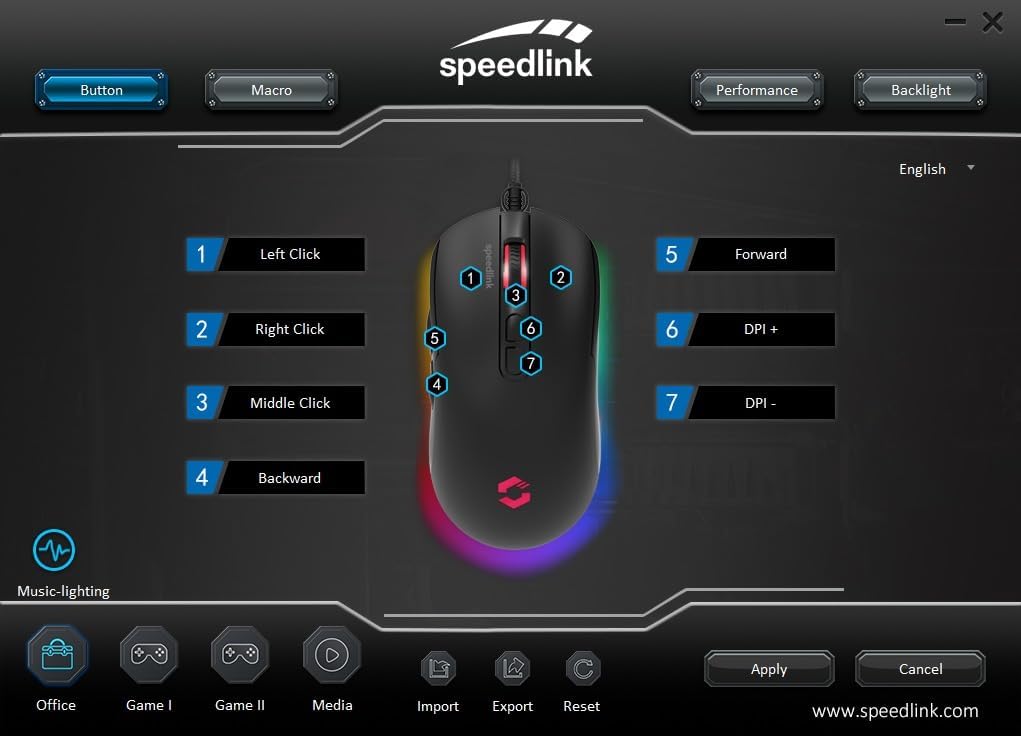
Image: Screenshot of the Speedlink software's 'Button' tab, illustrating the mapping of the mouse's 7 buttons.
4.3 RGB жарыктандыруу
The TAUROX Gaming Mouse features multi-coloured RGB lighting that can be customized through the configuration software. You can select from various lighting effects, colors, and brightness levels to match your personal preference or gaming setup. Access the 'Backlight' section in the software to adjust these settings.

Image: Screenshot of the Speedlink software's 'Backlight' tab, showing options for customizing the mouse's RGB lighting effects.
5. Техникалык тейлөө
To ensure the longevity and optimal performance of your TAUROX Gaming Mouse, follow these maintenance guidelines:
- Тазалоо: Чычкандын бетин тазалоо үчүн жумшак, кургак чүпүрөктү колдонуңуз. өжөр кир үчүн, бир аз гamp cloth can be used, but ensure no liquid enters the mouse. Avoid abrasive cleaners.
- Кабельге кам көрүү: Avoid sharp bends, kinks, or excessive pulling on the cable. Store the cable neatly when not in use to prevent damage.
- Сенсорду тейлөө: Так көз салууну камсыз кылуу үчүн чычкандын астыңкы жагындагы оптикалык сенсорду чаңдан же таштандыдан таза кармаңыз.
6. Кыйынчылыктарды
If you encounter issues with your TAUROX Gaming Mouse, consider the following:
- Чычкан жооп бербейт: Ensure the USB cable is securely connected to your computer. Try plugging the mouse into a different USB port.
- Так эмес көз салуу: Чычкандын астыңкы жагындагы оптикалык сенсорду тазалаңыз. Чычканды ылайыктуу бетте (мисалы, чычкан жаздыкчасында) колдонуп жатканыңызды текшериңиз.
- Программалык камсыздоо маселелери: If the configuration software is not functioning correctly, try reinstalling it. Ensure your operating system is up to date.
- Баскычтар иштебейт: Check the button assignments in the configuration software to ensure they are correctly configured.
- Жарык иштебейт: Verify the RGB lighting settings in the configuration software.
For persistent issues, refer to the support section on the Speedlink webсайт.
7. Техникалык шарттар
| Өзгөчөлүк | Спецификация |
|---|---|
| Продукциянын өлчөмдөрү | 4.92 x 2.48 x 0.04 inches (125x63x40 mm LxWxH) |
| Элемент Салмагы | 5.7 ounces (135 grams with cable) |
| Модель номери | SL-680016-BK |
| Бренд | Speedlink |
| Түс | Кара |
| Байланыш технологиясы | USB-A (Зымдуу) |
| Өзгөчөлүктөр | Programmable Buttons, Multi-coloured LED Lighting |
| Кыймылды аныктоо технологиясы | Оптикалык |
| DPI токтому | 7,200 XNUMX DPI чейин (жөндөлүүчү) |
| Кабелдин узундугу | 1.8 метр |
| Өндүрүүчү | Speedlink |
8. Safety Instructions and Compliance
8.1 Маанилүү коопсуздук нускамалары
Please note that the failure to observe these instructions can cause product damage, explosion, fire and/or electric shock!
- Түзмөктөрдү колдонуучу колдонмодо көрсөтүлгөндөй гана колдонуңуз. Аларды ачпаңыз же оңдоого болбойт.
- Аппараттарды суюктуктарга, ысыкка же муздакка тийгизбеңиз.
- Жарнамадагы түзмөктөрдү колдонбоңузamp айлана-чөйрө. Аппаратты кургак чүпүрөк менен тазалаңыз.
- Аппараттарды жана бардык бош бөлүктөрүн балдардан, үй жаныбарларынан жана уруксаты жок адамдардан алыс кармаңыз.
- Only use the devices with the appropriate provided accessories.
- Disconnect cables from the devices if they will not be used for a long time. When disconnecting by cables, don't pull on the cord but on the plug.
- Don't use the cables in any way other than mentioned in the user guide. Don't bend, cut, extend, knot or step on them.
- Don't insert any foreign objects into the openings of the device.
- Эгерде аппараттар кандайдыр бир жол менен бузулса же өтө ысып кетсе, аларды дароо колдонууну токтотуңуз.
- Take caution when using devices that emit radio signals if you have a pacemaker or are dependent on other sensitive electronic aids.
Кошумча тилдерде коопсуздук көрсөтмөлөрү: www.speedlink.com
8.2 Warning Symbols and Markings
Extended use of input devices may cause health problems such as discomfort or pain. As such, take regular breaks and consult a doctor if problems persist.
8.3 FCC билдирүүсү
Бул жабдуу сыналган жана FCC Эрежелеринин 15-бөлүгүнө ылайык, В классындагы санариптик аппараттын чектөөлөрүнө ылайык келери аныкталган. Бул чектөөлөр турак жай орнотулган зыяндуу кийлигишүүлөрдөн акылга сыярлык коргоону камсыз кылуу үчүн иштелип чыккан. Бул жабдуу радио жыштык энергиясын өндүрөт, колдонот жана нурландыра алат жана эгер нускамаларга ылайык орнотулбаса жана колдонулбаса, радио байланыштарына зыяндуу тоскоолдуктарды жаратышы мүмкүн. Бирок, кандайдыр бир орнотууда кийлигишүү болбойт деген кепилдик жок. Эгерде бул жабдуу радио же телевизорду кабыл алууда зыяндуу тоскоолдуктарды жаратса, аны өчүрүү жана күйгүзүү аркылуу аныктоого болот, колдонуучуга төмөнкү чаралардын бири же бир нечеси аркылуу тоскоолдукту оңдоого аракет кылуу сунушталат:
- Кабыл алуучу антеннанын багытын өзгөртүңүз же башка жерге которуңуз.
- Жабдуу менен кабыл алгычтын ортосундагы бөлүнүүнү көбөйтүңүз.
- Жабдууларды ресивер туташтырылгандан башка чынжырдагы розеткага туташтырыңыз.
- Жардам алуу үчүн дилерге же тажрыйбалуу радио/телевидение техникине кайрылыңыз.
Бул аппарат FCC эрежелеринин 15-бөлүгүнө ылайык келет. Иштетүү төмөнкү эки шартка ылайык ишке ашат: (1) Бул аппарат зыяндуу тоскоолдуктарды жаратпашы мүмкүн жана (2) бул аппарат келген тоскоолдуктарды, анын ичинде каалабаган иштөөгө алып келиши мүмкүн болгон тоскоолдуктарды кабыл алышы керек.
Эскертүү: Modifications to this product will void the user's authority to operate this equipment.
8.4 Conformity Notice
ИМПОРТОР/ӨНДҮРҮҮЧҮ: Zocherl Media GmbH, Im Dorf 5, 29303 Hemslingen, GERMANY
Телефон: +49 4267 9341 0
ПРОДУКЦИЯНЫН ТОЛУГУ МЕНЕН:
Түрү №: SL-680016-BK
Продукт сүрөттөмөсү: TAUROX оюн чычкан, кара
ПРОДУКЦИЯ Төмөнкү Директиваларга ылайык келет:
EMC: 2014/30/EU
RoHS: 2011/65/EU
For a full declaration of conformity, the latest user guide, FAQ or further information, please visit: www.speedlink.com
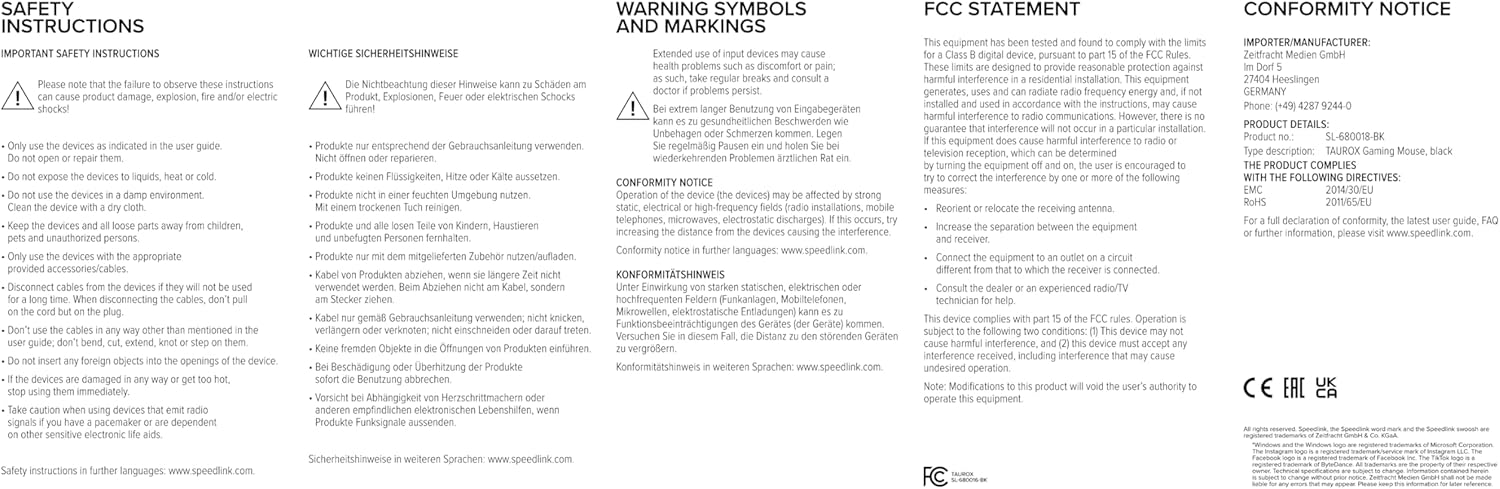
Image: Product packaging displaying various certifications and multilingual product names.
9. Кепилдик жана колдоо
For warranty information, technical support, frequently asked questions (FAQs), and the latest user guides, please visit the official Speedlink webсайт:


