Introduction
This manual provides detailed instructions for the installation, operation, and maintenance of your DB Drive WDX200.4 4-Channel Speaker Ampкөтөргүч. Сураныч, орнотууга же иштетүүгө аракет кылуудан мурун бул колдонмону кылдат окуп чыгыңыз amplifier to ensure proper function and safety. The WDX200.4 is a versatile 4-channel amplifier designed to deliver high-quality audio performance for various applications.
Орнотуу жана орнотуу
Туура орнотуу сиздин оптималдуу иштешиңиз жана узак мөөнөттүү иштешиңиз үчүн абдан маанилүү ampкөтөргүч. Орнотууну квалификациялуу адис аткарышы сунушталат.
Монтаждоо
The amplifier features a surface mount design. Ensure the mounting location provides adequate ventilation to prevent overheating. Avoid mounting in direct sunlight or near heat sources.
Power Connections
The WDX200.4 operates within a voltage range of 9V to 16V DC. Connect the power and ground cables securely to the robust power and output connectors. Ensure proper gauge wiring is used for power and ground connections to handle the amplifier's current draw.
Киргизүү байланыштары
The amplifier supports both RCA (low-level) and high-level inputs. This allows for compatibility with both aftermarket and factory head units without the need for additional adapters.
- RCA киргизүү: Use RCA cables to connect your head unit's pre-amp чыгарат ampкөтөргүчтүн RCA киргизүүлөрү.
- Жогорку деңгээлдеги киргизүү: If your head unit does not have RCA outputs, use the high-level input. This input typically connects directly to your head unit's speaker outputs.
Speaker Connections
The WDX200.4 is a 4-channel amplifier, providing 200 Watts RMS per channel at 2 ohms. It also supports bridging, allowing for 2 channels of 400 Watts RMS at 4 ohms. Connect your speakers to the appropriate output terminals, ensuring correct polarity.

Сүрөт: үстү жана асты view of the DB Drive WDX200.4 4-Channel Speaker Amplifier, illustrating the various input and output terminals for connection.
Crossover Adjustments
The amplifier features integrated crossovers with High-Pass Filter (HPF), Low-Pass Filter (LPF), and Full-Range adjustments. These allow you to tailor the frequency response for your specific speaker setup (subwoofers, woofers, midranges, tweeters).
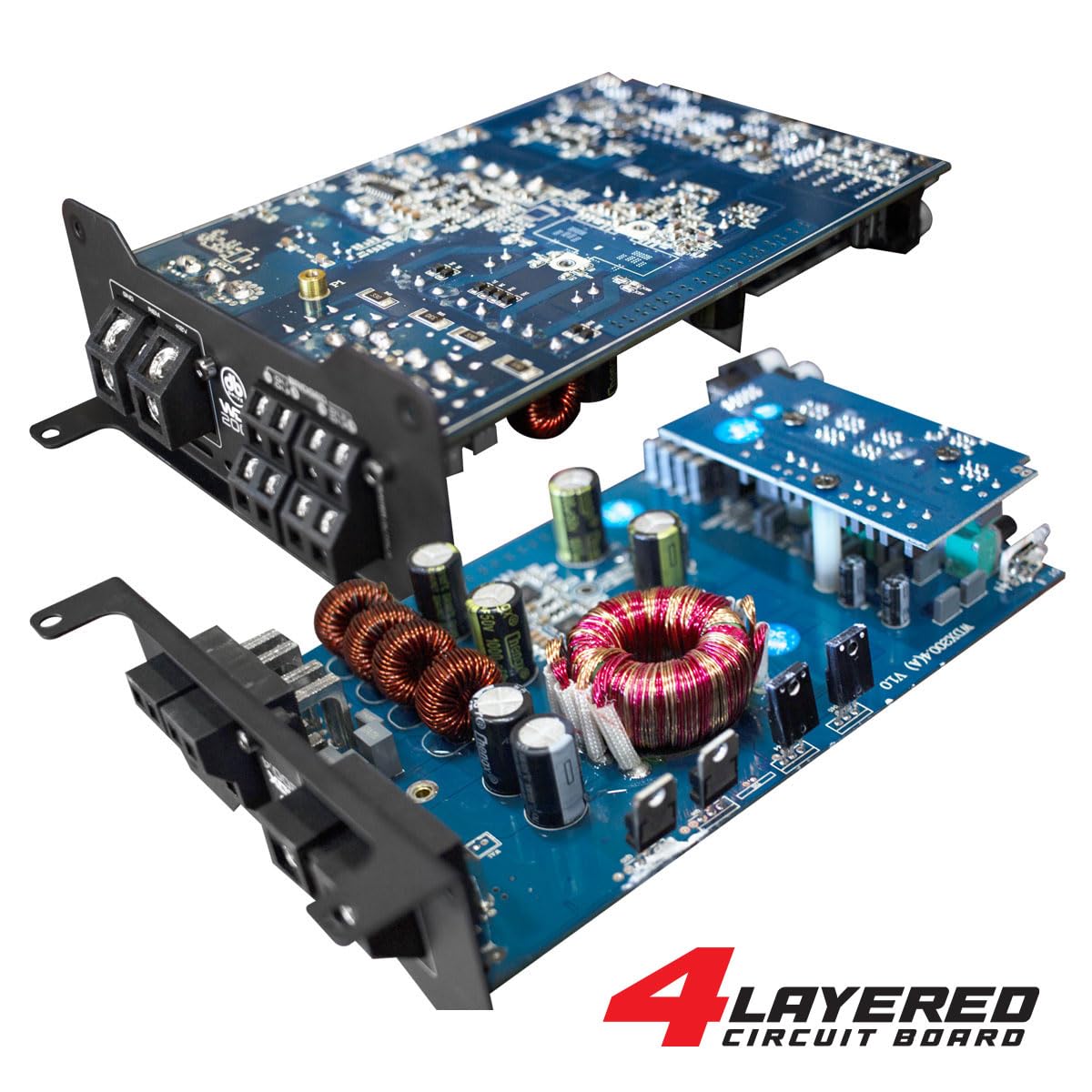
Сүрөт: ички view of the DB Drive WDX200.4 amplifier, highlighting its 4-layered circuit board design for enhanced performance and durability.
Иштөө нускамалары
орнотулгандан кийин, amplifier requires minimal user interaction for daily operation. The primary adjustments are for input level and crossover settings.
Деңгээлди тууралоо
Adjust the input level controls to match the output voltage of your head unit. Start with the amplifier's level control at minimum and slowly increase it until the desired volume is achieved without distortion.
Кроссовер орнотуулары
- HPF (Жогорку өткөрүүчү чыпка): Use this setting for speakers that should only reproduce high frequencies (e.g., tweeters, mid-range speakers). This filters out low bass frequencies.
- LPF (төмөн өткөрүүчү чыпка): Use this setting for speakers that should only reproduce low frequencies (e.g., subwoofers). This filters out high frequencies.
- FULL (Full-Range): Use this setting for speakers that should reproduce the entire frequency spectrum.
Adjust these settings according to the specifications of your speakers and your desired audio output.
Техникалык тейлөө
To ensure the longevity and optimal performance of your DB Drive WDX200.4 amplifier, бул тейлөө көрсөтмөлөрүн аткарыңыз:
- Тазалоо: Сырткы бетин мезгил-мезгили менен тазалап туруңуз amplifier with a soft, dry cloth. Do not use harsh chemicals or abrasive cleaners. Ensure all ventilation openings are free from dust and debris.
- Байланыштары: Regularly check all power, ground, and speaker connections to ensure they are secure and free from corrosion. Loose connections can lead to poor performance or damage.
- Вентиляция: камсыз кылуу amplifier always has adequate airflow around it. Blocked vents can lead to overheating and thermal shutdown.
Проблемаларды чечүү
Эгер сиз менен көйгөйлөр пайда болсо amplifier, төмөнкү жалпы көйгөйлөрдү жана чечимдерди карагыла:
- Кубат жок: Check the main fuse, power and ground connections, and the remote turn-on wire. Ensure the vehicle's battery has sufficient charge.
- Үн жок: Verify all input and output connections. Check speaker wires for shorts or open circuits. Ensure the head unit is functioning correctly and sending an audio signal. Check crossover settings.
- Бурмаланган үн: Reduce the input level (gain) on the amplifier. Check for proper crossover settings. Ensure speakers are not overdriven or damaged.
- AmpЛифтердин ашыкча ысып кетиши: айланасында жетиштүү желдетүүнү камсыз кылуу amplifier. Check speaker impedance to ensure it matches the amplifier's capabilities. Reduce the volume or gain settings.
- Коргоо режими: Эгерде amplifier enters protection mode (indicated by a specific LED), it usually signifies an issue such as overheating, a short circuit in the speaker wiring, or an impedance mismatch. Disconnect power, inspect all connections and speaker wiring, and allow the amplifier to cool before reconnecting.
If problems persist after attempting these solutions, consult a qualified car audio technician.
Техникалык шарттар
| Өзгөчөлүк | Спецификация |
|---|---|
| Модель номери | WDX200.4 |
| Бренд | DB Drive |
| Каналдардын саны | 4 |
| Чыгуу күчү (стерео) | 200 Watts RMS per channel at 2 Ohms |
| Output Power (Bridged) | 400 Watts RMS per channel at 4 Ohms (2 channels) |
| Тtage | 9 - 16 Volts (DC) |
| Монтаж түрү | Surface Mount |
| Кроссовер | Integrated HPF, LPF, Full-Range |
| Киргизүүлөр | RCA (Low-Level), High-Level with Automatic Turn-On |
| Сертификация | FCC |
Кепилдик жана колдоо
For warranty information and technical support, please refer to the documentation included with your purchase or visit the official DB Drive webсайт. Ар кандай кепилдик дооматтары үчүн сатып алганыңыздын далилин сактаңыз.


