1. Киришүү
The Zyxel VMG3625-T50B is a Dual Band Wireless AC/N VDSL2 Combo WAN Gigabit Gateway designed to provide high-speed internet access and robust wireless connectivity for home and small office environments. This device integrates a VDSL2 modem, a Gigabit Ethernet WAN port, and an AC1200 dual-band Wi-Fi router into a single unit, offering versatile connectivity options and advanced networking features.
This manual provides instructions for the proper installation, configuration, operation, and maintenance of your Zyxel VMG3625-T50B gateway.
2. Коопсуздук маалыматы
- Электр камсыздоо: Түзмөк менен кошо берилген кубат адаптерин гана колдонуңуз. Уруксат берилбеген кубат адаптерин колдонуу түзмөккө зыян келтирип, кепилдикти жокко чыгарышы мүмкүн.
- Вентиляция: Ensure proper ventilation around the device. Do not block ventilation openings. Avoid placing the device in enclosed spaces or on soft surfaces that may obstruct airflow.
- Жайгашкан жери: Place the device on a stable, flat surface away from direct sunlight, heat sources, and moisture. Keep it away from strong electromagnetic fields.
- Тазалоо: Disconnect the power adapter before cleaning. Use a soft, dry cloth. Do not use liquid or aerosol cleaners.
- Тейлөө: Аппаратты өзүңүз тейлөөгө аракет кылбаңыз. Бардык тейлөөлөрдү квалификациялуу кызматкерлерге тапшырыңыз.
3. Пакеттин мазмуну
Пакетиңизде төмөнкү заттар бар экенин текшериңиз:
- Zyxel VMG3625-T50B Wireless IAD
- Кубаттуу адаптер
- Ethernet кабели
- Quick Start Guide
4. Техникалык жабдыктар бүттүview
Familiarize yourself with the ports, buttons, and LED indicators on your VMG3625-T50B gateway.
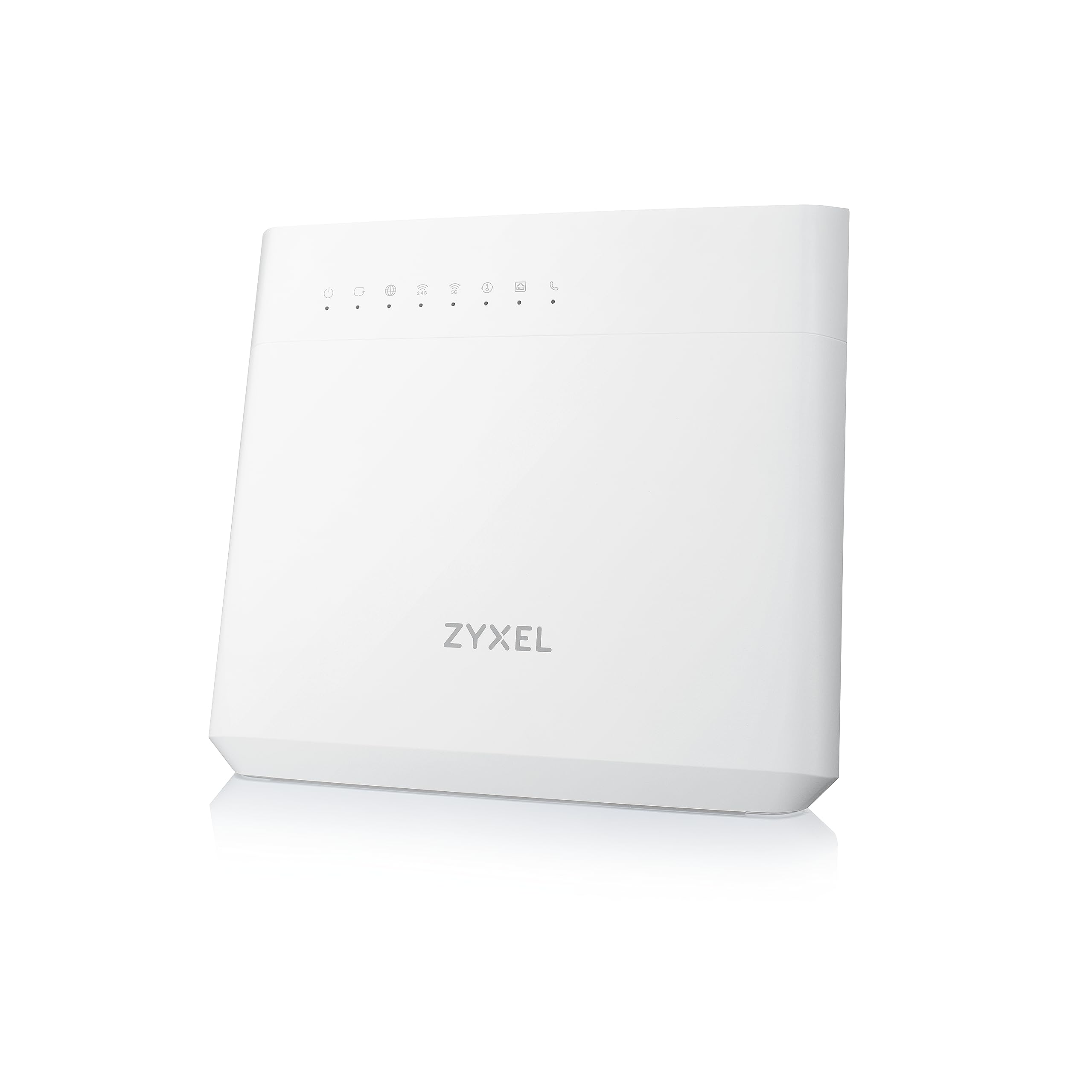
An image of the Zyxel VMG3625-T50B gateway, typically black, showing its compact design suitable for home or office environments.
Алдыңкы панелдин светодиоддору
- Күч: Indicates power status. (Solid Green: On, Off: Off)
- Интернет: Indicates internet connection status. (Solid Green: Connected, Blinking: Data transfer, Red: Disconnected)
- DSL: Indicates VDSL2 connection status. (Solid Green: Connected, Blinking: Syncing, Off: Disconnected)
- WAN: Indicates Ethernet WAN connection status. (Solid Green: Connected, Blinking: Data transfer, Off: Disconnected)
- WLAN 2.4G/5G: Indicates wireless network status. (Solid Green: On, Blinking: Data transfer, Off: Off)
- USB: Indicates USB device status. (Solid Green: Device connected, Blinking: Data transfer, Off: No device)
Арткы панелдин порттору жана баскычтары
- DSL порту: Connects to the VDSL2 line from your service provider.
- WAN Port (Gigabit Ethernet): Connects to an external modem or directly to an Ethernet service.
- LAN Ports (4x Gigabit Ethernet): Компьютерлер, оюн консолдору же тармактык сактагыч сыяктуу зымдуу түзмөктөргө туташат.
- USB 2.0 порт: Connects to USB storage devices for file бөлүшүү.
- Калыбына келтирүү баскычы: Used to restore factory default settings. Press and hold for 10 seconds while the device is powered on.
- WLAN On/Off Button: Зымсыз функцияны өчүрөт.
- Кубат туташтыргычы: Берилген кубат адаптерине туташат.
- Күйгүзүү / Өчүрүү баскычы: Аппаратты күйгүзөт же өчүрөт.
5. Орнотуу
5.1 Физикалык байланыш
- Connect to VDSL2 Line: Connect one end of a phone cable to the DSL port on the VMG3625-T50B and the other end to your wall VDSL2 socket. If using a splitter, connect to the modem port of the splitter.
- Connect to Ethernet WAN (Optional): If your internet service uses an Ethernet connection instead of VDSL2, connect an Ethernet cable from your service provider's modem or wall socket to the WAN port on the VMG3625-T50B.
- Connect Wired Devices: Connect Ethernet cables from your computers or other network devices to the LAN ports on the VMG3625-T50B.
- Туташуу кубаты: Connect the provided power adapter to the Power connector on the VMG3625-T50B and then plug it into a power outlet. Press the Power On/Off button to turn on the device.
Allow a few minutes for the device to boot up and establish connections. Observe the front panel LEDs for connection status.
5.2 Баштапкы конфигурация (Web GUI)
- кирүү Web GUI: ачуу а web browser on a computer connected to the VMG3625-T50B (either via Ethernet or Wi-Fi). In the address bar, type
http://192.168.1.1(default IP address) and press Enter. - Кирүү: Enter the default username and password. These are typically found on a label on the bottom or back of the device. It is recommended to change the default login credentials for security purposes during the initial setup wizard.
- Орнотуу устасын аткарыңыз: The device may present a setup wizard to guide you through basic internet and wireless settings. Follow the on-screen instructions.
5.3 Зымсыз тармакты орнотуу
During the initial setup or via the Web GUI, you can configure your wireless network settings:
- SSID (тармактын аталышы): Change the default Wi-Fi network name for both 2.4 GHz and 5 GHz bands to something easily recognizable.
- Password (Security Key): Set a strong, unique password for your Wi-Fi networks. WPA2-PSK (AES) is the recommended security type.
- Конок Wi-Fi: Consider enabling a separate guest Wi-Fi network for visitors to keep your main network secure.
6. Иштөө
6.1 Интернетке кирүүнүн негизги ыкмалары
Once configured, your devices should be able to connect to the internet via the VMG3625-T50B. Verify the Internet LED on the front panel is solid green.
6.2 Өркүндөтүлгөн функциялар
- USB File Бөлүшүү: Connect a USB storage device to the USB 2.0 port. You can configure file sharing settings through the Web GUI to access files from network-connected devices.
- Кызматтын сапаты (QoS): The VMG3625-T50B supports QoS, allowing you to prioritize network traffic for specific applications or devices. This ensures critical applications like video conferencing or online gaming receive sufficient bandwidth. Configure QoS settings in the Web GUI.
- Firewall: The device includes a NAT safety wall with SPI (Stateful Packet Inspection) and DoS (Denial of Service) protection to enhance network security. These features are typically enabled by default.
7. Техникалык тейлөө
7.1 Микропрограмма жаңыртуулары
Zyxel колдоосун мезгил-мезгили менен текшерип туруңуз website for firmware updates. Firmware updates can improve performance, add new features, and address security vulnerabilities. Download the latest firmware and follow the instructions in the Web жаңыртуу үчүн GUI.
7.2 Конфигурациянын камдык көчүрмөсүн сактоо жана калыбына келтирүү
It is recommended to back up your device's configuration settings regularly. This allows you to restore your settings quickly in case of a factory reset or other issues. The backup/restore function is available in the Web GUI.
7.3 Заводдук абалга кайтаруу
Эгерде сиз тынымсыз көйгөйлөргө туш болсоңуз же кирүү маалыматыңызды унутуп калсаңыз, заводдук жөндөөлөргө кайтарууну аткара аласыз. Бул үчүн, баскычын басып, кармап туруңуз Калыбына келтирүү button on the rear panel for approximately 10 seconds while the device is powered on. The device will restart with all settings restored to their factory defaults.
7.4 Тазалоо
Ensure the device is powered off and unplugged before cleaning. Use a soft, dry cloth to wipe the exterior. Do not use liquid or abrasive cleaners.
8. Кыйынчылыктарды
8.1 Интернет байланышы жок
- Кабелдерди текшерүү: Ensure all cables (DSL, WAN, Ethernet) are securely connected.
- LEDди текшерүү: Verify that the Power, DSL/WAN, and Internet LEDs are solid green. If the DSL LED is blinking, the device is trying to sync with the VDSL2 line. If the Internet LED is red, there is no internet connection.
- Түзмөктү кайра иштетүү: Power cycle the VMG3625-T50B by unplugging the power adapter, waiting 30 seconds, and plugging it back in.
- Интернет провайдерине кайрылуу: If the issue persists, contact your Internet Service Provider (ISP) to check for service outages or line issues.
8.2 Wi-Fi Not Connecting or Slow
- WLAN LEDди текшерүү: Ensure the WLAN 2.4G/5G LEDs are solid green. If off, press the WLAN On/Off button.
- Сырсөздү текшерүү: Туура Wi-Fi сырсөзүн киргизип жатканыңызды эки жолу текшериңиз.
- Сигнал күчү: Move closer to the gateway to check if signal strength is an issue. Obstacles like walls and large appliances can interfere with Wi-Fi signals.
- Канал кийлигишүүсү: Ичинде Web GUI, try changing the Wi-Fi channel for both 2.4 GHz and 5 GHz bands to a less congested one.
8.3 Кирүү мүмкүн эмес Web GUI
- IP дареги: Компьютериңиз IP дарегин автоматтык түрдө алууга (DHCP) конфигурацияланганын текшериңиз.
- Демейки IP: Confirm you are using the correct default IP address (
http://192.168.1.1). - Firewall/Антивирус: Компьютериңиздеги кирүүгө бөгөт коюп жаткан брандмауэрди же антивирустук программаны убактылуу өчүрүңүз.
- Заводдун баштапкы абалга келтирүү: If you have forgotten the login credentials, perform a factory reset (see Section 7.3).
9. Техникалык шарттар
| Бренд | ZYXEL |
| Модель аты | VMG3625-T50B |
| Байланыш технологиясы | Wi-Fi |
| Зымсыз стандарт | 802.11ac |
| Жыштык тилкесинин классы | Кош тилкелүү (2.4 ГГц, 5 ГГц) |
| Маалыматтарды өткөрүү ылдамдыгы | 867 Mbps (5 GHz), 300 Mbps (2.4 GHz) - AC1200 total |
| Порттардын саны | 4x Gigabit LAN, 1x Gigabit WAN, 1x DSL, 1x USB 2.0 |
| Өзгөчөлүктөр | QoS, USB File Sharing, Firewall (SPI, DoS) |
| Операция системасы | ZyNOS |
| Шайкеш түзмөктөр | Бардык түзмөктөр менен шайкеш келет |
| Өлчөмдөрү (L x W x Y) | 29 x 23.4 x 4.2 см |
| Салмагы | 690 г |
10. Кепилдик жана колдоо
For warranty information and technical support, please refer to the warranty card included in your product package or visit the official Zyxel webсайт. The website typically provides FAQs, driver downloads, and contact information for customer support.
Zyxel расмий Webсайт: www.zyxel.com


