Introduction
The Tilta F970 Battery Plate V2 is designed to provide versatile power solutions for your camera and accessories using Sony L-Series batteries. This manual provides essential information for proper setup, operation, and maintenance.
Орнотуу & Орнотуу
Mounting the Battery Plate
The battery plate features a 1/4"-20 screw with locating pins for secure attachment to camera cages or other rigging accessories. The anti-rotation design, combined with a silicone pad on the back, ensures a stable connection.

Сүрөттүн сүрөттөлүшү: Жакын план view of the Tilta F970 Battery Plate V2's underside, showing the 1/4"-20 thumb screw and two locating pins. The screw can be tightened by hand or with a flat-head screwdriver.
Inserting an L-Series Battery
Align your Sony L-Series battery with the battery slot on the plate and slide it in until it clicks securely into place. The design accommodates various L-Series battery sizes and brands.

Сүрөттүн сүрөттөлүшү: Two cameras with different sized L-Series batteries mounted on the Tilta F970 Battery Plate V2, demonstrating compatibility with various battery dimensions.
Иштөө нускамалары
Powering Accessories
The battery plate offers multiple power output options:
- USB-A: 5V/2.1A
- DC Out: 8V/3A (DC5521 standard)
- USB-C In/Out: 18W PD (Power Delivery)
- DC Out: 12V/2A (DC5525 standard)
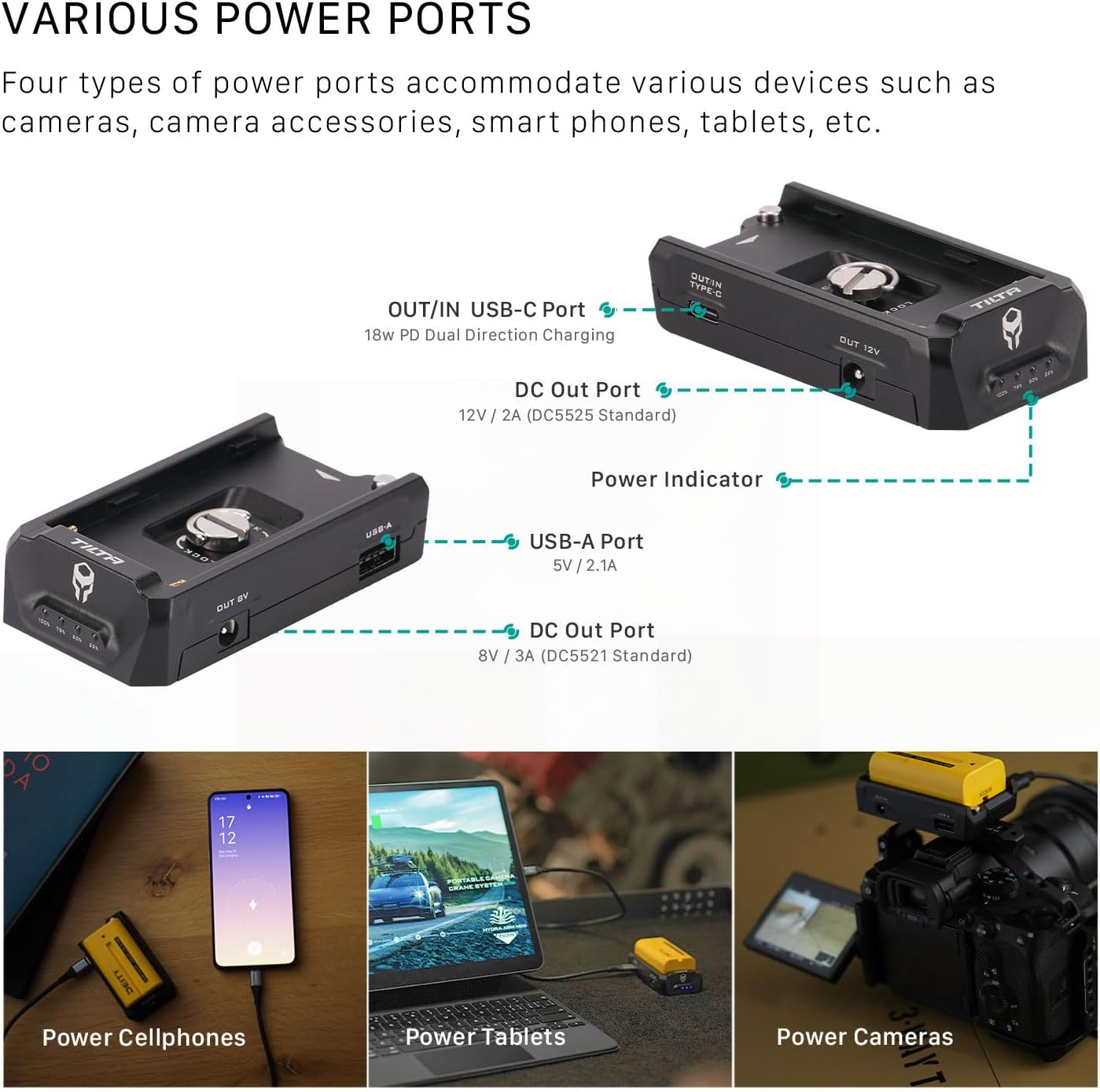
Сүрөттүн сүрөттөлүшү: A diagram illustrating the various output ports on the Tilta F970 Battery Plate V2, including USB-A, USB-C, and two DC outputs. Below the diagram, images show the plate powering a cellphone, a tablet, and a camera.
Charging L-Series Batteries
The USB-C port supports dual-directional power. Connect a USB-C PD charger to this port to charge the L-Series battery while it is connected to the plate.

Сүрөттүн сүрөттөлүшү: A close-up of the Tilta F970 Battery Plate V2 with a USB-C cable connected, indicating dual-direction fast charging capability.
Батарея көрсөткүчү
The integrated battery indicator provides real-time information on battery capacity and charging status.
- Разряд: Constant light display indicates current battery capacity.
- Заряд: Blinking light indicates current battery capacity during charging.
- Батарея салыңыз: The indicator turns on and displays the current capacity.
- No Charge/Discharge: Жарыктар 30 секунддан кийин өчөт.

Сүрөттүн сүрөттөлүшү: A close-up of the Tilta F970 Battery Plate V2 with an L-Series battery inserted, showing the four LED battery indicator lights.
Продукт өзгөчөлүктөрү
The Tilta F970 Battery Plate V2 offers several key features for enhanced functionality and reliability:
- Жалпы шайкештик: Designed for Sony L-Series batteries, compatible with various brands and battery sizes.
- Айланууга каршы дизайн: Securely mounts via a 1/4"-20 screw with locating pins and a silicone back plate to prevent rotation.
- Multiple Power Outputs: Provides power to accessories through USB-C PD, DC 8V, DC 12V, and USB-A ports.
- Dual-Directional USB-C: The USB-C port functions as both an output for powering devices and an input for charging connected L-Series batteries.
- Батареянын иштөө мөөнөтү индикатору: Displays real-time battery life and charging status via LED lights.
Техникалык мүнөздөмөлөр
| Өзгөчөлүк | Деталь |
|---|---|
| Бренд | Тилта |
| Модель номери | TA-BTP2-F970-B |
| Материал | Алюминий эритмеси, силикон |
| Түс | Кара |
| Элемент Салмагы | 0.26 фунт (120 г) |
| Dimensions (excluding bottom threads) | 91.5 x 49.5 x 22 мм |
| Dimensions (including bottom threads) | 91.5 x 49.5 x 27.1 мм |
| Киргизүү көлөмүtage | 12 вольт |
| Output Voltage | 8V/3A (DC5521), 12V/2A (DC5525) |
| USB-A чыгаруу | 5V/2.1A |
| USB-C Кирүү/Чыгуу | 18W PD Bi-Directional |
| Шайкеш түзмөктөр | NP-F Series Batteries, Sony Cameras |
| Жалпы USB порттору | 3 (1x USB-A, 1x USB-C) |
| Power Source | Батарея менен иштейт |
| Монтаждоо | 1/4"-20 screw with locating pins |

Сүрөттүн сүрөттөлүшү: A visual representation of the Tilta F970 Battery Plate V2 with key dimensions and product specifications listed in a table format.
Пакеттин мазмуну
- 1x Tilta F970 Battery Plate V2 - Black
Проблемаларды чечүү
If the battery indicator lights do not illuminate after inserting a charged battery, ensure the battery is correctly seated and fully charged. If power output issues occur, verify all cables are securely connected to the correct ports. For persistent issues, contact Tilta customer support.
Кепилдик жана Кардарларды колдоо
For warranty information, technical support, or service inquiries, please refer to the official Tilta webсайтка же ыйгарым укуктуу дилериңизге кайрылыңыз. Кепилдик дооматтар үчүн сатып алуу дүмүрчөгүңүздү сактаңыз.


