1. Introduction and Overview
The Acer Aspire 3 A314-36P-35UU is a slim and lightweight laptop designed for everyday productivity and multitasking. Featuring a 14.0-inch Full HD IPS display, an Intel Core i3-N305 Processor, 8GB LPDDR5 memory, and a 128GB NVMe SSD, it offers reliable performance for various tasks. This manual provides essential information for setting up, operating, and maintaining your laptop.

The Acer Aspire 3 A314-36P-35UU laptop, open and ready for use.
Негизги өзгөчөлүктөрү:
- Purposeful Design: Thin and light for easy portability.
- Ready-to-Go Performance: Powered by an Intel Core i3-N305 Processor for efficient multitasking.
- Visually Stunning Display: 14.0" Full HD IPS screen with narrow bezels for clear visuals.
- Internal Specifications: 8GB LPDDR5 Onboard Memory and 128GB NVMe SSD for storage.
- Жакшыртылган байланыш: HD front-facing camera with Acer TNR and PurifiedVoice technology for clear video calls.
- Зымсыз туташуу: Wi-Fi 6 (802.11ax) for strong and consistent wireless signals.
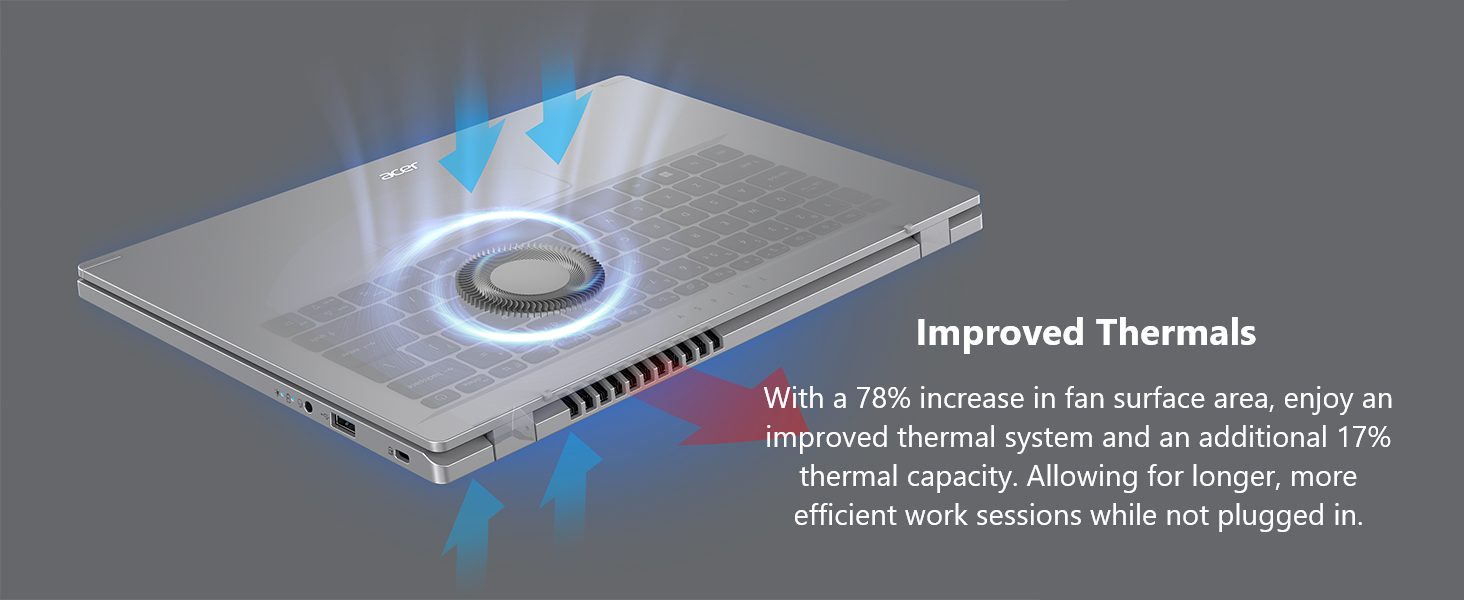
- Improved Thermals: Enhanced thermal system for efficient cooling during extended use.
- Операция системасы: Windows 11 Home in S mode.
2. Кутуда эмне бар
Upon unpacking your Acer Aspire 3 laptop, please ensure all the following items are present:
- Acer Aspire ноутбук
- AC адаптер
- Электр кабели
3. Орнотуу
Follow these steps to set up your new Acer Aspire 3 laptop:
- Ноутбукту таңгактан чыгаруу: Ноутбукту жана бардык аксессуарларды таңгактан этияттык менен алып салыңыз.
- Туташуу кубаты: Plug the AC adapter into the laptop's DC-in jack and then into a power outlet. It is recommended to fully charge the battery before first use.
- Баштапкы жүктөө: Open the laptop lid and press the power button. The laptop will guide you through the initial Windows 11 setup process. Follow the on-screen instructions to configure your region, language, network, and user account.
- Перифериялык түзүлүштөрдү туташтыруу: Connect any external devices such as a mouse, external keyboard, or monitor to the available ports.

The laptop features multiple ports for connectivity, including USB Type-C, USB 3.2, and HDMI.
4. Ноутбугуңузду иштетүү
Күйгүзүү/өчүрүү:
- To power on, press the power button located on the keyboard.
- To power off, click the Start button in Windows, then select Power > Shut down.
Сенсордук тактаны колдонуу:
The touchpad functions as a mouse. Use single-finger taps for left-clicks and two-finger taps for right-clicks. You can also use multi-touch gestures for scrolling and zooming.
Wi-Fi'га туташууда:
Your laptop supports Wi-Fi 6 for fast and stable wireless connections. To connect:
- Тапшырмалар тилкесиндеги Wi-Fi сөлөкөтүн чыкылдатыңыз.
- Тизмеден каалаган тармакты тандаңыз.
- Enter the network password if prompted and click Connect.
Enjoy fast and reliable internet with Wi-Fi 6 connectivity.
S режиминде Windows 11 Home:
Your laptop comes with Windows 11 Home in S mode, which is a version of Windows streamlined for security and performance. In S mode, you can only install apps from the Microsoft Store, and you must use Microsoft Edge for safe browsing. You can switch out of S mode at any time, but you cannot switch back.
This video demonstrates the powerful tools available with Microsoft 365, enhancing productivity on your Windows 11 device.
This video showcases Windows AI Photos, demonstrating how to easily enhance and manage your images.
This video illustrates the Windows 11 AI Snipping tool, allowing for easy text extraction and sensitive information protection.
This video demonstrates Windows AI Paint, highlighting its enhanced features for drawing and digital creation, including background removal.
This video introduces Microsoft Windows Copilot, your everyday AI companion for enhancing creativity and productivity.
5. Техникалык тейлөө
Тиешелүү тейлөө ноутбуктун узак мөөнөттүү жана оптималдуу иштешин камсыз кылат:
- Тазалоо: Экранды жана сыртты тазалоо үчүн жумшак, түксүз чүпүрөктү колдонуңуз. Кежир тактар үчүн, гampчүпүрөккө суу же экранды тазалоочу каражат. Катуу химиялык заттардан алыс болуңуз.
- Батареяга кам көрүү: To maximize battery life, avoid fully discharging the battery frequently. Store the laptop in a cool, dry place when not in use for extended periods.
- Программалык камсыздоо жаңыртуулары: Коопсуздукту жана иштөөнү камсыз кылуу үчүн Windows операциялык тутумуңузду жана драйверлериңизди үзгүлтүксүз жаңыртып туруңуз.
- Жылуулук башкаруу: The Aspire 3 features improved thermals. Ensure the vents are not obstructed to allow for proper airflow and prevent overheating. Avoid using the laptop on soft surfaces like beds or couches that can block ventilation.

The laptop's improved thermal design helps maintain optimal operating temperatures.
6. Кыйынчылыктарды
Эгерде сиз ноутбукта көйгөйлөргө туш болсоңуз, анда төмөнкү негизги көйгөйлөрдү чечүү кадамдарын колдонуп көрүңүз:
- Кубат жок: AC адаптери ноутбукка да, иштеген электр розеткасына да бекем туташып турганын текшериңиз. Электр розеткасынын иштешин текшериңиз.
- Система жооп бербейт: If the laptop freezes, press and hold the power button for 10-15 seconds to force a shutdown. Wait a few moments, then restart the laptop.
- Wi-Fi туташуу маселелери: Restart your router and modem. On your laptop, turn Wi-Fi off and then on again. Ensure you are selecting the correct network and entering the correct password.
- Дисплей көйгөйлөрү: If the screen is blank or flickering, try connecting an external monitor to the HDMI port to determine if the issue is with the laptop's display or graphics output.
- Жай аткаруу: Close unnecessary applications, check for malware, and ensure your operating system is up to date. Consider freeing up disk space if your storage is nearly full.
Татаал маселелер үчүн Acer колдоо бөлүмүнө кайрылыңыз webсайтка же кардарларды тейлөөгө кайрылыңыз.
7. Техникалык шарттар
Below are the detailed specifications for the Acer Aspire 3 A314-36P-35UU Slim Laptop:
| Өзгөчөлүк | Спецификация |
|---|---|
| Модель аты | A314-36P-35UU |
| Screen Size | 14 дюйм |
| Screen Resolution | 1920 x 1080 пиксел (Full HD IPS) |
| Процессор | Intel Core i3-N305 (3.8 ГГц) |
| RAM | 8 ГБ LPDDR5 |
| Memory Speed | 2400 МГц |
| Катуу диск | 128 ГБ NVMe SSD |
| Графикалык сопроцессор | Intel UHD графикасы (интегралдык) |
| Зымсыз түрү | 802.11ax (Wi-Fi 6), Bluetooth |
| USB 3.0 порттору | 3 (1x USB Type-C 3.2 Gen 2, 2x USB 3.2 Gen 1) |
| HDMI порту | 1 (HDMI 2.1 with HDCP support) |
| Операция системасы | Windows 11 Home S режиминде |
| Элемент Салмагы | 3.09 фунт |
| Продукциянын өлчөмдөрү | 12.93 x 0.74 x 8.55 дюйм |
| Түс | Silver |
8. Кепилдик жана колдоо
Кепилдик боюнча кенен маалымат алуу үчүн продуктуңузга кошулган кепилдик картасын караңыз же расмий Acer колдоо бөлүмүнө кайрылыңыз. webсайт. Кепилдик, адатта, сатып алынган күндөн тартып белгилүү бир мезгил ичинде өндүрүш кемчиликтерин камтыйт.
If you require technical assistance or have questions not covered in this manual, please contact Acer customer support through their official channels. Have your laptop's model number (A314-36P-35UU) and serial number ready when contacting support.


