1. Продукт бүтүп калдыview
The VANTRUE Wireless Remote Control provides convenient access to essential dashcam functions, allowing users to quickly lock video files, take snapshots, and control the microphone without diverting attention from the road. This enhances safety and ease of use for compatible VANTRUE dashcam models.

Image 1: The VANTRUE Wireless Remote Control, a compact black device with a microphone icon and a warning triangle, featuring a green indicator light.
2. Шайкештик
This remote control is specifically designed for use with the following VANTRUE dashcam models:
- VANTRUE N5
- VANTRUE N4 Pro
- VANTRUE S1 Pro
- VANTRUE E1
- VANTRUE E2
- VANTRUE E3
Эскертүү: This remote control is not compatible with other dashcam models not listed above.
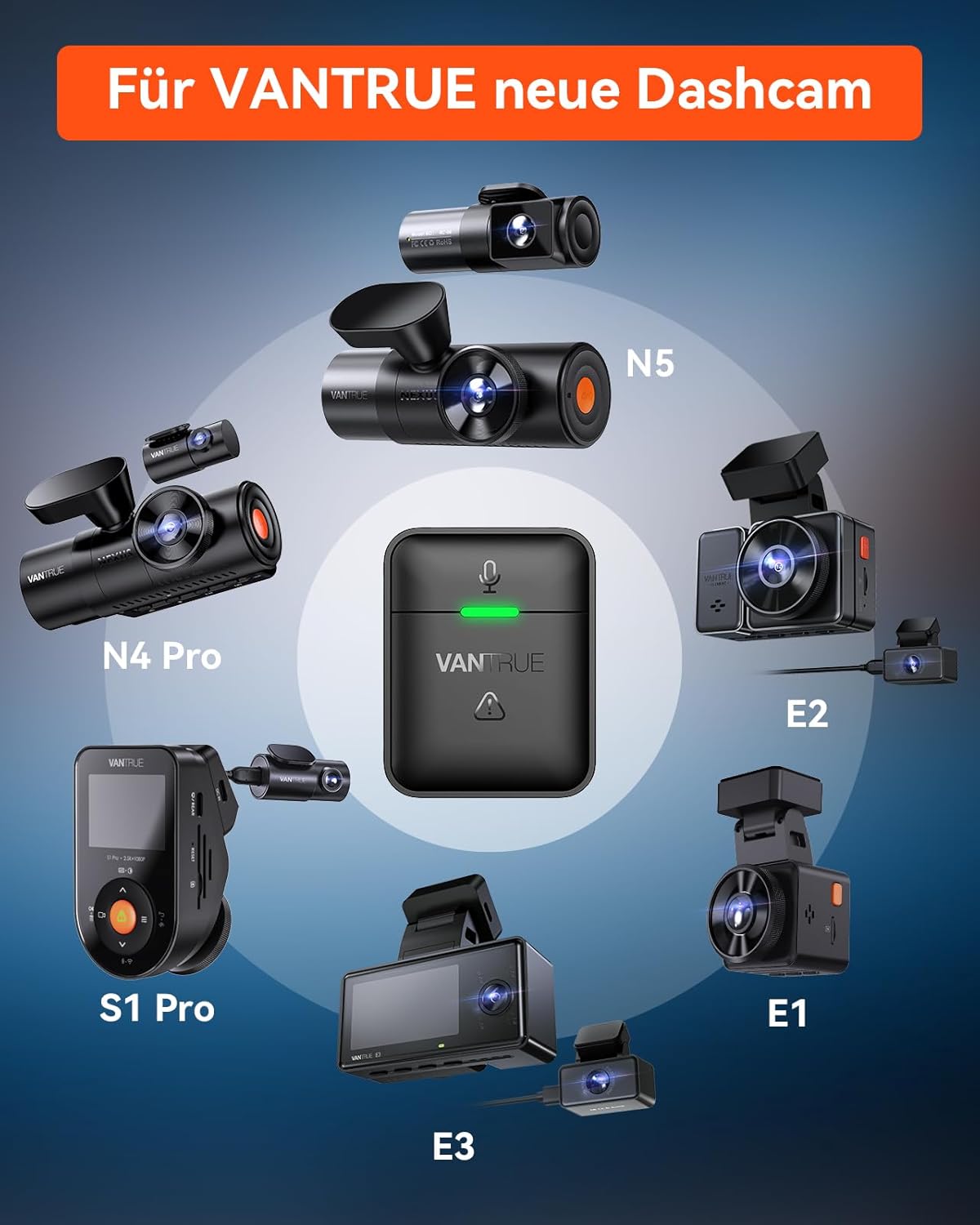
Image 2: Diagram illustrating the compatibility of the remote control with various VANTRUE dashcam models, including N5, N4 Pro, S1 Pro, E1, E2, and E3.
3. Пакеттин мазмуну
Сураныч, төмөнкү нерселер үчүн кутучаны белгилеңиз:
- VANTRUE Wireless Remote Control
- 3M Жабыштыргыч
- CR2032 Lithium-ion Battery (pre-installed)

Image 3: Contents of the package, showing the remote control, a 3M adhesive pad, and a Panasonic CR2032 3V battery.
4. Орнотуу жана орнотуу
4.1 Батарея маалыматы
The remote control comes with a pre-installed CR2032 battery. The battery is not rechargeable. If the green indicator light does not flash when you press the button, the battery may be depleted and needs replacement.
4.2 Орнотуу жери
An adhesive pad is located on the back of the remote control for easy mounting. You can place the remote control in various convenient locations within your vehicle, such as:
- Куралдар тактасында
- Near the steering wheel
- In the car's armrest box
Choose a location that is easily accessible and does not obstruct your view or interfere with driving. The remote has an effective range of approximately 9.8 feet (3 meters).

Image 4: Illustration of suggested installation locations for the remote control within a car, highlighting its compact dimensions (1.49 inches height, 1.18 inches width, 1.04 inches depth) and a 9.8 feet range.
5. Операция
The remote control features a single button for multiple functions, making it simple to operate while driving.
- Жалгыз басуу: Quickly locks the current video clip to prevent it from being overwritten. This is crucial for preserving footage of incidents or important events.
- Кош басуу: Takes a snapshot (still image) from the dashcam's view.
- Узак басуу: Toggles the microphone on or off, allowing you to control audio recording as needed.

Image 5: Visual guide to the remote control's functions: Audio ON/OFF (microphone icon), Snapshot (camera icon), and Emergency Lock (padlock icon), all activated by pressing the single button.
6. Техникалык тейлөө
6.1 Батареяны алмаштыруу
When the green indicator light on the remote control no longer flashes upon pressing the button, it indicates that the CR2032 battery is depleted and needs to be replaced. To replace the battery:
- Carefully open the battery compartment on the remote control.
- Эски CR2032 батареясын алып салыңыз.
- Туура полярдуулукту камсыз кылуу менен жаңы CR2032 батареясын салыңыз.
- Батарея отсегин бекем жабыңыз.
Колдонулган батарейкаларды жергиликтүү эрежелерге ылайык таштаңыз.
7. Кыйынчылыктарды
7.1 Алыстан башкаруучу жооп бербейт
- Батареяны текшерүү: If the green light does not flash when you press the button, the battery is likely depleted. Replace the CR2032 battery as described in the Maintenance section.
- Шайкештик: Ensure your dashcam model is listed as compatible (N5, N4 Pro, S1 Pro, E1, E2, E3). This remote will not work with non-compatible models.
- Жакындык: Ensure the remote control is within approximately 9.8 feet (3 meters) of the dashcam for optimal signal reception.
- Интерференция: Minimize potential wireless interference from other electronic devices in the vehicle.
7.2 Functions Not Working Correctly
- Dashcam Firmware: Ensure your dashcam's firmware is up to date. Refer to your dashcam's user manual or the VANTRUE official webмикропрограмманы жаңыртуу нускамалары үчүн сайт.
- Пультту кайра жупташтыруу: If issues persist, try re-pairing the remote control with your dashcam according to your dashcam's specific instructions for accessory pairing.
8. Техникалык шарттар
| Өзгөчөлүк | Деталь |
|---|---|
| Бренд | ВАНТРУ |
| Модель аты | Wireless Remote Control for N5, N4 Pro, S1 Pro, E1, E2, E3 |
| Түс | Кара |
| Байланыш технологиясы | Зымсыз (Wi-Fi) |
| Шайкеш түзмөктөр | VANTRUE N5, N4 PRO, S1 PRO, E1, E2, E3 Dashcams |
| Батарея түрү | Lithium-ion (CR2032) |
| Батарея кайра заряддалуучу | Жок |
| Монтаж түрү | Жабыштыруучу тоо |
| Өзгөчөлүктөр | Quick video lock, microphone control, snapshot function |
9. Кепилдик жана колдоо
The VANTRUE wireless remote control comes with an 18 айлык кепилдик сатып алынган күндөн тартып.
If you have any questions, encounter issues, or require technical assistance, please do not hesitate to contact VANTRUE customer support. We are committed to providing prompt assistance and will respond to your inquiries within 24 hours.
For support, please visit the official VANTRUE webсайтка же продуктунун таңгагында берилген байланыш маалыматына кайрылыңыз.


