1. Introduction and Overview
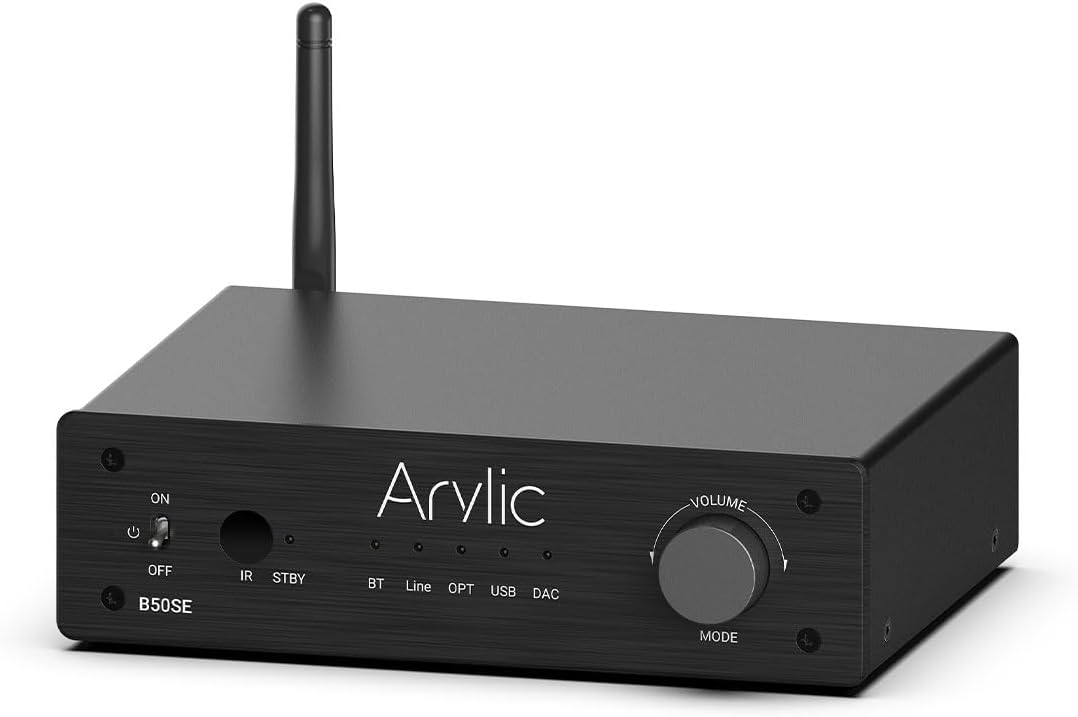
The Arylic B50 SE is a versatile Bluetooth 5.1 stereo audio amplifier designed for home audio systems. It delivers 50W x 2 powerful output, supporting 2.1 channel configurations with a dedicated subwoofer output. Featuring the TPA3116D2 chip, it ensures stable and high-quality audio transmission with long-range Bluetooth connectivity. Control is made easy through the intuitive Go Control APP and integrated EQ settings, providing an enhanced listening experience for various audio sources.
2. Продукциянын өзгөчөлүктөрү
- Күчтүү чыгаруу: Delivers 50W x 2 stereo output, suitable for various home speakers.
- 2.1 Channel Support: Includes a dedicated subwoofer output for building a 2.1 home cinema system.
- Өркүндөтүлгөн Bluetooth 5.1: Ensures stable, long-range (up to 10 meters) wireless audio streaming with low latency.
- TPA3116D2 Chip: Utilizes the TPA3116D2 amplifier chip for high efficiency, stable performance, and built-in overheat, overcurrent, and short-circuit protection.
- Бир нече аудио киргизүүлөр: Supports Bluetooth, Line-in (RCA), Optical, and USB DAC inputs for versatile connectivity.
- Go Control APP: Intuitive mobile application for comprehensive control, including input selection, volume adjustment, EQ customization, and USB song list management.
- Easy Control EQ: Offers preset and customizable equalizer settings via the app or remote control for optimized sound.

3. Пакеттин мазмуну
Сураныч, бардык буюмдар бар экенин жана жакшы абалда экендигин текшерүү үчүн пакетти кылдат текшериңиз:
- Arylic B50 SE Bluetooth Ampөмүрлүү
- Кубаттуу адаптер
- Алыстан башкаруу
- Bluetooth антеннасы
- Колдонуучунун Колдонмосу (бул документ)
4. Продукциянын жайгашуусу жана башкаруу элементтери
4.1 алдыңкы панели
- ON/OFF которуу: Күйгүзөт ampкөтөргүч күч.
- IR: Алыстан башкаруу үчүн инфракызыл кабылдагыч.
- STBY: Standby indicator light.
- BT/Line/OPT/USB/DAC Indicators: Lights indicating the currently selected input mode.
- Volume/MODE Knob: Rotates to adjust volume; press to cycle through input modes.
4.2 Арткы панель
- DC киргизүү: Кубат туташтыруу порту.
- Speaker (L/R): Terminals for connecting passive left and right speakers.
- SW Чыгуу: Активдүү сабвуферди туташтыруу үчүн RCA чыгышы.
- Line In (RCA): RCA input for connecting analog audio sources.
- Оптикалык кириш: Optical (Toslink) input for connecting digital audio sources.
- USB: USB-A port for connecting USB storage devices for music playback.
- DAC: USB-B port for connecting to a computer as a USB DAC.
- Кайтаруу: Button to reset the device. Press twice in Bluetooth Receiver mode to disconnect all Bluetooth connections. Press and hold to perform a factory reset.
- BT: Antenna connector for Bluetooth.

5. Орнотуу жана байланыштар
Follow these steps to set up your Arylic B50 SE ampөмүр берүүчү:
- Динамиктерди туташтыруу: Connect your passive stereo speakers to the L (Left) and R (Right) speaker terminals on the rear panel. Ensure correct polarity (+ to + and - to -).
- Connect Subwoofer (Optional): If using an active subwoofer, connect its input to the 'SW Out' RCA port on the ampөмүрлүү.
- Аудио булактарын туташтыруу:
- Линия: Use an RCA cable to connect your analog audio source (e.g., CD player, turntable with pre-amp) to the 'Line In' RCA ports.
- Оптикалык: Use an optical (Toslink) cable to connect digital audio sources (e.g., TV, game console) to the 'Optical In' port.
- USB DAC: Connect your computer to the 'DAC' USB-B port using a USB cable.
- USB диск: Insert a USB storage device (flash drive) into the 'USB' USB-A port for direct music playback.
- Connect Bluetooth Antenna: Screw the provided Bluetooth antenna into the 'BT' connector on the rear panel.
- Туташуу кубаты: Plug the power adapter into the 'DC Input' port on the ampкөтөргүчтү, анан адаптерди розеткага сайыңыз.
- Күйгүзүү: Flip the ON/OFF switch on the front panel to the 'ON' position.


6. Иштөө нускамалары
6.1 Киргизүүнү тандоо
басыңыз Volume/MODE knob on the front panel to cycle through the available input modes: Bluetooth (BT), Line-in (Line), Optical (OPT), USB, and DAC. The corresponding indicator light will illuminate.
6.2 Үндү башкаруу
айлантыңыз Volume/MODE knob clockwise to increase volume and counter-clockwise to decrease volume. Volume can also be controlled via the remote control or the Go Control APP.
6.3 Алыстан башкаруу функциялары
Камтылган алыстан башкаруу ар кандай функцияларга ыңгайлуу мүмкүнчүлүк берет:
- Күйгүзүү/өчүрүү
- Киргизүүнү тандоо: Dedicated buttons for Phono In, Line In, Optical In, ARC, BT RX.
- Basic Playback Controls: Play/Pause, Next/Previous Track.
- Үнүн жогорулатуу/төмөндөтүү
- EQ алдын ала орнотуулары: Buttons for Flat, Classic, Pop, Jazz, Rock, Vocal.
- Treble/Bass Control: Adjust treble and bass levels.

7. Bluetooth Жупташтыруу
To connect your Bluetooth device to the Arylic B50 SE:
- камсыз кылуу amplifier is powered on and the input mode is set to Bluetooth (BT). The BT indicator light will blink, indicating it's in pairing mode.
- On your mobile device (smartphone, tablet, laptop), go to Bluetooth settings and search for available devices.
- Тандоо "Arylic B50 SE" түзмөктөрдүн тизмесинен.
- Once connected, the BT indicator light on the amplifier will become solid. You can now stream audio wirelessly.
The Arylic B50 SE features Bluetooth 5.1 for a stable connection and supports long-distance transmission, typically over 10 meters (33 feet), allowing for flexible placement within your home.

8. Go Control APP
The Go Control APP provides advanced control and customization options for your Arylic B50 SE ampөмүрлүү.
8.1 Колдонмону жүктөп алуу
Download the "Go Control" app from your device's app store (Google Play Store for Android, Apple App Store for iOS).
8.2 Колдонмонун өзгөчөлүктөрү
- Bluetooth башкаруу: Manage Bluetooth connections and playback directly from the app.
- Customize Theme: Personalize the app's appearance with different color schemes.
- EQ ыңгайлаштыруу: Adjust sound settings with a graphic equalizer or select from preset EQ modes (Flat, Classical, Pop, Jazz, Rock).
- USB Stick Song List: Browse and select songs directly from a connected USB storage device.
- Программалык камсыздоонун жаңыртуулары: Check for and install the latest firmware for your ampөмүрлүү.

9. USB ойнотуу
The Arylic B50 SE supports direct music playback from a USB storage device.
- Insert a USB flash drive containing your music files into the 'USB' port on the rear panel.
- которуштуруу amplifier's input mode to USB.
- Use the Go Control APP to browse your music library and select tracks for playback. The app allows you to filter and manage playlists.

10. Оптикалык киргизүү
For high-fidelity digital audio, connect your source device using the optical input.
- Connect an optical (Toslink) cable from your source device (e.g., TV, Blu-ray player, game console) to the 'Optical In' port on the ampөмүрлүү.
- которуштуруу amplifier's input mode to OPT.
- Ensure your source device's audio output is set to PCM/Stereo, as the amplifier may not support Dolby Digital or DTS formats.

11. Кыйынчылыктарды
| Көйгөй | Мүмкүн себеп | Чечим |
|---|---|---|
| Күч жок | Кубат адаптери туташкан эмес же туура эмес. | Кубат адаптеринин бекем туташтырылганын текшериңиз amplifier and a working power outlet. Check the power switch. |
| Үн жок | Incorrect input selected; volume too low; speaker connections loose; faulty audio cable. | Verify the correct input mode is selected. Increase volume. Check all speaker and audio cable connections. Test with a different audio source or cable. |
| Bluetooth байланышы туруксуз же үзгүлтүккө учурайт | Түзмөк өтө алыс amplifier; interference; multiple devices trying to connect. | Move Bluetooth device closer to the amplifier. Avoid placing amplifier near other wireless devices. Disconnect other Bluetooth devices. Try resetting Bluetooth on both devices. |
| Go Control APP cannot connect | Bluetooth not enabled on phone; app permissions; ampкөтөргүч Bluetooth режиминде эмес. | Ensure Bluetooth is enabled on your phone and the amplifier is in BT mode. Grant necessary permissions to the app. Restart the app and ampөмүрлүү. |
| Пульт иштебей жатат | Batteries low/dead; IR receiver blocked; remote not pointed correctly. | Replace batteries. Ensure no obstructions between remote and amplifier's IR receiver. Point remote directly at the ampөмүрлүү. |
12. Техникалык шарттар
| Өзгөчөлүк | Спецификация |
|---|---|
| Чыгуу күчү | 50W х 2 |
| Каналдар | 2.1 канал |
| Bluetooth версиясы | 5.1 |
| Киргизүүлөр | Bluetooth, Line-in (RCA), Optical, USB DAC, USB Disk |
| Чыгуулар | Speaker L/R, Subwoofer Out |
| Ampкөтөргүч чип | TPA3116D2 |
| Өлчөмдөрү (L x W x Y) | 14.53 x 9.13 x 2.64 дюйм |
| Элемент Салмагы | 3.61 фунт |
| Контролдоо ыкмалары | Front Panel Knob, Remote Control, Go Control APP (Android, iOS) |
13. Коопсуздук маалыматы
Түзмөгүңүздүн коопсуз иштешин камсыз кылуу жана анын иштөө мөөнөтүн узартуу үчүн төмөнкү коопсуздук көрсөтмөлөрүн окуп чыгып, аткарыңыз:
- Бул шайманды жамгырга же нымга тийгизбеңиз.
- Ваза сыяктуу суюктуктар толтурулган нерселерди шаймандын үстүнө койбоңуз.
- Туура желдетүүнү камсыз кылыңыз. Эч кандай желдетүүчү тешиктерди жаап албаңыз.
- Радиаторлор, жылуулук регистрлери, мештер же башка аппараттар (анын ичинде) сыяктуу жылуулук булактарынын жанына орнотпоңуз ampкөтөргүчтөр) жылуулукту пайда кылуучу.
- Өндүрүүчү тарабынан көрсөтүлгөн тиркемелерди/аксессуарларды гана колдонуңуз.
- Чагылган бороондо же узак убакыт бою колдонбогондо бул шайманды розеткадан ажыратыңыз.
- Бардык тейлөөлөрдү квалификациялуу тейлөө кызматкерлерине тапшырыңыз. Аппарат кандайдыр бир зыянга учураганда, мисалы, кубат берүүчү шнур же сайгыч бузулганда, суюктук төгүлгөндө же аппараттын ичине нерселер түшкөндө, аппарат жамгырга же нымдуулукка дуушар болгондо, нормалдуу иштебей калганда тейлөө талап кылынат. , же түшүрүлгөн.
14. Кепилдик жана колдоо
Arylic products are designed and manufactured to the highest quality standards. This product is covered by a limited warranty from the date of purchase. For detailed warranty terms and conditions, please refer to the warranty card included with your product or visit the official Arylic webсайт.
For technical support, troubleshooting assistance, or service inquiries, please contact Arylic customer support through their official website or the contact information provided in your product packaging. You may also find additional resources and FAQs on the Arylic support page.
A comprehensive Instructions for Use (IFU) document is also available in PDF format for further details: PDF Колдонуучуну жүктөп алыңыз


