Продукт бүттүview
The BOBLOV A23 is a compact and versatile body-worn camera designed for various recording needs, from daily life to professional applications. It features a 180-degree rotatable lens, 1080p HD video recording, 48-megapixel photo capture, and night vision capabilities. The camera is equipped with a 2-inch display and a long-lasting battery for extended use.
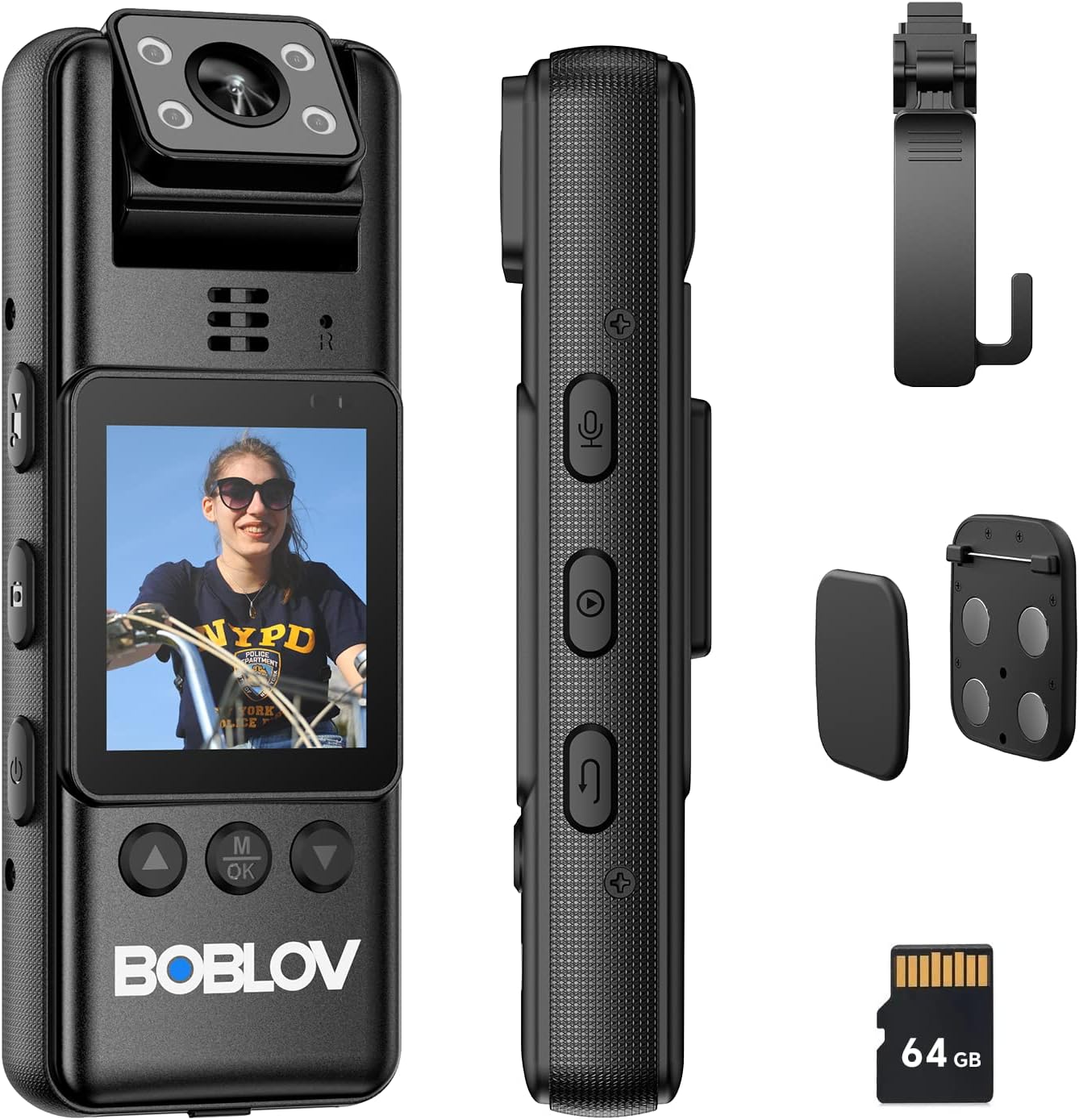
Figure 1: BOBLOV A23 Body Camera and its components, including the camera unit, USB-C cable, magnetic clips, and a 360-degree rotatable clip.
Негизги өзгөчөлүктөрү:
- 180-Degree Rotatable Lens: Allows for flexible recording angles and automatic image orientation adjustment when in standby mode.
- 1080p HD Video & 48MP Photo: Так жана деталдуу фоону тартатtage and high-resolution still images.
- Түнкү көрүнүш: Equipped with 4 built-in IR lights for effective recording in low-light or dark conditions.
- Батареянын узак иштөө мөөнөтү: Integrated 2200mAh battery provides up to 9 hours of continuous recording.
- 64GB Micro SD Card Included: Comes with a pre-installed A1 64GB micro SD card for immediate use.
- Ар тараптуу орнотуу параметрлери: Includes magnetic clips and a 360-degree rotatable long clip for various attachment methods.
- 2 дюймдук дисплей: For easy navigation and playback.
Орнотуу жана биринчи колдонуу
1. Кутудан чыгаруу жана Пакеттин мазмуну
Before using your BOBLOV A23 camera, please ensure all components are present in the package:

2-сүрөт: Детальдуу view of the BOBLOV A23 packaging list.
- BOBLOV A23 Body Worn Camera (1 unit)
- USB-C Cable (1 unit)
- Magnetic Clips (1 set)
- Колдонуучунун колдонмосу (1 бирдик)
- Long 360° Rotatable Clip (1 unit)
2. Камераны заряддоо
Fully charge the camera before its first use to ensure optimal battery performance. Use the provided USB-C cable.
- USB-C кабелин камеранын кубаттоо портуна туташтырыңыз.
- Кабелдин экинчи учун USB кубат адаптерине (кошумча эмес) же компьютердин USB портуна туташтырыңыз.
- The charging indicator light will show the charging status. A full charge typically takes approximately 4 hours.

Figure 3: USB-C charging port and battery capacity information.
The built-in 2200mAh battery provides sufficient power for up to 9 hours of video recording.
3. Микро SD картаны орнотуу
The camera comes with a 64GB A1 micro SD card pre-installed. If you need to access or replace it:
- Locate the micro SD card slot on the camera.
- Gently push the card into the slot until it clicks into place. Ensure the card is inserted in the correct orientation.
- To remove, push the card again until it pops out.
Эскертүү: For optimal performance, use high-speed (Class 10 or higher) micro SD cards. The camera supports loop recording, but this feature may not function correctly with cards larger than the camera's specified capacity (64GB for this model).
Иштөө нускамалары
1. Basic Controls and Buttons
Familiarize yourself with the camera's buttons for easy operation:

Figure 4: Button layout and functions on the BOBLOV A23 camera.
- Кубат баскычы: Press and hold to turn the camera on or off.
- Видео режиминин баскычы: Видео жаздыруу режимине которулат.
- Сүрөт режиминин баскычы: Сүрөткө тартуу режимине которулат.
- Аудио режиминин баскычы: Switches to audio-only recording mode.
- Playback Mode Button: Кайра ойнотуу режимине өтөтview жазылган files.
- Кайтаруу баскычы: Used to go back in menus or exit playback.
- OK/Menu Button (M/OK): Confirms selections or accesses the menu.
- Навигация баскычтары (өйдө/ылдый): Менюлар жана параметрлер боюнча чабыттоо үчүн колдонулат.
2. Күйгүзүү / Өчүрүү
- Күйгүзүү үчүн: Press and hold the Power Button until the screen illuminates.
- Өчүрүү үчүн: Press and hold the Power Button until the camera shuts down.
3. Видео жаздыруу
- Камера күйгүзүлгөнүн текшериңиз.
- басыңыз Видео режиминин баскычы to enter video recording mode.
- басыңыз OK/Меню баскычы to start recording. A red indicator light will typically blink to confirm recording is active.
- басыңыз OK/Меню баскычы жазууну токтотуу үчүн дагы.
4. Сүрөт тартуу
- Камера күйгүзүлгөнүн текшериңиз.
- басыңыз Сүрөт режиминин баскычы to enter photo capture mode.
- басыңыз OK/Меню баскычы сүрөткө тартуу.
5. Аудио жазуу
- Камера күйгүзүлгөнүн текшериңиз.
- басыңыз Аудио режим баскычы to enter audio-only recording mode.
- басыңыз OK/Меню баскычы to start audio recording.
- басыңыз OK/Меню баскычы аудио жазууну токтотуу үчүн дагы.
6. Ойнотуу
- басыңыз Playback Mode Button ойнотуу режимине кирүү үчүн.
- колдонуу Navigation Buttons (Up/Down) to browse through your recorded videos, photos, and audio files.
- басыңыз OK/Меню баскычы to play a selected file.
- басыңыз Кайтуу баскычы to exit playback or go back to the file тизме.
7. 180-Degree Rotatable Lens
The camera's lens can be manually rotated 180 degrees to adjust the recording angle. When the camera is in standby mode, the image direction on the screen will automatically adjust to match the lens orientation. However, during active video recording, the image orientation will not change.

Figure 5: Illustration of the 180-degree rotatable lens for flexible filming.
8. Түнкү көрүнүш
The BOBLOV A23 features built-in IR lights for enhanced recording in low-light or dark environments. The camera can automatically switch to night vision mode when light conditions require it, or it can be manually activated through the settings menu.

Figure 6: Day and night recording capabilities of the BOBLOV A23 camera, demonstrating effective night vision.
Mounting and Usage Scenarios
The BOBLOV A23 offers multiple carrying options to suit various situations:

Figure 7: Magnetic clips and the 360-degree rotatable clip for secure attachment.
- Магниттик клиптер: For quick and secure attachment to clothing or other magnetic surfaces.
- Long 360° Rotatable Clip: Ideal for attaching the camera to a shoulder strap, belt, or other gear, allowing for flexible positioning and rotation.
The camera is suitable for a variety of uses, including:

8-сүрөт: Мисamples of multiple uses for the A23 video recorder, including business, dog walking, law enforcement, and travel.
Техникалык тейлөө
Proper maintenance ensures the longevity and optimal performance of your BOBLOV A23 camera.
- Тазалоо: Камера корпусун тазалоо үчүн жумшак, кургак чүпүрөктү колдонуңуз. Линза үчүн, чийилип калбашы үчүн линзаны тазалоочу атайын чүпүрөктү жана эритмени колдонуңуз. Катуу химиялык заттарды же абразивдүү материалдарды колдонбоңуз.
- Сактагыч: Камераны салкын, кургак жерде, түз күндүн нурунан, экстремалдык температурадан жана жогорку нымдуулуктан алыс сактаңыз.
- Батареяга кам көрүү: To preserve battery life, avoid fully discharging the battery frequently. If storing for extended periods, charge the battery to about 50% every few months.
- Программалык камсыздоонун жаңыртуулары: Расмий BOBLOVду мезгил-мезгили менен текшерип туруңуз website for any available firmware updates to ensure your camera has the latest features and bug fixes.
Проблемаларды чечүү
Эгерде сиз BOBLOV A23 камераңыз менен көйгөйлөргө туш болсоңуз, төмөнкү кеңири таралган көйгөйлөрдү жана чечимдерди караңыз:
| Көйгөй | Мүмкүн болгон себеп / Чечим |
|---|---|
| Камера күйбөйт. |
|
| Recording stops unexpectedly or camera freezes. |
|
| Видео/сүрөттүн сапаты начар. |
|
| Cannot unclip camera from mount. |
|
Эгер көйгөй чечилбесе, кошумча жардам алуу үчүн BOBLOV кардарларды колдоо кызматына кайрылыңыз.
Техникалык шарттар
| Өзгөчөлүк | Деталь |
|---|---|
| Бренд | БОБЛОВ |
| Модел | A23 |
| Screen Size | 2 дюйм |
| Өзгөчөлүктөр | Night Vision, 180° Rotatable Lens |
| Диафрагма | f/2 |
| Колдоого алынган форматтар | Микро SD |
| Батареянын курамы | Литий-полимер |
| Video Resolution | 1080p |
| Пакеттин өлчөмдөрү (L x W x Y) | 12.6 x 7.5 x 5.7 см |
| Image Stabilization | Жок |
| Натыйжалуу дагы эле чечим | 48 мегапиксел |
| Фото сенсор технологиясы | CMOS |
| Видео тартуу форматы | MOV |
| Элемент Салмагы | 270 грамм |
Кепилдик жана колдоо
BOBLOV offers a two-year warranty for high-quality products. For warranty claims, technical support, or any inquiries not covered in this manual, please refer to the official BOBLOV webсайтына кириңиз же алардын кардарларды тейлөө кызматына түз кайрылыңыз. Кепилдик максатында сатып алуунун далили катары сатып алуу дүмүрчөгүңүздү сактап коюңуз.
Эң акыркы колдоо маалыматы үчүн төмөнкү дарекке кайрылыңыз: www.boblov.com


