Introduction
The TRIGKEY S5 Pro Max Mini PC is a compact and powerful desktop computer designed for a wide range of applications, from everyday office tasks to demanding multimedia and light gaming. Featuring an AMD Ryzen 7 5700U processor, 16GB DDR4 RAM, and a 500GB NVMe SSD, this micro computer delivers efficient performance. Its versatile connectivity options, including support for 4K triple display output, WiFi 6, and Bluetooth 5.2, ensure a seamless user experience. This manual provides essential information for setting up, operating, and maintaining your TRIGKEY S5 Pro Max Mini PC.
Орнотуу колдонмосу
Follow these steps to set up your TRIGKEY S5 Pro Max Mini PC for the first time.
1. Пакеттен чыгаруу жана компоненттерди текшерүү
Бардык компоненттерди таңгактан кылдаттык менен алып салыңыз. Сизде төмөнкү нерселер бар экенин текшериңиз:
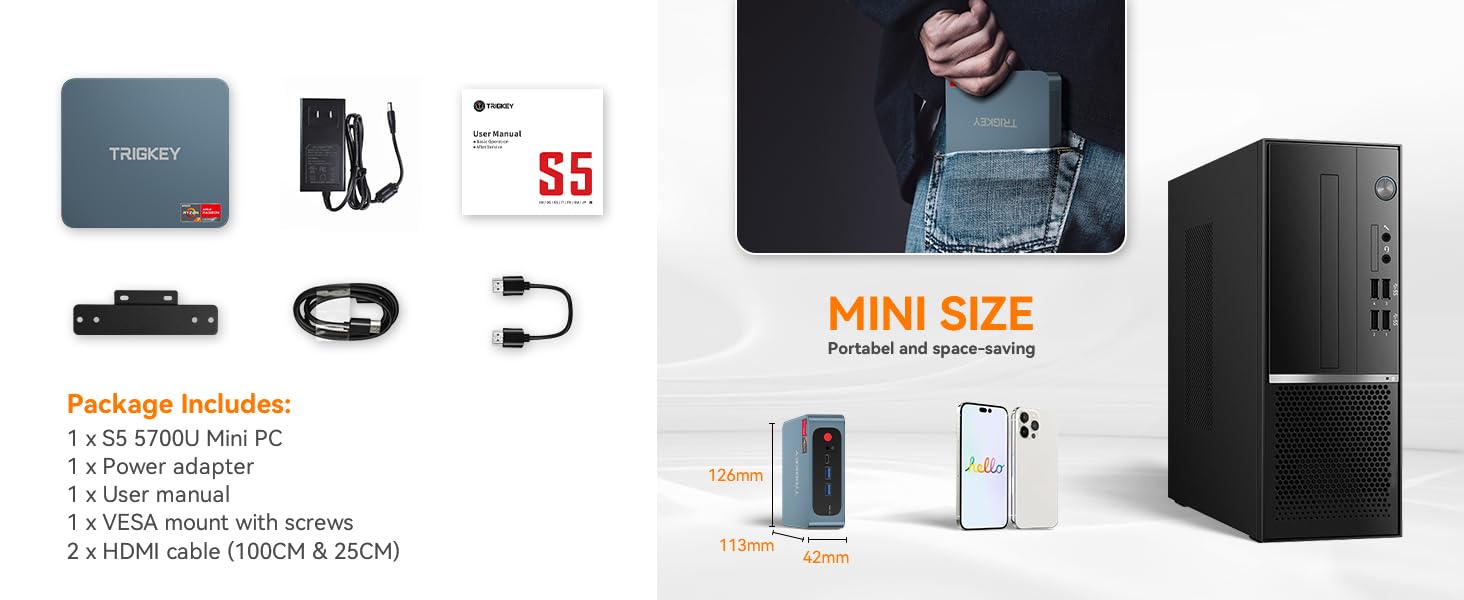
- 1 x TRIGKEY S5 Pro Max Mini PC
- 1 х кубат адаптери
- 1 х Колдонуучунун колдонмосу (бул документ)
- 1 x VESA монтаждоо бурамалар менен
- 2 x HDMI Cables (100CM & 25CM)

Figure 1: TRIGKEY S5 Pro Max Mini PC and its included accessories, including the power adapter, user manual, VESA mount, and two HDMI cables.
2. Перифериялык түзүлүштөрдү туташтыруу
Connect your monitor(s), keyboard, and mouse to the Mini PC. The device supports triple display output via HDMI, DisplayPort (DP), and Type-C ports.
- Мониторлор: Connect your monitor(s) using the provided HDMI cables or your own DP/Type-C cables. The Mini PC supports up to three displays simultaneously.
- Баскычтоп жана чычкан: Connect your USB keyboard and mouse to the available USB 3.2 Gen2 or USB 2.0 ports.
- Тармак: For wired internet access, connect an Ethernet cable to the RJ45 1000Mbps LAN port. For wireless, ensure WiFi 6 is enabled.
- Аудио: Динамиктерди же кулакчындарды аудио уячага туташтырыңыз.
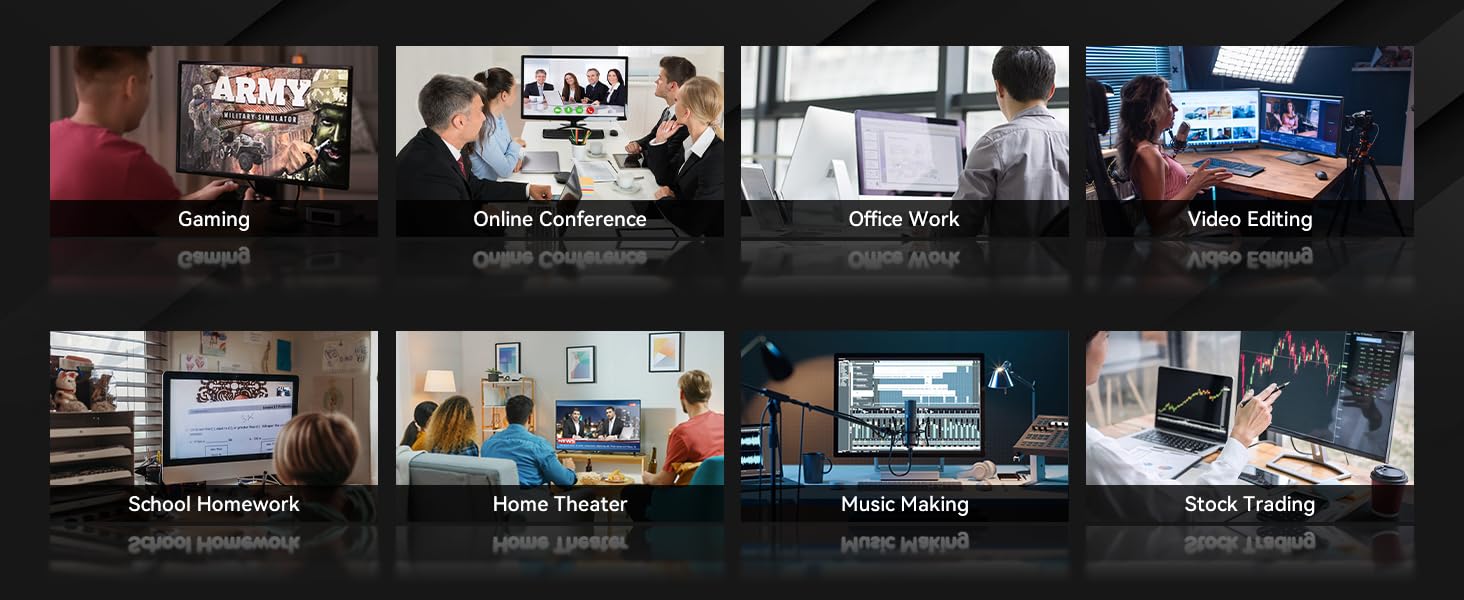
Figure 2: ашыкview of the convenient interfaces on the TRIGKEY S5 Pro Max Mini PC, including USB 3.2 Gen2, Type-C, DP 1.4, HDMI 2.0, USB 2.0, LAN, and Audio Jack.
3. Күйгүзүү
Connect the power adapter to the DC-in port on the Mini PC, then plug the adapter into a power outlet. Press the power button located on the front of the device. The power indicator light will illuminate, and the system will begin to boot.

Figure 3: The TRIGKEY S5 Pro Max Mini PC, highlighting its compact design and accessible ports for easy setup.
4. Initial Display Setup
Upon first boot, the operating system (Windows 10 Pro) will guide you through the initial setup process. If you are connecting multiple monitors, the system should automatically detect them. You can configure display settings (e.g., extend, duplicate) within the operating system's display settings.
Video 1: This video demonstrates the ease of setting up dual monitors with the TRIGKEY S5 Pro Max Mini PC, showing the connection process and automatic display detection.
Мини-компьютериңизди иштетүү
The TRIGKEY S5 Pro Max Mini PC is pre-installed with Windows 10 Pro, providing a familiar and user-friendly operating environment. Its powerful hardware ensures smooth performance for various tasks.
1. Аткаруу көрсөткүчү жогоруview
Equipped with an AMD Ryzen 7 5700U processor (8 Cores, 16 Threads, up to 4.30GHz) and AMD Radeon Graphics 8 CUs, the Mini PC offers robust performance for multitasking, content creation, and entertainment. The 16GB DDR4 3200MHz RAM (expandable up to 64GB) and 500GB NVMe SSD (configurable up to 2TB) contribute to fast boot times and responsive application loading.

Figure 4: Detailed specifications of the AMD Ryzen 7 5700U processor, highlighting its base and turbo frequencies, core/thread count, graphics card frequency, and processor technology.

Figure 5: Key features of the Mini PC, including its plastic body, dual fan design for cooling, M.2 2280 PCIe3.0X4 slot for SSD, Wi-Fi 6, Bluetooth 5.2, and triple-screen display support.

Figure 6: A bar chart comparing the single-core and multi-core CPU performance of the AMD Ryzen 7 5700U against other processors based on Cinebench R20 scores.
2. Сактоо жана эс тутум
The Mini PC comes with a 500GB M.2 2280 NVMe SSD for high-speed storage. It also supports expansion up to 2TB. The system includes 16GB of DDR4 3200MHz SO-DIMM RAM, with two available slots supporting up to 64GB for enhanced multitasking and gaming performance.

Figure 7: Illustration showing the SO-DIMM DDR4 3200MHz RAM modules and the capability to support up to 64GB, enhancing performance for demanding applications like Adobe Photoshop and Illustrator.

Figure 8: Visual representation of the M.2 2280 NVMe SSD, emphasizing its fast and stable data transfer capabilities and upgrade potential up to 2TB.
3. Колдонуу сценарийлери
The TRIGKEY S5 Pro Max Mini PC is versatile and suitable for various applications:
- Офис иши: Efficiently handle documents, spreadsheets, and presentations.
- Online Conference: Smooth video conferencing with stable network connectivity.
- Video Editing & Music Making: Process multimedia content with ease thanks to powerful CPU and ample RAM.
- Оюн: Enjoy light to moderate gaming with integrated AMD Radeon Graphics.
- Үй кинотеатры: Connect to your TV for 4K media consumption.
- Stock Trading & School Homework: Reliable performance for analytical and educational tasks.
Сүрөт 9: Visual examples of the Mini PC's diverse applications, including gaming, online conferences, office work, video editing, school homework, home theater, music making, and stock trading.
Техникалык тейлөө
Тийиштүү техникалык тейлөө сиздин мини-компьютериңиздин узак мөөнөттүү иштешин жана оптималдуу иштешин камсыз кылат.
1. Тазалоо
Мини ПКнын сыртын жумшак, кургак чүпүрөк менен дайыма тазалап туруңуз. Желдетүүчү тешиктерге чаң топтоо үчүн кысылган абаны колдонуңуз. Тазалоодон мурун аппараттын өчүрүлгөнүн жана розеткадан ажыратылганын текшериңиз.
2. Программалык камсыздоону жаңыртуу
Keep your operating system and drivers updated to ensure stability, security, and optimal performance. Windows Update can be accessed through the system settings.
3. Hardware Upgrades
The TRIGKEY S5 Pro Max Mini PC supports RAM and SSD upgrades. For RAM, it has two SO-DIMM slots, allowing for an upgrade up to 64GB DDR4 3200MHz. The M.2 2280 NVMe SSD can be upgraded to a larger capacity, up to 2TB. Additionally, there is a 2.5-inch SATA HDD slot for further storage expansion. When performing upgrades, ensure the device is powered off and unplugged, and refer to detailed guides or seek professional assistance if unsure.

10-сүрөт: Ички view of the Mini PC, illustrating its efficient heat dissipation technology, M.2 2280 PCIe3.0 X4 SSD slot, and DDR4 dual-channel SODIMM slots for potential upgrades.
Проблемаларды чечүү
Бул бөлүмдө сиздин Mini PC менен кездешиши мүмкүн болгон жалпы көйгөйлөр каралат.
1. Дисплейдин чыгышы жок
- Кабелдерди текшерүү: Ensure all display cables (HDMI, DP, Type-C) are securely connected to both the Mini PC and the monitor.
- Power Cycle: Turn off the Mini PC, unplug the power adapter, wait 10 seconds, then plug it back in and power on.
- Монитор киргизүү: Verify that your monitor is set to the correct input source (e.g., HDMI 1, DisplayPort).
- Single Monitor Test: If using multiple monitors, try connecting only one monitor to isolate the issue.
2. Система күйбөй жатат
- Кубат туташуу: Ensure the power adapter is firmly connected to the Mini PC and the wall outlet.
- Электр розеткасы: Розетканын иштеп жатканын текшерүү үчүн аны башка түзмөк менен текшериңиз.
- Кубат баскычы: Кубат баскычын бир нече секунд басып туруңуз.
3. Жай аткаруу
- Колдонулбаган тиркемелерди жабуу: Close any unnecessary programs running in the background.
- Сактагычты текшерүү: SSD'ңизде жетиштүү бош орун бар экенин текшериңиз.
- Жаңыртуулар: Perform Windows updates and driver updates.
- Муздатуу: Ensure the Mini PC's vents are not obstructed to allow for proper airflow and prevent overheating.
Техникалык шарттар
| Өзгөчөлүк | Спецификация |
|---|---|
| Бренд | TRIGKEY |
| Модель аты | Ылдам S5 |
| Элемент моделинин номери | Speed S5 5500 16+500 |
| Операция системасы | Windows 10 Pro (Алдын ала орнотулган) |
| Процессор | AMD Ryzen 7 5700U (8 Cores, 16 Threads, 1.80GHz Base, 4.30GHz Max Turbo) |
| Графикалык сопроцессор | AMD Radeon Vega 8 графикасы |
| RAM | 16GB DDR4 3200MHz (2 SO-DIMM slots, expandable to 64GB) |
| Катуу диск | 500GB NVMe SSD (M.2 2280 PCIe3.0X4, configurable to 2TB) |
| Кошумча сактагыч | 2.5-inch SATA HDD Slot |
| Max Screen Resolution | 3840 x 2160 пиксел (4K) |
| Display Output | HDMI (4K@60Hz), DisplayPort (4K@144Hz), Type-C (10Gbps/Max 4K@120Hz) - Triple Display Support |
| Зымсыз байланыш | WiFi 6, Bluetooth 5.2 |
| Зымдуу туташуу | RJ45 1000Mbps LAN |
| USB порттору | 3x USB 3.2 Gen2 (10Gbps), 1x USB 2.0 (480Mbps) |
| Аудио Jack | 1x Аудио уячасы |
| Элемент Салмагы | 2.16 фунт |
| Пакеттин өлчөмдөрү | 9.09 x 5.35 x 2.48 дюйм |
Кепилдик жана колдоо
TRIGKEY is committed to providing excellent customer service and support for its products.
- 24 сааттык тез жооп: Суроолоруңузга 24 сааттын ичинде жооп күтүңүз.
- 30-Day No Reason to Return: Enjoy a 30-day return policy for any reason.
- 12 айлык алмаштыруу: Сатып алынгандан кийин 12 айдын ичинде жарактуу көйгөйлөр үчүн алмаштыруучу түзүлүш бар.
- Lifetime After-Sales Service and Technical Support: Benefit from long-term support for your product.
For further assistance, please refer to the contact information provided on the official TRIGKEY webсайт же сатып алуу платформасы аркылуу.

Figure 11: Icons representing TRIGKEY's customer support commitments: 24-hour quick reply, 30-day no-reason return, 12-month replacement, and lifetime after-sales service and technical support.


