1. Киришүү
This manual provides detailed instructions for the assembly, installation, operation, and maintenance of your Tecmojo 18U Wall Mount Rack Network Cabinet. Please read this manual thoroughly before beginning installation to ensure proper setup and safe operation. Keep this manual for future reference.
2. Продукциянын өзгөчөлүктөрү
- Мыкты курулуш: Manufactured from high-quality cold-rolled steel, supporting up to 110 lbs (50 kg) for secure equipment housing.
- Ventilation and Security: Features one built-in top fan for airflow to prevent overheating. Tempered glass front door and side panels are lockable to prevent unauthorized access.
- Easy Equipment Configuration: Includes fully adjustable mounting rails with numbered U positions and square holes for straightforward equipment mounting. The inner mountable depth is 14.2 inches (360mm).
- Ыңгайлуу дизайн: The front door is reversible, allowing installation on either side. Removable top and bottom panels facilitate easy cable management. Compact dimensions of 21.65"L x 17.72"D x 34.76"H with 16-inch apart mounting holes accommodate standard stud placement.
- Коопсуздук жана шайкештик: PCI, HIPPA, and EIA/ECA-310-E compliant for server rack cabinet standards.
3. Пакеттин мазмуну
Монтаждоону баштаардан мурун, төмөндө келтирилген бардык компоненттер пакетиңизде бар экенин текшериңиз.

Сүрөт: Пакетке кирген бардык компоненттер.
- 1 x Tecmojo 18U Wall Mount Rack Network Cabinet (unassembled)
- 1 x Instruction Manual
- 1 x муздаткыч желдеткич
- 2 х ачкычтар
- 25 x 10-32 Screws
- 25 x 10-32 Cage Nuts
- 1 x Mounting Hole Drilling Template
4. Орнотуу жана орнотуу
Follow these steps carefully for proper assembly and wall mounting of your network cabinet.
4.1 Assembly Guide Video
Video: Step-by-step assembly instructions for the Tecmojo 18U Wall Mount Rack Network Cabinet.
4.2 Кадамдык Ассамблея
- Рамканы чогултуу: Begin by attaching the front frames and back cover to the bottom panel. Secure all connections with the provided screws.
- Install Top Cover: Place the top cover onto the assembled frame and secure it with screws. Ensure all joints on both sides are fixed firmly.
- Fasten Rack Rails: Install the vertical rack rails inside the cabinet. These rails are versatile and can accommodate both square and tapped mounting hardware. Ensure they are securely fastened.
- Каптал панелдерин орнотуу: Attach the removable side panels to the cabinet. These panels provide additional security and can be removed for easy access during maintenance.
- Install Front Glass Door: Mount the tempered glass front door. The door is reversible and can be installed to open from either the left or right side.
4.3 Дубалга орнотуу
- Орнотуу шаблонун колдонуңуз: Utilize the included mounting hole drilling template to mark the desired wall mounting locations. The mounting holes are spaced 16 inches apart to align with standard wall studs.
- Бургулоочу тешиктер: Drill appropriate pilot holes at the marked locations.
- Secure Cabinet to Wall: Carefully lift the assembled cabinet and align it with the pilot holes. Secure the cabinet to the wall using appropriate mounting hardware (not included, typically wall anchors or lag screws depending on wall type and load).
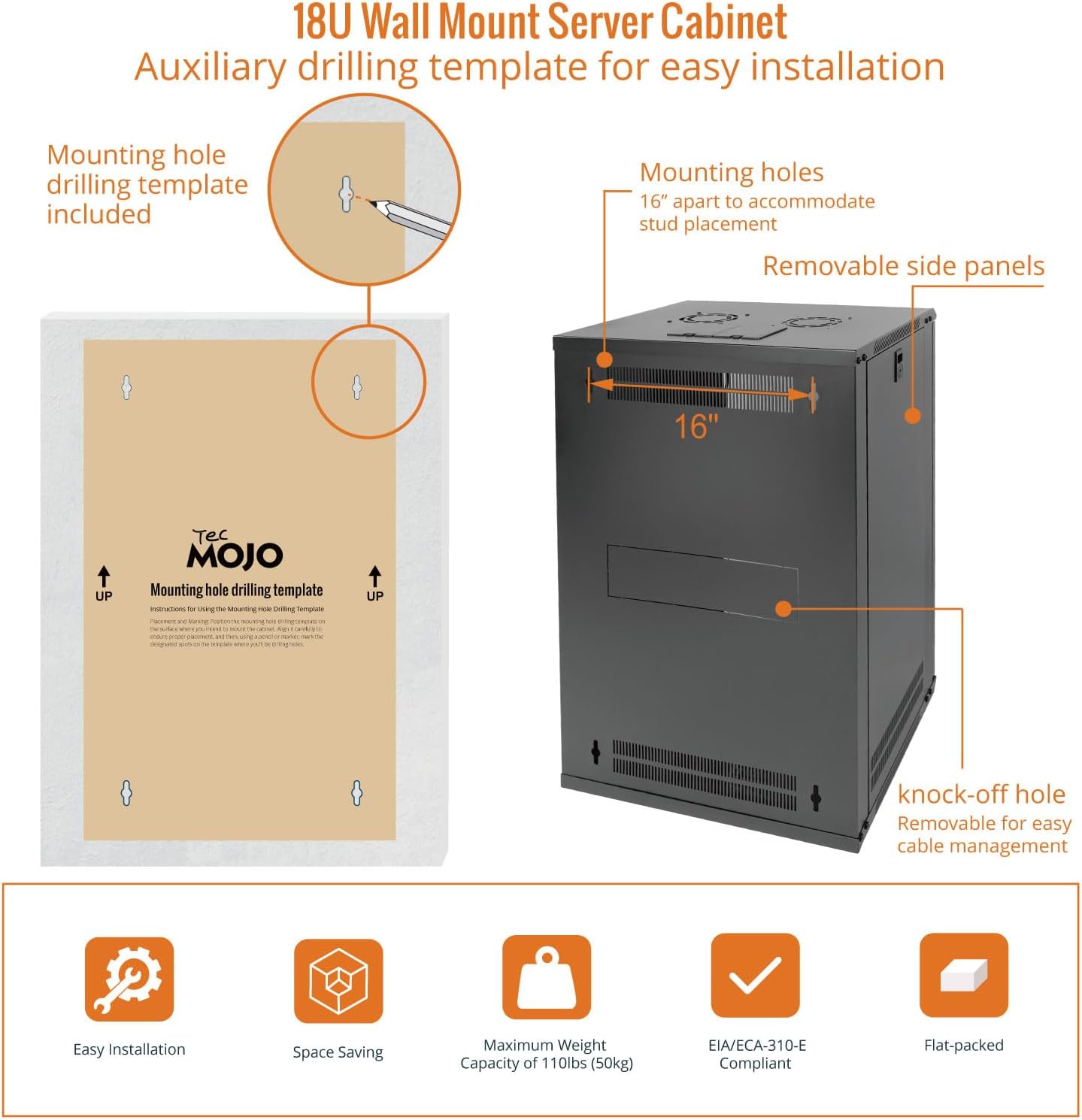
Image: Using the mounting hole drilling template.
5. Операция
Once installed, the Tecmojo 18U Wall Mount Rack Network Cabinet is ready for use. This section outlines key operational aspects.
5.1 Жабдууларды орнотуу
Install your 19-inch IT equipment onto the adjustable rack rails using the provided 10-32 screws and cage nuts. Ensure equipment is evenly distributed to maintain balance and stability.

Сүрөт: Интерьер view with equipment installed, showing rack rails.
5.2 Кабелди башкаруу
Utilize the removable top and bottom panels for routing cables. This helps maintain an organized and efficient setup, reducing clutter and improving airflow.
5.3 Коопсуздук
The front glass door and side panels are lockable. Use the provided keys to secure your equipment against unauthorized access.

Image: Close-up of the lockable door for enhanced security.
5.4 Муздатуу жана желдетүү
The cabinet includes a built-in top fan to increase airflow and prevent overheating of your network equipment. Additionally, side ventilation holes further enhance air circulation to maintain a stable internal temperature.

Image: Cooling fan and side ventilation details.
5.5 Продукт бүттүview Video
Видео: Бүттүview of the Tecmojo 18U Wall Mount Rack Network Cabinet's features, including security and ventilation.
6. Техникалык тейлөө
Regular maintenance ensures the longevity and optimal performance of your network cabinet.
- Тазалоо: Use a soft, dry cloth to clean the exterior surfaces. For the glass door, use a non-abrasive glass cleaner. Avoid harsh chemicals that may damage the finish.
- желдеткич текшерүү: Periodically check the cooling fan for dust accumulation. Clean the fan blades gently with compressed air or a soft brush to maintain efficient airflow.
- Аппараттык камсыздоону текшерүү: Annually inspect all screws and fasteners to ensure they remain tight. Re-tighten if necessary.
- Door Hinges and Locks: Lubricate door hinges and locks periodically with a silicone-based lubricant to ensure smooth operation.
7. Кыйынчылыктарды
This section addresses common issues you might encounter with your network cabinet.
- Cabinet Not Level: Ensure the wall mounting points are level. Adjust mounting hardware as needed. Verify all frame screws are tightened.
- Эшик туура жабылбай жатат: Check hinges for obstruction or damage. Ensure the cabinet itself is not warped due to improper installation. Verify the lock mechanism is clear.
- Желдеткич иштебейт: Check the power connection to the fan. Ensure no wires are pinched or disconnected. If the fan still does not operate, it may require replacement.
- Excessive Heat Buildup: Ensure the cooling fan is operating correctly. Verify that side ventilation holes are not obstructed. Ensure proper cable management to avoid blocking airflow within the cabinet.
8. Техникалык шарттар

Image: Key specifications and dimensions.
| Спецификация | Деталь |
|---|---|
| Продукциянын өлчөмдөрү | 17.72 x 21.65 x 34.76 inches (450mm D x 550mm W x 883mm H) |
| Элемент Салмагы | 53.9 фунт (24.4 кг) |
| Өндүрүүчү | Tecmojo |
| Элемент моделинин номери | 11110205 |
| Бренд | Tecmojo |
| Түс | Кара |
| Өлчөмү | 18U/Glass Door |
| Материал | Эритме болот |
| Салмак сыйымдуулугу | 110 фунт (50 кг) |
| Mountable Depth | 14.2 дюйм (360мм) |
| Шайкештик | PCI, HIPPA, EIA/ECA-310-E |
9. Кепилдик жана колдоо
For warranty information or technical support, please refer to the contact details provided with your purchase documentation or visit the official Tecmojo webсайт. Кепилдик дооматтар үчүн сатып алганыңыздын далилин сактаңыз.


