1. Киришүү
Welcome to your new Homall Electric Standing Desk. This manual provides essential information for the safe and efficient assembly, operation, and maintenance of your desk. Please read these instructions carefully before use and retain them for future reference.
Коопсуздук маалыматы
- Do not exceed the maximum weight capacity of 50 kg (110 lbs) on the desktop.
- Ensure the desk is placed on a level surface and properly anchored to prevent tipping.
- Балдарды жана үй жаныбарларын жаракаттарды болтурбоо үчүн иш учурунда столдон алыс кармаңыз.
- Суюктуктарды түздөн-түз башкаруу панелине же электрдик тетиктердин жанына коюудан алыс болуңуз.
- Үстөлдүн электрдик компоненттерин бөлүктөргө бөлбөңүз же өзгөртпөңүз. Тейлөө үчүн кардарларды колдоо кызматына кайрылыңыз.
- Бийиктикти тууралоодо столдун жолунда эч кандай тоскоолдуктар жок экенин текшериңиз.
2. Орнотуу жана чогултуу
The Homall Electric Standing Desk is designed for straightforward assembly. All necessary tools and detailed instructions are included in the packaging. The desktop is composed of multiple sections that fit together precisely using dowels and screws.
Ассамблея кадамдарыview:
- Бардык компоненттерди таңгактан чыгарып, монтаждоо колдонмосунда берилген тетиктердин тизмесин текшериңиз.
- Assemble the desktop sections using the provided dowels and screws. Ensure a flush and secure fit.
- Attach the lifting columns to the desktop using the designated hardware.
- Install the foot supports onto the lifting columns.
- Mount the control panel and motor unit according to the instructions.
- Connect all electrical cables as indicated in the assembly guide.
- Бийиктикти жөндөө функциясынын баштапкы сыноосун жүргүзүңүз.

3. Иштөө нускамалары
Your Homall Electric Standing Desk features an intuitive control panel for easy height adjustment and personalized settings.
Башкаруу панелинин функциялары:

- Бийиктигин тууралоо: колдонуу + (Өйдө) жана - (Down) buttons to smoothly adjust the desk height between 73 cm and 118 cm. The current height is displayed on the LCD screen.
- Эстутум алдын ала орнотуулары: The desk supports 3 programmable height memory positions. To save a position: Adjust the desk to your desired height, then press the M баскычын жана андан кийин 1, 2, же 3. To recall a saved position, simply press the corresponding number button (1, 2, же 3).
- Отуруучу эстеткич: Activate the sedentary reminder function to receive alerts to change your working posture. Refer to the detailed assembly guide for specific activation and setting instructions.
- USB кубаттоо порту: A convenient USB port is integrated into the control panel for charging mobile devices or powering small accessories.
- Кагылышууга каршы технология: The desk is equipped with an anti-collision system that automatically stops and slightly reverses the desk's movement if it encounters an obstruction during height adjustment, enhancing safety.

4. Техникалык тейлөө
Regular maintenance ensures the longevity and optimal performance of your Homall Electric Standing Desk.
- Тазалоо: Иш тактасын жана алкакты жумшак менен сүртүңүз, гamp кездеме. Абразивдүү тазалагычтардан же финишке зыян келтирүүчү катаал химиялык заттардан алыс болуңуз.
- Текшерүү: Мезгил-мезгили менен бардык бурамалар менен байланыштарды текшерип, алардын бекемдигин текшерип туруңуз. Керек болсо кайра тартыңыз.
- Кабелдик башкаруу: Бардык кабелдердин тыкан башкарылганын жана, айрыкча, бийиктикти тууралоо учурунда, кысылып же чаташып калбаганын текшериңиз.
- Мотор багуу: The motor is designed for quiet and stable operation. Avoid overloading the desk, which can strain the motor.
5. Кыйынчылыктарды
If you encounter issues with your Homall Electric Standing Desk, refer to the following common troubleshooting steps:
| Көйгөй | Мүмкүн себеп | Чечим |
|---|---|---|
| Иш стол өйдө же ылдый жылбайт. | Электр кабели үзүлүп калды, мотордо ката кетти, ашыкча жүктөлдү. | Check power connection. Unplug and replug the desk. Reduce weight on the desktop. Refer to the full manual for error codes. |
| Үстел бир калыпта эмес кыймылдайт же адаттан тыш үндөрдү чыгарат. | Бир калыпта эмес жүк, бош байланыштар, тоскоолдуктар. | Distribute weight evenly. Check and tighten all assembly screws. Ensure no objects are interfering with the lifting columns. |
| Эстутум алдын ала орнотуулары иштебей жатат. | Туура эмес сактоо процедурасы. | Ensure you press 'M' then the number button to save. To recall, press only the number button. |
| Кагылышууга каршы өзгөчөлүк тез-тез иштетилет. | Жолдогу тоскоолдук. | Clear any objects above or below the desk that might be causing interference. |
If the problem persists after attempting these solutions, please contact Homall customer support for further assistance.
6. Техникалык шарттар
Detailed technical specifications for the Homall Electric Standing Desk Model 01 (140x60cm, White).
- Бренд: Homall
- Модель номери: 01
- Түсү: Ак
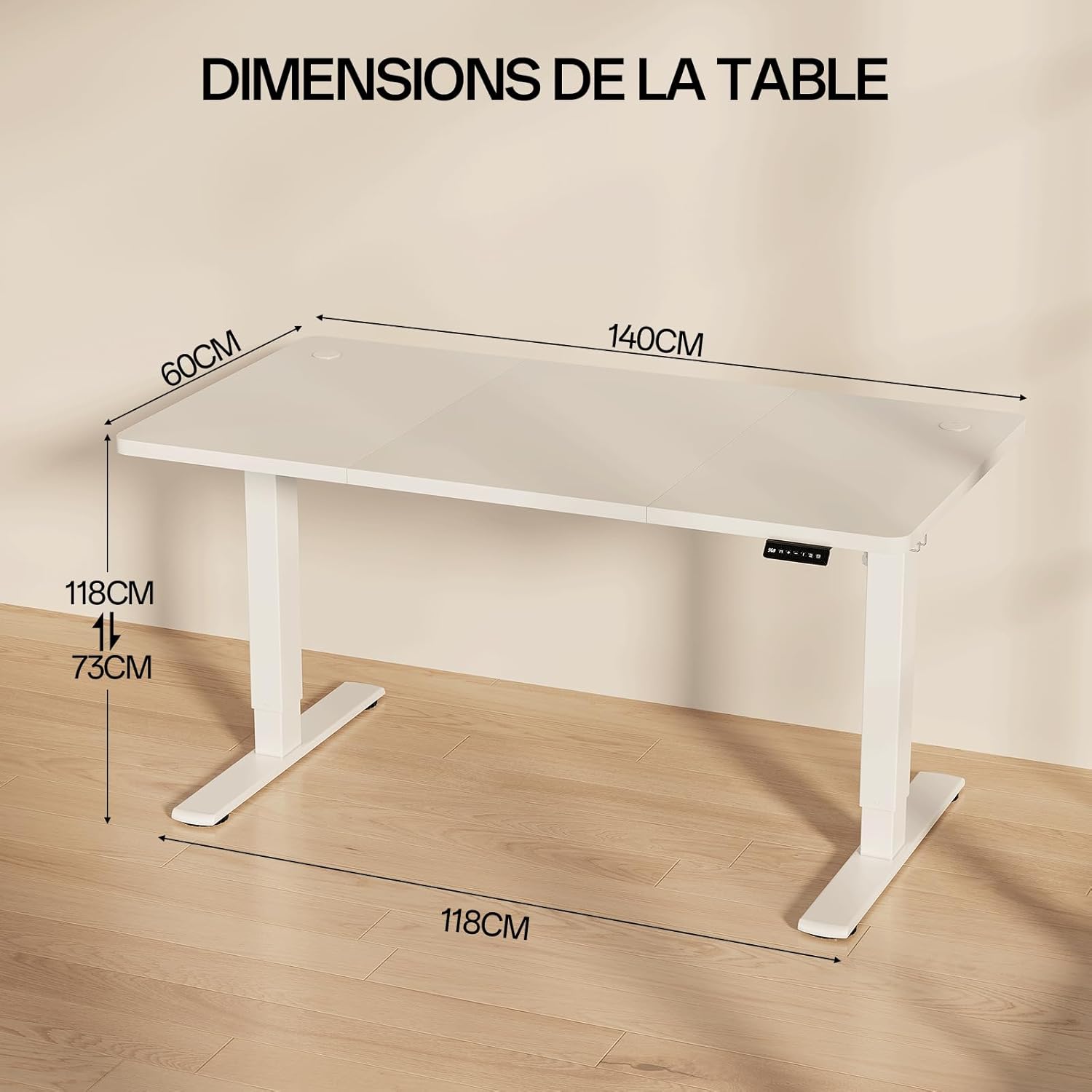
- Продукциянын өлчөмдөрү (L x W x Y): 140 см х 60 см х 73-118 см
- Жөнгө салынуучу бийиктик диапазону: 73 смден 118 смге чейин
- Максималдуу Салмак сыйымдуулугу: 50 кг
- Материал: Alloy Steel (frame), Painted finish (desktop)
- Өзгөчөлүктөр: Ergonomic, Adjustable, Electric, USB Charging Port, Sedentary Reminder, 3 Memory Positions, Anti-collision Technology
- Ызы-чуу деңгээли: Approximately 55 dB during operation (comparable to quiet conversation)
- Элемент Салмагы: Болжол менен 25.5 кг

7. Кепилдик жана колдоо
For warranty information, product support, or to purchase replacement parts, please contact Homall customer service. Refer to your purchase documentation for specific warranty terms and contact details.
You can typically find support contact information on the Homall official webсайты же продуктуну сатып алган сатуучу аркылуу.


