1. Киришүү
Thank you for choosing BUGANI Open Ear Headphones, Model MH22109. These headphones are designed to provide a comfortable, open-ear listening experience with advanced Bluetooth 5.3 technology, immersive stereo sound, and clear call functionality. This manual will guide you through the setup, operation, and maintenance of your new headphones.
2. Коопсуздук маалыматы
- Do not expose the headphones or charging case to extreme temperatures, direct sunlight, or fire.
- Угуу жөндөмүнө зыян келтирбөө үчүн кулакчындарды өтө жогорку үн менен узак убакытка колдонуудан алыс болуңуз.
- Keep the device away from water and liquids, although it is IPX5 rated for sweat and light splashes, it is not designed for submersion.
- Аппаратты ажыратууга же өзгөртүүгө аракет кылбаңыз. Бул кепилдикти жокко чыгарат.
- Кубаттоо үчүн берилген кубаттоочу кабелди же сертификатталган Type-C кабелин гана колдонуңуз.
- Be aware of your surroundings when using open-ear headphones, especially in traffic or hazardous environments.
3. Пакеттин мазмуну
The BUGANI Open Ear Headphones package includes the following items:
- BUGANI Open Ear Headphones (Left and Right)
- Заряддоо кутусу
- USB Type-C кубаттоочу кабели (ачык тизмеде жок, бирок стандарттуу)
- Колдонуучунун Колдонмосу (бул документ)

Image: The BUGANI Open Ear Headphones and their transparent charging case.
4. Продукт бүтүп калдыview
The BUGANI Open Ear Headphones feature a unique design that rests gently on your ears without entering the ear canal, providing comfort and situational awareness. The charging case protects the earbuds and provides extended battery life.

Image: A woman wearing the BUGANI Open Ear Headphones, illustrating the open-ear design and comfortable fit.

Image: A man relaxing and listening to music with the headphones, highlighting the immersive stereo sound.
5. Орнотуу
5.1 Наушниктерди жана капты заряддоо
Биринчи колдонуудан мурун, наушникти жана кубаттоочу кутучаны толук заряддаңыз.
- Кулакчындарды заряддоо кутусуна салыңыз. Алардын туура отурганын текшериңиз.
- Connect the Type-C charging cable to the charging port on the case and plug the other end into a USB power adapter (not included) or a computer's USB port.
- The LED indicator on the charging case will show the charging status. A full charge for the case typically takes 1-2 hours.
- The earbuds provide up to 6 hours of playtime on a single charge, and the charging case extends total playtime to approximately 30 hours.

Image: The charging case with earbuds, displaying the battery level, next to a smartphone playing music, illustrating the 30-hour playtime.
5.2 Bluetooth жупташтыруу
The headphones feature one-step auto-pairing for convenience.
- Заряддоо кутучасын ачыңыз. Кулакчындар автоматтык түрдө күйүп, жупташтыруу режимине өтөт.
- Түзмөгүңүздө (смартфон, планшет, компьютер) Bluetooth иштетиңиз.
- Издөө available Bluetooth devices and select "BUGANI OpenFit" from the list.
- Once connected, you will hear an audible confirmation, and the device will show "Connected".
- Эгер аппаратта Bluetooth иштетилген болсо, гарнитура корпусунан чыгарылганда акыркы жупташтырылган түзмөккө автоматтык түрдө кайра туташат.

Image: A smartphone screen displaying the Bluetooth settings, with "BUGANI OpenFit" listed as a connected device, demonstrating the one-step auto-pairing process.
6. Иштөө нускамалары
6.1 Наушник тагынуу
The open-ear design ensures a secure and comfortable fit without blocking your ear canal.
- Сол (L) жана Оң (R) кулакчындарды аныктаңыз.
- Gently hook the earbud over your ear, ensuring the speaker portion is positioned near your ear canal without entering it.
- Adjust for a snug and comfortable fit.
6.2 Smart Touch Controls
The headphones feature touch-sensitive areas for controlling various functions:
| Акция | Наушник | Функция |
|---|---|---|
| X1 таптап | R/L | Музыканы ойнотуу/тындыруу, чалууга жооп берүү |
| X2 таптап | R | Үндү көтөрүү |
| X2 таптап | L | Үндү төмөндөтүү |
| X3 таптап | R | Кийинки трек |
| X3 таптап | L | Мурунку трек |
| Басуу жана кармап туруу (2сек) | R/L | Чакырууну бүтүрүү, Чакырууну четке кагуу |
| Басуу жана кармап туруу (2сек) | L | Үн жардамчысын жандырыңыз |
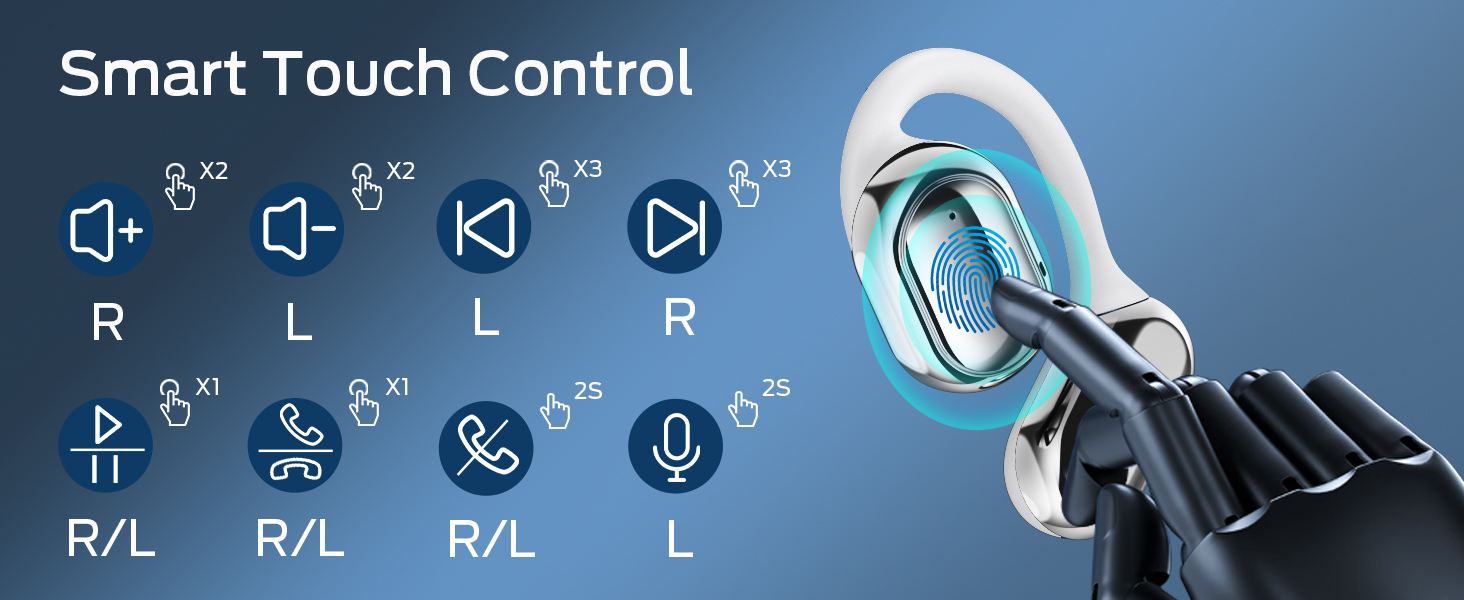
Image: A visual guide to the smart touch controls on the BUGANI Open Ear Headphones, detailing single, double, triple taps, and long presses for various functions.
6.3 Чалууларды кабыл алуу жана кабыл алуу
The built-in dual microphones with environmental noise reduction technology ensure clear calls.
- Чакырууга жооп берүү: Кулакчындарды бир жолу таптаңыз.
- Чакырууну аяктоо: Кулакчындардын бирин 2 секунд басып туруңуз.
- Чакырууну четке кагуу: Кулакчындардын бирин 2 секунд басып туруңуз.

Image: A man using the BUGANI Open Ear Headphones to make a phone call, emphasizing the clear call feature.
7. Техникалык тейлөө
7.1 Тазалоо
- Кулакчындарды жана кубаттоочу кутуну жумшак, кургак, түксүз чүпүрөк менен сүртүңүз.
- Абразивдүү тазалагычтарды, спиртти же химиялык эриткичтерди колдонбоңуз.
- Ensure charging contacts are clean and dry.
7.2 Сактоо
- Кулакчындарды коргоо жана кубаттап туруу үчүн колдонулбаган учурда кубаттоо кутучасында сактаңыз.
- Салкын, кургак жерде, экстремалдык температурадан алыс сактаңыз.
7.3 Сууга туруктуулук (IPX5)
The headphones are rated IPX5, meaning they are protected against low-pressure water jets from any direction. This makes them suitable for sports and running, protecting against sweat and light rain. They are not designed for swimming or submersion in water.
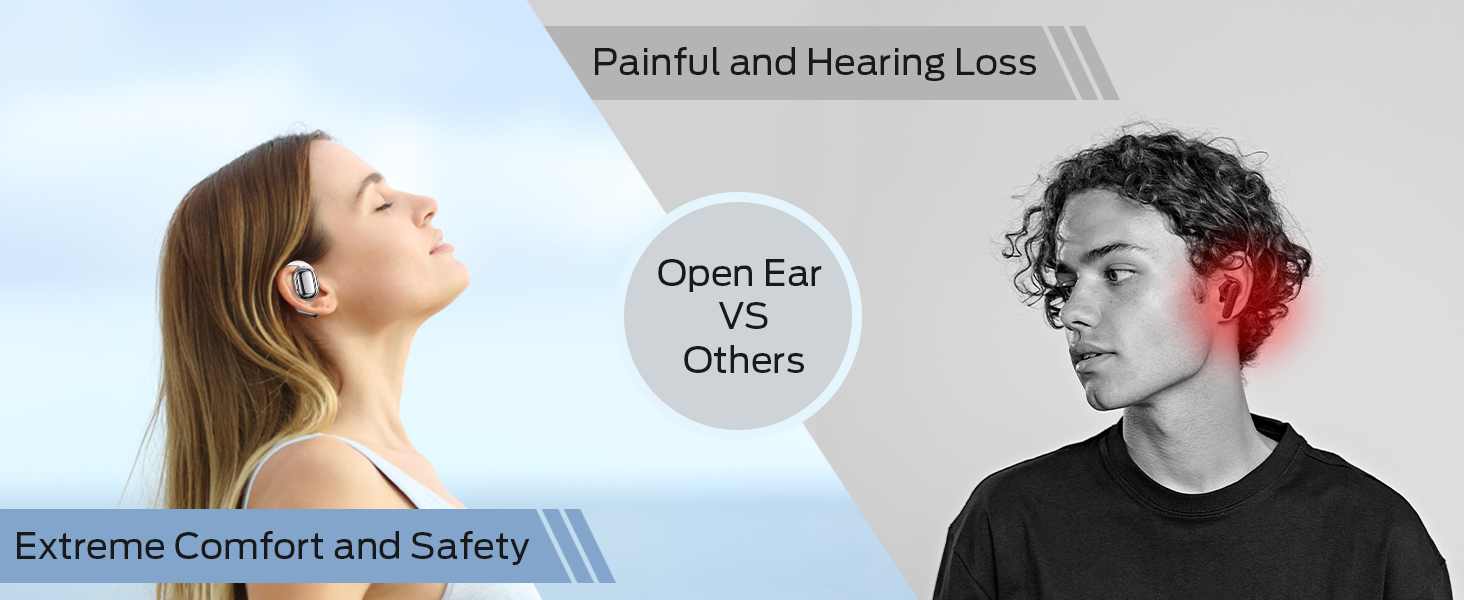
Image: A man running with water splashing on him, demonstrating the IPX5 waterproof feature of the headphones, suitable for active use.
8. Кыйынчылыктарды
If you encounter issues with your BUGANI Open Ear Headphones, please refer to the following common solutions:
- Үн жок: Ensure the headphones are charged, paired correctly, and the volume on both the headphones and your device is turned up.
- Жупташтыруу маселелери: Turn off Bluetooth on your device, then turn it back on. Place the earbuds back in the case, close it, then open it again to re-enter pairing mode. Try pairing again.
- Үзгүлтүксүз туташуу: Ensure you are within the Bluetooth range (up to 10 meters) and there are no significant obstacles between the headphones and your device. Avoid strong electromagnetic interference.
- Кулакчындар кубатталбай жатат: Check that the charging cable is securely connected and the charging contacts on the earbuds and case are clean. Ensure the charging case itself has power.
- Бир кулакчын иштебей жатат: Try placing both earbuds back in the case, closing it, and then taking them out again to reset the connection. If the issue persists, try re-pairing.
9. Техникалык шарттар
| Өзгөчөлүк | Спецификация |
|---|---|
| Модель аты | BUGANI OpenFit |
| Модель номери | MH22109 |
| Байланыш технологиясы | Зымсыз (Bluetooth) |
| Bluetooth версиясы | 5.3 |
| Bluetooth диапазону | 10 метр |
| Кулак жайгаштыруу | Ачык кулак |
| Айдоочунун өлчөмү | 16mm (Dual Large Driver) |
| Батареянын иштөө мөөнөтү (бир кубаттоо) | 6 саатка чейин |
| Жалпы ойноо убактысы (заряддоо кутусу менен) | 30 саатка чейин |
| Заряддоо порту | Type-C |
| Сууга туруктуулук рейтинги | IPX5 |
| Микрофондор | Built-in Dual Microphones with Environmental Noise Reduction |
| Шайкеш түзмөктөр | Bluetooth-enabled devices (smartphones, computers, TVs) |
| Материал | Пластик |
| Элемент Салмагы | 6.4 унция |
10. Кепилдик жана колдоо
BUGANI products are designed for reliability and performance. For warranty information, please refer to the warranty card included with your purchase or visit the official BUGANI website. If you require technical support or have questions not covered in this manual, please contact BUGANI customer service through their official channels.
You can often find support contact information on the BUGANI brand store page: BUGANI Store on Amazon


