1. Продукт бүтүп калдыview
The SOVMIKU Wireless Security Camera System provides comprehensive surveillance for indoor and outdoor environments. This system includes a 10-inch NVR monitor with a built-in 1TB HDD, two 3-megapixel wireless cameras, and features such as two-way audio, AI motion detection, and IP66 waterproof rating.

Figure 1: ашыкview of the SOVMIKU Wireless Security Camera System, including the NVR monitor, two cameras, and 1TB hard drive.
Негизги өзгөчөлүктөрү:
- 10-inch NVR Monitor: Integrated display for live viewжана ойнотуу.
- 1TB HDD Built-in: камсыз кылат ample storage for continuous recording with overwrite function.
- 3-Megapixel Cameras: Delivers clear 1536P video resolution.
- Эки тараптуу аудио: Байланыш үчүн орнотулган микрофон жана динамик.
- Кыймылды аныктоо: Жасалма интеллект Advanced detection to minimize false alarms and optimize recording.
- IP66 Суу өткөрбөйт: Cameras are designed for reliable outdoor use in various weather conditions.
- Алыстан байкоо: Түз эфирдеги жана жаздырылган тамак-ашка кирүүtage via smartphone, tablet, or PC application.
- H.265 Видео кысуу: Efficient storage utilization, reducing capacity requirements by approximately 50% compared to H.264.
2. Пакеттин мазмуну
Төмөндө тизмеленген нерселердин баары пакетиңизге камтылганын текшериңиз:

Figure 2: Illustration of the items included in the SOVMIKU security camera system package.
- NVR Main Unit (with 1TB HDD built-in)
- 3-Megapixel IP66 Waterproof Cameras (Quantity: 2)
- Power Adapters for Cameras
- NVR үчүн кубаттуу адаптер
- USB чычкан
- LAN кабели
- HDMI кабели
- Mounting Screws and Anti-theft Stickers
- User Manual (Japanese, but this document serves as the English equivalent)
3. Орнотуу колдонмосу
3.1 Баштапкы орнотуу
The system is designed for simple setup. Cameras are pre-paired with the NVR. Simply power on the devices to begin surveillance.
- NVRди туташтырыңыз: Connect the NVR power adapter to the NVR and plug it into a power outlet.
- Камераларды туташтыруу: Connect each camera's power adapter to the camera and plug it into a power outlet.
- Монитор дисплей: The NVR's integrated 10-inch monitor will display the camera feeds automatically.
- Чычкан туташуу: Connect the included USB mouse to the NVR for navigation and configuration.

Figure 3: Diagram illustrating the simple power-on setup for the NVR and cameras, showing automatic wireless connection.
3.2 Камераны орнотуу
The cameras are IP66 waterproof, suitable for both indoor and outdoor installation. Ensure a stable power source is available at the installation location.
- Монтаждоо: Use the provided screws to securely mount the cameras to a wall or ceiling.
- Бурчту тууралоо: The camera features 180° horizontal and 360° vertical adjustment for optimal viewing angles. Secure the angle after adjustment.
- Waterproofing Connections: For outdoor installations, ensure all cable connections are properly sealed and protected from moisture.
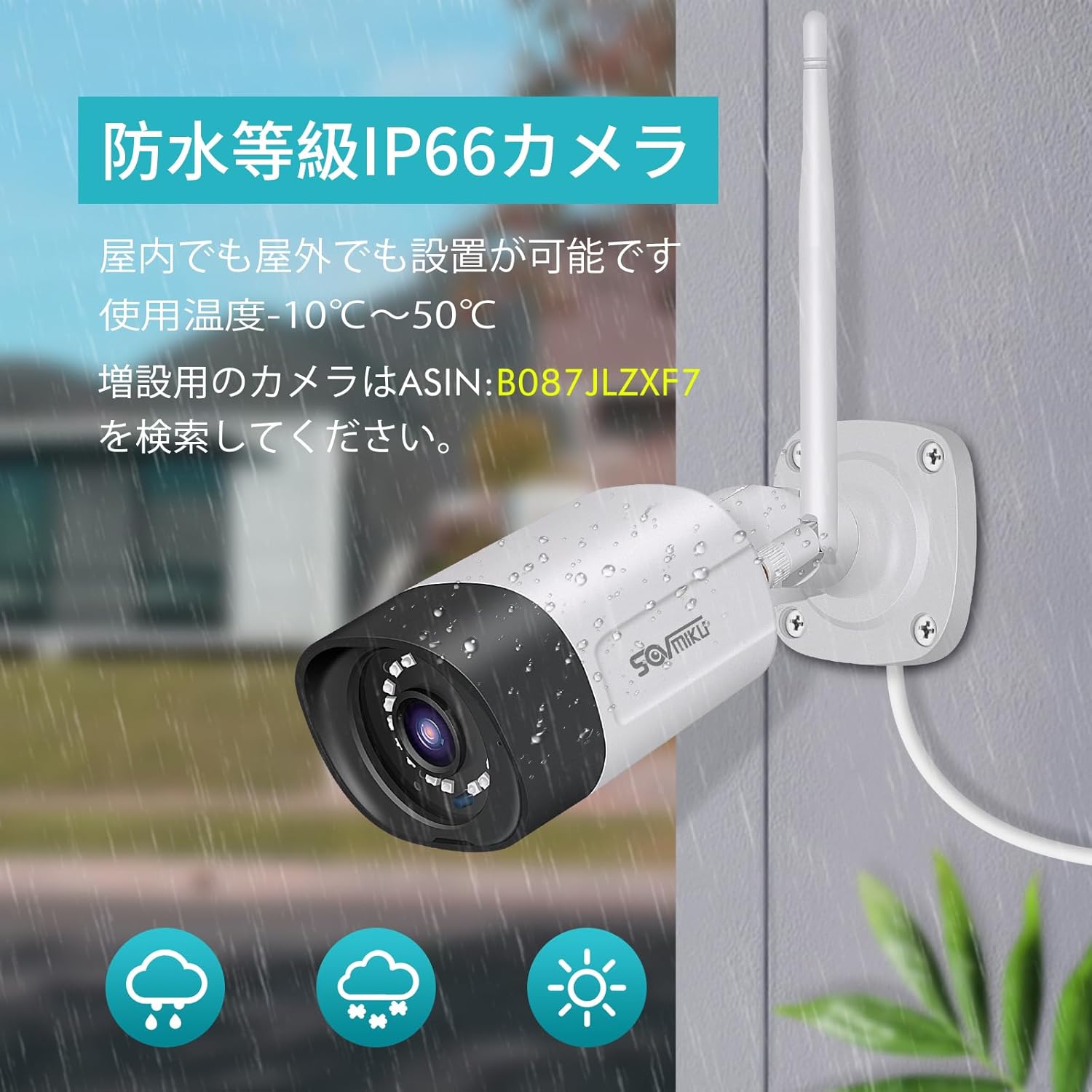
Figure 4: A SOVMIKU camera installed outdoors, demonstrating its IP66 waterproof rating against rain and snow.

Figure 5: Detailed diagram showing the camera components (wireless antenna, LED, lens, microphone, sensor light, speaker, adjustable bracket) and NVR ports (power, USB, HDMI, Ethernet, reset, TF card slot).
4. Иштөө нускамалары
4.1 ViewТүз эфирде жана ойнотууда
- NVR мониторунда: The 10-inch NVR monitor displays live feeds from connected cameras. Use the USB mouse to navigate the NVR interface for playback, system settings, and other functions.
- Remote Monitoring (EseeCloud App):
- Connect the NVR to your internet router using the provided LAN cable.
- Download the "EseeCloud" app on your smartphone or tablet (available for iOS).
- Follow the in-app instructions to add your NVR device.
- Туташкандан кийин, мүмкүн view түз эфирдеги берүүлөр, жаздырылган азык-түлүктөргө кирүүtage, and receive notifications from anywhere.
- Компьютердик Программалык камсыздоо: For PC monitoring, download the "EseeCloud" software.
4.2 Жазуу режимдери
The system supports various recording modes to suit your needs:
- Тынымсыз жаздыруу: Records 24/7. The 1TB HDD with H.265 compression allows for extended recording periods (e.g., over 2 months for 2 cameras). Older data is automatically overwritten when the HDD is full.
- Пландаштырылган жаздыруу: Жаздыруу үчүн атайын убакыттарды коюңуз.
- Кыймылды аныктоо жазуусу: Records only when motion is detected, saving storage space and making event review натыйжалуураак.

Figure 6: Visual representation of continuous, scheduled, and motion detection recording modes, along with notification options via app or email.
4.3 Эки тараптуу аудио
Each camera is equipped with a built-in microphone and speaker, enabling two-way communication.
- Initiating Communication: Use the EseeCloud app on your mobile device to speak through the camera's speaker and listen through its microphone.
- Таза үн: The omnidirectional microphone and optimized algorithms ensure clear sound quality.

Figure 7: Demonstration of the two-way audio function, showing a user communicating with someone at their door via the camera and smartphone app.
4.4 AI Motion Detection and Notifications
The system utilizes AI human detection to accurately identify human movement, reducing false alarms from pets or environmental factors.
- Event Notification: When motion is detected, the system can send instant notifications to your mobile app or email.
- Efficient Search: Recorded events triggered by motion detection can be quickly searched and reviewред.

Figure 8: Illustration of H.265 video compression efficiency (1TB H.265 equals 2TB H.264) and AI human detection identifying a person in a scene.

Figure 9: A visual comparison demonstrating the superior clarity and detail of 5-megapixel resolution compared to 1.3-megapixel resolution, highlighting the system's high-definition capabilities.
5. Техникалык тейлөө
Үзгүлтүксүз техникалык тейлөө сиздин коопсуздук системаңыздын оптималдуу иштешин жана узак мөөнөттүү иштешин камсыз кылат.
- Камеранын линзасын тазалоо: Мезгил-мезгили менен камеранын линзаларын жумшак, гamp тосуп калышы мүмкүн болгон чаңды, кирди же суу тактарын кетирүү үчүн кездемени view. Абразивдүү тазалагычтардан алыс болуңуз.
- Байланыштарды текшерүү: Ensure all power and network cables are securely connected and free from damage.
- Программалык камсыздоонун жаңыртуулары: Check the EseeCloud app or SOVMIKU website for any available firmware updates for the NVR and cameras to ensure the latest features and security patches.
- HDD ден соолугу: While the 1TB HDD is built-in, it's good practice to periodically check its status through the NVR settings to ensure it's functioning correctly.
6. Кыйынчылыктарды
If you encounter issues with your SOVMIKU security camera system, refer to the following common troubleshooting steps:
- Монитордо сүрөт жок:
- Ensure the NVR and cameras are powered on and their power adapters are securely connected.
- Check if the NVR's internal monitor is functioning. If using an external monitor, ensure the HDMI cable is connected correctly.
- Cameras Not Connecting to NVR:
- Verify that cameras are within range of the NVR's wireless signal. Walls and obstacles can reduce signal strength.
- NVRди да, камераларды да өчүрүп-күйгүзүңүз.
- If adding new cameras or re-pairing, refer to the NVR's on-screen menu for camera pairing instructions.
- Колдонмо аркылуу алыстан жетүү мүмкүн эмес:
- Ensure the NVR is connected to your internet router via the LAN cable.
- Интернет байланышыңызды текшериңиз.
- Verify that the NVR is correctly added to the EseeCloud app and has an active network status.
- Сүрөттүн сапаты начар:
- Камера линзасын тазалаңыз.
- Камеранын талаасында эч кандай тоскоолдуктар жок экенин текшериңиз view.
- Check the camera's resolution settings in the NVR interface.
- Эки тараптуу аудио көйгөйлөр:
- Ensure the microphone and speaker settings are enabled in the NVR or app.
- Check for any physical obstructions blocking the microphone or speaker on the camera.
- Verify network stability for clear audio transmission.
7. Техникалык шарттар
| Өзгөчөлүк | Деталь |
|---|---|
| Бренд | SOVMIKU |
| Модель номери | SFWK-10V-2HB312-1T |
| Видео тартуунун резолюциясы | 1536p (3 Megapixel) |
| Өзгөчө өзгөчөлүк | Суу өткөрбөйт (IP66) |
| Каналдардын саны | 8 (8 камерага чейин колдойт) |
| Эстутум сактоо сыйымдуулугу | 1 ТБ катуу диск (орнотулган) |
| Power Source | Электр зымдары |
| Операциялык система (тиркеме) | iOS (and Android compatible via EseeCloud app) |
| Шайкеш түзмөктөр | Смартфон, Планшет, ЖК |
| Камеранын башка өзгөчөлүктөрү | Front-facing, Night color (low light technology) |
| Жазуу режими | Continuous, Scheduled, Motion Detection |
| Аппараттык интерфейс | 802.11 ac/b/g/n (Wireless), Ethernet, HDMI, USB |
| Линзанын түрү | Wide Angle (3.6 mm) |
| Продукциянын өлчөмдөрү (NVR) | 29 x 17 x 24 см |
| Элемент Салмагы | 2.88 кг |
| UPC | 616612550644 |
8. Кепилдик жана колдоо
SOVMIKU provides comprehensive support for its products.
- 1 жылдык сапат кепилдиги: продукт сатып алынган күндөн тартып 12 ай кепилдик менен келет.
- Техникалык колдоо: Professional technical support is available to assist with setup, operation, and troubleshooting.
- Байланыш маалыматы: For any questions or issues, please contact SOVMIKU customer support via email or phone. (Specific contact details are usually provided in the physical manual or on the product's official webсайт.)
- PSE Certification: Our products have passed PSE certification in accordance with Japanese electrical safety standards, ensuring safe usage.


