1. Киришүү
This manual provides detailed instructions for the setup, operation, maintenance, and troubleshooting of your Xprinter XP-233B Thermal Barcode Printer. The XP-233B is designed for efficient thermal printing of barcodes and labels, utilizing heat-sensitive paper without the need for ink or ribbons.
2. Коопсуздук нускамалары
- Принтер кубат булагына туура том менен туташтырылганын текшериңизtage as specified on the power adapter.
- Принтерди сууга же ашыкча нымдуулукка дуушар кылбаңыз.
- Принтерди күн тийген жерге же жылуулук булактарынын жанына коюудан алыс болуңуз.
- Keep the printer away from dust and debris to prevent damage to internal components.
- Do not attempt to disassemble or repair the printer yourself. Contact qualified service personnel for assistance.
- Use only recommended thermal label rolls to ensure optimal print quality and printer longevity.
3. Пакеттин мазмуну
Пакетте бардык буюмдар бар экенин текшериңиз:
- Xprinter XP-233B Thermal Barcode Printer
- Кубаттуу адаптер
- USB кабели
- Ыкчам баштоо колдонмосу (эгер камтылган болсо)
- Driver CD (if included, drivers can also be downloaded online)
4. Продукт бүтүп калдыview
Familiarize yourself with the main components of the XP-233B printer.

4.1-сүрөт: Алдыңкы жагы view of the Xprinter XP-233B, showing the power switch, control panel, and label output slot.

4.2-сүрөт: Арткы view of the Xprinter XP-233B, highlighting the USB, Ethernet, and power input ports.
Башкаруу панелинин функциялары:
- FEED баскычы: Press to feed a blank label. Hold to perform a self-test print.
- ТЫНЫКТЫРУУ баскычы: Pauses or resumes printing.
- ЖОК КЫЛУУ баскычы: Учурдагы басып чыгаруу ишин жокко чыгарат.
- LED көрсөткүчтөрү: Display printer status (e.g., Power, Error, Paper Out). Refer to troubleshooting for specific light patterns.
5. Орнотуу
5.1 Принтерди туташтыруу
- Connect the power adapter to the printer's power input port and then plug it into a wall outlet.
- Connect the USB cable from the printer to your computer. For Ethernet connectivity, connect an Ethernet cable from the printer to your network router or switch.
- Капталында жайгашкан кубат которгучу менен принтерди күйгүзүңүз.
5.2 этикеткаларды жүктөө
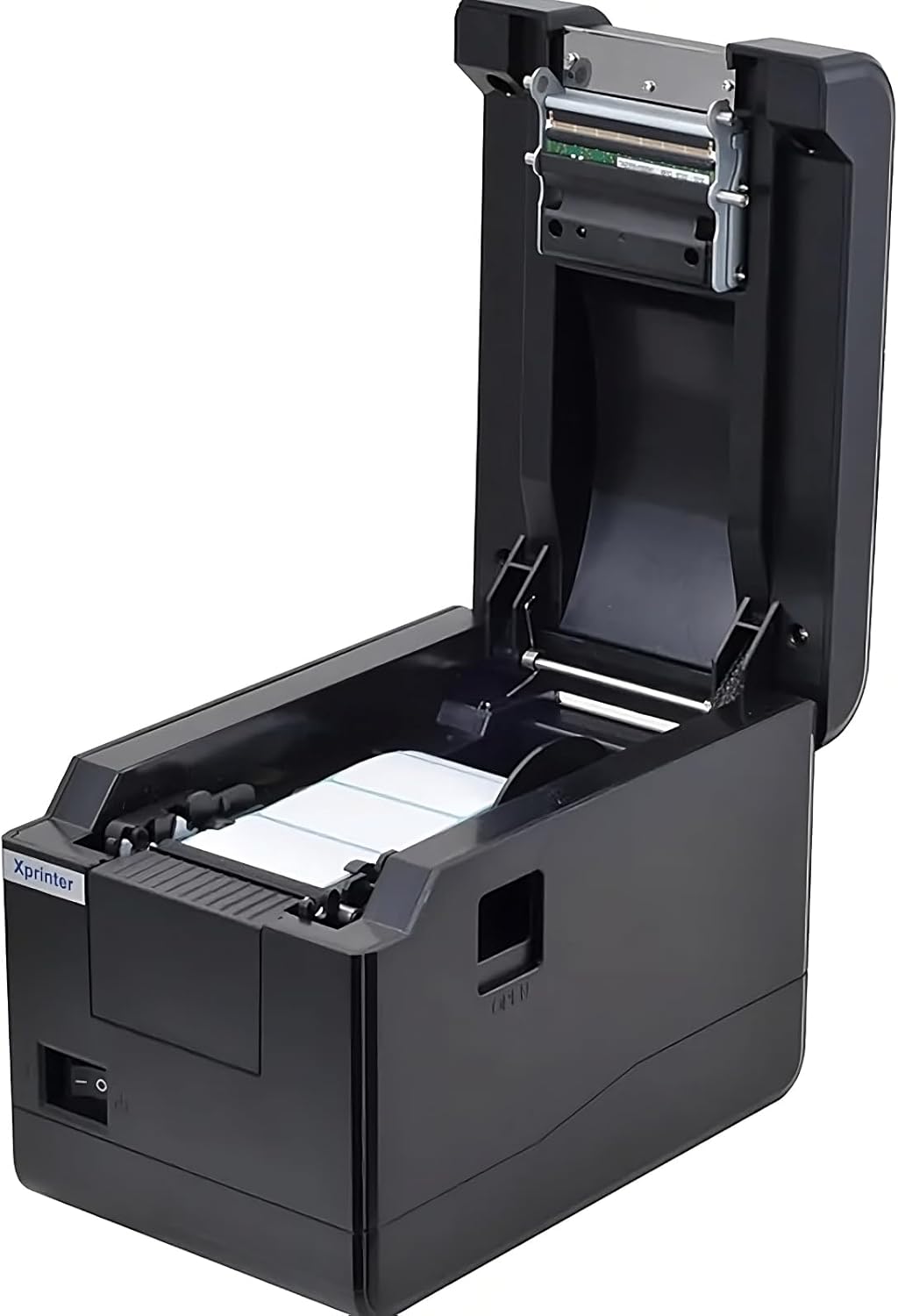
5.1-сүрөт: Жогорудан төмөн view of the Xprinter XP-233B with the cover open, illustrating the label loading area.
- Press the 'OPEN' button on the side of the printer to open the top cover.
- Place the thermal label roll into the label compartment, ensuring the labels feed from the bottom of the roll and the printable side faces upwards.
- Adjust the movable label guides to fit the width of your label roll snugly, without pinching the labels.
- Pull a few labels past the print head and out through the front slot.
- Үстүнкү капкакты чыкылдагыча бекем жабыңыз.
- The printer will automatically calibrate and feed a few labels to detect the label gap.
5.3 Драйверди орнотуу
Install the printer drivers on your computer. Drivers can typically be found on the included CD or downloaded from the official Xprinter webсайт. Орнотуу үчүн экрандагы нускамаларды аткарыңыз.
6. Принтерди иштетүү
6.1 Негизги басып чыгаруу
Once the printer is set up and drivers are installed, you can print labels from your application (e.g., label design software, shipping software). Ensure the correct printer model (Xprinter XP-233B) is selected in your application's print settings.
6.2 Self-Test Print
To perform a self-test print:
- Ensure the printer is powered on and labels are loaded.
- басып, кармап туруңуз ЖЕМ button for approximately 3-5 seconds until the printer starts printing.
- The self-test print will display printer information and a test pattern, confirming basic functionality.
7. Техникалык тейлөө
7.1 Басып чыгаруу башын тазалоо
Regular cleaning of the print head ensures optimal print quality and extends the printer's lifespan. Clean the print head when print quality degrades or after every few rolls of labels.
- Принтерди өчүрүп, кубат сымын сууруп алыңыз.
- Жогорку капкакты ачыңыз.
- Gently wipe the print head surface with a cotton swab lightly dampened with isopropyl alcohol (70% or higher).
- Allow the print head to dry completely (approximately 2-3 minutes) before closing the cover and turning on the printer.
7.2 Сырты тазалоо
Принтердин сыртын жумшак менен сүртүңүз, damp кездеме. Катуу химиялык заттарды же абразивдүү тазалагычтарды колдонбоңуз.
8. Кыйынчылыктарды
| Көйгөй | Мүмкүн себеп | Чечим |
|---|---|---|
| Принтер күйбөй жатат | Power cord loose; power outlet faulty; power adapter damaged. | Check power connections; try a different outlet; replace power adapter if necessary. |
| No labels feeding | Labels incorrectly loaded; paper out; label guides too tight. | Reload labels correctly; replace label roll; adjust label guides. |
| Басып чыгаруунун сапаты начар (өчүп кеткен, сызыктар) | Print head dirty; low-quality labels; print head damaged. | Clean print head (refer to Section 7.1); use recommended thermal labels; contact support if print head is damaged. |
| Printer not responding to print commands | Incorrect driver installed; USB/Ethernet cable loose; printer paused. | Reinstall drivers; check cable connections; press ТЫНЫГУУ улантуу үчүн баскыч. |
| Labels skipping or misaligning | Incorrect label sensor calibration; label guides not set correctly. | Perform a self-test print to recalibrate; adjust label guides. |
9. Техникалык шарттар
| Өзгөчөлүк | Спецификация |
|---|---|
| Модель аты | Xprinter - Thermal barcode printer |
| Элемент моделинин номери | XP-233B |
| Принтер технологиясы | Термикалык |
| Байланыш технологиясы | Ethernet, USB |
| Принтердин чыгышы | Монохромдуу |
| Басма маалымат каражаттары | Энбелгилер |
| Барактын максималдуу сыйымдуулугу | 100 (typical for roll capacity, actual sheet capacity depends on label size) |
| Продукциянын өлчөмдөрү (D x W x Y) | 26.8 x 18 x 17.2 см |
| Элемент Салмагы | 1.2 кг |
| Түс | Кара |
10. Кепилдик маалыматы
Xprinter products typically come with a limited manufacturer's warranty. Please refer to the warranty card included with your product or visit the official Xprinter website for specific warranty terms and conditions, including coverage duration and service procedures. Keep your purchase receipt as proof of purchase for warranty claims.
11. Кардарларды колдоо кызматы
For technical assistance, driver downloads, or further inquiries regarding your Xprinter XP-233B, please visit the official Xprinter support website or contact their customer service department. Contact information can usually be found on the Xprinter webсайтында же принтериңиз менен берилген документтерде.


