1. Киришүү
This user manual provides comprehensive instructions for the setup, operation, and maintenance of your FULLJA 17-inch Dual-WiFi Digital Picture Frame. This device allows you to instantly share photos and videos with loved ones from anywhere using the VPhoto app or email, supporting both 2.4 GHz and 5 GHz Wi-Fi networks. With its large display, ample storage, and versatile features, it is designed to preserve and display your precious memories with ease.
2. Коопсуздук маалыматы
Please read all safety instructions carefully before using the device to ensure proper operation and to prevent damage or injury. Keep this manual for future reference.
- Аппаратты сууга же ашыкча нымдуулукка дуушар кылбаңыз.
- Аппаратты радиаторлор, жылуулук регистрлери, мештер же башка аппараттар (анын ичинде) сыяктуу жылуулук булактарынын жанына коюудан алыс болуңуз. ampкөтөргүчтөр) жылуулукту пайда кылуучу.
- Аппарат менен кошо берилген кубат адаптерин гана колдонуңуз.
- Эч кандай желдетүүчү тешиктерди жаап албаңыз. Өндүрүүчүнүн көрсөтмөлөрүнө ылайык орнотуу.
- Электр шнурунун, өзгөчө сайгычтарда, розеткаларда жана алар аппараттан чыга турган жеринде басылып калуудан же кысып калуудан сактаңыз.
- Аппаратты чагылгандуу бороондордо же узак убакыт бою колдонбогондо электр розеткасынан ажыратыңыз.
- Бардык тейлөөлөрдү квалификациялуу тейлөө кызматкерлерине тапшырыңыз. Түзмөк кандайдыр бир зыянга учураганда, мисалы, кубат берүүчү шнур же сайгыч бузулганда, суюктук төгүлгөндө же аппараттын ичине нерселер түшүп кеткенде, аппарат жамгырга же нымдуулукка дуушар болгондо, нормалдуу иштебей калганда тейлөө талап кылынат. , же түшүрүлгөн.
- Кургак чүпүрөк менен гана тазалаңыз.
3. Пакеттин мазмуну
Пакетте бардык буюмдар бар экенин текшериңиз:
- 1x FULLJA 17-inch Digital Picture Frame
- 1x Колдонуучунун колдонмосу
- 1x Power адаптер
- 1x Bracket (for stand)
- 1x Алыстан башкаруу
- 1x Микро USB Cable

Image: FULLJA Brand Logo
This image displays the official FULLJA brand logo, typically found on product packaging and documentation.

Image: FULLJA 17-inch Digital Picture Frame
This image shows the 17-inch FULLJA Digital Picture Frame in a vertical orientation, resting on a surface.
4. Продукт бүтүп калдыview
4.1. Компоненттер жана башкаруу элементтери
Familiarize yourself with the various parts of your digital picture frame:
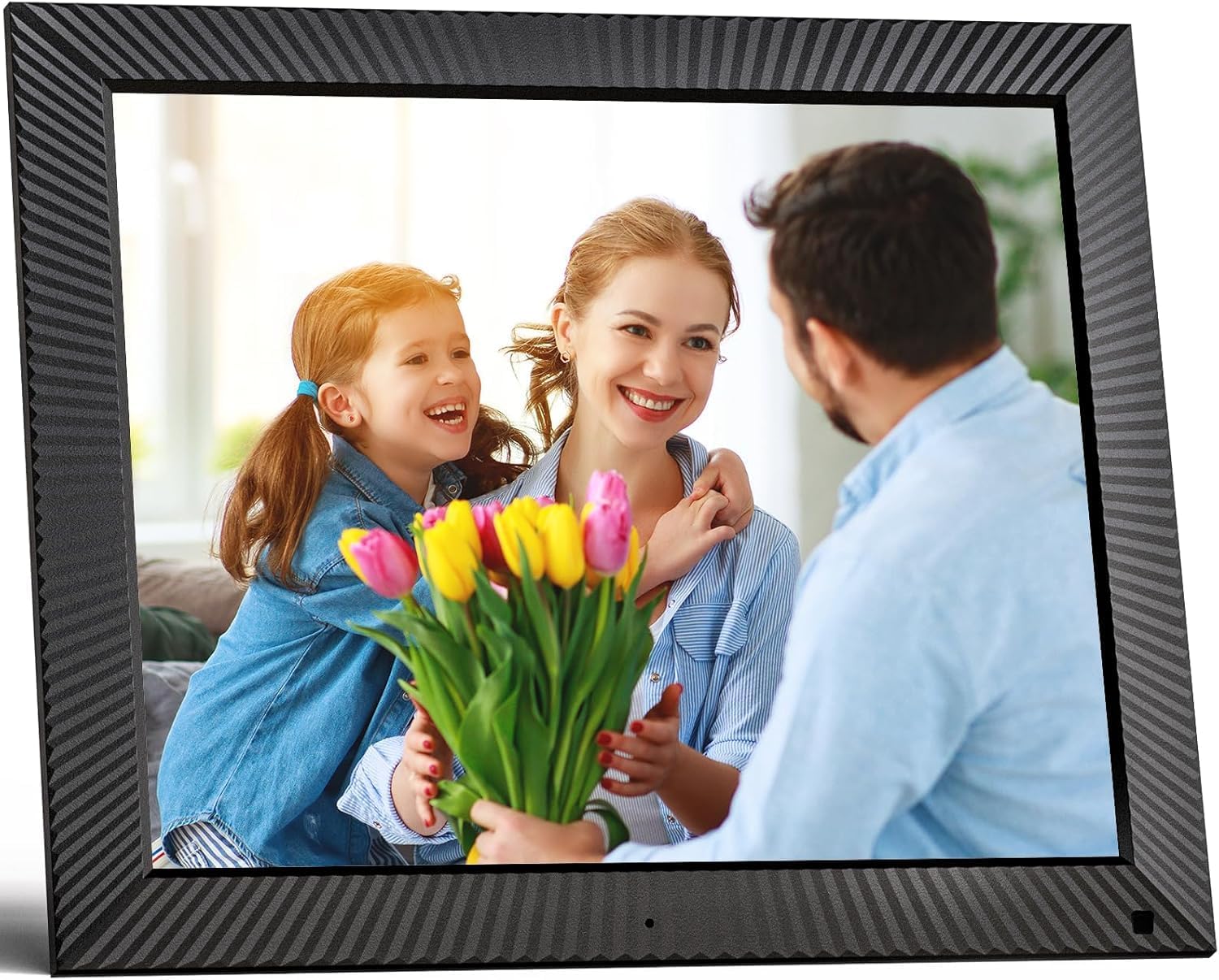
Сүрөт: алдыңкы view of the FULLJA 17-inch Digital Picture Frame
This image displays the front of the digital picture frame, showcasing its large screen with a family photo displayed. The frame has a textured black border.

Image: Features of the FULLJA 17-inch Digital Picture Frame
This image highlights key features of the 17-inch digital picture frame, including its touch screen, HD 1280x1024 pixel resolution, 4:3 aspect ratio, and remote control functionality. It shows the frame in both landscape and portrait orientations, with a view of the back panel and stand.
- Дисплей экраны: 17-inch IPS display with 1280x1024 resolution. Touch-enabled for direct interaction.
- Кубат баскычы: Located on the back or side, used to turn the frame on/off or put it into standby.
- USB порт: For connecting USB sticks to transfer photos/videos.
- TF карта уячасы: For inserting TF (MicroSD) cards (up to 64GB) to expand storage or transfer media.
- Микро USB порту: For connecting to a computer for data transfer or firmware updates.
- Туруктуу кубат киргизүү: Кубат адаптерин туташтыруу үчүн.
- Кыймыл сенсору: Detects presence to automatically turn the screen on/off, saving energy.
- Камтылган динамик: For audio playback with videos or background music.
- Дубалга орнотуучу тешиктер: VESA compatible holes on the back for wall mounting.
- Stand Bracket: Attachable bracket for desktop placement in portrait or landscape orientation.
4.2. Алыстан башкаруу
The included remote control provides convenient access to various functions without touching the screen.
- Күч: Turn the frame on/off.
- Меню/Орнотуулар: Access the main menu and settings.
- Чабыттоо баскычтары (өйдө/төмөн/сол/оң): Менюлар жана параметрлер боюнча чабыттоо.
- OK/Enter: Тандоолорду ырастаңыз.
- Артка/Чыгуу: Мурунку экранга кайтуу же менюдан чыгуу.
- Көлөм +/-: Аудионун үнүн тууралоо.
- Ойнотуу/тындыруу: Медиа ойнотууну көзөмөлдөө.
- Кийинки/Мурунку: Skip to the next or previous photo/video.
5. Орнотуу
5.1. Баштапкы күйгүзүү
- Unpack the digital picture frame and all accessories.
- Attach the stand bracket to the back of the frame if you intend to place it on a desk or shelf. Ensure it is securely fastened.
- Connect the power adapter to the DC power input port on the frame, then plug the adapter into a wall outlet.
- The frame will automatically power on or you may need to press the power button.
- Follow the on-screen prompts to select your language and time zone.
5.2. Wi-Fiга туташуу
A Wi-Fi connection is essential for sharing photos via the app or email.
- Негизги менюдан, төмөнкүгө өтүңүз Орнотуулар.
- Тандоо Wi-Fi.
- The frame will scan for available networks. Select your desired 2.4 GHz or 5 GHz network from the list.
- Экрандагы клавиатураны колдонуп, Wi-Fi сырсөзүңүздү киргизиңиз.
- таптаңыз Туташуу. Once connected, a Wi-Fi icon will appear on the screen.

Image: Digital Picture Frame with Wi-Fi Sharing
This image illustrates the capability of the digital picture frame to share photos and videos wirelessly via Wi-Fi. It shows the frame displaying a family photo, with a smartphone in the foreground indicating app-based sharing.
5.3. Installing the VPhoto App
The VPhoto app is available for both iOS and Android devices and is the primary method for sharing content remotely.
- Издөө "VPhoto" in the Apple App Store (for iOS) or Google Play Store (for Android).
- Колдонмону смартфонуңузга же планшетиңизге жүктөп орнотуңуз.
- Open the VPhoto app and create an account or log in.
- To connect your frame, go to the Орнотуулар menu on your digital picture frame and find the unique binding code.
- In the VPhoto app, select Түзмөк кошуу and enter the binding code displayed on your frame.
- Once connected, you can start sending photos and videos to your frame. Up to 30 app accounts can be bound to one frame.

Image: Sharing Options for Digital Picture Frame
This image demonstrates the various ways to share content with the digital picture frame, including the free VPhoto app for iOS and Android, unlimited cloud storage with 32GB built-in, and the ability to invite multiple family members to share. It shows the frame displaying a photo and a smartphone screen with the VPhoto app interface.
6. Иштөө нускамалары
6.1. Сүрөттөрдү жана видеолорду жөнөтүү
There are multiple ways to send media to your FULLJA digital picture frame:
- Via VPhoto App: Open the VPhoto app, select the photos/videos you wish to send (up to 50 at a time), choose your connected frame, and tap send.
- Электрондук почта аркылуу: Each frame has a unique email address. You can send photos and short videos as attachments to this email address. The frame will automatically receive and display them.
- Via USB Stick/TF Card: Insert a USB stick or TF card into the respective port. Navigate to the Сүрөт папкасы or Video section on the frame, select the external storage, and copy files to the internal memory if desired.

Image: Digital Picture Frame with 32GB Internal Storage
This image highlights the frame's built-in 32GB internal storage, capable of storing approximately 80,000+ photos. The main frame displays a photo of a mother and child, surrounded by smaller circular images representing the vast number of memories that can be stored.
6.2. Негизги функциялар
- Slideshow Playback: Photos and videos will automatically play in a slideshow. You can adjust the display interval and transition effects in the settings.
- Photo/Video Browsing: Tap the screen or use the remote to manually browse through your media.
- Үндү көзөмөлдөө: Adjust the volume for videos or background music using the touch screen controls or the remote.
- Автоматтык айлантуу: The frame automatically adjusts the display orientation (portrait or landscape) based on how it is positioned.
6.3. Өркүндөтүлгөн функциялар
- Кыймыл сенсору: Enable this feature in settings to have the frame automatically turn on when motion is detected and off when no motion is detected for a set period, saving energy.
- Auto Screen On/Off: Set specific times for the frame to automatically turn on and off daily.
- Clock & Calendar: Access the built-in clock and calendar functions from the main menu.
- Ойготкуч: Эстеткичтер үчүн ойготкучтарды коюу.
- Бөлүнгөн экран: Display multiple photos simultaneously (check settings for layout options).
- Text Captions: Add captions to your photos via the VPhoto app.
- Музыка ойнотуу: Play background music during slideshows (ensure music files are on the frame's internal storage or connected USB/TF card).

Image: Digital Picture Frame with Function Icons
This image showcases the multi-functional capabilities of the digital picture frame, including Wi-Fi connectivity, weather display, clock, calendar, photo and video playback, music, and slideshow features. Two frames are shown, one on a wall and one on a cabinet, with icons representing these functions below.
7. Техникалык тейлөө
7.1. Рамканы тазалоо
- Тазалоодон мурун ар дайым рамканы розеткадан сууруп алыңыз.
- Экранды жана алкакты акырын сүртүү үчүн жумшак, кургак, түксүз чүпүрөктү колдонуңуз.
- Экрандагы өжөр тактар үчүн, жеңилampen the cloth with water or a screen-cleaning solution (specifically designed for electronics) and wipe carefully. Do not spray liquid directly onto the screen.
- Абразивдүү тазалоочу каражаттарды, момдорду же эриткичтерди колдонуудан алыс болуңуз, анткени алар бетке зыян келтириши мүмкүн.
7.2. Программалык камсыздоону жаңыртуу
Periodically check for software updates in the frame's settings menu to ensure optimal performance and access to new features. Updates are typically downloaded and installed over Wi-Fi.
7.3. Сактагычты башкаруу
While the frame has 32GB of internal storage and unlimited cloud storage, you may occasionally want to manage local files:
- кирүү Сүрөт папкасы or File менеджер орнотууларда view, delete, or organize stored media.
- Сиз өткөрө аласыз files to/from a USB stick or TF card to manage internal storage.
8. Кыйынчылыктарды
If you encounter issues with your digital picture frame, refer to the following common problems and solutions:
| Көйгөй | Мүмкүн болгон себеп / Чечим |
|---|---|
| Рамка күйбөйт. |
|
| Wi-Fi'га туташпай жатат. |
|
| Сүрөттөр/видеолор кадрда көрүнбөйт. |
|
| Экран катып калат же жооп бербей калат. |
|
| Кыймыл сенсор иштебейт. |
|
9. Техникалык шарттар
| Өзгөчөлүк | Деталь |
|---|---|
| Модель номери | B0CCVBSM87 |
| Бренд | ФУЛЬЯ |
| Screen Size | 17 дюйм |
| Display Resolution | 1280 x 1024 пиксел (IPS) |
| Аспект катышы | 4:3 |
| Ички сактагыч | 32 ГБ |
| Тышкы сактагычты колдоо | USB stick, TF card (MicroSD) up to 64GB |
| Wi-Fi туташуусу | 2.4 GHz / 5 GHz Dual-Band |
| Башкаруу ыкмасы | Touch Screen, Remote Control, VPhoto App |
| Motion Sensor | Ооба |
| Auto Rotate | Ооба |
| Дубалга орнотулган | Ооба |
| Продукциянын өлчөмдөрү | 29.67 x 43.51 x 2.51 см |
| Продукт Салмагы | 2.52 кг |
| Түс | Кара |
10. Кепилдик жана колдоо
10.1. Чектелген кепилдик
The FULLJA 17-inch Dual-WiFi Digital Picture Frame comes with a бир жылдык чектелген кепилдик from the date of purchase. This warranty covers defects in materials and workmanship under normal use. It does not cover damage caused by accident, misuse, abuse, neglect, unauthorized modification, or improper installation.
To make a warranty claim, please retain your proof of purchase and contact FULLJA customer support.
10.2. Кардарларды колдоо кызматы
For any questions, technical assistance, or support inquiries, please contact FULLJA customer service. We offer lifetime support and aim to provide a prompt response within 24 hours.
Please refer to the contact information provided on the product packaging or the official FULLJA webэң заманбап колдоо каналдары үчүн сайт.

