1. Киришүү
This manual provides detailed instructions for the installation, operation, and maintenance of your SECULINK C17-4MP Dual-Band WiFi Dome Security Camera. This camera is designed for outdoor surveillance, featuring 4MP resolution, pan/tilt/zoom capabilities, automatic tracking, human detection, and color night vision. Please read this manual thoroughly before use to ensure proper functionality and safety.
2. Пакеттин мазмуну
Пакетиңизде бардык буюмдар бар экенин текшериңиз:
- SECULINK C17-4MP Dome Security Camera
- Кубат адаптери (заряддагыч)
- Монтаждоо бурамалар жана дубал сайгычтар
- Waterproof Kit for Network Cable (if applicable)
- Quick Start Guide
3. Продукт бүтүп калдыview
The SECULINK C17-4MP camera features a robust dome design suitable for outdoor environments. Key components include:
- Камера линзасы: Video foo тартатtage.
- Инфракызыл диоддор: Түнкү көрүнүш үчүн жарыктандырууну камсыз кылыңыз.
- White Light LEDs (Floodlight): Enhance color night vision and act as a deterrent.
- Микрофон: Аудио киргизүү жана эки тараптуу байланыш үчүн.
- Баяндамачы: Аудио чыгаруу жана эки тараптуу байланыш үчүн.
- Антенналар: For dual-band 2.4GHz/5GHz Wi-Fi connectivity.
- Микро SD карта слоту: Supports local storage up to 256GB.
- Калыбына келтирүү баскычы: Заводдук жөндөөлөргө кайтаруу үчүн.
- Электр порту: DC 12V электр киргизүү.

Сүрөт 3.1: Бүттүview of the SECULINK C17-4MP camera and its mobile application interface.
4. Орнотуу
4.1 Колдонмону жүктөп алуу жана каттоо эсебин каттоо
- жүктөп алыңыз SECUEYE mobile application from the App Store (iOS) or Google Play Store (Android).
- Колдонмону ачып, жаңы аккаунт каттоо же эгер сизде мурунтан эле бар болсо, кирүү үчүн экрандагы көрсөтмөлөрдү аткарыңыз.
4.2 Камераны күйгүзүү
Connect the provided power adapter to the camera's power port and plug it into an electrical outlet. The camera will initiate its self-test sequence, indicated by a rotating motion and status light changes.
4.3 Wi-Fiга туташуу
The SECULINK C17-4MP supports dual-band Wi-Fi (2.4GHz and 5GHz) for flexible network connectivity.
- Мобилдик түзмөгүңүз камераны туташтыргыңыз келген ошол эле Wi-Fi тармагына туташып турганын текшериңиз.
- In the SECUEYE app, tap the "Add Device" or "+" icon.
- Камераңыздын моделин тандаңыз же камерадагы QR кодун сканерлеңиз (эгер бар болсо).
- Follow the app's instructions to enter your Wi-Fi network name (SSID) and password.
- The app will guide you through the pairing process, which may involve scanning a QR code displayed on your phone with the camera lens or listening for an audio prompt.
- Once connected, the camera's status light will indicate a successful connection (refer to the app or quick start guide for specific light indicators).
4.4 Камераны орнотуу
The camera is designed for wall mounting and is IP65/IP66 weatherproof, making it suitable for outdoor installation.
- Каалаган орнотууну камсыз кылган ылайыктуу жерди тандаңыз viewкөрүү бурчу жана Wi-Fi диапазонунда.
- Use the mounting template (if provided) or the camera base to mark the drill holes on the wall.
- Тешиктерди бургула жана дубал тыгындарын салгыла.
- Камеранын негизин берилген бурамалар менен дубалга бекитиңиз.
- Attach the camera body to the base.
- Ensure all cable connections are secure and protected from weather using the waterproof kit if necessary.
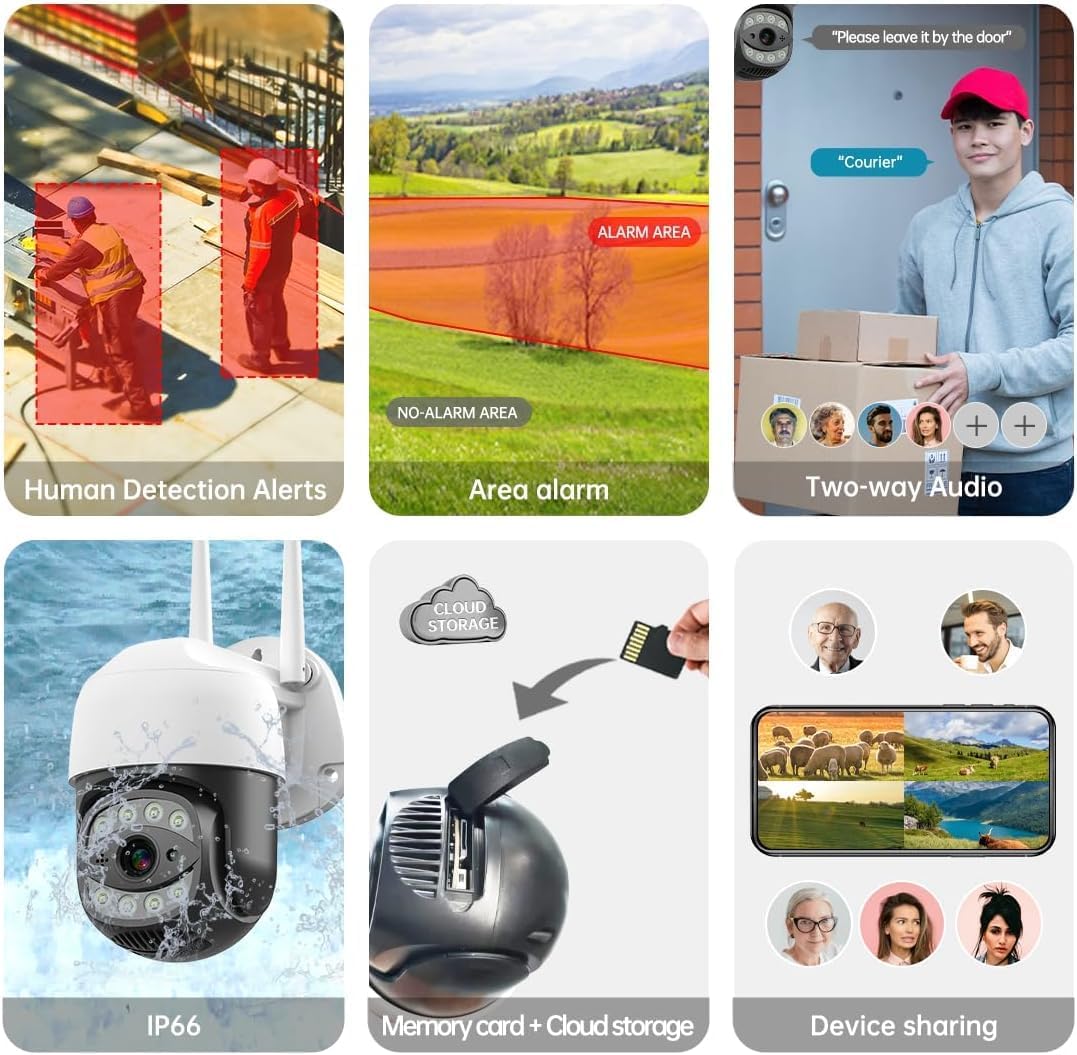
Image 4.1: The SECULINK C17-4MP camera is rated IP66 for dust and water resistance, suitable for various weather conditions.
5. Иштөө нускамалары
5.1 Live View жана Ойнотуу
Access the live video feed and review foo жазылганtage through the SECUEYE app. The camera provides 4MP (2560x1440p) resolution for clear images.

Image 5.1: Visual comparison demonstrating the enhanced clarity of 5MP resolution over lower resolutions.
5.2 Pan, Tilt, and Digital Zoom (PTZ)
Камераны башкарыңыз viewing angle remotely using the SECUEYE app. The camera offers:
- Горизонталдык айлануу: 335 градус
- Вертикалдуу кыйшаюу: 90 градус
- Digital Zoom: 10x чоңойтуу
Use pinch-to-zoom gestures on your mobile device to digitally zoom in on specific areas of interest.

Image 5.2: Demonstrates controlling the camera's pan and tilt functions via the mobile app.

Image 5.3: Illustration of the 10x digital zoom feature, allowing closer inspection of details.
5.3 Automatic Tracking and Human Motion Detection
The camera features intelligent detection capabilities to enhance security monitoring.
- Автоматтык түрдө көзөмөлдөө: When enabled, the camera will automatically detect and follow moving human figures within its field of view, recording their path.
- Адамдын кыймылын аныктоо: Advanced algorithms distinguish human activity from other movements (e.g., pets, swaying branches), reducing false alarms.
- Эскертүүлөр: Upon detection, the camera can send real-time alerts to your mobile phone.
- Floodlight and Sound Alarm: Built-in spotlights activate upon motion detection at night, and a security siren can be triggered as an additional deterrent.

Image 5.4: The camera's AI Humanoid Detection identifies human presence and sends alerts.

Image 5.5: The camera's automatic tracking capability follows detected human movement.

Image 5.6: Illustrates the camera's ability to differentiate human activity from other movements, reducing false alarms.
5.4 Түнкү көрүү режимдери
The camera offers multiple night vision options for clear surveillance in low-light conditions:
- Инфракызыл (ИК) түнкү көрүү: Uses IR LEDs to provide black and white video in complete darkness, with a range of up to 100ft (30m).
- Түнкү көрүнүш: Utilizes white light LEDs (floodlight) to capture full-color video at night when motion is detected or manually activated.
- Starlight Sensor: Enhances low-light performance to produce clearer images even without additional illumination.

Image 5.7: Demonstrates the different night vision modes: infrared (black and white), white light (color), and full-color night vision.

Image 5.8: The camera's infrared night vision provides visibility up to 20 meters in darkness.
5.5 Эки тараптуу аудио
The built-in microphone and speaker allow for real-time two-way communication through the SECUEYE app. You can listen to audio from the camera's location and speak through the camera's speaker.
5.6 Сактоо параметрлери
The camera supports two primary storage methods for recorded footage:
- Micro SD картасы: Insert a Micro SD card (up to 256GB, sold separately) into the designated slot for local storage. The camera can record 24/7 or motion-triggered videos.
- Булуттагы сактагыч: Optional cloud storage services are available through the SECUEYE app for secure, remote backup of your recordings.
5.7 Түзмөктү бөлүшүү
You can share access to your camera's live feed and recordings with family members or trusted individuals through the SECUEYE app, allowing multiple users to monitor the property simultaneously.
6. Техникалык тейлөө
To ensure optimal performance and longevity of your SECULINK C17-4MP camera, consider the following maintenance tips:
- Линзаны тазалоо: Periodically wipe the camera lens with a soft, clean, lint-free cloth to remove dust, dirt, or water spots that may affect image clarity. Avoid abrasive cleaners.
- кубат туташуу текшерүү: Ensure the power adapter and cable remain securely connected and free from damage, especially in outdoor environments.
- Программалык камсыздоонун жаңыртуулары: Regularly check the SECUEYE app for available firmware updates. Updates often include performance improvements, new features, and security enhancements.
- Монтаждоону текшерүү: Periodically check the camera's mounting for stability, especially after severe weather conditions.
7. Кыйынчылыктарды
If you encounter issues with your SECULINK C17-4MP camera, refer to the following common troubleshooting steps:
7.1 Камера Wi-Fiга туташпай жатат
- Wi-Fi сигналын текшерүү: Ensure the camera is within range of your Wi-Fi router. Weak signals can cause connection issues.
- Verify Network Credentials: Double-check that the Wi-Fi network name (SSID) and password entered in the app are correct.
- Маршрутизатордун шайкештиги: Confirm your router supports 2.4GHz or 5GHz bands, and that the camera is attempting to connect to a compatible band.
- Түзмөктөрдү кайра иштетүү: Power cycle both your Wi-Fi router and the camera.
- Камераны баштапкы абалга келтирүү: If issues persist, perform a factory reset on the camera (refer to the quick start guide for reset button location and procedure) and attempt the setup process again.
7.2 Сүрөттүн сапаты начар
- Таза линза: Камеранын линзасы таза жана тактар же кир жок экенин текшериңиз.
- Тармак өткөрүү жөндөмдүүлүгү: A slow internet connection can affect live stream quality. Check your network speed.
- Жарыктандыруу шарттары: Ensure adequate lighting for optimal image quality, especially for color night vision.
7.3 Motion Detection Not Working or Too Sensitive
- Сезгичтикти тууралоо: In the SECUEYE app settings, adjust the motion detection sensitivity level.
- аныктоо зоналары: Configure specific detection zones to monitor only relevant areas and exclude areas with frequent irrelevant motion (e.g., public roads, swaying trees).
- Check Schedule: Ensure motion detection is enabled for the desired time periods in the app.
7.4 SD картага жаздыруу жок
- Insert SD Card Correctly: Ensure the Micro SD card is inserted properly into the slot.
- SD картасын форматтоо: Format the SD card through the camera settings in the SECUEYE app.
- Card Capacity/Health: Ensure the SD card is not full or corrupted. Try a different, known-good SD card if necessary.
- Жаздыруу орнотуулары: Verify that continuous recording or motion-triggered recording is enabled in the app settings.
8. Техникалык шарттар
| Өзгөчөлүк | Спецификация |
|---|---|
| Модел | C17-4MP |
| Резолюция | 4MP (2560x1440p Max) |
| Сүрөт сенсору | CMOS |
| Фокустун узундугу | 3.6мм |
| Пан айлануу бурчу | 335 ° Горизонталдуу |
| Айлануу бурчу | 90 ° Vertical |
| Digital Zoom | 10x |
| Түнкү көрүнүш | IR-Cut, Starlight, LED (Color Night Vision) |
| Infrared Расстояние | 100 фут (30 метр) чейин |
| Аудио | Built-in Microphone and Speaker (Two-Way Audio) |
| Суу каршылык | IP65, IP66 (Waterproof) |
| Байланыш | Dual-Band Wi-Fi (2.4GHz/5GHz), Wired Ethernet |
| Сактагыч | Микро SD карта (256 ГБ чейин), Cloud Storage |
| Күч | DC 12V, 9 Watts |
| Иштөө температурасы | -10°Cден +50°Cге чейин (14°F менен 122°F) |
| Колдонмонун шайкештиги | SECUEYE (iOS, Android) |
| Өлчөмдөр | 7 x 7 x 5 дюйм (Пакет) |
| Элемент Салмагы | 1.2 фунт |
9. Кепилдик жана колдоо
For warranty information and technical support, please refer to the official SECULINK webсайтка же түздөн-түз кардарларды тейлөөгө кайрылыңыз. Сатып алуу квитанциясын кепилдик дооматтары үчүн сатып алуунун далили катары сактаңыз.
Өндүрүүчү: SECULINK


