1. Киришүү
This manual provides essential information for setting up, operating, and maintaining your HUAWEI Watch FIT Special Edition. Please read this manual thoroughly to ensure proper use and to maximize the device's features. Keep this manual for future reference.
2. Кутуда эмне бар
- HUAWEI Watch FIT Special Edition (with strap)
- Заряддоо бешиги
- Заряддоо кабели
- Quick Start Guide
- Коопсуздук маалыматы
3. Баштапкы орнотуу
3.1 Аппаратты заряддоо
Before first use, fully charge your HUAWEI Watch FIT Special Edition. Connect the charging cradle to a power adapter using the provided charging cable, then place the watch onto the cradle, ensuring the charging contacts align. The watch screen will indicate charging status.

Сүрөт: алдыңкы view of the HUAWEI Watch FIT Special Edition, showing the display and strap. This image represents the device during initial setup or general use.
3.2 Downloading and Installing the HUAWEI Health App
The HUAWEI Health app is required to manage your watch and access all its features. Scan the QR code provided in the Quick Start Guide or search for "HUAWEI Health" in your smartphone's app store (compatible with Android and iOS). Download and install the application.
3.3 Смартфонуңуз менен жупташуу
Open the HUAWEI Health app on your smartphone. Navigate to 'Devices' > 'Add' > 'Smartwatch' and select your HUAWEI Watch FIT Special Edition from the list of available devices. Follow the on-screen instructions to complete the pairing process.

Image: Visual guide for setting up the HUAWEI Health App, showing steps for downloading, pairing, and updating the device.
3.4 Микропрограмманы жаңылоо
After pairing, it is recommended to check for and install any available firmware updates. In the HUAWEI Health app, go to 'Personal' > 'Check for updates'. This ensures your watch has the latest features and performance improvements.
4. Иштөө нускамалары
4.1 Негизги навигация
- Сенсордук экран: Менюларда жана эскертмелерде чабыттоо үчүн өйдө, ылдый, солго же оңго сүрүңүз. Нерселерди тандоо үчүн таптаңыз.
- Каптал баскычы: Press to wake the screen, return to the home screen, or open the app list. Press and hold to power on/off or restart the device.
4.2 Сааттын беттерин өзгөртүү
You can customize your watch face directly on the device or through the HUAWEI Health app. On the watch, press and hold the current watch face, then swipe left or right to browse available options. Tap to select a new watch face.

Image: A HUAWEI Watch FIT Special Edition on a wrist, showcasing a unique watch face design.
5. Ден соолук мониторингинин өзгөчөлүктөрү
The HUAWEI Watch FIT Special Edition offers comprehensive health tracking capabilities:
- Жүрөктүн кагышын көзөмөлдөө: Utilizes HUAWEI TruSeen™ 5.0 technology for continuous and accurate heart rate tracking.
- SpO2 мониторинги: Кандын кычкылтек менен каныккандыгын өлчөйт.
- Уйкуга көз салуу: HUAWEI TruSleep™ provides detailed analysis of sleep stages жана сапаты.
- Стресс мониторинги: Tracks stress levels and offers breathing exercises to help manage stress.
- Активдүүлүккө көз салуу: Records steps, distance, calories burned, and supports multiple sports modes.

Image: The watch display showing various personal health metrics, including SpO2, heart rate, and stress levels.
6. GPS функциясы
The integrated GPS allows for precise tracking of your outdoor activities, such as running or cycling, without needing to carry your smartphone. The watch records your route, speed, and distance, which can be viewed in detail on the HUAWEI Health app.
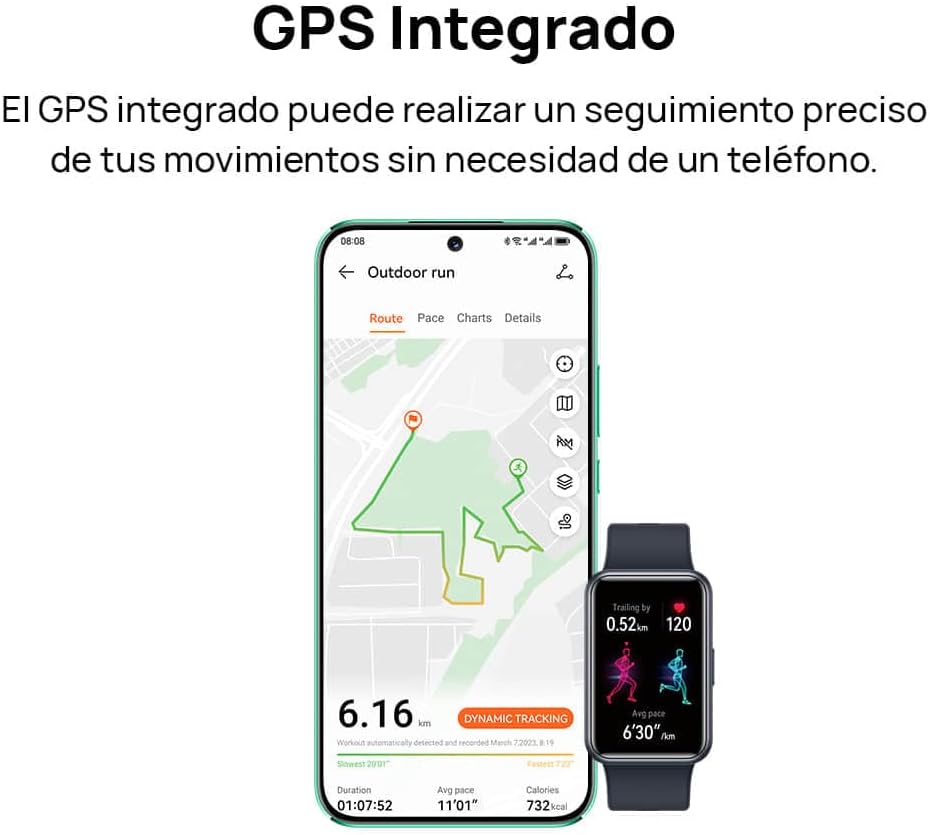
Image: A smartphone screen displaying a tracked outdoor run route, alongside the HUAWEI Watch FIT Special Edition showing activity data.
7. Notifications and Connectivity
Stay connected with your HUAWEI Watch FIT Special Edition. It supports incoming call notifications and quick message replies directly from your wrist. The watch connects to your smartphone via Bluetooth and is compatible with both Android and iOS devices.

Image: Two HUAWEI Watch FIT Special Edition devices showing an incoming call notification and a quick message reply interface.

Image: A smartphone displaying the HUAWEI Health app interface, illustrating the watch's compatibility with both Android and iOS operating systems.
8. Батареянын иштөө мөөнөтү жана заряддоо
The HUAWEI Watch FIT Special Edition is designed for extended battery life. Actual battery performance may vary based on usage patterns and settings. To charge, use the provided charging cradle and cable. Ensure the watch is placed correctly on the cradle for optimal charging.
9. Техникалык тейлөө
9.1 Саатты тазалоо
Теринин кыжырданышын алдын алуу жана анын иштешин сактоо үчүн саатыңызды жана бооңузду үзгүлтүксүз тазалап туруңуз. Жумшак, нымдуу каражатты колдонуңузamp сааттын корпусун жана боосун сүртүү үчүн чүпүрөк колдонуңуз. Катуу химиялык заттарды же абразивдүү материалдарды колдонуудан алыс болуңуз. Заряддоодон мурун заряддоочу контакттардын таза жана кургак экенине ынаныңыз.
9.2 Сууга туруктуулук
The HUAWEI Watch FIT Special Edition has a water resistance rating. Refer to the product specifications for details on its water resistance capabilities. Avoid using the watch in hot water, saunas, or steam rooms, as this may compromise its water resistance.

Image: The back of the HUAWEI Watch FIT Special Edition, showing the optical heart rate sensors and regulatory markings.
10. Кыйынчылыктарды
If you encounter issues with your HUAWEI Watch FIT Special Edition, try the following steps:
- Күйгүзүлбөй жаткан саат: Саат толук заряддалганын текшериңиз. Аны заряддагычка кеминде 10 мүнөт туташтырыңыз.
- Телефон менен жупташтыруу мүмкүн эмес: Ensure Bluetooth is enabled on your phone and the watch. Restart both devices and try pairing again. Check if the HUAWEI Health app is updated to the latest version.
- Туура эмес ден соолук маалыматтары: Саат өтө тар же өтө бош эмес, билегиңизге бекем тагылганын текшериңиз. Сааттын артындагы сенсорлорду тазалаңыз.
- Билдирмелер алынган жок: Check notification settings in the HUAWEI Health app and your phone's system settings to ensure permissions are granted.
- Экран жооп бербейт: Restart the watch by pressing and holding the side button until the restart option appears, then confirm. If unresponsive, force restart by holding the button for a longer duration (e.g., 10-15 seconds).
11. Техникалык шарттар
| Өзгөчөлүк | Спецификация |
|---|---|
| Бренд | HUAWEI |
| Модель номери | 55020BEE-ES |
| Операция системасы | HUAWEI LiteOS |
| Screen Size | 1.64 дюйм |
| Байланыш | Bluetooth |
| Өзгөчөлүктөр | Professional health management, multiple sports modes |
| Шайкеш түзмөктөр | Смартфон (Android жана iOS) |
| Батареянын курамы | Литий-ион |
| Заряддалуучу батарея | Ооба |
| GPS | Интегралдык GPS |
| Форма | Төрт бурчтуу |
| Эстутум сактоо сыйымдуулугу | 4 ГБ |
| Батарея сыйымдуулугу | 900 миллионampсаатына (мАч) |
12. Кепилдик жана колдоо
Кепилдик жөнүндө маалымат алуу үчүн, өнүмүңүз менен кошо берилген кепилдик картасын караңыз же расмий HUAWEI веб-сайтына кириңиз website. For technical support, troubleshooting assistance, or service inquiries, please contact HUAWEI customer support through their official channels.


