Introduction
Thank you for choosing the Sensei Phase 61 Pro Electronic Keyboard. This manual provides essential information for the safe and effective use of your instrument. Please read it thoroughly before operation and retain it for future reference.
Коопсуздук маалыматы
- Кубат булагы томго дал келишин текшериңизtage requirements specified for the keyboard.
- Do not expose the keyboard to water, moisture, or extreme temperatures.
- Клавиатурага оор нерселерди коюудан алыс болуңуз.
- Keep the instrument away from direct sunlight and heat sources.
- Disconnect the power cable during thunderstorms or when not in use for extended periods.
- Do not attempt to disassemble or modify the keyboard. Refer all servicing to qualified personnel.
Пакеттин мазмуну
Пакетте бардык буюмдар бар экенин текшериңиз:
- Sensei Phase 61 Pro Electronic Keyboard
- Баскычтоп стенд
- Таблетка
- Наушник
- USB Charger Line
- Музыкалык эс алуу
Продукт бүттүview
The Sensei Phase 61 Pro is a 61-key touch-sensitive electronic keyboard designed for a comprehensive musical experience. It features an LCD display, various control buttons, built-in speakers, and multiple connectivity options.

1-сүрөт: Sensei Phase 61 Pro Electronic Keyboard complete set, including the keyboard, adjustable stand, padded stool, and headphones.
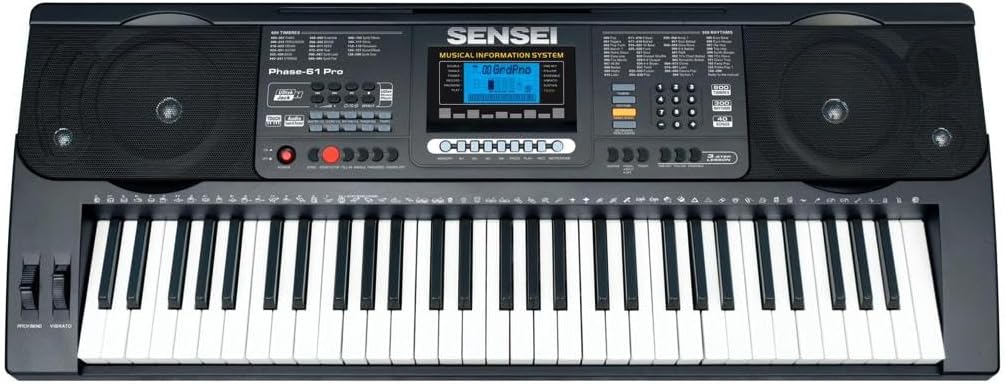
2-сүрөт: Деталдаштырылган view of the Sensei Phase 61 Pro keyboard's control panel, LCD display, speakers, and 61 touch-sensitive keys.
Жайгашуу
1. Keyboard Stand Assembly
Unfold the keyboard stand and adjust it to a comfortable playing height. Ensure all locking mechanisms are securely fastened to prevent wobbling.
2. Stool Assembly
Unfold the stool and ensure its legs are stable. The stool provides a comfortable seating option for playing.

3-сүрөт: The included foldable stool, designed for stability and portability.
3. Power Connection
Connect the provided USB charger line to the keyboard's power input port and then to a suitable USB power adapter (not included) or a powered USB port. The keyboard is USB powered.
4. Аксессуарларды туташтыруу
- Наушник: Plug the headphones into the 3.5mm Phone/Output Jack for private practice.
- USB Flash диск: Insert a USB flash disk (not included) into the Udisk Jack to use the music player function.
- Микрофон: Connect a microphone to the MIC Jack for vocal input.
- Аудио киргизүү: Use the Audio Input Jack to connect external audio sources.

4-сүрөт: The included over-ear headphones for silent practice.
Иштөө нускамалары
1. Күйгүзүү/өчүрүү жана Көлөмү
- басыңыз КҮЧ баскычтопту күйгүзүү же өчүрүү үчүн.
- Жалпы үн деңгээлин төмөнкү менен тууралаңыз: Башкы том контролдоо.
- Separate volume controls are available for Chord Volume жана Rithm Volume.
2. Timbres and Rhythms
- The keyboard features 600 Timbres (instrument sounds) and 300 Ритмдер (accompaniment styles).
- Use the dedicated buttons or number pad to select desired Timbres and Rhythms. The LCD display will show the current selection.
3. Demonstration Songs and Percussion
- Мүмкүнчүлүк 40 Demonstration Songs for listening or practice.
- тартуу Баскычтоп Перкуссиясы mode to assign drum sounds to the keys.
4. Advanced Key Features
- Тийүү функциясы: The keys are touch-sensitive, meaning the volume changes based on how hard you press them, mimicking an acoustic piano.
- Transpose Control: Бүтүндөй баскычтоптун бийиктигин жарым тондук кадамдар менен өйдө же ылдый тууралаңыз.
- Кош режим: Layer two different Timbres to play simultaneously with each key press.
- Keyboard Split: Divide the keyboard into two sections, each with a different Timbre, allowing two different sounds to be played at once.
- Chord Functions:
- Sing Finger аккорды: Play chords by pressing a single key in the lower section of the keyboard.
- Манжалуу аккорд: Play chords by pressing the appropriate chord notes in the lower section.
- Аккорд өчүрүү: Disables the auto-accompaniment chord function.
5. Rhythm Control
- Баштоо/Токтоо: Begin or end the selected rhythm.
- Синхрондоштуруу: Start the rhythm automatically when you play a key or chord.
- Толтуруу: Add a short drum fill to the rhythm.
- Метроном: Activate a click track for timing practice.
- Темпти көзөмөлдөө: Adjust the speed of the rhythm and metronome.
6. Learning Modes
- One-key: Practice a song by pressing any key to advance the melody.
- Издөө: The keyboard waits for you to play the correct note before proceeding.
- Бирге: Play along with the melody, and the keyboard will provide accompaniment.
7. Жазуу жана ойнотуу
- колдонуу Ритмдик программалоо функциясы to create and store your own rhythm patterns.
- The Жаздыруу жана ойнотуу function allows you to record your performances and listen back to them.
8. Эстутум функциялары
Store your preferred settings (Timbre, Rhythm, Tempo, etc.) into Memory banks M1, M2, M3, M4 тез чакыртып алуу үчүн.
9. Expressive Controls
- Pitch Bend: Use the pitch bend wheel to smoothly raise or lower the pitch of notes.
- Vibrato: Add a slight, rapid fluctuation in pitch to notes for expressive effect.
- Туруктуу: Extend the decay of notes, similar to a piano's sustain pedal.
Техникалык тейлөө
- Тазалоо: Баскычтоптун бетин жумшак, кургак чүпүрөк менен сүртүңүз. өжөр кир үчүн, бир аз d колдонууamp чүпүрөк, анан кылдат кургатуу. Абразивдүү тазалагычтардан же эриткичтерден качыңыз.
- Сактагыч: When not in use, store the keyboard in a clean, dry place, away from direct sunlight and extreme temperatures. If possible, cover it to protect against dust.
- Колдонуу: Always handle the keyboard with care. Avoid dropping it or subjecting it to strong impacts.
Проблемаларды чечүү
| Көйгөй | Мүмкүн себеп | Чечим |
|---|---|---|
| Күч жок | Power cable not connected; USB power source faulty. | Ensure USB cable is securely connected. Try a different USB power adapter or port. |
| Үн жок | Volume too low; headphones connected; Timbre not selected. | Increase Master Volume. Disconnect headphones. Select a Timbre. |
| Ачкычтар жооп бербейт | Keyboard in a specific mode (e.g., learning mode waiting for input). | Check current mode settings. Power cycle the keyboard. |
| Ритм ойнобой жатат | Rhythm not selected; Tempo set to zero; Start/Stop not pressed. | Select a rhythm. Adjust Tempo. Press Start/Stop. |
Техникалык шарттар
| Өзгөчөлүк | Деталь |
|---|---|
| Модель аты | PHASE-61 PRO |
| Ачкычтардын саны | 61 Touch Sensitive Keys |
| Timbres | 600 |
| Ритмдер | 300 |
| Демонстрация ырлары | 40 |
| Power Source | USB менен иштейт |
| Наушник уясы | 3.5 мм Jack |
| Байланыш технологиясы | USB |
| Элемент Салмагы | 8.1 кг |
| Продукциянын өлчөмдөрү | 16 x 16.8 x 41 см |
| UPC | 810015319994 |
Кепилдик жана колдоо
For warranty information, please refer to the documentation provided at the time of purchase or contact your retailer. For technical support or service inquiries, please reach out to the manufacturer, SENSEI, through their official support channels.


