1. Орнотуу
The SNOOZ Pro Smart White Noise Machine is designed for ease of use. Follow these steps for initial setup:
- Кутудан чыгаруу: Carefully remove the SNOOZ Pro unit and its power adapter from the packaging. The unit also comes with a travel case for convenient portability.
- Кубат туташуу: Plug the power adapter into the SNOOZ Pro unit and then into a standard electrical outlet.
- Жайгашкан жери: Place the SNOOZ Pro on a flat, stable surface, such as a nightstand or desk, ensuring adequate airflow around the device.
- Колдонмону жүктөө: For enhanced control and scheduling features, download the free SNOOZ app from your device's app store (available on iOS and Android).

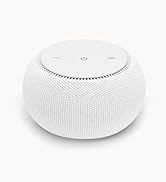
The SNOOZ Pro Smart White Noise Machine in Blush color, ready for setup.

The SNOOZ Pro can be controlled remotely via its dedicated smartphone application, allowing for convenient adjustments from a distance.
2. Иштөө нускамалары
The SNOOZ Pro offers both physical controls and app-based remote control for a personalized white noise experience.
Физикалык көзөмөл:
- Кубат баскычы: Located on the top surface, press to turn the unit on or off.
- Үндү көзөмөлдөө: Use the '+' and '-' buttons on the top surface to adjust the volume. There are 10 distinct volume levels.
- Тонду тууралоо: The tone of the fan sound is adjusted using a knob located on the bottom of the unit. Rotate this knob to transition between a light fan sound and a deep fan drone, and everything in between.
App-Based Controls:
The SNOOZ app provides comprehensive control over your device, including:
- Remote Power & Volume: Turn the unit on/off and adjust volume levels directly from your smartphone.
- Тонду тууралоо: Fine-tune the fan's tone to your preference.
- Программалануучу график: Set up to 7 different schedules each day to automatically turn the sound on/off or fade in/out, aligning with your sleep routine.
- Жарыкты башкаруу: Adjust the brightness of the indicator lights on the device, or turn them off completely for a dark sleeping environment.
The tone adjustment knob is located on the bottom of the SNOOZ Pro, allowing users to customize the sound profile.

The SNOOZ app provides comprehensive control over the device, including volume, light, and scheduling features.
3. Техникалык тейлөө
To ensure the longevity and optimal performance of your SNOOZ Pro, follow these simple maintenance guidelines:
- Тазалоо: Regularly wipe the exterior of the unit with a soft, dry cloth to remove dust. Do not use liquid cleaners or abrasive materials.
- Ички компоненттери: The SNOOZ Pro features a real fan inside. The outer fabric shell is affixed to the device and is not designed to be removed for cleaning of internal components. Dusting the exterior is sufficient.
- Сактагыч: When not in use for extended periods, store the SNOOZ Pro in its included travel case to protect it from dust and damage.
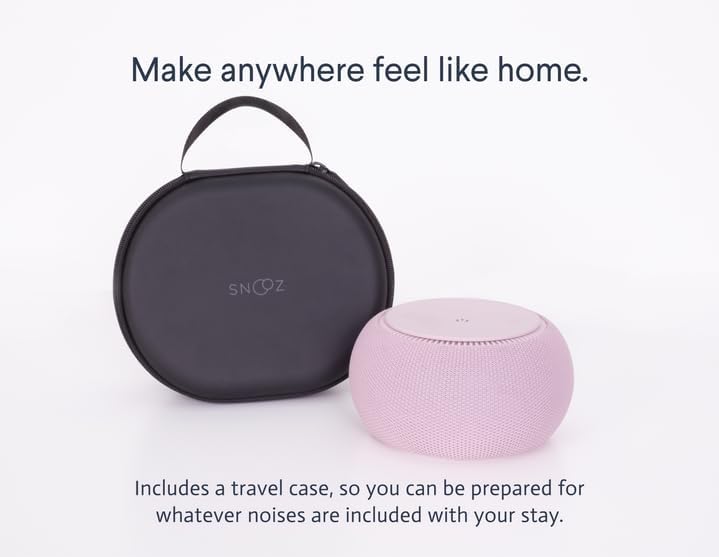
The SNOOZ Pro comes with a durable travel case, ideal for protecting the device during storage or transport.
4. Кыйынчылыктарды
If you encounter any issues with your SNOOZ Pro, refer to the following common troubleshooting tips:
- Үн жок: Ensure the device is properly plugged into a working power outlet and the power button is pressed. Check the volume level on both the device and the app.
- Connectivity Issues (App): Make sure your smartphone's Bluetooth is enabled and the SNOOZ Pro is within range. Try restarting both the app and the SNOOZ Pro unit.
- Unwanted Light: If the indicator lights are too bright, use the SNOOZ app to adjust their brightness or activate 'Night Mode' to turn them off completely.
- адаттан тыш үндөр: While the SNOOZ Pro uses a real fan for natural white noise, if you hear any unusual motor sounds or rattling, ensure the unit is on a stable, flat surface. If the issue persists, contact customer support.
For further assistance, consult the comprehensive help section within the SNOOZ app or visit the official SNOOZ support webсайт.
5. Техникалык шарттар
| Өзгөчөлүк | Деталь |
|---|---|
| Модель аты | SNOOZ Pro |
| Элемент моделинин номери | Кызаруу |
| Продукциянын өлчөмдөрү | 5.8 x 5.8 x 3.2 дюйм |
| Элемент Салмагы | 1.92 фунт |
| Материал | Metal, Soft Cloth |
| Түс | Кызаруу |
| Өндүрүүчү | SNOOZ |
| Дата биринчи жеткиликтүү | 10-август, 2023-жыл |
6. Кепилдик жана колдоо
For detailed warranty information and customer support, please refer to the official SNOOZ website or the documentation included with your product. SNOOZ is committed to providing high-quality products and support to its customers.
Өндүрүүчү: SNOOZ
For the most current support resources, please visit the SNOOZ Store on Amazon же алардын расмий бренди webсайт.


