Introduction
The KAIWEETS KM602 rechargeable digital multimeter and the KM100 digital multimeter are essential tools designed for various electrical projects. These multimeters combine innovative features with ease of use, enabling efficient and precise resolution of electrical testing issues in automotive, industrial, and household settings.
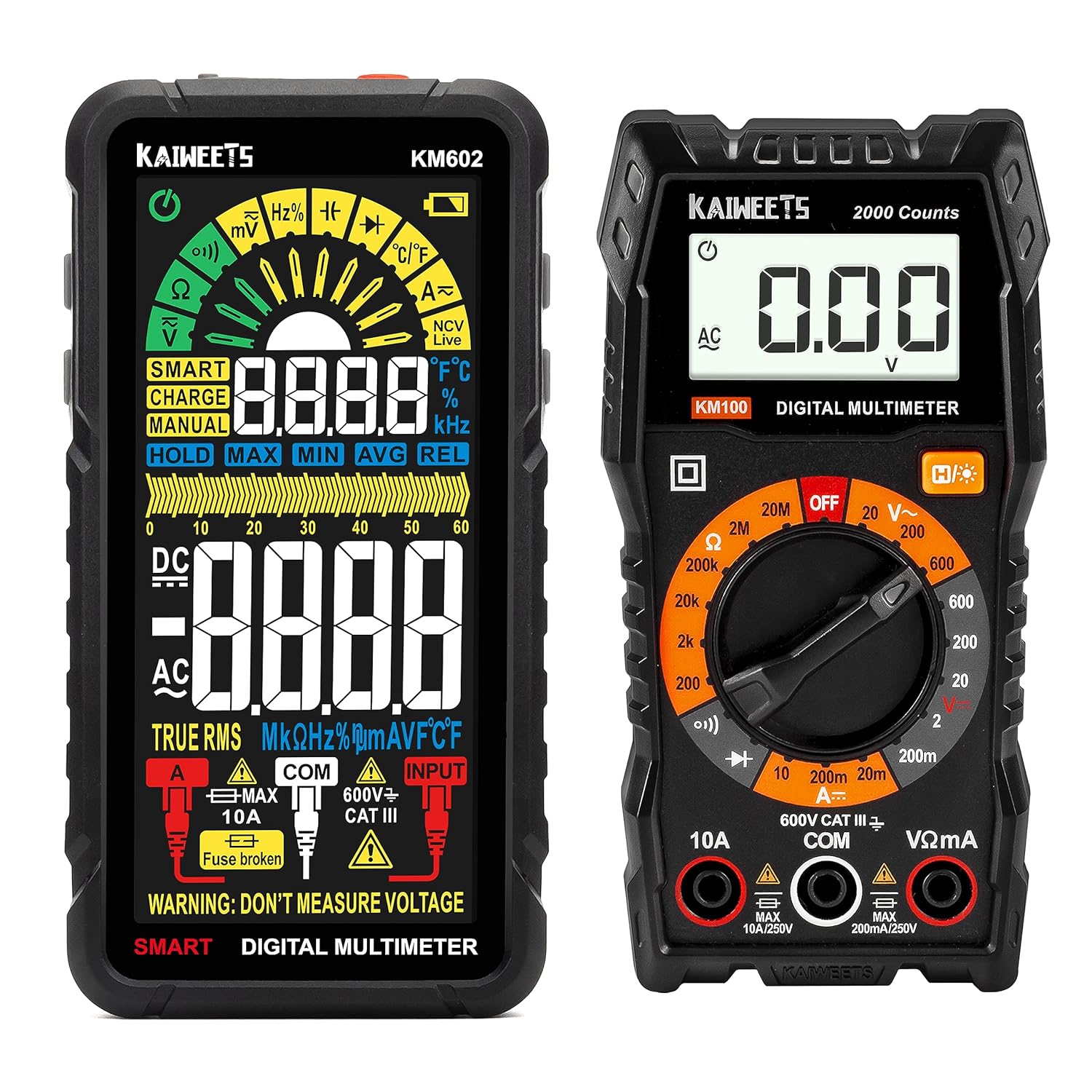
Image: KAIWEETS KM100 and KM602 Digital Multimeters. The KM602 features a full-color display, while the KM100 has a traditional LCD with a rotary dial.
Жайгашуу
Before using your KAIWEETS multimeter, ensure it is properly set up.
1. Кутудан чыгаруу жана алгачкы текшерүү
Carefully remove all components from the packaging. Verify that all accessories, including test leads and the carrying case, are present and undamaged.

Image: KAIWEETS KM100 Digital Multimeter shown with its included test leads and a protective carrying case.

Image: KAIWEETS KM602 Smart Multimeter displayed with its accessories, including test leads, a USB charging cable, and a zippered carrying case.
2. Charging the KM602 Multimeter
The KM602 features a built-in rechargeable battery. Connect the provided USB charging cable to the multimeter and a suitable USB power source. The battery life is designed for extended use, and quick charging ensures the device is ready when needed.
3. Сыноо линияларын туташтыруу
Insert the red test lead into the positive (+) input jack and the black test lead into the common (COM) input jack. Ensure a secure connection before proceeding with any measurements.
Иштөө нускамалары
Both the KM100 and KM602 multimeters offer various measurement capabilities. The KM602 defaults to a SMART mode for simplified operation.
KM602 Smart Mode Operation
In SMART mode, the KM602 automatically identifies and measures AC/DC voltage, resistance, and continuity. This mode automatically selects the optimal range for the highest precision, simplifying the measurement process.

Image: KAIWEETS KM602 Smart Multimeter showcasing its color HD screen, which displays "Auto" when in Smart Mode, enhancing readability in various lighting conditions.
Common Measurement Functions
Both models can precisely gauge a wide range of electrical parameters:
- AC жана DC Voltage: Measure voltagсхемаларда e.
- Каршылык: Determine the electrical resistance of components.
- Үзгүлтүксүздүк: Check for complete electrical paths.
- AC and DC Current: Measure current flow (KM602 supports AC/DC current, KM100 supports DC current).
- Сыйымдуулугу: Конденсаторлордун сыйымдуулугун өлчөө.
- Жыштыгы: AC сигналдарынын жыштыгын өлчөө.
- Диод сыноо: Диоддордун функционалдуулугун текшерүү.
- Милдеттик цикл: Measure the duty cycle of pulsed signals.
- Температура: Measure temperature (KM602).
- NCV (контактсыз томtage) & Live Wire: Detect live voltage without direct contact for enhanced safety.

Image: KAIWEETS KM100 Multimeter performing an AC voltage test on a wall outlet. Note: The KM100 cannot test AC current.

Image: KAIWEETS KM100 Multimeter measuring DC voltage from a car battery, displaying the voltage окуу.

Image: KAIWEETS KM602 Smart Multimeter demonstrating its versatility by showing different measurement modes: AC/DC Voltage, AC/DC Current, Continuity, and Thermometer function.

Image: KAIWEETS KM602 Smart Multimeter being used to measure the voltage of a car battery, showing a clear digital reading.
For detailed instructions on selecting specific functions (if not using SMART mode) and interpreting readings, please refer to the comprehensive user manual included with your product.
Техникалык тейлөө
Proper maintenance ensures the longevity and accuracy of your KAIWEETS multimeter.
Тазалоо
Wipe the device with a dry, clean cloth. Do not use abrasive cleaners or solvents. Ensure the device is powered off before cleaning.
Battery Care (KM602)
To maximize the life of the KM602's rechargeable battery, avoid fully discharging it frequently. Charge the device regularly, especially if it will be stored for an extended period.
Фузерди алмаштыруу
The multimeters feature two distinct fuse sizes for safeguarding against overload. If a fuse blows, replace it with a fuse of the exact same type and rating to maintain safety and functionality. Refer to the full manual for specific fuse specifications and replacement procedures.
Проблемаларды чечүү
If you encounter issues with your KAIWEETS multimeter, consider the following general troubleshooting steps:
- Дисплей/кубат жок: Ensure the device is powered on. For KM602, check battery charge level and recharge if necessary. For KM100, check battery installation.
- Туура эмес окуулар: Verify test lead connections are secure and inserted into the correct input jacks for the desired measurement. Ensure the correct function is selected (or rely on SMART mode for KM602).
- Үзгүлтүксүздүк сигналы жок: Check if the continuity function is selected and if the circuit is indeed continuous.
- Ашыкча жүктөө көрсөткүчү: If the display shows "OL" or an overload symbol, the measured value exceeds the meter's range for the selected function. Switch to a higher range if available, or ensure the measurement is within the device's capabilities.
For more specific troubleshooting or persistent issues, please refer to the detailed troubleshooting section in the complete user manual or contact KAIWEETS customer service.
Техникалык шарттар
Key technical specifications for the KAIWEETS KM100 and KM602 multimeters:
| Өзгөчөлүк | Спецификация |
|---|---|
| Элемент моделинин номери | KM602 (also KM100 in bundle) |
| Бренд | KAIWEETS |
| Power Source | Battery Powered (KM602: Rechargeable; KM100: Standard Batteries) |
| Стиль | KM100 & KM602 |
| Коопсуздукту сактоо | IEC rated CAT.III 600V, CE, RoHS |
| Өлчөө түрү | Voltmeter, Multimeter (AC/DC Voltage, Resistance, Continuity, AC/DC Current, Capacitance, Frequency, Diode, Duty Cycle, Temperature, NCV, Live Wire) |
| Display (KM602) | Color HD Screen |
| Counts (KM100) | 2000 Counts True-RMS |
| Коргоо | Dual fuse protection, silicone casing for shock resistance |

Сүрөт: Жакын план view of the KAIWEETS KM100 Digital Multimeter's display and rotary dial, highlighting its "2000 Counts True-RMS Meter" capability.
Кепилдик жана колдоо
KAIWEETS offers comprehensive customer support for your multimeter.
- Сатуудан кийинки тейлөө: A 3-year after-sales service is provided.
- Техникалык жардам: Lifetime technical assistance is available.
- Байланыш: For any inquiries or support needs, please do not hesitate to get in touch with KAIWEETS customer service.


