Introduction
Сатып алганыңыз үчүн рахматasing the Denver KMS-20B Karaoke Speaker. This manual provides essential information for the safe and efficient operation of your device. Please read these instructions carefully before use and retain them for future reference.
Маанилүү коопсуздук маалыматы
- Аппаратты жамгырдын, нымдуулуктун же экстремалдык температуранын таасиринде калтырбаңыз.
- Аппаратты түшүрүүдөн же катуу таасирлерден сактаныңыз.
- Аппаратты өз алдынча бөлүүгө же оңдоого аракет кылбаңыз. Бардык тейлөөлөрдү квалификациялуу кызматкерлерге тапшырыңыз.
- Аппаратты жылуулук булактарынан жана түз күн нурунан алыс кармаңыз.
- Белгиленген кубаттоо кабелин жана кубат адаптерин гана колдонуңуз.
- Батареяларды жергиликтүү эрежелерге ылайык таштаңыз.
Пакеттин мазмуну
Пакетте бардык буюмдар бар экенин текшериңиз:
- Denver KMS-20B Karaoke Speaker
- Quick Start Guide
- Power Cable (USB Type A)
Продукт бүттүview
Familiarize yourself with the components and controls of your Denver KMS-20B Karaoke Speaker.
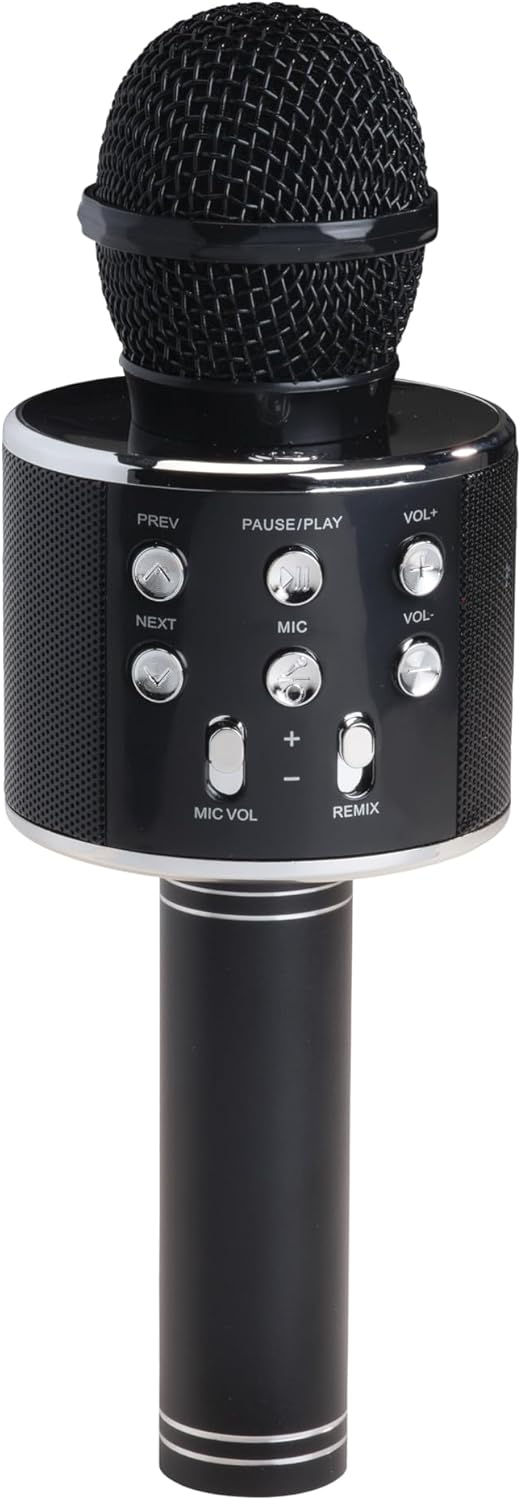
Сүрөт 1: Алдыңкы View. This image displays the main body of the karaoke speaker, featuring the microphone grille at the top and the central control panel with various buttons for playback and volume adjustments.
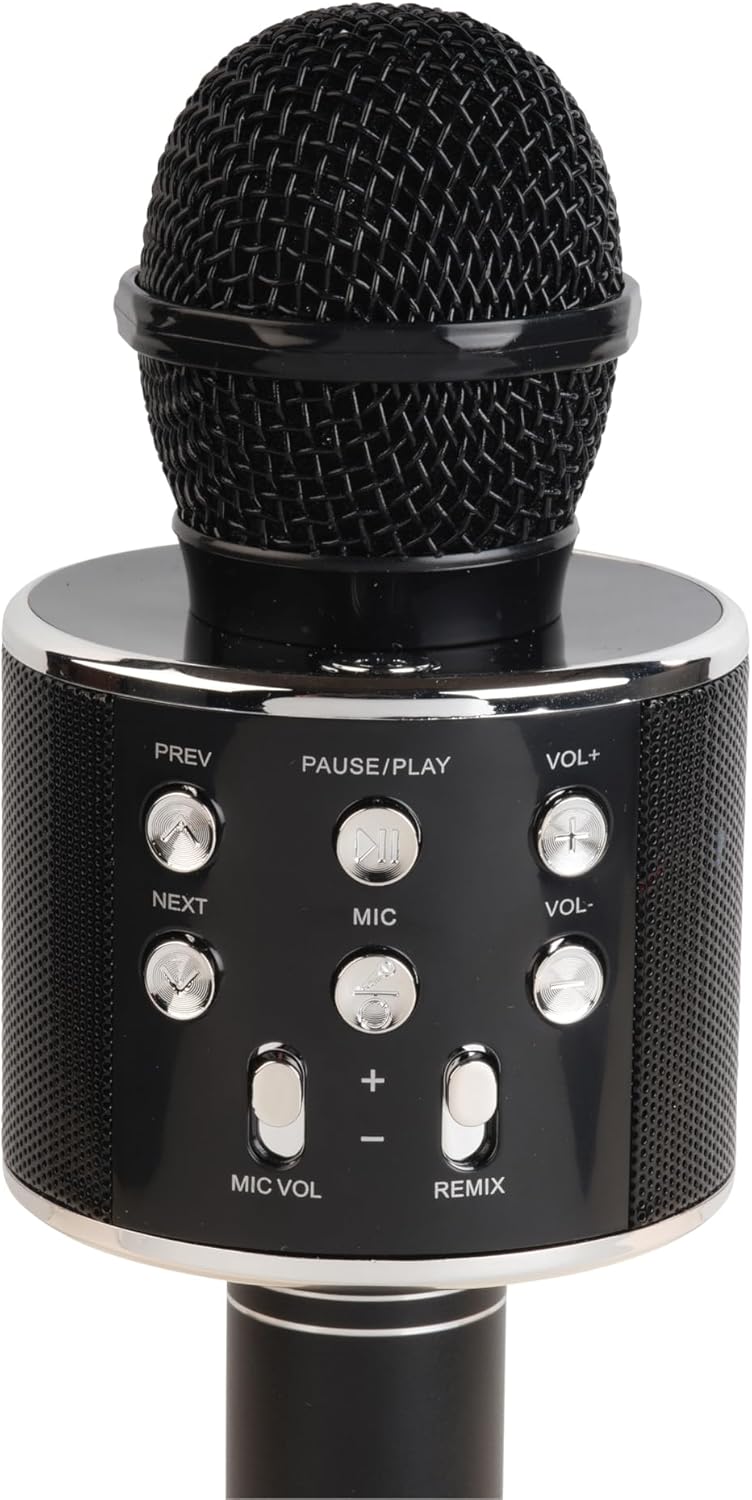
Сүрөт 2: Башкаруу панелинин деталдары. A closer look at the control panel, highlighting buttons such as PREV, NEXT, PAUSE/PLAY, VOL+, VOL-, MIC, MIC VOL, and REMIX. The power button is also visible.

Figure 3: Bottom Ports. This image shows the bottom section of the speaker handle, revealing the charging port (5V 0.5A), a USB port, and a 3.5mm headphone jack for external connections.
Башкаруу панелинин функциялары:
- Кубат баскычы: Динамикти күйгүзүү/өчүрүү үчүн басып кармап туруңуз.
- ТЫНЫТТЫРУ/ОЙНОО: Музыканы ойнотуу же тындыруу үчүн басыңыз.
- PREV (Previous): Мурунку трекке өтүү үчүн басыңыз.
- КИЙИНКИ: Кийинки трекке өтүү үчүн басыңыз.
- VOL+ (Үнүн жогорулатуу): Динамиктин үнүн көбөйтүү үчүн басыңыз.
- VOL- (Көлөмүн төмөндөтүү): Динамиктин үнүн азайтуу үчүн басыңыз.
- MIC: Press to activate/deactivate the microphone.
- MIC ҮНҮ (+/-): Микрофондун үнүн тууралайт.
- РЕМИКС: Activates/deactivates the echo effect for the microphone.
Порттор:
- Charging Port (5V 0.5A): Ички батареяны заряддоо үчүн.
- USB порт: USB флеш-дисктен музыка ойнотуу үчүн.
- 3.5 мм гарнитура уячасы: For connecting headphones or external audio devices.
Жайгашуу
1. Динамикти кубаттоо
- Connect the provided power cable to the charging port (5V 0.5A) on the speaker.
- Connect the other end of the cable to a compatible USB power adapter (not included) or a USB port on a computer.
- The charging indicator (if present) will illuminate during charging and turn off or change color when fully charged.
- Allow approximately 2-3 hours for a full charge before first use.
2. Күйгүзүү / Өчүрүү
- To turn ON: Press and hold the Power button until the indicator light illuminates and you hear an audible prompt.
- To turn OFF: Press and hold the Power button again until the indicator light turns off and you hear an audible prompt.
3. Bluetooth Жупташтыруу
- Динамиктин күйүп турганын текшериңиз. Ал автоматтык түрдө Bluetooth жупташтыруу режимине өтөт, бул күйүп-өчүүчү LED жарыгы жана үндүү сигнал менен көрсөтүлөт.
- Мобилдик түзмөгүңүздө (смартфон, планшет ж.б.) Bluetooth иштетип, жеткиликтүү түзмөктөрдү издеңиз.
- Select "KMS-20B" from the list of found devices.
- Once successfully paired, the LED indicator will stop flashing, and you will hear a confirmation sound.
- The speaker will automatically connect to the last paired device when powered on, if it is within range and Bluetooth is enabled.
Иштөө нускамалары
Music Playback (Bluetooth/USB)
- Bluetooth: After successful pairing, start playing music on your connected device. The audio will stream through the KMS-20B speaker.
- USB: MP3 аудиосу бар USB флэш-дискти салыңыз files into the USB port. The speaker will automatically detect and begin playing music from the drive.
- ТЫНЫТТЫРУ/ОЙНОО: Press this button to pause or resume music playback.
- АЛГА/КИЙИНКИ: Press these buttons to skip to the previous or next track.
- VOL+/VOL-: Press these buttons to adjust the main speaker volume.
Микрофонду колдонуу
- Activating Microphone: басыңыз MIC button to turn on the microphone function. Press it again to turn off.
- Микрофондун үнү: колдонуу МИКРОФОНДУН ҮНҮ (+/-) buttons to increase or decrease the microphone's output volume.
- Echo Effect (REMIX): басыңыз РЕМИКС button to activate or deactivate the echo effect for your voice. This adds a reverberation effect, common in karaoke.
Техникалык тейлөө
- Тазалоо: Динамиктин сыртын тазалоо үчүн жумшак, кургак чүпүрөктү колдонуңуз. Абразивдүү тазалагычтарды же эриткичтерди колдонбоңуз.
- Сактагыч: Узак мөөнөткө колдонулбаганда, динамикти салкын, кургак жерде, тике күн нурунан жана экстремалдык температурадан алыс сактаңыз.
- Батареяга кам көрүү: To prolong battery life, fully charge the speaker at least once every three months, even if not in regular use.
Проблемаларды чечүү
| Көйгөй | Мүмкүн себеп | Чечим |
|---|---|---|
| Динамик күйбөйт. | Батарея аз. | Динамикти толук заряддаңыз. |
| Bluetooth аркылуу жупташтыруу мүмкүн эмес. | Түзмөгүңүздө Bluetooth өчүк; динамик жупташтыруу режиминде эмес; түзмөктөн өтө алыс. | Ensure Bluetooth is enabled on your device. Power cycle the speaker to enter pairing mode. Move device closer to speaker (within 10 meters). |
| Динамиктен үн жок. | Volume too low; device not connected; incorrect input source. | Increase speaker and device volume. Ensure Bluetooth is connected or USB is properly inserted. |
| Микрофон иштебей жатат. | Microphone function is off; MIC VOL is too low. | Press the MIC button to activate. Increase MIC VOL. |
Техникалык шарттар
- Модел: KMS-20B
- Бренд: Денвер
- Байланыш: Bluetooth, USB Type A, 3.5mm Jack
- Кубат булагы: Батарея менен иштейт
- Батарея түрү: Литий-ион (кайра заряддалуучу)
- Заряддоо киргизүү: 5V 0.5A (via USB Type A)
- Өлчөмдөрү: 7.8 x 7.8 x 23 см (болжол менен 3.07 x 3.07 x 9.06 дюйм)
- Салмагы: 340 г (болжол менен 0.75 фунт)
- Камтылган компоненттер: Quick Start Guide, Power Cable
Кепилдик жана колдоо
Кепилдик маалыматы жана техникалык колдоо үчүн продуктуңузга кошулган кепилдик картасын караңыз же расмий Денверге барыңыз webсайт. Сатып алганыңыздын далили катары сатып алуу дүмүрчөгүңүздү сактаңыз.


